
Picture an HR executive at a 30-person plant in Pune who runs payroll on a spreadsheet, uploads the PF ECR by hand, and found out in September that the EPF wage ceiling had moved from ₹15,000 to ₹25,000 and every formula needed changing. Frappe HR is free, open-source payroll software that runs inside the same database as ERPNext. This post covers what it does out of the box, what Indian statutory payroll needs on top, and where you will still configure or build.
TL;DR
- Frappe HR is the HR and payroll app for ERPNext, split out as a separate GPL-3.0 app from version 14. It covers the employee lifecycle, attendance and shifts, leave, expense claims, salary structures, payroll entry and a mobile PWA.
- Core Frappe HR has no built-in PF, ESI or professional tax rules. You define them as salary components with formulas, or install Frappe's free India Payroll app, which ships them preconfigured with ECR and register exports.
- Rules that changed in the last year: the four Labour Codes took effect on 21 November 2025, the EPF wage ceiling became ₹25,000 from 17 September 2026, and TDS on salary moved to section 392 of the Income-tax Act, 2025 from April 2026.
- Expect configuration work for each state's professional tax, the Labour Code 50% wage test, gratuity rules and your own allowance structure.
Free ERPNext fit check
Will ERPNext fit your factory?
Answer a few quick questions. On a short call we tell you whether ERPNext fits how you make, stock and sell, and what the rollout looks like.
Check my fit →What Frappe HR is, and how it relates to ERPNext
HR and payroll used to be modules inside ERPNext. Frappe's hrms repository says that from version 14 "Frappe HR was created as a separate product". You install ERPNext and Frappe HR as two apps on the same site. Salary slips, payroll accruals and expense claims post into ERPNext's chart of accounts, so there is no export to a separate accounting package at month end.
Both are GPL-3.0, with no per-employee fee; you pay for hosting, setup, training and support. ERPNext implementation covers how we scope HR along with the rest of the ERP.
"ERPNext HRMS" and "ERPNext HR module" mean the same app. Older guides show HR screens inside ERPNext because they predate the split.
What Frappe HR covers out of the box
The Frappe HR documentation groups the product into these areas:
Employee lifecycle
Attendance and shifts
Leave
Expense claims
Performance
For a plant, attendance is the detail to check. The Shift Type page says check-ins arrive "from a device or the mobile app", and the auto-attendance job turns them into Attendance records. It also handles devices that do not send an IN or OUT direction by alternating punches. Connecting a specific biometric machine still needs a sync script or middleware, because the documentation does not name supported devices.
The mobile app is a progressive web app (PWA), available from version 15 at your site address plus /hrms. Employees install it from Chrome or Safari, then apply for leave, approve requests, check in and out, and view their profile. The v16.0.0 release notes list expense claims and advances in the PWA and a setting to allow check-in from the app. For the wider picture of phone access to ERPNext, see our ERPNext mobile app guide.
How an ERPNext payroll run works in Frappe HR
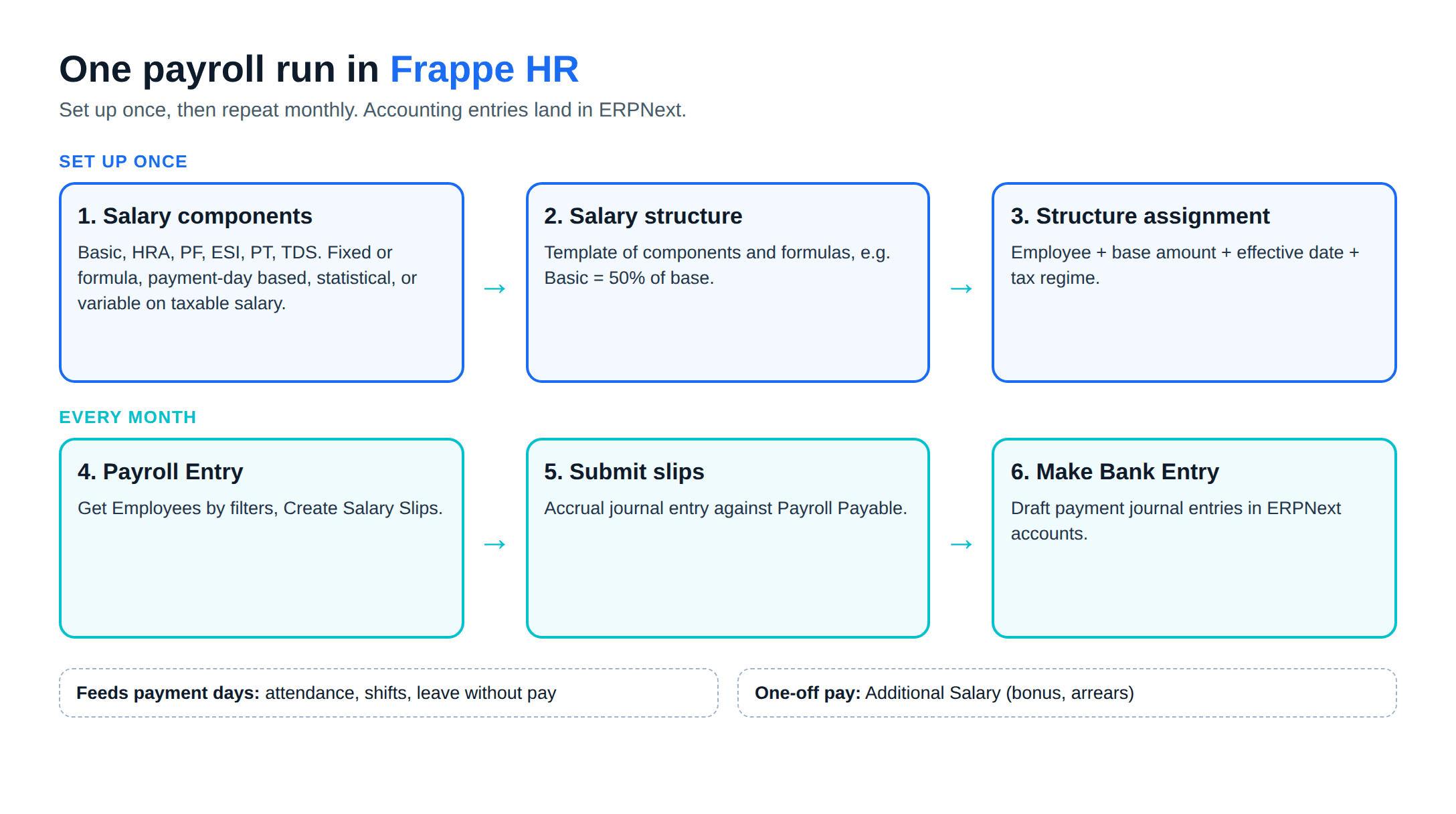
The building blocks sit in a chain:
- Salary components: each earning or deduction is a component: Basic, HRA, conveyance, PF, ESI, professional tax, TDS. The Salary Component page explains that a component can be a fixed amount or "Amount based on formula", can depend on payment days, can be a statistical component that feeds other formulas without being paid, and can be "variable based on taxable salary", which is how TDS is calculated from the slab.
- Salary structure: a template that lists components and formulas, for example Basic as 50% of the monthly CTC base.
- Salary Structure Assignment: links a structure to an employee with a base amount and effective date, and records the tax regime.
- Payroll Entry: the Payroll Entry document fetches employees by filters, creates salary slips, submits them together, and books an accrual journal entry against Payroll Payable. "Make Bank Entry" then creates the draft payment journal entries.
Leave without pay reduces any component marked "depends on payment days", and one-off items such as a Diwali bonus go through Additional Salary.
Indian payroll rules your system has to follow
These are the rules at the time of writing. Payroll law changed three times in the last twelve months, so check each linked source before you build a component.
The Labour Codes are in force
The Ministry of Labour announced that the Code on Wages, the Industrial Relations Code, the Code on Social Security and the OSH Code took effect on 21 November 2025, replacing 29 central labour laws. Labour is a concurrent subject, so states issue their own rules, and their progress differs; check your state labour department's gazette.
The change that hits salary structures is the definition of wages. Under the proviso to section 2(y) of the Code on Wages, 2019, if the excluded payments (allowances such as HRA and conveyance, and the other items the clause lists) exceed half of total remuneration, the excess is added back to wages. The Ministry's FAQs apply this test to PF contributions. A structure with Basic at 30% of remuneration and the other 70% in excluded allowances fails the test, and the added-back amount raises the PF base.
In Frappe HR this is a formula question. You can add a statistical component that computes wages under the 50% test and point the PF formula at it instead of at Basic. Neither core Frappe HR nor the India Payroll README describes a built-in 50% test, so treat it as configuration you own.
Provident Fund (EPF)
- Rates: 12% of PF wages from the employee and 12% from the employer. Of the employer's share, 8.33% goes to the pension scheme (EPS).
- Wage ceiling: The ceiling for mandatory coverage rose from ₹15,000 to ₹25,000 a month with effect from 17 September 2026, notified as S.O. 5109(E) (PIB). PIB states the maximum employer EPS contribution rose from ₹1,250 to ₹2,083 a month; commentators differ on whether the EPS scheme itself has been amended to match, so confirm this with your EPF adviser before you change payroll.
- Above the ceiling: some establishments contribute on actual wages above the ceiling. The India Payroll app has a setting for this; check your existing practice and EPFO's rules before changing it.
Employees' State Insurance (ESI)
ESIC's contribution page lists 0.75% of wages from the employee and 3.25% from the employer, effective 1 July 2019. Employees with an average daily wage up to ₹176 pay no employee share, though the employer still pays. ESIC's standard note puts the coverage limit at ₹21,000 a month, or ₹25,000 for employees with a disability.
Professional Tax
Professional tax is a state levy, so the rule depends on where the employee works, and some states levy none. Two examples:
- Maharashtra: MahaGST's rate schedule sets nil up to ₹7,500 a month, ₹175 a month from ₹7,501 to ₹10,000, and ₹2,500 a year above ₹10,000 (₹200 a month, ₹300 in February). Women earning up to ₹25,000 a month pay nil.
- Other states use different slabs and deduction months. Karnataka, West Bengal, Tamil Nadu and Gujarat, for example, all levy it on their own slabs; check the state commercial tax department before you build the component.
TDS on salary under the Income-tax Act, 2025
The Income-tax Act, 2025 replaced the 1961 Act from 1 April 2026. Section 392 now covers deduction from salary, as section 192 did before. The employer deducts tax at the average rate on the estimated salary income for the tax year, and takes into account particulars the employee furnishes, such as income from a previous employer. The department's transition FAQs describe the new Act as broadly no change in policy, with salary for tax year 2026-27 falling under the new section. Section references in reports and employee letters still need updating.
What Frappe HR handles, by statutory item
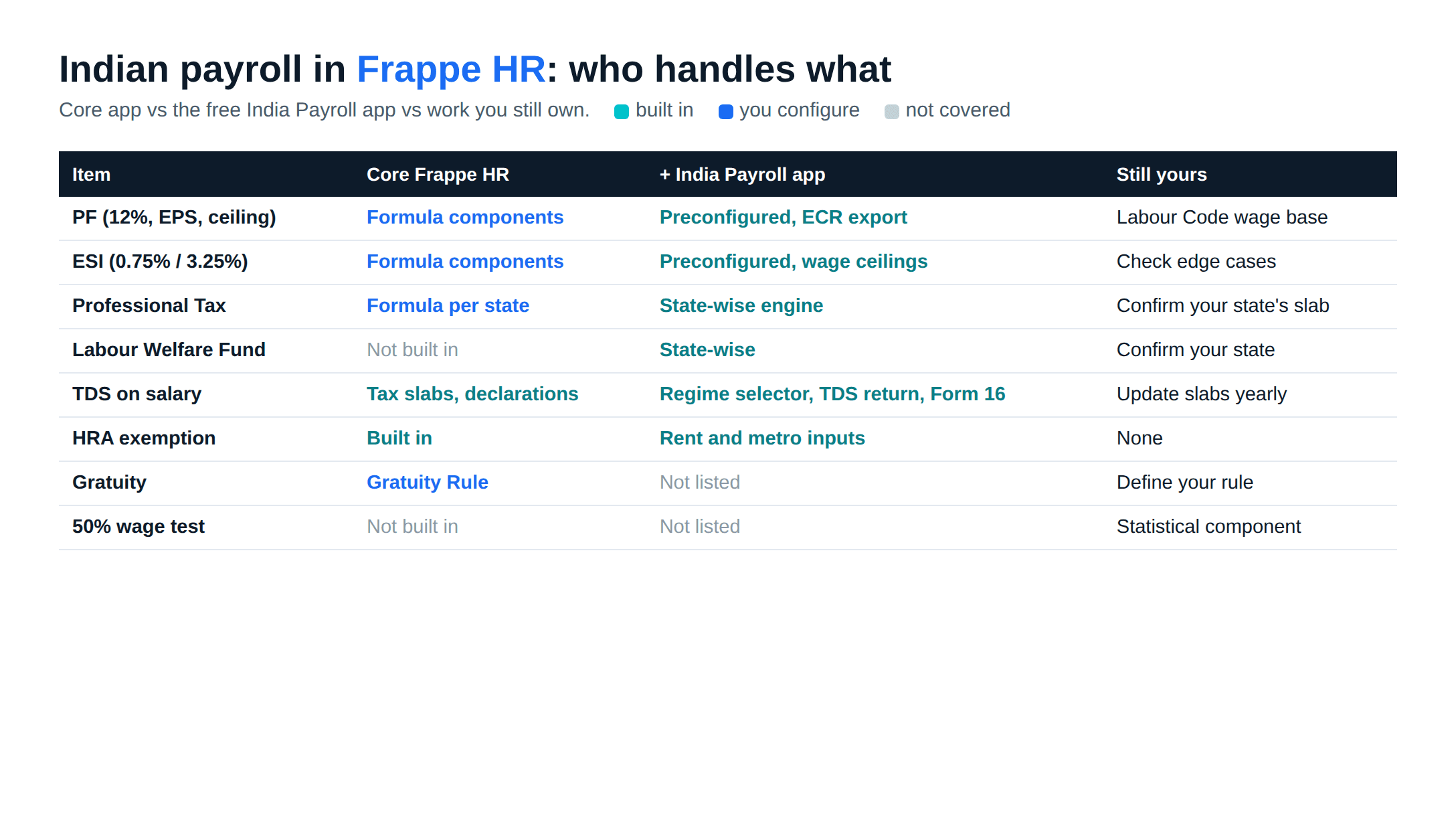
| Item | Core Frappe HR | With India Payroll app | Still configuration or custom work |
|---|---|---|---|
| PF (12%, EPS split, ceiling) | Formula components you write | Preconfigured, ECR export for EPFO | Labour Code wage base, voluntary higher contributions policy |
| ESI (0.75% / 3.25%, ceiling) | Formula components you write | Preconfigured, applies wage ceilings | Contribution-period rule for employees crossing the limit |
| Professional Tax | Formula per state you write | State-wise engine (README: monthly and half-yearly rules) | Check your state's current slab is present |
| Labour Welfare Fund | Not built in | State-wise contributions | None beyond checking your state |
| TDS on salary | Income Tax Slabs, exemption declarations, tax component | Old vs new regime selector, quarterly TDS return, Form 16 | Updating slabs each tax year |
| HRA exemption | Built in (Company HRA settings, India sub-category) | Regime selector asks rent and metro city | None |
| Gratuity | Gratuity Rule document | Not listed in README | Define your rule against the Code on Social Security |
| Labour Code 50% wage test | Not built in | Not listed in README | Statistical component and formulas |
Two notes on the table. First, Frappe's India Payroll repository describes it as "a free and open-source layer", licensed GPL-3.0, that installs on top of Frappe HR. Its README lists PF with employer splits and ECR export, ESI within the wage ceiling, a state-wise professional tax engine, Labour Welfare Fund, old and new tax regimes with surcharge, quarterly TDS return filing, Form 16 and statutory reports. Its install instructions point at the develop branch, so pin a tested version for production. Second, the separate India Compliance app many ERPNext users install is for GST, not payroll. Our ERPNext GST accounting post covers that side.
A worked example: one employee, one month
Assumptions, for a typical 30-person plant in Maharashtra: a male machine operator with a monthly gross of ₹20,000, Basic of ₹10,000, no allowances outside Basic and HRA, and ESI wages equal to gross. These are illustrations, not advice for your payroll.
- Labour Code wages: HRA and other allowances are ₹10,000, exactly half of remuneration, so nothing is added back. PF wages are ₹10,000.
- PF: employee 12% = ₹1,200. Employer 12% = ₹1,200, of which EPS 8.33% = ₹833 and EPF ₹367.
- ESI: gross is within ₹21,000, so employee 0.75% = ₹150 and employer 3.25% = ₹650.
- Professional tax: above ₹10,000, so ₹200 (₹300 in February).
- TDS: annual salary of ₹2.4 lakh is inside the nil slab (up to ₹4 lakh) of the new regime for tax year 2026-27, per the Finance Bill 2026 memorandum, so TDS is nil. The employee still needs a regime recorded on the assignment.
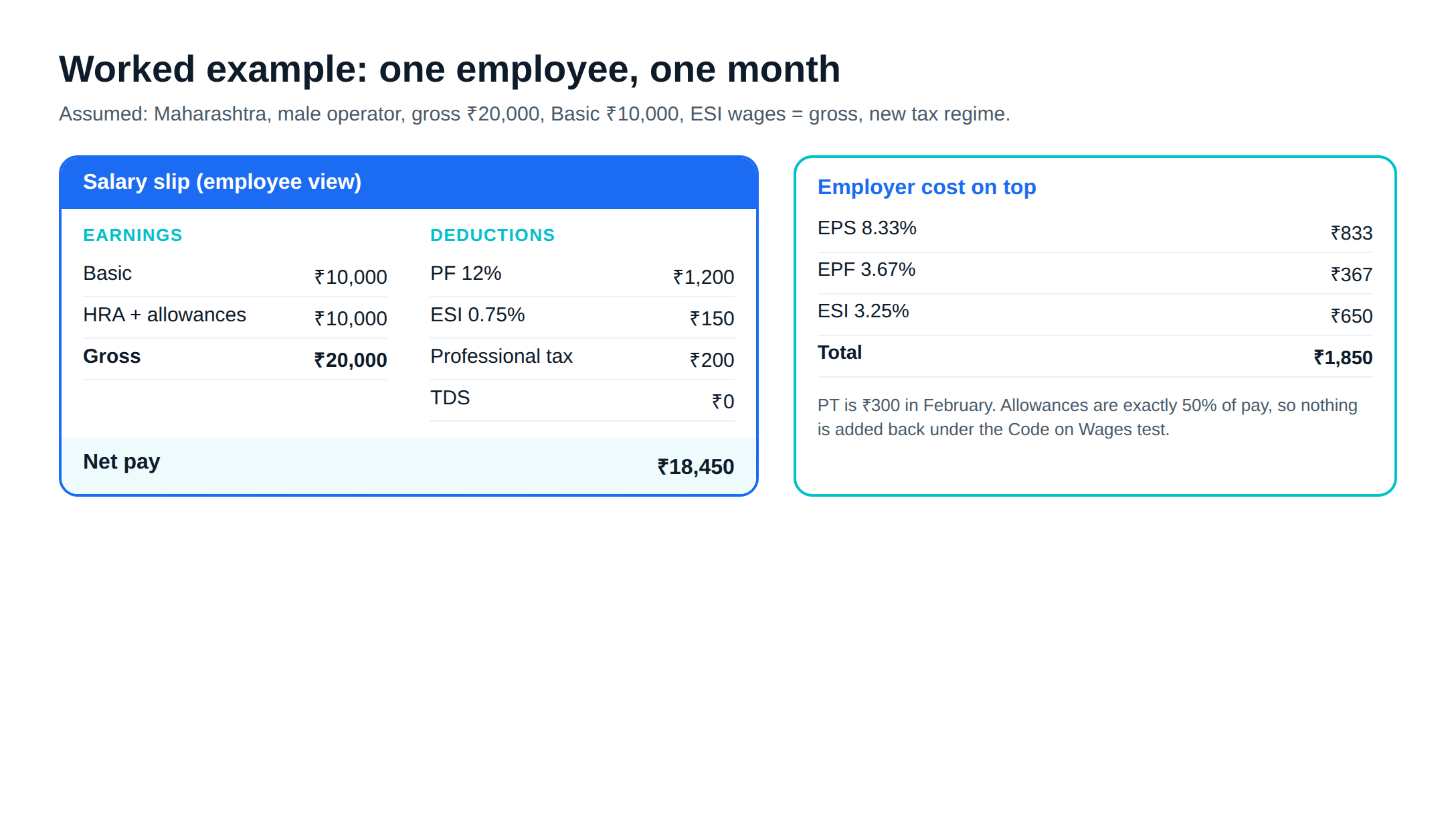
In Frappe HR, each line is a salary component with a formula and a condition. ESI carries a condition that gross is within the ceiling, and PF reads a statistical "PF wages" component instead of Basic directly. After that, each month is one Payroll Entry.
What an implementation adds
An HR and payroll rollout comes down to these jobs:
- Map every current pay head to a salary component, and decide which are statistical
- Build the Labour Code wage base and check each grade against the 50% test
- Set up PF, ESI, PT and LWF, either through India Payroll or your own components
- Load opening balances: leave, loans, advances and year-to-date tax
- Connect biometric devices to Employee Checkin, or roll out mobile check-in
- Run one or two months in parallel with the old payroll and reconcile line by line
The parallel run is the step we would not skip: two months of matching salary slips against the old system finds formula errors before employees do. If you are moving from Tally, our Tally to ERPNext migration post covers opening balances, and ERPNext implementation cost in India shows how scope drives cost.
Where Frappe HR is a weak fit
- You want a payroll vendor to file returns for you, not software you run
- No one in HR or accounts will own salary structures and slab updates
- You need a ready connector for a specific biometric brand and cannot fund integration work
Is Frappe HR the right payroll software for you?
If you already run ERPNext, or plan to, Frappe HR keeps payroll, attendance and accounts in one database with no per-employee fee. The Indian statutory layer is no longer a blank page: the India Payroll app covers PF, ESI, professional tax and TDS, and what remains is your wage structure, your states and your gratuity policy. If you run Tally for accounts and want payroll only, a hosted payroll service may be simpler.
Metageeks is an independent ERPNext implementer. Our ERPNext implementation service can set up Frappe HR with the rest of the ERP, including the parallel payroll run.
Frequently asked questions
Is Frappe HR free?+
Yes. Frappe HR is published on GitHub under the GPL-3.0 licence, with no per-employee fee. Frappe's India Payroll app, which adds PF, ESI, professional tax and TDS handling on top, is also GPL-3.0. You still pay for hosting, setup and support.
Is Frappe HR the same as the ERPNext HR module?+
It grew out of it. HR and payroll used to be modules inside ERPNext. From version 14, Frappe split them into a separate app called Frappe HR (the code repository is named hrms). It installs on the same site as ERPNext and posts payroll and expense entries into ERPNext accounting.
Does Frappe HR calculate PF and ESI automatically?+
Core Frappe HR calculates whatever salary components you define, so PF and ESI can be set up as formula components. The India Payroll app goes further: it ships preconfigured PF and ESI logic, applies the wage ceilings, and exports an ECR file for the EPFO portal and ESIC registers.
Can Frappe HR handle TDS on salary under the new Income-tax Act?+
Frappe HR calculates monthly income tax from Income Tax Slabs, tax exemption declarations and a tax component that is variable on taxable salary. The slabs and payroll period are data you maintain, so for tax year 2026-27 you configure the new regime slabs yourself. Section 392 of the Income-tax Act, 2025 now governs TDS on salary paid from April 2026.
Does Frappe HR have a mobile app?+
Yes. From version 15 it includes a progressive web app at your site address followed by /hrms. Employees install it from Chrome or Safari and use it to apply for leave, approve requests, check in and out, and see their profile. Version 16 added expense claims and advances to it.
Related reading
- ERPNext CRM vs Frappe CRM: the other module decision on the same site.
- ERPNext pricing in India: hosting, implementation and support costs.
- Frappe Cloud pricing in India: hosted plans against self-hosting.
- Open-source ERP in India: what the GPL licence does and does not promise.
Free ERPNext fit check
Will ERPNext fit your factory?
Answer a few quick questions. On a short call we tell you whether ERPNext fits how you make, stock and sell, and what the rollout looks like.
Check my fit →About the author

- Tags
- erpnext
- erp
- india
- hr payroll
- manufacturing
Subscribe to Our Newsletter
The AI Build Brief: practical playbooks on how to build, price and ship AI features, in one short email every other week.