

Picture the accounts desk at a 30-person plant in Haryana in the second week of the month. Purchase bills sit in a folder, and someone ticks the GSTR-2B download line by line against the purchase register before GSTR-3B is due. Good GST accounting software removes that spreadsheet, because the tax is calculated and posted correctly the moment each invoice is saved. This guide shows how ERPNext does that with the free India Compliance app, from the first GST account to the GSTR-3B report. It is general information, not tax advice; check your position with your CA.
TL;DR
- ERPNext handles GST through India Compliance, a free GPL-3.0 app. On a new install it creates GST accounts, In-State and Out-State tax templates and item tax templates for each rate.
- The app picks CGST plus SGST or IGST by comparing the place of supply with your GSTIN's state code, validates HSN codes to 4 or 6 digits, and handles reverse charge and ITC reversal.
- GSTR-1 is prepared, compared with the portal and can be filed from ERPNext; GSTR-3B is generated from the books by the ITC claim period.
- The Purchase Reconciliation Tool matches your purchase invoices against GSTR-2B and GSTR-2A, and the IMS screen records accept, reject or pending on supplier invoices.
- Portal-connected features need GST API access, which costs money on self-hosted sites.
Free ERPNext fit check
Will ERPNext fit your factory?
Answer a few quick questions. On a short call we tell you whether ERPNext fits how you make, stock and sell, and what the rollout looks like.
Check my fit →ERPNext accounting as GST accounting software: who does what
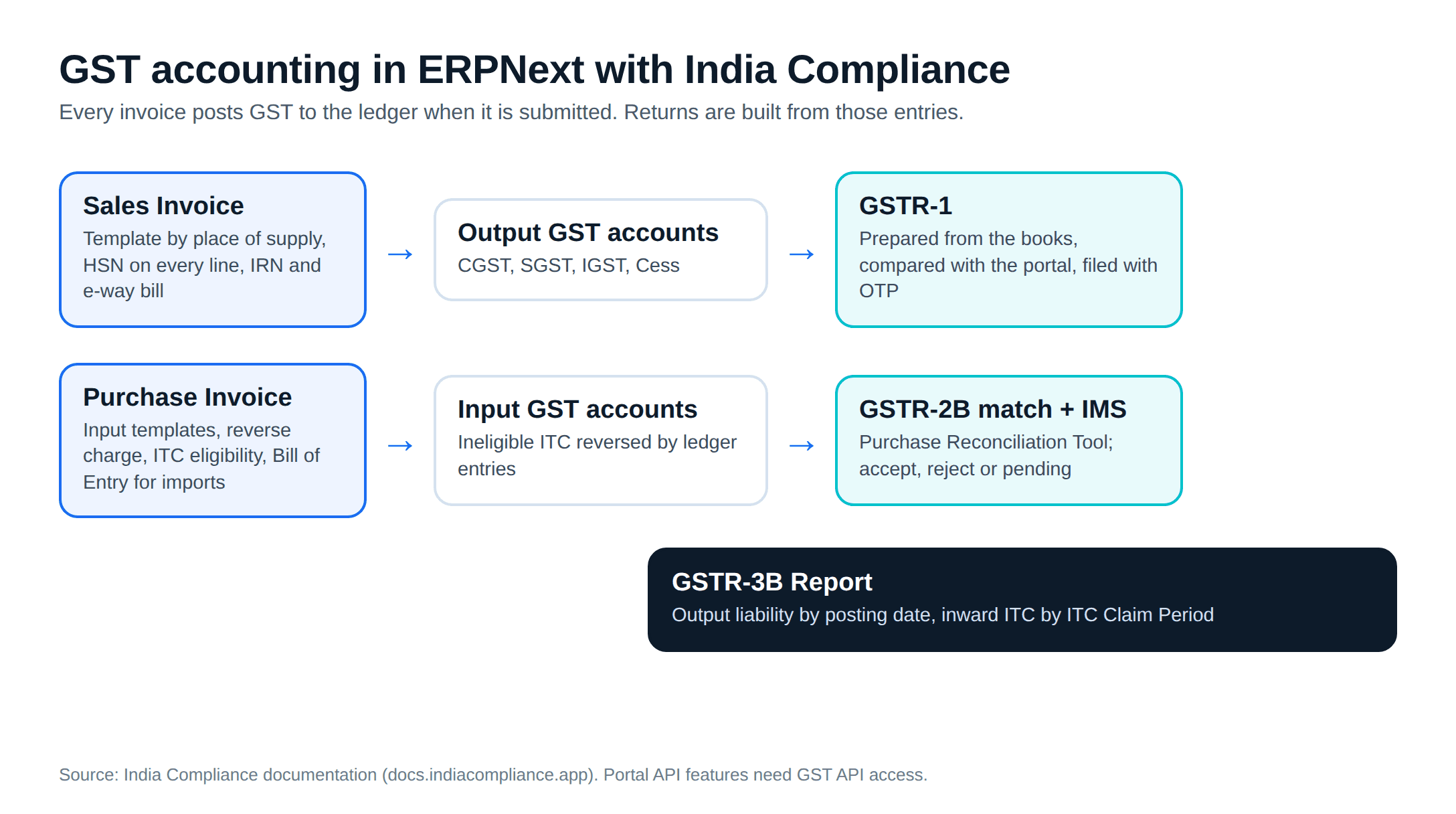
ERPNext keeps the books. Its own tax features, such as templates and tax categories, are generic. India Compliance adds the GST layer. Its README lists "automated return preparation" for GSTR-1, invoice management (IMS) for GSTR-3B, purchase reconciliation against GSTR-2B and GSTR-2A, e-invoice and e-way bill integration with the NIC portal, and GSTIN validation against government APIs.
The same README says some automation needs access to GST APIs, and that the "costs associated with these APIs" are why access goes through an India Compliance account. Plan for that line in the yearly budget; our ERPNext pricing guide covers the numbers.
ERPNext GST setup: accounts, company and parties
The India Compliance setup guide says a new installation creates default GST accounts for the company and fills them into GST Settings. The GST Accounts table should hold three rows per company: Input, Output and Reverse Charge. Each row names the CGST, SGST, IGST and Cess accounts.
The guide also says not to open a separate GST account per rate. One set of accounts can serve 5%, 18% and 28% items, and even several GSTINs, because the break-up comes from the transactions. Every validation and the ITC calculation depend on these accounts being right, so this table is the first thing we check when an ERPNext implementation takes over an existing install.
Then the masters:
- Company: GST details and an address with the GSTIN. The GST Category set on the company drives the validations on its transactions.
- Addresses: GSTIN sits on the address and the party. A transaction reads GST details from the address first, then from the customer or supplier.
- Parties: every Indian customer and supplier gets a GST state, registered or not. The guide gives the reason: GST is destination-based, so the state decides the tax.
GSTIN verification against the portal catches a mistyped number before it reaches a return.
GST tax templates: intra-state and inter-state
Per the defaults file in the app's repository, India Compliance creates In-State and Out-State tax categories (plus reverse charge versions) and matching templates such as "Output GST In-state" and "Input GST Out-state". It also creates item tax templates for GST 5%, 12%, 18% and 28%, plus Nil-Rated, Exempted and Non-GST.
The selection logic is in the app's transaction code. If the party or address carries a tax category, its template wins. Otherwise the app compares the first two digits of the place of supply with the state code of your GSTIN. A match means In-State, so CGST plus SGST. A difference means Out-State, so IGST. A party with GST category SEZ is always treated as inter-state.
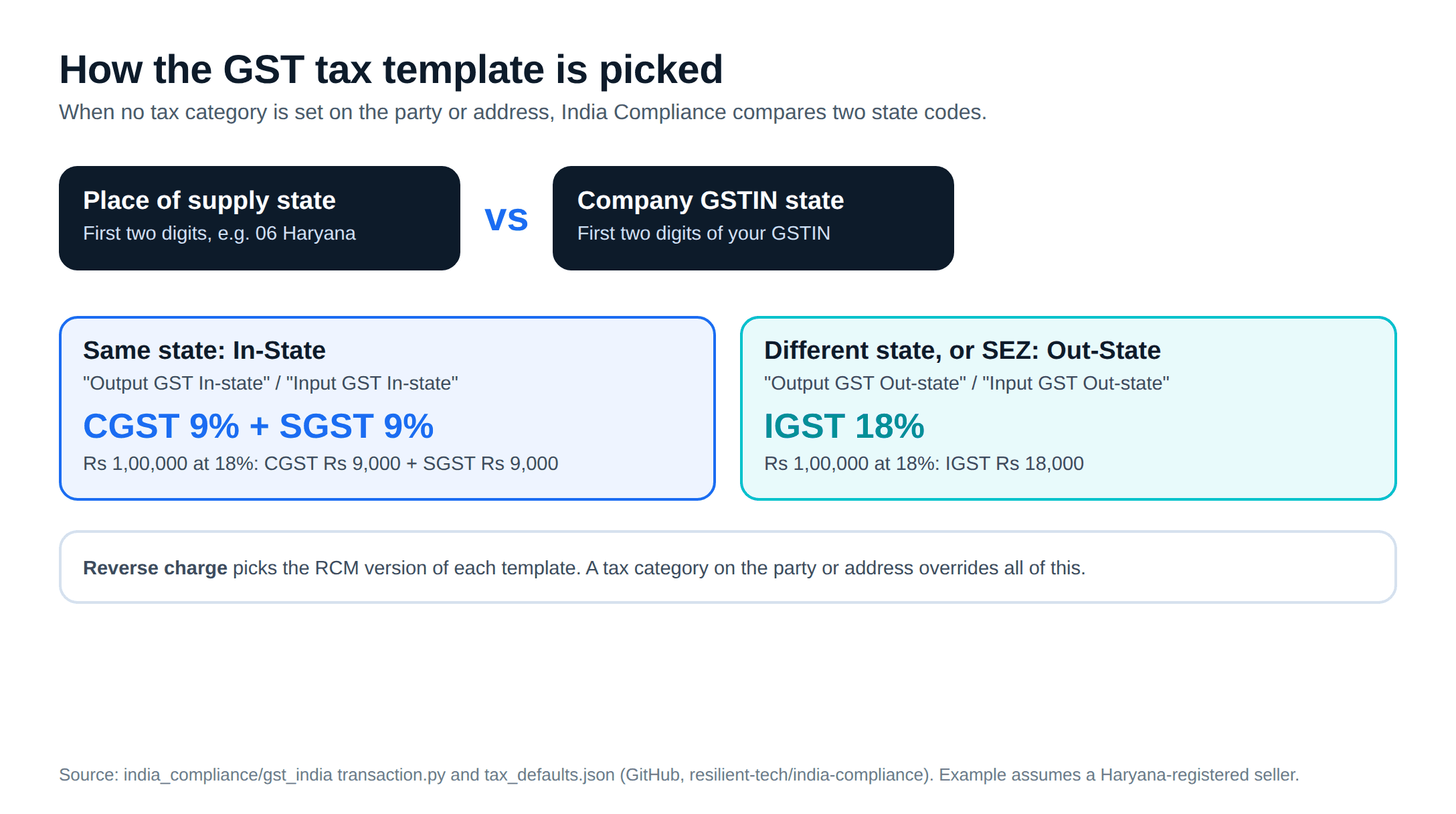
A worked example, assuming a Haryana-registered plant and an 18% item. A ₹1,00,000 sale to a buyer in Gurugram gets the In-State template: CGST ₹9,000 and SGST ₹9,000. The same sale to a buyer in Ahmedabad gets IGST of ₹18,000. Nobody picks the template; the place of supply decides.
Items at other rates take an Item Tax Template, which overrides the rate for that item while the invoice template still supplies the account rows. The Frappe docs add a caveat for India Compliance users: leave the auto-add setting off.
HSN and SAC codes
GST Settings has three HSN controls, per the setup guide:
- "Validate HSN Code in Sales Item and Transactions" makes HSN or SAC mandatory on items you sell. The guide cites Notification No. 78/2020-Central Tax.
- "Minimum HSN/SAC Code Digits" sets 4 or 6 digits, depending on your turnover.
- "View Tax Breakup Table Based On HSN Code" groups the invoice's tax break-up by HSN rather than by item.
The app loads more than 12,000 HSN codes, so the item master is a lookup, not a typing exercise. The GSTR-1 HSN summary is built from these codes, so errors in the item master show up in the return.
Reverse charge in ERPNext
Section 9(3) of the CGST Act lets the government notify categories of supply on which the recipient pays the tax. Section 9(4) originally made every registered buyer pay tax on purchases from unregistered suppliers. The 2018 amendment, in force from 1 February 2019, narrowed it to a notified class of registered persons and specified categories of supply. So reverse charge on unregistered purchases applies only if your business and the supply are in a notification.
The settings follow that split:
- "Enable Reverse Charge in Sales Transactions" is for businesses that sell supplies on which the buyer pays the tax.
- "Enable Reverse Charge for Purchase from Unregistered Supplier", with its invoice value threshold, belongs on only if you fall under a 9(4) notification.
- "Reverse Charge Applicable" on the supplier master applies reverse charge to every transaction with that supplier.
On a purchase invoice you tick "Is Reverse Charge" and, where the credit is available, set "Eligibility for ITC" to "ITC on Reverse Charge" (purchase transactions guide). Tax is added through the input accounts and deducted through the reverse charge accounts, so the supplier is paid nothing for GST and you carry the liability.
Input tax credit: eligibility and reversal
Section 16(2) of the CGST Act sets the conditions for ITC. You hold a tax invoice or debit note; its details have been furnished by the supplier and communicated to you under section 37 (clause aa, which is what GSTR-2B shows); you have received the goods or services; the tax has been paid to the government; and you have filed your return. Timing rules sit on top. Goods received in lots earn credit on the last lot. If you do not pay the supplier within 180 days of the invoice, the credit is paid back with interest and can be retaken after payment; this does not apply to reverse charge supplies. Section 16(4) bars credit after 30 November following the end of the financial year, or after the annual return is filed, whichever comes first.
India Compliance handles the bookkeeping side. Since v14.18.0 it reverses ineligible ITC with ledger entries. You set a GST Expense Account on the company and mark items "Is Ineligible for ITC". Section 17(5) cases reverse automatically on the purchase invoice when the item is marked. A place of supply mismatch reverses automatically whatever the item setting. Reversals under Rules 38, 42 and 43, and other reasons, go through a journal entry. For stock and asset items, the reversed tax is added to valuation. For imports, the reversal and valuation sit on the Bill of Entry, and a Landed Cost Voucher created from it fills in the proportionate value.
GSTR-1 and GSTR-3B preparation
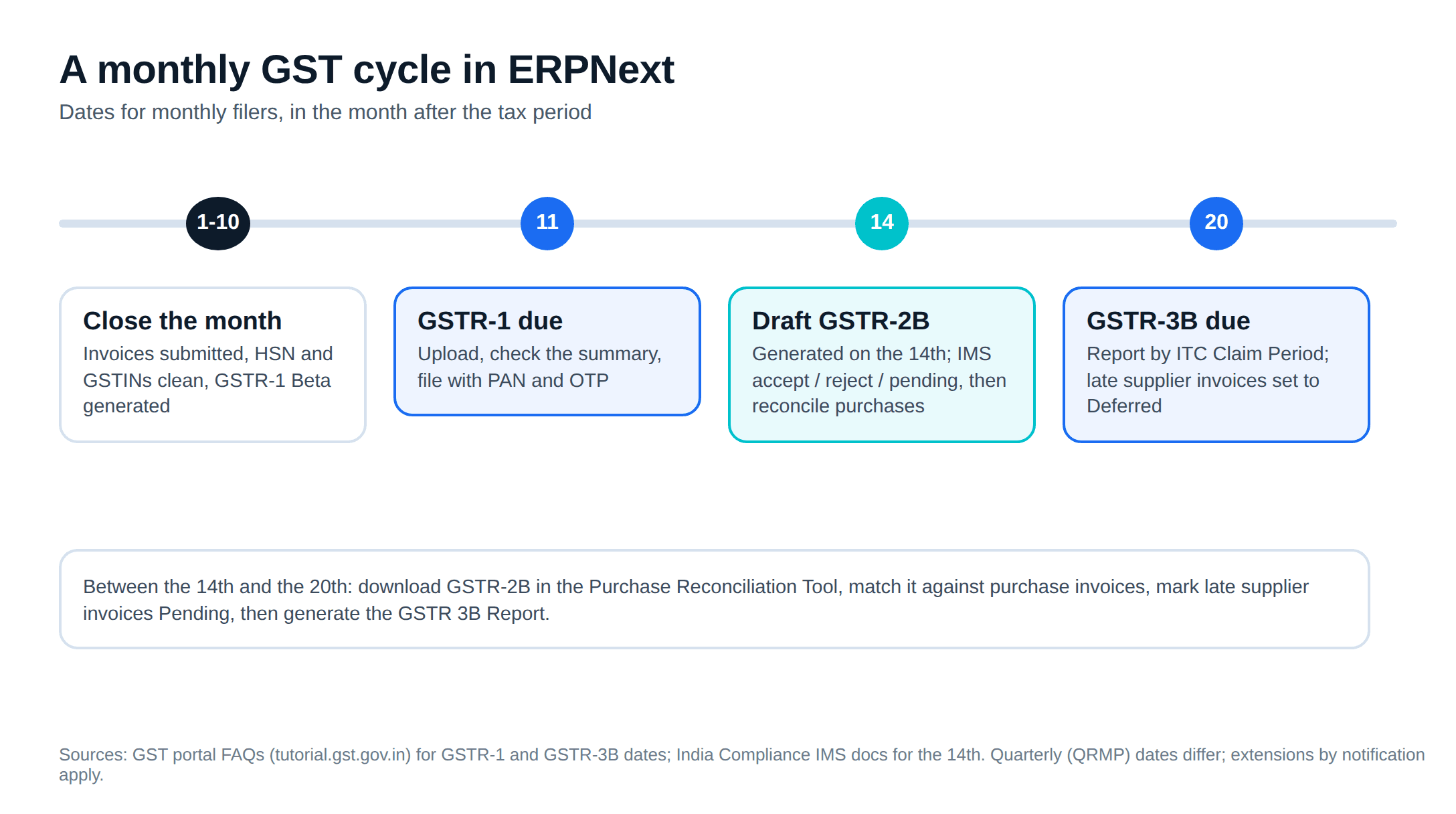
The GST portal's FAQs put the monthly due dates at the 11th of the next month for GSTR-1 and the 20th for GSTR-3B. Quarterly (QRMP) filers have different dates, and the government can extend any of them by notification.
For GSTR-1, India Compliance's GSTR-1 Beta builds the return from the books. With API access for the Returns service enabled on the portal, it uploads your data, lists errors by invoice, compares the summary and marks the return "Ready to File"; you file with the signatory PAN and an OTP. After filing it can lock that period's sales invoices, with named roles allowed to override. Without API access, you download the JSON and upload it yourself.
For GSTR-3B, the GSTR 3B Report is created for a company, GSTIN and month or quarter, and regenerates on save; a GSTR-3B Details report lists the purchases behind it. Inward documents are picked by their ITC Claim Period, which is set from the posting period or the GSTR-2B period, whichever is later. You can set it to "Deferred" for a supplier invoice that has not yet appeared in 2B. Once GSTR-3B for a period is filed, that period cannot be assigned or changed.
Purchase reconciliation with GSTR-2B
The Purchase Reconciliation Tool downloads GSTR-2A or GSTR-2B with an OTP-based portal session. If APIs are off for your site, you upload the JSON files from the portal instead. Each entry lands as a GST Inward Supply record and is matched against purchase invoices:
- Match Available: accept the match, or unlink it if it is wrong.
- Missing in Purchase: create the purchase invoice, or link it to an existing one.
- Missing in GSTR2A/2B: link it, mark it Pending while the supplier files, or ignore it.
Bulk actions work from any tab, and you can download a report to share with suppliers. The Invoice Management System screen sits alongside: download supplier invoices from the portal, mark each Accept, Reject or Pending, and upload the actions. Invoices with no action count as accepted. The draft GSTR-2B is generated on the 14th of the following month, and after changing actions you regenerate it so GSTR-3B uses the right figures.
ERPNext e-invoice and e-way bill
ERPNext generates the IRN and QR code when a sales invoice is submitted, and it can create the e-way bill in the same call. Rather than repeat the thresholds and settings here, our e-invoice and e-way bill guide covers who must e-invoice, the 30-day reporting limit and how India Compliance's settings map to a dispatch gate.
Material sent to a job worker is reported on ITC-04; the ITC-04 and job work guide explains the one-year and three-year limits and how ERPNext tracks stock at the job worker.
ERPNext or Tally for GST accounting
TallyPrime files GST and generates e-invoices and e-way bills too, so compliance alone is not a reason to switch, as our ERPNext vs Tally comparison explains. What changes is where the GST data starts. In ERPNext the tax lines come from the same sales order, delivery note and purchase receipt that move stock and drive production, so HSN, place of supply and valuation are set once, upstream. If the accounts team is reconciling the plant's paperwork into Tally every month, that is the gap an ERPNext implementation closes.
A GST setup checklist before go-live
- GST Accounts table: Input, Output and Reverse Charge rows, one set of accounts, no per-rate accounts
- Company, every address and every party: GSTIN where registered, GST state always
- Item master: HSN or SAC on every sale item, at the digit count your turnover requires
- Item tax templates on items or item groups that are not at the default rate
- Reverse charge: supplier flags set; unregistered purchase setting on only if a 9(4) notification covers you
- GST Expense Account on the company; ineligible items marked
- API access for the Returns service and e-invoice credentials, tested before the first live period
- A parallel month of GSTR-1 and GSTR-3B checked against your current figures
Metageeks is an independent ERPNext implementer. Our ERPNext implementation work includes the GST setup above and a parallel month before go-live, and if you want to see these screens first, book an ERPNext demo.
Frequently asked questions
Can ERPNext be used as GST accounting software in India?+
Yes, with the free India Compliance app installed. ERPNext keeps the books; India Compliance adds GST accounts, In-State and Out-State tax templates, HSN validation, reverse charge, ITC reversal, GSTR-1 and GSTR-3B preparation, purchase reconciliation against GSTR-2A and GSTR-2B, and e-invoice and e-way bill generation. Some of the portal-connected features need GST API access, which has a cost.
How does ERPNext decide between CGST plus SGST and IGST?+
India Compliance compares the place of supply with the state code of the company's GSTIN. If they match, it picks the In-State template (CGST plus SGST); if they differ, or the party's GST category is SEZ, it picks the Out-State template (IGST). A tax category set on the party or address overrides this, so check both when a wrong template appears.
Does ERPNext file GSTR-1 directly on the GST portal?+
India Compliance's GSTR-1 Beta can upload the return to the GST portal, show errors and a summary, and file it after you enter the signatory PAN and an OTP. This needs API access for the Returns service enabled on the portal. Without it, you can download the JSON and upload it yourself.
How does purchase reconciliation with GSTR-2B work in ERPNext?+
The Purchase Reconciliation Tool downloads GSTR-2A or GSTR-2B through the API, or takes the JSON files you download from the portal, and matches them against your purchase invoices. It sorts entries into matches, invoices missing in your books and invoices missing in 2A or 2B, and you link, accept, mark pending or ignore each one.
Does ERPNext handle reverse charge under GST?+
Yes. India Compliance has settings for reverse charge on sales, a flag to apply reverse charge to every purchase from a particular supplier, and reverse charge tax templates. Turn on its option for purchases from unregistered suppliers only if your business falls in a class notified under section 9(4) of the CGST Act, because since 1 February 2019 that provision is not a blanket rule.
Related reading
- E-invoice and e-way bill from your ERP: thresholds, the 30-day limit and India Compliance settings.
- ITC-04 and job work under GST: material at job workers and the return that tracks it.
- ERPNext vs Tally for manufacturers: when Tally stops being enough.
- ERPNext inventory management: warehouses, batches and valuation behind the stock ledger.
Free ERPNext fit check
Will ERPNext fit your factory?
Answer a few quick questions. On a short call we tell you whether ERPNext fits how you make, stock and sell, and what the rollout looks like.
Check my fit →About the author

- Tags
- erpnext
- erp
- india
- gst
- manufacturing
Subscribe to Our Newsletter
The AI Build Brief: practical playbooks on how to build, price and ship AI features, in one short email every other week.