Plants that decide to leave Tally tend to ask the same thing first: what happens to ten years of vouchers? The short answer is that most of them stay behind, and that is fine. This guide to Tally to ERPNext migration sets out what moves, what does not, and how to run the cut-over weekend, for the owner or accountant of a 10-50 person plant.
TL;DR
- Move masters, closing balances, unpaid invoices and opening stock. Leave voucher history in a read-only Tally company file.
- The Tally Migrator app described on the Frappe forum moves masters, opening balances, receivables and payables, and opening stock from a Tally XML export. It does not move historical transactions. Where it leaves gaps, ERPNext's own tools fill them.
- GST ledger balances and party GSTINs need their own check. Tax accounts exist in ERPNext after India Compliance is installed, but you map the balances yourself.
- Pick the start of a month or financial year, rehearse on a test site first, and do not go live until the trial balance, stock value and party outstanding match Tally.
Decide how much history you need
Before touching a file, decide what history ERPNext must hold on day one. Three questions settle it.
Will anyone need to search an old voucher inside the new system? Usually not. Auditors and your accountant are the ones who ask for old records, and Tally still answers those.
Do you need prior-year figures side by side for management reports? Then load closing balances for the previous year-end as well, and keep the rest as reference.
Is there a legal or contractual reason to keep full history searchable? Then ask your accountant before you decide, because that changes the plan.
For most plants the answer is: balances and open items in ERPNext, everything else in an archived Tally company. Keep that file, back it up in two places, and note which Tally release opened it.
This also shrinks the project, because less data means fewer things to reconcile. For the price side, our implementation cost guide explains where migration fits among the cost drivers.
What moves: masters, balances, open items
Think of three layers, from easy to fiddly.
Masters. Customers, suppliers, groups, items, units of measure, warehouses, the chart of accounts and cost centres. The Tally Migrator thread on the Frappe forum lists these as what the app handles. It adds price lists, bills of materials and batch-tracked stock to that list.
Opening balances. Ledger closing balances become the opening balances in ERPNext. The Tally Migrator repository says you export "Masters" from Tally with "Export closing balance as opening balance" set to Yes, in XML format, and that this setting is what turns last year's closing figures into opening balances.
Open items. A customer's balance is not enough if you want ageing and receipts to work: you need each unpaid invoice with its date and due date. The forum thread says the app brings over outstanding receivables and payables, and the repository says it carries customer and supplier opening balances. If you hit gaps, or want line-by-line control of ageing, load them yourself. The ERPNext documentation says customer and supplier balances should be loaded through outstanding invoices, not journal entries, where ageing and settlement matter. The Opening Invoice Creation Tool is built for that: it takes unpaid or partly paid invoices at the cut-over date and uses the outstanding amount, not the original total. It is not meant for fully paid invoices or stock movement.
So the app moves masters, opening balances, receivables and payables, and opening inventory. What it does not move, in its own words, is historical transactions such as Sales Invoices, Purchase Invoices, Payments or Journal Entries, and that history stays in Tally. The forum thread also lists TDS and TCS, HR and payroll, and BOM co-products and by-products as not yet supported. If your plant relies on any of these, plan to enter them by hand or with a separate import. At the time of writing the thread says the app is built for ERPNext v16 and TallyPrime, so check your versions before you start.
For anything the app does not cover, or if you would rather load a piece yourself, ERPNext's own Data Import tool takes CSV or Excel files. It validates the sheet before importing and shows warnings by row and column that you must clear first. The documentation suggests a few thousand records at a time. Whichever route you take, you still own the check at the end.
GST ledgers and tax templates
GST ledgers are where a Tally to ERPNext migration most often goes wrong, so give them their own pass.
Tax accounts: the India Compliance setup guide says a new installation gets default GST accounts and default sales and purchase tax templates for the company. Your Tally GST ledgers (input and output CGST, SGST and IGST, and anything for reverse charge) need a matching account in ERPNext. Map them by name on paper before loading anything.
Balances: input credit and tax payable balances at the cut-over date are ordinary ledger balances. GST ledgers are ordinary ledger accounts, so the usual route is the opening Journal Entry that the ERPNext documentation describes for residual ledger balances, one row per ledger, with debits equal to credits and a temporary opening account that should land on zero. Take the figures from the Tally trial balance and your last filed return, and confirm the mapping with your accountant.
Parties and items: the same guide says GST law requires GSTIN details for every customer and supplier, kept in the relevant addresses, and that GST is applied and validated by transaction against that master. If you use the Tally Migrator with India Compliance installed, the repository says it brings HSN codes, tax rates, GST unit codes and registration type where available. Without India Compliance, it says, the core records still import and anything GST-specific is skipped with a note in the log. Check a sample of customers and items for GSTIN, GST category and HSN code, since a blank GSTIN will fail validation on the first invoice.
Run one purchase and one sales invoice of each tax pattern on the test site: in-state, inter-state and an exempt item. The tax lines should match what Tally produced for the same transaction.
Stock and batches on the cut-over date
Stock has to agree in quantity and in value, so it needs its own check.
Opening stock goes in with a Stock Reconciliation using the opening purpose. The documentation says it updates the quantity of items in a warehouse as of a given date and time, supports batch and serial numbers, and uses the Temporary Opening account as the difference account for opening stock. Its CSV format is case-sensitive, so item codes and warehouse names must match exactly. The Tally Migrator also brings opening stock and batch-tracked stock, with manufacturing and expiry dates, according to the repository.
Three habits help:
- Count first. Do a physical count of the day you cut over, or reconcile Tally's stock to the last count, and load that figure. Loading Tally's number when the shelf disagrees just moves the error.
- Match warehouses. Tally godowns map to ERPNext warehouses. Agree the list before the weekend.
- Check value, not only quantity. Compare the total stock value in ERPNext with Tally's stock summary and the stock line on the trial balance.
Bills of materials are a separate check from stock. The Tally Migrator lists them as supported, with co-products and by-products excluded. Review each one on the test site, since a BOM that looked fine in Tally may need operations and a routing in ERPNext before a work order will run.
A cut-over weekend, step by step
Order matters here, because each step depends on the one before. This is a sample weekend for a single-plant business with the data work already rehearsed on a test site. Treat the timings as a planning guide, since your own volumes decide them.
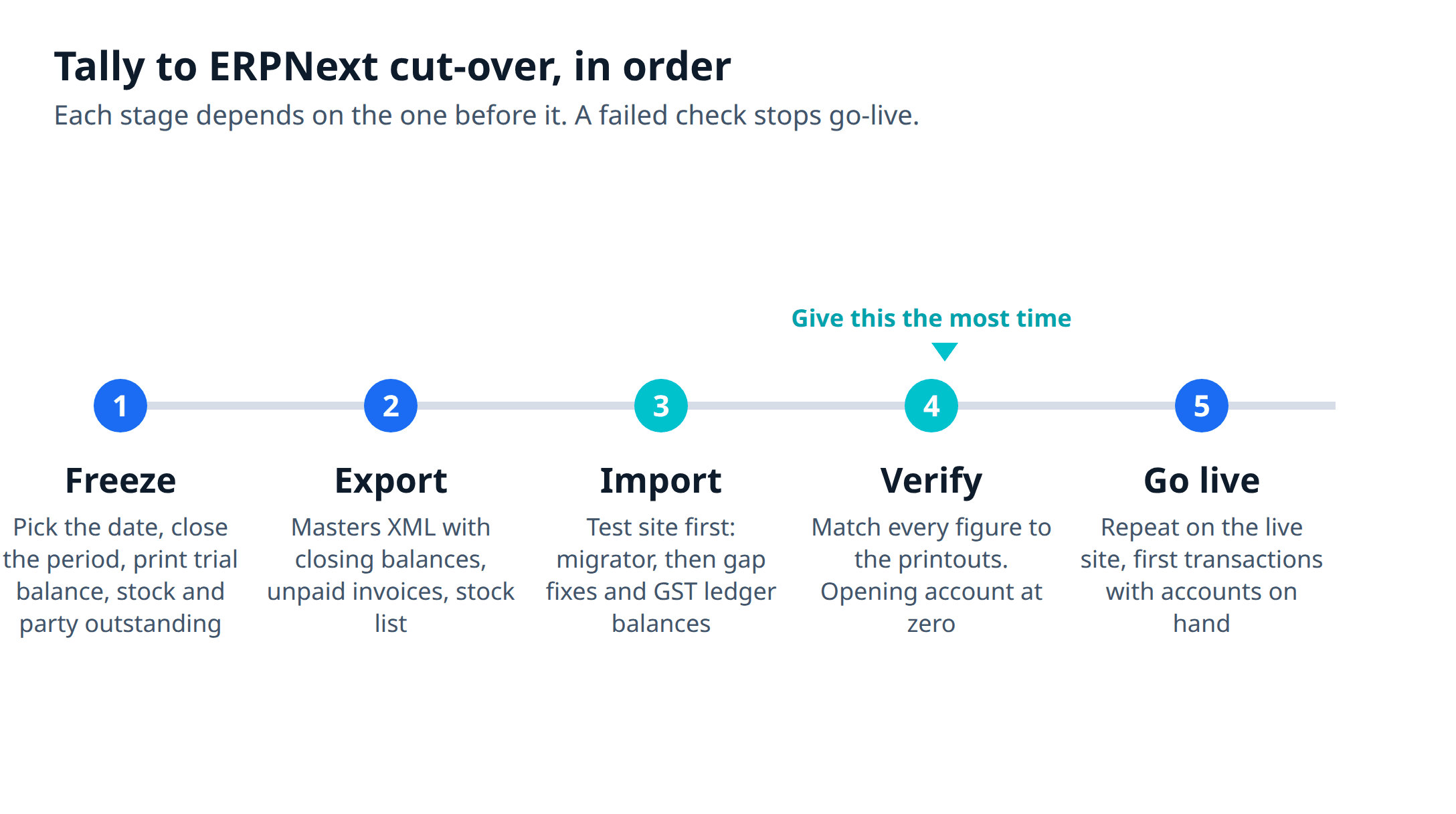
- Freeze. Agree the cut-over date and stop new masters in Tally. Finish the period close: post all vouchers up to the day before, take the trial balance, stock summary and party outstanding, and print them. These printouts are what you check against.
- Export. Export the Masters XML with closing balances as opening balances. If you plan to load unpaid invoices or stock yourself, also export the unpaid invoice list and the stock list as sheets. Keep a copy of the Tally company file, untouched.
- Import on the test site. Run the Tally Migrator for masters, opening balances, receivables and payables, and opening stock. Then fill the gaps with the Opening Invoice Creation Tool, Stock Reconciliation or Data Import, and load the GST ledger and any remaining ledger balances as an opening Journal Entry. Fix the validation warnings. Keep the migration revertible so you can run it again.
- Verify. Compare trial balance, stock value, party balances and GST ledgers to the printouts, line by line. The opening balance documentation says to reconcile account by account and not to hide an unexplained difference in retained earnings, suspense or rounding. The temporary opening account should be zero.
- Go live. Repeat the same load on the live site, run the same checks, and open the site to users on Monday. Stores, sales and purchase enter their first transactions with someone from accounts standing by.
If any check in step 4 fails and cannot be explained by end of day Sunday, do not go live. Run Tally for another cycle and try again at the next month start. That costs a few days. A wrong opening position costs months, because every report built on it is off.
Plan the weeks before as well: clean duplicate items and customers while still in Tally, train by role on the test site, and decide who owns each check. The ERPNext vs Tally comparison covers why plants run both for one closing cycle, and our ERPNext implementation page shows how we scope the data work as part of a written plan.
Keeping Tally read-only afterwards
After go-live, Tally becomes an archive. Keep it for three jobs: answering questions about past years, supporting audits and notices, and checking the first month in ERPNext.
Stop entering new vouchers in Tally once the first closing cycle in ERPNext agrees. Entering in both for long burns out the accounts team, and the two sets drift.
Keep the company data files in at least two places, and record the Tally release that opens them. Ask your accountant how many years of records you must retain for tax and audit purposes, and keep the file at least that long. Check your Tally licence and subscription terms for the archive, because they are separate from anything you do in ERPNext.
If an auditor asks for a voucher from before the cut-over, open it in Tally. If they ask for a balance at the cut-over date, ERPNext shows it as the opening entry, and the printouts from step 1 back it up. Put those printouts, signed by the accountant, in the same folder as the archive.
Metageeks is an independent ERPNext implementer. If you are weighing a move, tell us what the plant runs on today, and we will tell you what moves, what stays and whether the switch is worth it.
Frequently asked questions
Can I move all my Tally data into ERPNext?+
You can move the data you need to run the business: masters, opening balances, unpaid invoices and opening stock. Past vouchers are a different matter. The Tally Migrator thread on the Frappe forum says the app focuses on masters and opening balances, not historical transactions such as invoices, payments or journal entries. Most plants keep the old Tally company file as a read-only archive for past years and audits.
What is the Tally Migrator?+
It is a free, open-source Frappe app, described on the Frappe forum as moving master data and opening balances from a Tally export into ERPNext. You upload a Tally Masters XML file, review the validation results and run the migration. The forum thread says it is built for Indian users on ERPNext v16 and TallyPrime, and that every run can be rolled back. It does not replace a reconciliation: you still compare the result against Tally.
When is the best date to cut over from Tally?+
The start of a month or a financial year, so there is one clean closing figure to load. The ERPNext documentation says opening balances tell ERPNext where the company stands at the cut-off date, so every balance must agree with the old books as of the day before. April 1 is the natural date for an Indian plant, but a month start after a closed period works too.
Can I rehearse the migration before going live?+
Yes, and you should. The Tally Migrator thread on the Frappe forum says existing records are skipped, never duplicated or overwritten, and that every migration run can be rolled back. Run the full load on a test site first, compare the result with your Tally printouts, and repeat the same steps on the live site only when the numbers match.
Free PDF
The 2026 AI Development Rate Sheet
Build, agent, RAG and consulting rates by tier, in one PDF, so you can check a quote before you sign it.

Written by
Pankaj Kumar
Founder · Metageeks Technologies
Metageeks builds software and AI products for growing businesses. Every build is scoped in writing before it starts, and you see progress every week. We write about what holds up once it reaches production.
Connect on LinkedInThe AI Build Brief
Ship AI that holds up in production.
Practical playbooks on how to build, price and ship AI features, in one short email every other week.