

Picture a sales rep standing in a dealer's shop in Indore with an order for 40 cartons. He opens ERPNext in his phone's browser, scrolls past forty fields to find the item table, loses signal halfway through, and writes the order on paper to type in that evening. Searching for an "ERPNext mobile app" usually starts with a moment like that. The answer has four parts: what the browser already does, what Frappe publishes, what other companies sell, and when it is worth building your own.
TL;DR
- Frappe does not publish an ERPNext app on the app stores. It deprecated its mobile apps in December 2021 and recommends the responsive web interface, which covers every module in a phone browser.
- Frappe HR and Frappe CRM ship their own progressive web apps (PWAs), installed from the browser at
/hrmsand/crm. - Third-party ERPNext apps exist on both stores. They are not Frappe's, so check the publisher, update history, version support and where your login goes.
- A custom app on the Frappe REST API makes sense for one painful, high-volume task, such as offline field orders or warehouse scanning, not as a copy of the whole ERP.
Free ERPNext fit check
Will ERPNext fit your factory?
Answer a few quick questions. On a short call we tell you whether ERPNext fits how you make, stock and sell, and what the rollout looks like.
Check my fit →What "ERPNext mobile app" means today
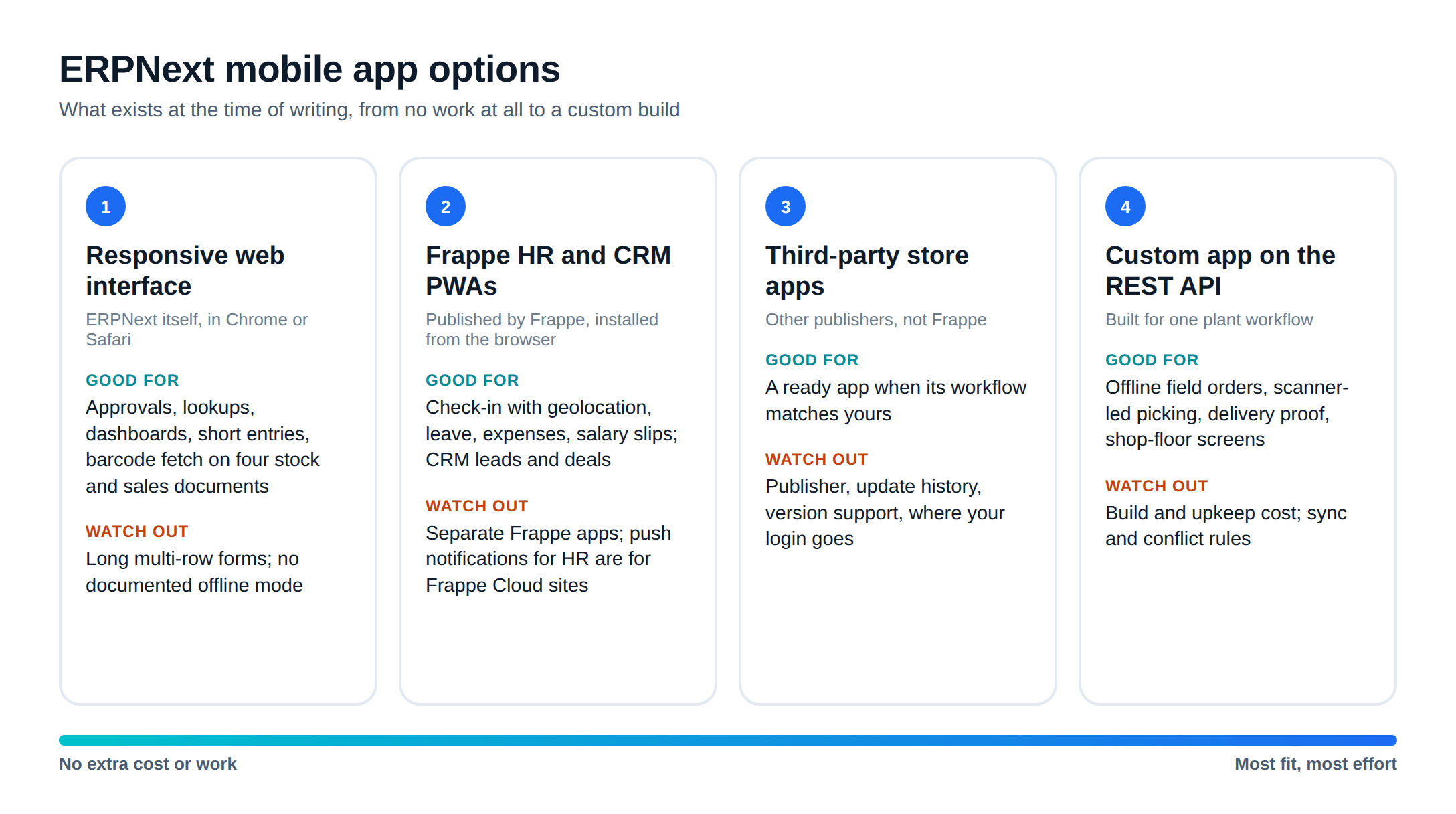
There are four ways to run ERPNext from a phone, and they solve different problems:
- The responsive web interface. The same ERPNext you use on a laptop, in the phone's browser.
- Frappe's own PWAs for Frappe HR and Frappe CRM, which are separate Frappe apps installed alongside ERPNext.
- Third-party apps on the Play Store and App Store, built by other companies on ERPNext's API.
- A custom app built for your plant's workflow, talking to ERPNext through the same API.
Option 1: the responsive web interface
Frappe's ERPNext mobile page says the "ERPNext UI is designed to be responsive so it works on your favorite browser", and lists "Mobile-friendly" with the line "Manage all modules from any device." There is nothing to install and no extra cost, and every permission, workflow and custom field you set up on the desktop applies on the phone too.
It handles short tasks well:
- Approving a purchase order or leave request from a notification
- Checking stock balance, a customer's outstanding amount or a sales order's status
- Looking at a dashboard or a saved report
- Adding a comment, an attachment or a photo to a document
Barcode scanning also works in the browser for some documents. Frappe's barcode guide says you can "scan barcodes and add Items right from your smartphone", and lists Delivery Note, Sales Invoice, Purchase Receipt and Stock Reconciliation as the transactions that fetch items by barcode. Test it with your own labels and phones, because camera scanning depends on the browser granting camera access.
Where it struggles is long data entry. A sales order or stock entry with many rows is slow to fill on a small screen, and Frappe does not document an offline mode for the ERPNext desk, so a dropped signal can mean a lost entry. You can trim the forms (hide fields, set defaults, make role-specific workspaces) without code, which makes short entries on a phone much easier. Our ERPNext review scores mobile as one of ERPNext's weaker areas for exactly this reason.
Option 2: Frappe HR and Frappe CRM as PWAs
A progressive web app is a website that installs to the phone's home screen and opens full screen like an app. Frappe has built PWA frontends for two of its products.
Frappe HR. The Frappe HR mobile docs say it ships "a mobile frontend (progressive web app) v15 onwards". You open your site address followed by /hrms in Chrome or Safari and install it from the browser. Frappe's HR mobile app page lists:
- Check-in and check-out, with optional geolocation tracking
- Leave balances and leave applications
- Expense claims, approvals and advance balances
- Salary slips you can download
- Push notifications, for "sites hosted on Frappe Cloud"
For shop-floor attendance and leave, that may be all you need, at no licence cost. Payroll and statutory setup sit in the desk; our Frappe HR and payroll guide covers that side.
Frappe CRM. The CRM mobile docs describe "a mobile-friendly interface through a Progressive Web App (PWA)" at /crm. Note that Frappe CRM is a separate product from the CRM module inside ERPNext.
Both docs say Firefox does not install PWAs without a plugin, so standardise on Chrome for Android and Safari for iPhone.
What happened to the official ERPNext app
Frappe did publish native apps once. In a December 2021 forum announcement, it said the apps had only "basic functionality", that "adding full support for these apps takes lot of development & maintenance work", and that it would delist them from both stores. The advice was: "consider using mobile browser to access ERPNext."
The code is still visible. Frappe's Flutter mobile app repository is archived, with its last change in January 2022 and a deprecation warning at the top of its README. At the time of writing, the App Store app published by Frappe Technologies that we found is Raven Mobile, a team chat app, not ERPNext. We found no ERPNext app published by Frappe on either store.
Option 3: third-party ERPNext apps
Other companies publish apps that connect to ERPNext, on both stores and on the Frappe Cloud marketplace. We do not endorse any of them, and some may suit your plant well. Before you roll one out to a sales team, check:
- Who publishes it, and whether they have a support contact you can reach
- When it was last updated, and which ERPNext versions it says it supports (v15, v16)
- Whether it connects directly to your site or routes your data through the vendor's own server
- What phone permissions it asks for, and whether it needs them
- Whether it uses API keys for a dedicated ERPNext user, so you can limit its roles and revoke it
- How it handles offline entries and what happens when two people edit the same record
- What it costs per user per year, and what happens to your workflow if the publisher stops
Create a separate ERPNext user for the app with only the roles it needs. If the app is lost, stolen or abandoned, you disable one user instead of resetting everyone's password.
Option 4: when a custom ERPNext mobile app makes sense
A custom ERP mobile app is worth the cost when one task is done many times a day, by people away from a desk, and the browser keeps getting in the way. Four cases where we would consider one:
- Field sales orders. A rep needs the price list, stock availability and the customer's credit position offline, then syncs the order when signal returns. Add GPS on the visit and a photo of the shop if the sales manager wants it.
- Warehouse picking and receiving. Scanning batch or serial numbers with a rugged Android scanner, confirming bin locations and posting a stock entry in two taps, not twenty.
- Delivery proof. The driver captures a photo and signature against the delivery note, even in a basement godown with no signal.
- Shop-floor screens. An operator starts and ends a job card, logs scrap and downtime, and never sees the rest of the desk.
For attendance, try the Frappe HR PWA first. It may be enough.
A custom app is the wrong answer when the real problem is a cluttered form or missing training, or when you want the whole ERP on a phone. That is what the responsive interface is for. Whether to customise ERPNext or build a separate system is a broader question, covered in custom ERP vs ERPNext customization.
How a custom app talks to ERPNext
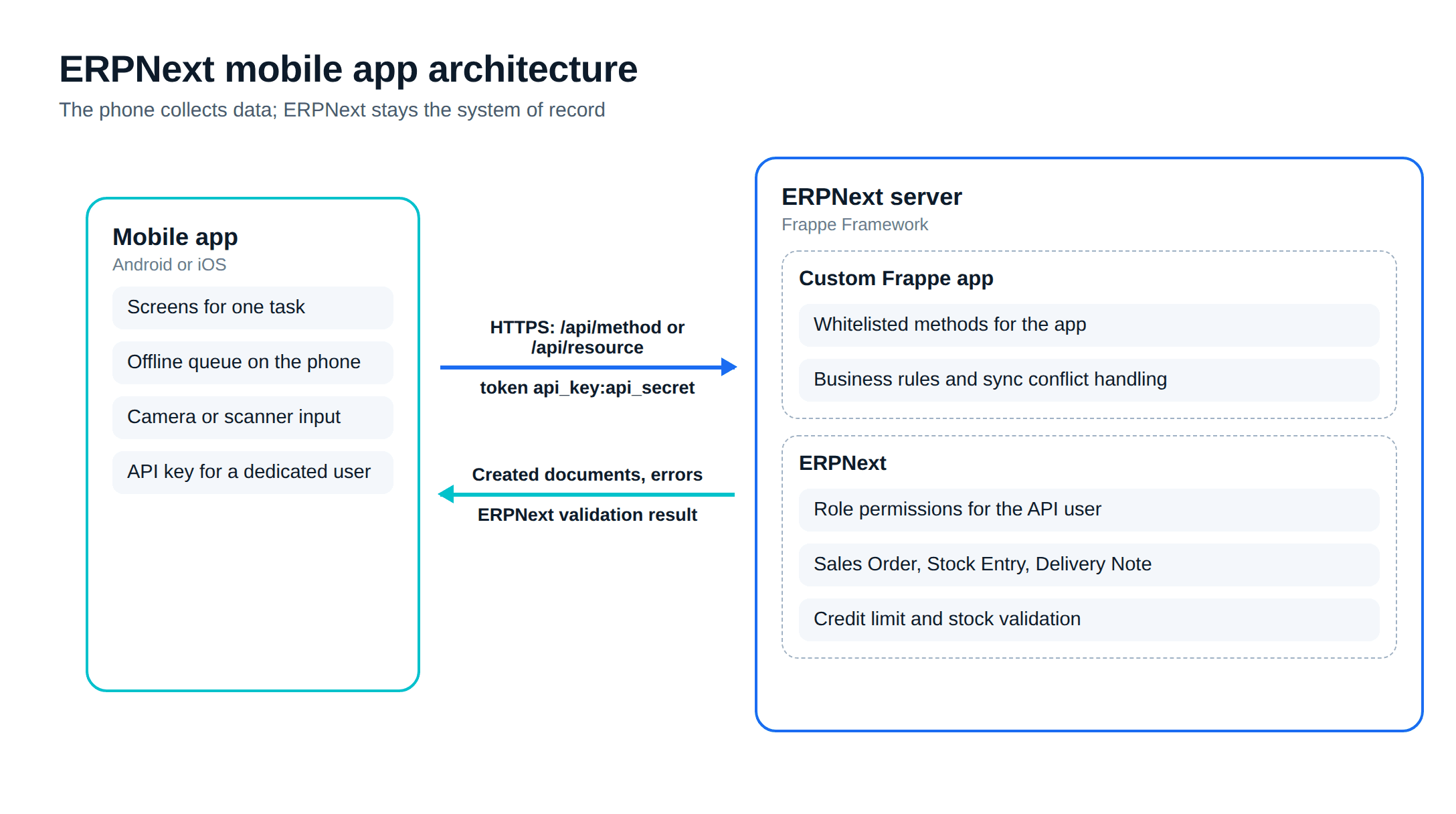
ERPNext runs on the Frappe Framework, which exposes every document type through a REST API:
GET /api/resource/Sales Orderlists records, with filters and field selection;POSTcreates one;PUTupdates one./api/method/<path>calls server-side Python functions, which "must be marked as whitelisted" to be reachable.- Authentication is a token header (
token api_key:api_secret) for a dedicated user, an OAuth bearer token, or a session login.
Permissions follow the ERPNext user behind the token, so a rep's app sees only what his role allows. Validation stays on the server: if a sales order breaks a credit limit or a stock entry would go negative, ERPNext rejects it the same way it would on the desktop.
The design rule we follow is to keep business logic in a custom Frappe app on the server, not in the phone. The mobile app collects data, queues it when offline and sends it to a whitelisted method that does the checks and creates the documents. That keeps upgrades manageable, and it means a second app (or a WhatsApp flow) can reuse the same endpoints. Our ERPNext integrations guide uses the same pattern for connecting other systems.
Plan for three things that a web form never has to worry about: what the app does when the same record changes on the server while the phone is offline, how you push app updates to 30 phones when the API changes, and how the app behaves on the cheapest Android phone your team actually carries.
This is the kind of work our ERPNext development team scopes: one workflow, one app, built against your ERPNext version and kept in your own repository.
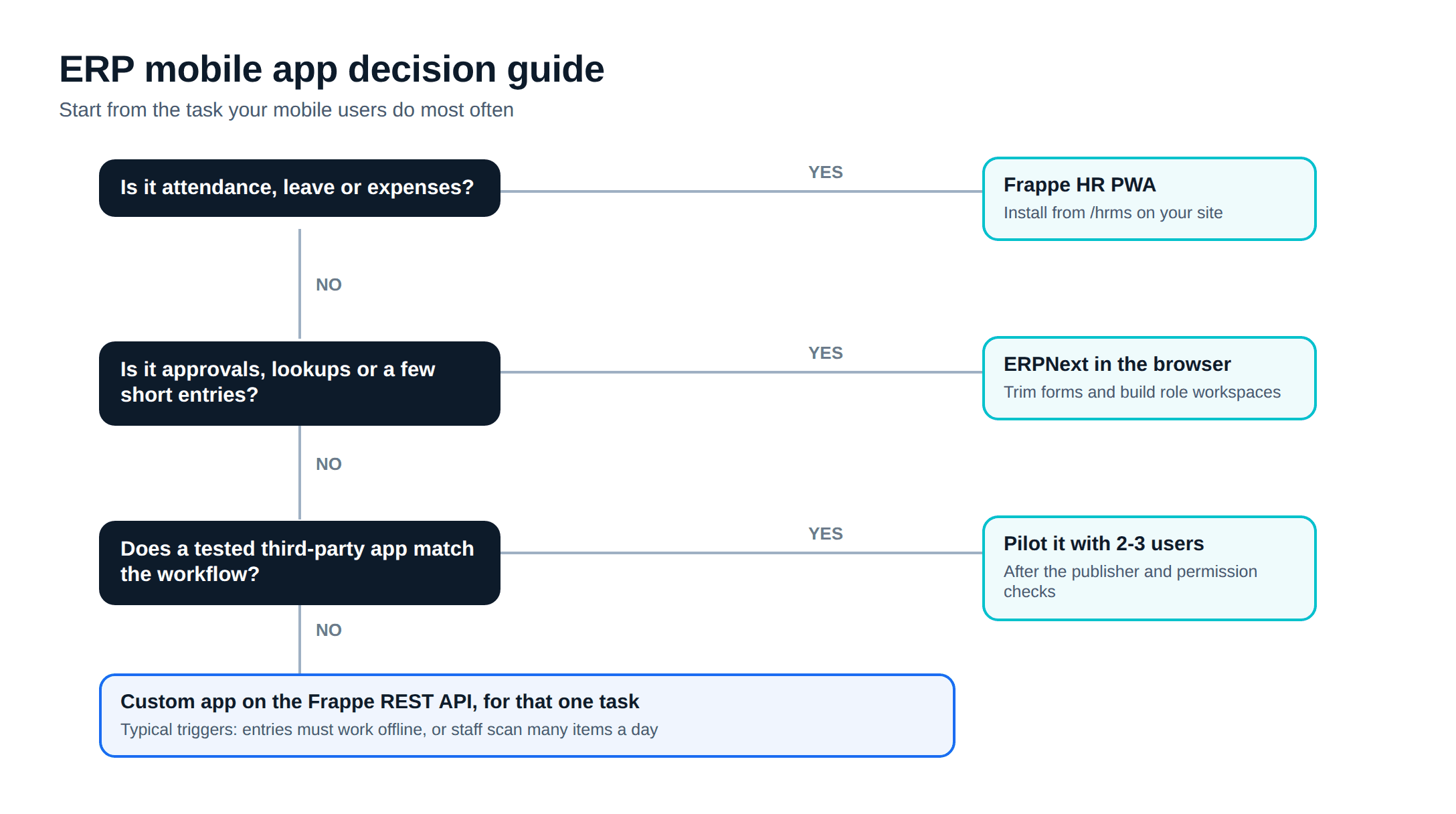
A sensible order of steps
Our default advice is to go in this order and stop at the first step that solves the problem.
- Trim the forms your mobile users touch: hide fields, set defaults, build a role workspace.
- Install the Frappe HR PWA if attendance and leave are the main mobile need.
- Pilot a third-party app with two or three users if it matches your workflow, after the checks above.
- Build a custom app only for the task that is still painful, and measure it against the paper or WhatsApp process it replaces.
If you reach step 4, ERPNext development explains how Metageeks, an independent ERPNext implementer, scopes a custom Frappe app before any code is written.
Frequently asked questions
Is there an official ERPNext mobile app?+
Not as a store app. Frappe announced on its forum in December 2021 that it was deprecating its ERPNext mobile apps and would delist them, and its Flutter mobile app repository on GitHub is archived. Frappe's ERPNext mobile page describes a responsive web interface that works in the phone's browser across all modules.
Can I use ERPNext on my phone?+
Yes. ERPNext's web interface is responsive, so it runs in Chrome or Safari on a phone and covers every module. It works well for approvals, lookups, dashboards and short entries. Long forms with many rows are slower on a small screen, and Frappe does not document an offline mode for the ERPNext desk.
Does Frappe HR have a mobile app?+
Yes, as a progressive web app. Frappe HR ships a mobile frontend from version 15, opened at your site address followed by /hrms and installed from the browser. Frappe lists check-in and check-out with optional geolocation, leave balances, expense claims and salary slips, with push notifications on Frappe Cloud sites.
Are third-party ERPNext apps safe to use?+
Some are well made, but none of them is published by Frappe, so check before rollout: who publishes it, when it was last updated, which ERPNext version it supports, whether it connects straight to your site or through the vendor's server, and what phone permissions it asks for. Give it a dedicated user with only the roles it needs.
When does a custom ERPNext mobile app make sense?+
When one high-volume task is painful in the browser: field sales orders that must work offline, warehouse picking with scanners, delivery proof with photos and signatures, or a shop-floor screen for people who should never see the full desk. A custom app built on the Frappe REST API keeps ERPNext as the system of record.
Related reading
- ERPNext review: strengths and gaps for Indian plants.
- ERPNext integrations in India: connecting ERPNext to other systems.
- Custom ERP vs ERPNext customization: build or extend.
Free ERPNext fit check
Will ERPNext fit your factory?
Answer a few quick questions. On a short call we tell you whether ERPNext fits how you make, stock and sell, and what the rollout looks like.
Check my fit →About the author

- Tags
- erpnext
- erp
- india
- manufacturing
- mobile
Subscribe to Our Newsletter
The AI Build Brief: practical playbooks on how to build, price and ship AI features, in one short email every other week.