


Picture a sales head at a 30-person packaging plant who opens ERPNext, sees Lead and Opportunity in the sidebar, and is then told by a consultant to install a different app called Frappe CRM. Two CRMs from the same company is confusing, and the search results do not settle it. This post compares the CRM module inside ERPNext with the standalone Frappe CRM app, explains why the choice now leans one way, and shows how a deal turns into a Sales Order and an invoice.
TL;DR
- ERPNext CRM is the Lead, Opportunity and Quotation module inside ERPNext. Frappe's current documentation says it is scheduled for deprecation and will be removed in version 17.
- Frappe CRM is a separate AGPL-3.0 app with a modern interface: leads and deals, Kanban, calling, WhatsApp, web forms, assignment rules and automations. It runs with or without ERPNext.
- With the integration on, a Frappe CRM deal creates an ERPNext Quotation, a Customer is created on Won or at Sales Order, and fulfilment and invoicing stay in ERPNext.
- For a new implementation, start with Frappe CRM. If you run ERPNext CRM today, plan a migration before v17 rather than during it.
Free ERPNext fit check
Will ERPNext fit your factory?
Answer a few quick questions. On a short call we tell you whether ERPNext fits how you make, stock and sell, and what the rollout looks like.
Check my fit →The two CRMs in one paragraph each
ERPNext CRM is part of ERPNext. Its documentation covers Lead, Opportunity, Customer, Contact and Address, activities, campaigns and email campaigns, sales stages, territories, lost reasons and pipeline reports. A Lead can be turned into an Opportunity, a Customer or a Quotation from its Make menu, and an Opportunity ("a qualified lead") can carry items and become a Quotation. It uses the same desk interface as the rest of ERPNext.
Frappe CRM is a separate app in its own GitHub repository, licensed AGPL-3.0, with a newer interface built on Vue. It works with leads and deals rather than leads and opportunities, puts activities, notes, tasks and emails on one page, and has Kanban and custom views. It does not need ERPNext to run.
Why the choice leans towards Frappe CRM
The ERPNext CRM page now carries a direct warning: "this module is scheduled for deprecation and will be completely removed in version 17", and "Frappe recommends using Frappe CRM instead." For new implementations it advises you to "evaluate Frappe CRM before configuring a long-term workflow", and for existing users, "do not assume that custom CRM behavior will move automatically."
Frappe's own blog says the same in softer words. A June 2025 post, ERPNext CRM vs Frappe CRM, describes ERPNext CRM as maintained with bug fixes but "not evolving further". The Frappe CRM in 2026 update from November 2026 says "all new CRM work happens in Frappe CRM".
That narrows the decision to one question: do you have a reason to stay on a module with an announced end?
ERPNext CRM vs Frappe CRM: feature comparison
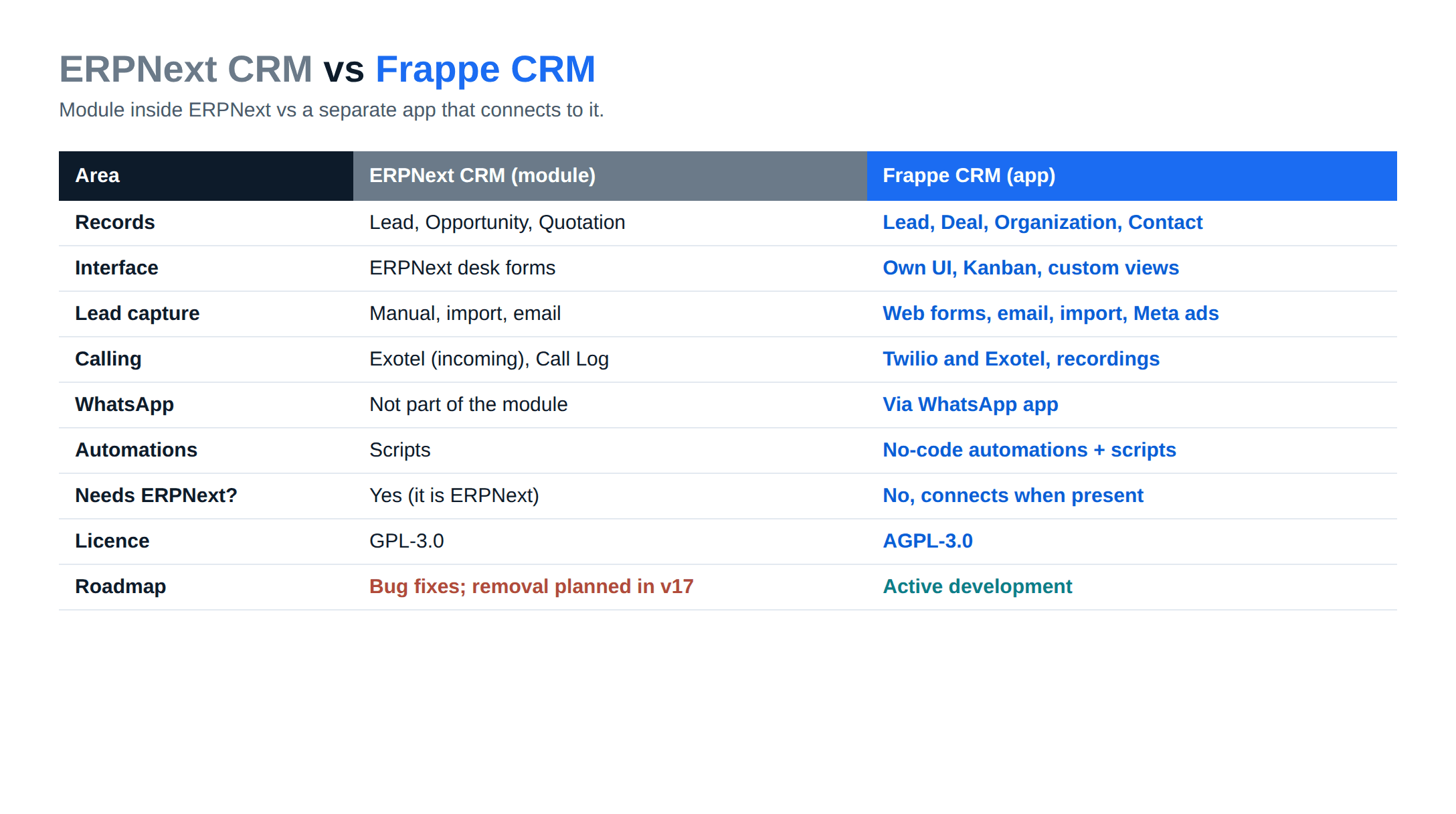
| Area | ERPNext CRM (module) | Frappe CRM (app) |
|---|---|---|
| Records | Lead, Opportunity, Quotation, Customer | Lead, Deal, Organization, Contact |
| Interface | ERPNext desk forms and lists | Separate app UI, Kanban, custom views |
| Pipeline stages | Sales Stage master on Opportunity | Deal statuses from Qualification to Won or Lost |
| Lead capture | Manual entry, data import, automatic lead creation from CRM Settings | Manual, CSV or Google Sheet import, web form builder, incoming email, Meta lead syncing |
| Calling | Exotel integration for incoming calls and Call Log | Twilio and Exotel with call recording |
| Not part of the module | Through the separate WhatsApp app | |
| Assignment and SLAs | Assignment rules on Opportunity | Round-robin or least-load rules, SLAs in working hours |
| Automations | Server and client scripts | No-code workflow automations, plus scripts |
| Campaigns | Campaign and Email Campaign | Newsletter today; campaigns listed as a next priority |
| Licence | GPL-3.0 (part of ERPNext) | AGPL-3.0 |
| Roadmap | Bug fixes only; removal planned in v17 | Active development on framework v16 |
Two rows matter for Indian sales teams. ERPNext already has an Exotel integration for incoming calls, while Frappe CRM's Exotel setup routes calls through agents' mobile phones and keeps the recording on the deal. And Meta lead syncing pulls Facebook and Instagram ad leads into the CRM, which the setup guide lists under Settings, Lead Syncing.
ERPNext CRM still has one advantage: it is already inside ERPNext. A Lead can become a Customer or Quotation without any integration settings, and there is one interface to train on.
How Frappe CRM connects to ERPNext
The ERPNext integration page gives two setups:
- Same site. Both apps installed on one site. You enable the integration under Settings, ERPNext and pick the company.
- Different sites. You enter the ERPNext site URL and the API key and secret of a user there, then verify the connection.
Product sync and the sync logs work only on the same site. On a same-site setup, ERPNext Items flow into CRM Products (name, rate, image, description, disabled status), and deal line prices come from the customer's price list or the default selling price list. Sync in the other direction, from CRM Products back to Items, is an option you switch on.
For a plant running ERPNext already, we would install Frappe CRM on the same site unless there is a reason to separate them, such as a sales team in a different entity. ERPNext implementation covers how we plan the site layout along with the other modules.
From deal to invoice: the data flow
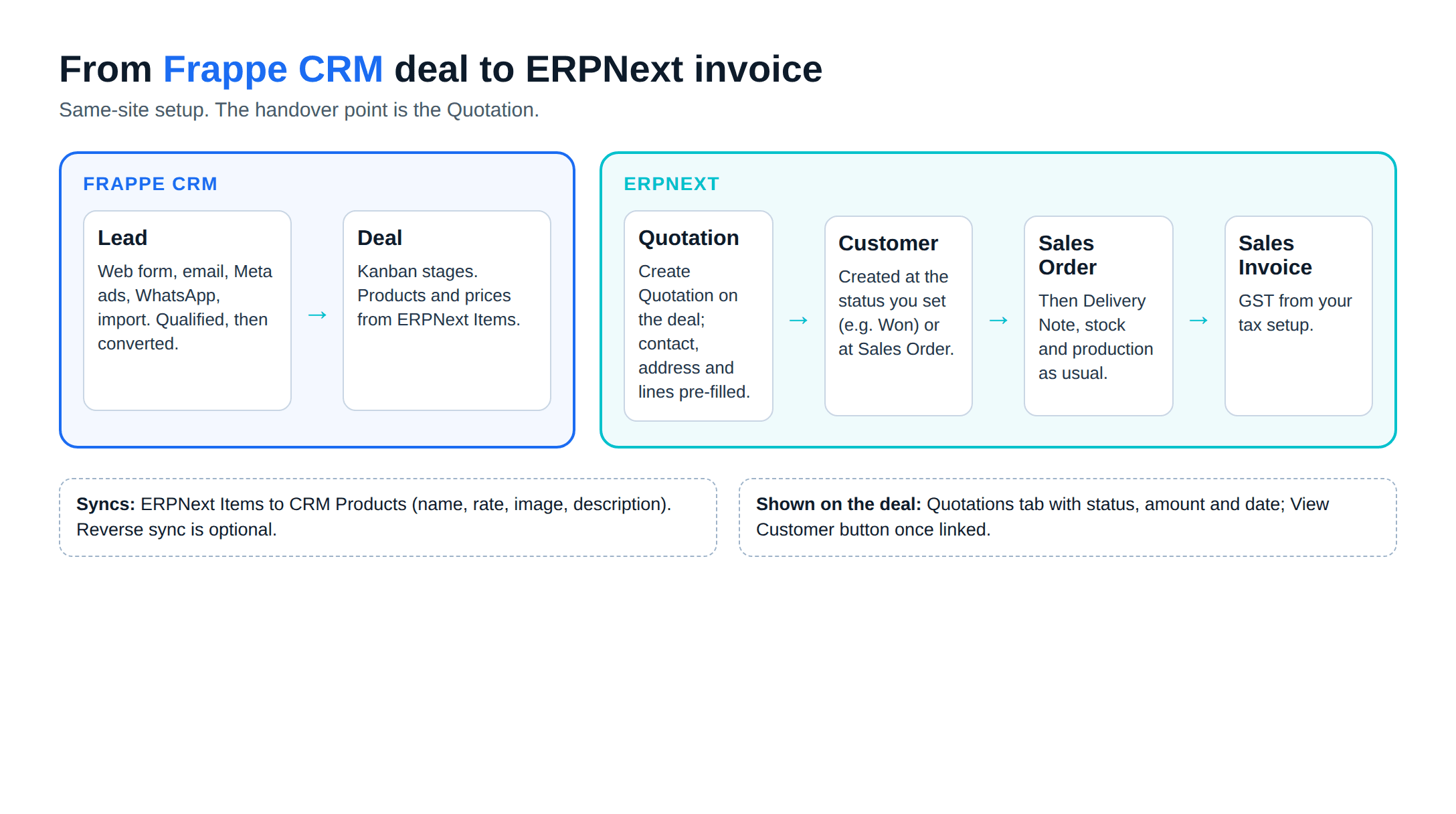
Lead (CRM)
Deal (CRM)
Quotation (ERPNext)
Customer (ERPNext)
Order and invoice (ERPNext)
Some details from the integration page that affect setup:
- The quotation is raised against the Customer if one exists, otherwise against the CRM Deal. On separate sites it is raised against a Prospect created from the deal.
- The deal's Quotations tab lists every linked quotation with status, amount and date, so the rep sees whether the customer has accepted without opening ERPNext.
- The new Customer takes the organisation name (or the contact's name for an individual), plus contacts, address, territory, currency, industry and website. Territory and industry are dropped if they do not exist in ERPNext, so align those masters before go-live.
- The Create Quotation and View Customer buttons appear only for users who can create Quotations in ERPNext.
After the Sales Order, nothing is CRM-specific. Stock reservation, production, delivery and GST invoicing run as they do in any ERPNext setup. Our ERPNext GST accounting post covers the invoice side, and ERPNext production planning covers what happens when a Sales Order drives a work order.
Who should use which
Start with Frappe CRM if
Stay on ERPNext CRM for now if
A third case: a business that needs a CRM but not an ERP yet. Frappe CRM installs on its own, and ERPNext can be added to the same site later, with the integration switched on at that point.
Moving from ERPNext CRM to Frappe CRM
Frappe's June 2025 post said a migrator was being built. The November 2026 update does not mention one, and points to the data import tool for leads, contacts and opportunities. Plan for an import project:
- Export open leads and opportunities, and decide which closed ones are worth moving
- Map Opportunity stages and lost reasons to Frappe CRM deal statuses
- List every custom field, script and report on Lead and Opportunity, since the ERPNext docs warn custom behaviour will not move automatically
- Turn on the ERPNext integration and check that existing Customers and Items line up
- Run both side by side for one sales cycle, with new leads entered only in Frappe CRM
In our experience, the custom field and script list is where most of the effort goes. Rebuilding a custom quotation rule as a Frappe CRM form script or an ERPNext server script is development work; our ERPNext development team handles that kind of change, along with telephony or WhatsApp set-up. For other systems on the sales side, ERPNext integrations in India lists the common connectors.
A note on the AGPL licence
Frappe CRM's AGPL-3.0 licence differs from ERPNext's GPL-3.0 in one clause: if you modify the program and let users interact with it over a network, section 13 requires you to offer those users the modified source. The clause is triggered by modifying the program, so check with counsel how it applies to your customisations. If you plan to fork the app itself, read the licence text and get legal advice; this is not legal advice.
The short answer
For a new ERPNext project, use Frappe CRM for sales and ERPNext for everything from the quotation onward. For an existing ERPNext CRM user, keep working, but schedule the move before v17. Metageeks is an independent ERPNext implementer; our implementation service sets up Frappe CRM alongside ERPNext, including the deal-to-quotation handover.
Frequently asked questions
What is the difference between ERPNext CRM and Frappe CRM?+
ERPNext CRM is a module inside ERPNext built on Lead, Opportunity and Quotation documents in the standard desk interface. Frappe CRM is a separate app with its own interface, built around leads and deals with a Kanban pipeline, calling through Twilio or Exotel, WhatsApp through an add-on app, web forms and workflow automations. Frappe CRM can run without ERPNext.
Is the ERPNext CRM module being removed?+
Yes. ERPNext's current CRM documentation (the develop-branch manual) says the module is scheduled for deprecation and will be completely removed in version 17, and that Frappe recommends Frappe CRM instead. It still receives bug fixes in the meantime.
Is Frappe CRM free?+
The software is open source under the AGPL-3.0 licence, with no per-user fee when you host it yourself. Frappe also offers it on Frappe Cloud, where hosting is paid. Calling and WhatsApp integrations carry their own provider charges.
Can Frappe CRM create quotations and sales orders in ERPNext?+
Yes. With the ERPNext integration enabled, a Create Quotation button on a deal opens a pre-filled ERPNext Quotation. ERPNext can create a Customer automatically when the deal reaches a status you choose, such as Won, or when a Sales Order is made from the deal's quotation. The Sales Order and invoice are then ERPNext documents.
Do Frappe CRM and ERPNext need to be on the same site?+
No, but the same site gives you more. Frappe CRM can connect to an ERPNext site elsewhere using an API key and secret. Product sync between ERPNext Items and CRM Products, and the sync logs, work only when both apps are on the same site.
Related reading
- Frappe HR for Indian payroll: the HR app that sits on the same site.
- How to integrate AI with your CRM: where AI fits in a sales pipeline.
- Frappe Cloud pricing in India: hosted plans against self-hosting.
- ERPNext tutorial for manufacturing: from item master to first work order.
Free ERPNext fit check
Will ERPNext fit your factory?
Answer a few quick questions. On a short call we tell you whether ERPNext fits how you make, stock and sell, and what the rollout looks like.
Check my fit →About the author

- Tags
- erpnext
- erp
- india
- crm
- manufacturing
Subscribe to Our Newsletter
The AI Build Brief: practical playbooks on how to build, price and ship AI features, in one short email every other week.