

The pitch for replacing your CRM always arrives dressed as an AI conversation. The new platform has better AI, the current one is behind, and migrating is framed as modernizing. It rarely holds up. The complaint underneath is usually that nobody built a workflow, and a new database will not build it either.
TL;DR
- You almost never need to replace the CRM. Any CRM with an API and webhooks can carry an AI layer beside it.
- Three integration patterns: native features (fast, limited), middleware (flexible, brittle at scale), custom layer (slow to build, fully yours).
- Start with inbound lead qualification. Highest return per unit of effort, and cheap to get wrong.
- Never give AI unconditional write access. Read, draft, score confidence, approve, write, and log the previous value.
- One workflow: $6K-$18K. Multi-workflow with write access: $20K-$45K. Systems drive the cost, not the model.
Free scoping call
Turn your AI idea into a written plan
Tell us what you want AI to do. In 30 minutes we tell you plainly whether it will pay for itself, and what it would take to build.
Book a scoping call →The short answer
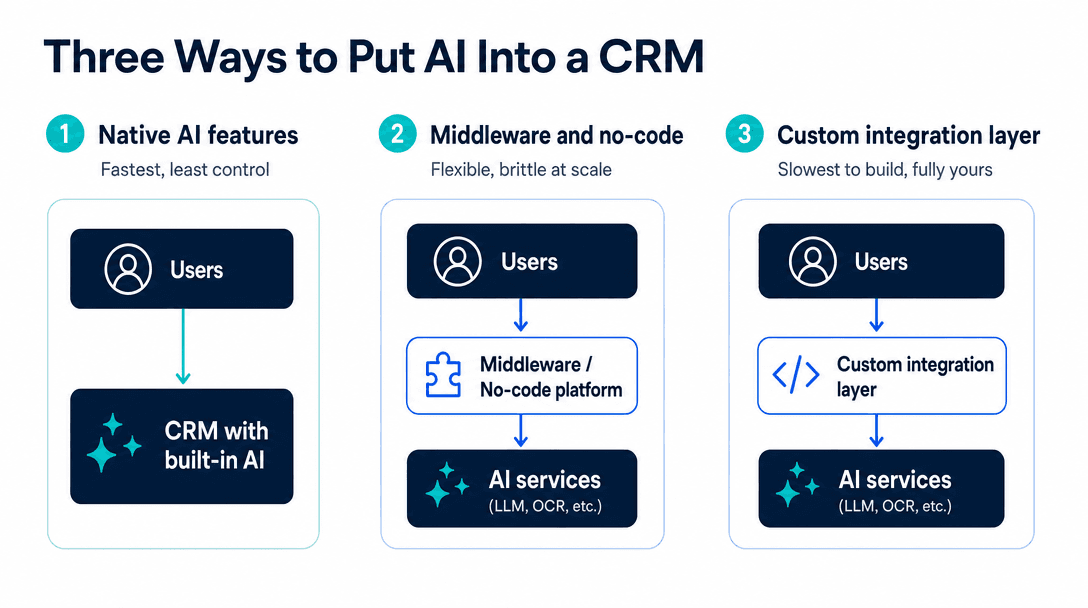
Put the AI beside the CRM and keep the CRM as the system of record. Three patterns exist: native AI features (minutes to enable, bounded by the vendor's roadmap), middleware and no-code connectors (flexible, fragile above modest volume), and a custom integration layer (reads through the API, applies your logic, writes to custom fields). Start native, prove the value, then build only for what native cannot reach. Automate inbound qualification first. Put every write behind a confidence threshold and log the prior value so changes are reversible. Budget $6K-$18K for one workflow, $20K-$45K for a multi-workflow layer.
Why a migration is the expensive answer to the wrong question
Price a CRM migration properly before treating it as an option. Historical data mapping, workflow rebuilds, reporting rewrites, every integration reconnected, and a sales team that stops trusting the pipeline for a quarter while they learn a new interface. For a business between $1M and $15M, six figures of disruption is a conservative read once you price people's time.
Now look at the complaint that started it. It is usually specific and narrow: leads are not scored well, reps spend an hour a day on data entry, nobody knows which deals went quiet. Those are missing workflows sitting on top of a database that works fine. The new CRM will have the same gaps, because the gap is that nobody built the logic.
Your CRM stores records, tracks stages and fires workflows reliably. What it does not do is read a messy inbound inquiry, cross-reference it against your product catalogue, decide whether it is worth a call, and write a reasoned summary onto the record. That is a different job, and it belongs in a different layer.
The three integration patterns
Native AI features
Every major CRM now ships its own AI: email drafting, call summaries, some form of scoring. Switching them on takes minutes and they are already paid for inside your seat cost.
Use them when the job only needs data the CRM already holds and the vendor's version of the job is close enough to yours. Summarizing a call is a good example. There is no business-specific logic in it, so there is nothing to gain from building your own.
The ceiling arrives when the answer depends on something the CRM cannot see, or when the vendor's scoring model does not match your criteria and offers no way to change it.
Middleware and no-code connectors
A connector platform sits between the CRM and a model, catching webhook events and running steps. This buys flexibility without a codebase, and for a first automation it is the right starting point.
It degrades in two predictable ways. Branching logic grows past what the visual builder can express clearly, and steps fail silently so nobody notices until a customer asks why nobody replied. The Zapier AI automation piece covers where that line sits and how to tell you have crossed it.
A custom integration layer
Your own service reads from the CRM API, applies logic you control, and writes results into custom fields on the record. The reps never see a separate tool, because the output lands in the CRM they already use.
This is slower and more expensive to start. What it buys is the ability to combine the CRM with systems it knows nothing about, to encode criteria that are specific to your business, and to change any of it the week you decide to rather than when a vendor ships it.
The read-then-write rule
What hurts is not a wrong answer on its own. It is a wrong answer applied at machine speed with write access.
A person who mis-scores a lead affects one record and usually notices. An integration writing 400 records a day with a subtly broken rule corrupts a quarter of your pipeline data before anyone looks, and unwinding it means reconstructing what each field held beforehand. If you did not log that, it is gone.
Five steps prevent this. The AI reads the relevant records. It drafts the proposed change instead of applying it. It scores its own confidence. Above your threshold it writes; below it, the change queues for a person to approve. Only then does it write.
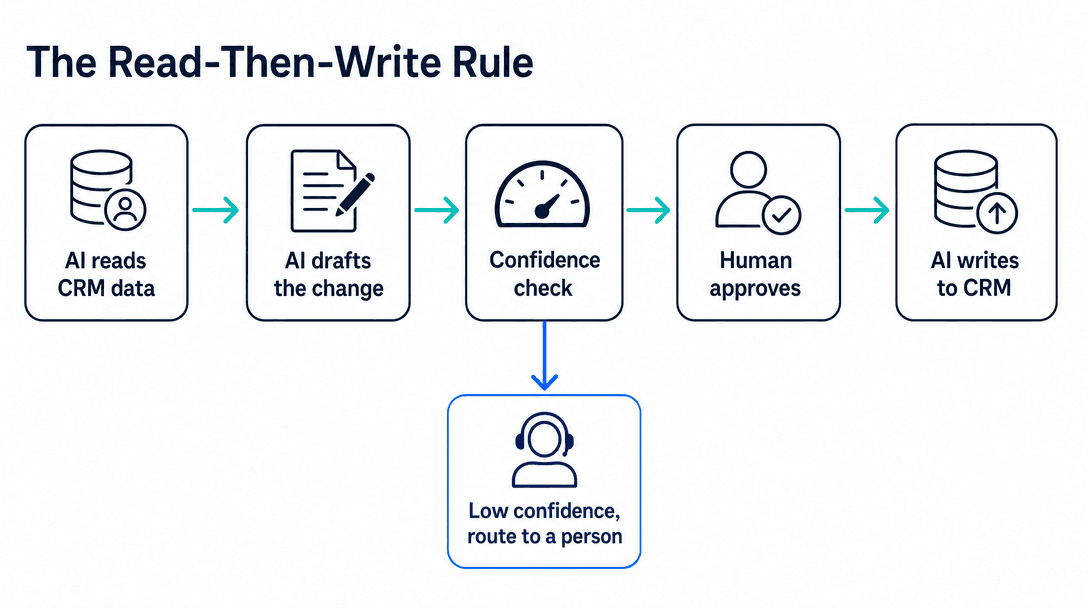
Two operational details make it hold. Log the previous value of every field the AI touches, so any change is reversible without archaeology. And set the threshold from evidence rather than optimism: run the workflow in draft-only mode for two weeks, send every proposed change to a human, and use the resulting accuracy-by-confidence-band table to pick the number. Teams that start permissive and tighten later have usually already written the bad data.
The permission detail people miss
Give the integration its own scoped credentials, not an admin user's. An integration that only needs to update three custom fields should be unable to delete a contact. This costs nothing at build time and it is the difference between a bad rule producing a fixable mess and an unfixable one.
Which workflows to automate, in order
Inbound lead qualification. A form arrives, the AI enriches and scores it against your criteria, writes a short reason onto the record, and routes it. Best first project for most businesses: the data is already in the CRM, the criteria usually exist in writing somewhere, the work repeats constantly, and a wrong score costs a minute. The lead qualification automation piece covers how the scoring logic gets built.
Meeting and call summaries. After a call or an email thread, the AI writes a structured summary onto the deal: what was discussed, what was agreed, what happens next. Reps skip these, which is why pipelines go stale. Low risk and adoption is immediate, because it removes work rather than adding a step.
Enrichment and hygiene. Filling missing company details, normalizing titles, flagging duplicates. Useful and cheap, though the hours saved are smaller than the demo suggests.
Deal-risk flagging. Surfacing deals that have gone quiet or lost their champion. Valuable, and it needs enough closed-won and closed-lost history for the signal to be real.
Forecasting. Attractive on a slide, usually premature. It needs more clean historical outcome data than most businesses under $15M have. Building it on thin data produces confident numbers that are wrong, which is worse than no numbers at all.
What most people get wrong
Scoping by tool rather than by decision. "Add AI to our CRM" has no definition of done. "Every inbound form fill is scored against our five criteria and routed within two minutes, with the reasoning written onto the record" has one, plus a baseline you can measure and a failure signal you would notice.
Automating outbound before inbound. Outbound feels like growth, so teams reach for AI-written prospecting first. Inbound qualification is worth more in almost every case: those people already raised their hand, slow follow-up has a measurable cost, and nothing about it risks your sending reputation.
Skipping the baseline. If you do not know what share of inbound leads currently get contacted within an hour, you cannot prove the integration worked. Two weeks of counting costs nothing and turns the result into a number rather than a feeling.
Building against a CRM you are about to leave. Rare, but worth checking. If a migration is already decided for reasons unrelated to AI, build the layer against the new system.
Cost and timeline
One production workflow, such as inbound qualification with enrichment, scoring and routing, runs $6K to $18K and takes three to six weeks. Operating cost sits between $100 and $500 a month at typical SMB volume.
A multi-workflow layer with write access, approval queues and audit logging runs $20K to $45K over eight to fourteen weeks.
What moves the number is the count of systems beyond the CRM and whether the layer writes as well as reads. A second integration against a modern documented API adds days; a legacy system with no API can add weeks and sometimes forces a different design. For a HubSpot-specific walkthrough of the same architecture, see adding AI to HubSpot.
Free scoping call
Turn your AI idea into a written plan
Tell us what you want AI to do. In 30 minutes we tell you plainly whether it will pay for itself, and what it would take to build.
Book a scoping call →The bottom line
Keep the CRM. Put the AI beside it, reading through the API and writing back into custom fields so the output lands where your team already works. Start with inbound lead qualification, because it returns the most per dollar and a mistake costs a minute. Put every write behind a confidence threshold set from two weeks of measured accuracy, and log what you overwrite. Measure the baseline before you build so the result is a number. Done in that order, one workflow will tell you more about whether AI belongs in your revenue operation than a migration ever could, and for roughly a tenth of the disruption.
Next step: If you want to talk through the first workflow against your own pipeline data, a 20-minute scoping call is the place to start. For the wider automation picture, see the AI workflow automation pillar.
How do you integrate AI into a CRM?+
Three patterns cover almost every case. Native AI features built into the CRM are fastest to switch on and limited to what the vendor ships. Middleware or no-code connectors sit between the CRM and a model, which is flexible and starts to break at volume or with complex branching. A custom integration layer reads from the CRM through its API, applies your own logic, and writes results back into custom fields. Most businesses should start with native, prove the value, then build the layer only for the workflow that native cannot reach.
Do you need to replace your CRM to use AI?+
Almost never. Any CRM with a documented REST API and webhooks can support an AI layer beside it, with the CRM staying the system of record. A migration costs six figures once you count data mapping, workflow rebuilds, reporting rewrites and the quarter your sales team spends not trusting the pipeline. The complaint that triggers migrations is usually a missing workflow rather than a missing database, and building the workflow is the cheaper fix.
Should AI have write access to your CRM?+
Only behind a confidence gate, and only with the previous value logged. The safe pattern is read, draft, score confidence, approve, write: the AI proposes a change, writes it automatically above a threshold you set, and queues it for a person below that threshold. Unconditional write access is how CRM data gets corrupted at machine speed, and because nobody notices for weeks, reconstructing what each field held before the change is often impossible.
What CRM tasks are worth automating with AI first?+
Inbound lead qualification and scoring, then meeting and call summarization written back to the record, then data enrichment. Qualification wins because the data is already in the CRM, the criteria usually exist in writing, the work repeats constantly, and a wrong score costs a minute to correct. Forecasting looks attractive and generally is not a good first project, because it needs more clean historical outcome data than most businesses under $15M have accumulated.
How much does an AI CRM integration cost?+
One well-scoped workflow typically runs $6K to $18K to build and $100 to $500 a month to operate. A multi-workflow layer with write access, approval queues and audit logging runs $20K to $45K. The number is driven by how many systems the layer touches beyond the CRM and whether it writes as well as reads. The AI model itself is a minor line item, usually a few hundred dollars a month at SMB volume.
Free scoping call
Turn your AI idea into a written plan
Tell us what you want AI to do. In 30 minutes we tell you plainly whether it will pay for itself, and what it would take to build.
Book a scoping call →About the author

- Tags
- integrations
- crm
Subscribe to Our Newsletter
The AI Build Brief: practical playbooks on how to build, price and ship AI features, in one short email every other week.