

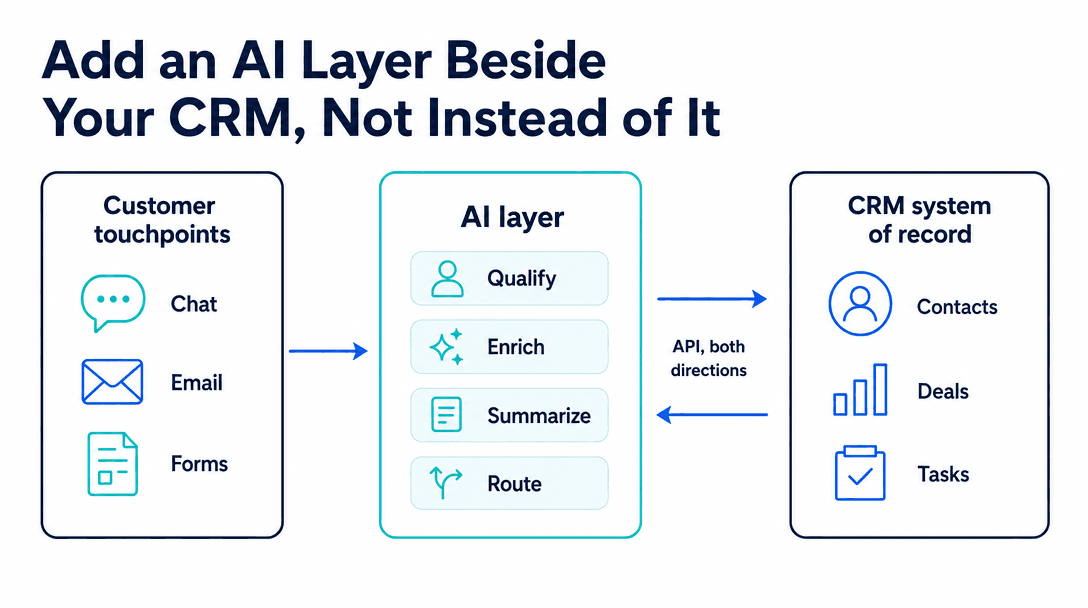
Most HubSpot AI projects start with a bad question: should we move to a platform with better AI? It is a bad question because it treats the CRM as the constraint, when the constraint is almost always that nobody is doing anything with the data already sitting in it. HubSpot is a system of record with a full API. That is all an AI layer needs.
TL;DR
- You don't need to leave HubSpot. Its REST API, webhooks and private apps are enough to run a real AI layer beside it.
- Native HubSpot AI works on HubSpot data and does what HubSpot built. Custom AI combines HubSpot with systems it doesn't know about, and applies your logic.
- Automate inbound lead qualification first. Best hours-saved per dollar, cheap to get wrong, data already in place.
- Never give AI unconditional write access. Read → draft → confidence check → approve → write.
- One workflow runs $6K-$15K to build; a multi-workflow integration $15K-$40K, plus $100-$500/month to operate.
Free scoping call
Turn your AI idea into a written plan
Tell us what you want AI to do. In 30 minutes we tell you plainly whether it will pay for itself, and what it would take to build.
Book a scoping call →The short answer
Add AI beside HubSpot, not instead of it. HubSpot's REST API covers contacts, companies, deals, tickets and workflows; webhooks fire on record changes; private apps handle scoped auth. An AI layer reads from the CRM, applies logic HubSpot cannot express, and writes results back through a confidence gate. Start with inbound lead qualification, which returns the most value per unit of effort, then deal and call summarization. Expect $6K-$15K for one production workflow plus $100-$500/month to run it. The rule that keeps this safe: AI drafts, a threshold decides, and low-confidence changes wait for a person.
Why "replace the CRM" is almost always the wrong answer
A CRM migration is one of the most expensive things a $1M-$15M business can do to itself. Historical data mapping, workflow rebuilds, reporting rewrites, integrations reconnected, and a sales team that stops trusting the pipeline for a quarter. Six figures of disruption is a conservative estimate once you count people's time.
Set against that, the complaint is usually narrow: "our CRM doesn't score leads well," or "reps spend an hour a day on data entry." Those are workflow problems sitting on top of a perfectly adequate database. Replacing the database does not fix them. The new CRM will have the same gap, because the gap is that nobody built the logic.
The useful framing is that HubSpot is doing its job. It stores records, tracks stages, and triggers workflows reliably. What it does not do is read a messy inbound form, cross-reference your product catalog, decide whether this lead is worth a call, and write a reasoned summary into the record. That is a different job, and it belongs in a different layer.
What HubSpot gives you to build against
Four surfaces do the work, and all of them are documented.
The REST API covers the objects you care about: contacts, companies, deals, tickets, line items, notes and engagements. You can read them, create them, and update properties. This is how the AI layer gets its inputs and delivers its outputs.
Webhooks fire when records change: a form submission, a deal stage change, a new ticket. These are the triggers. Without them you would be polling, which is slower, noisier and more expensive.
Private apps handle authentication with scoped tokens, so the AI layer gets exactly the permissions it needs and nothing more. This matters more than it sounds: a scoped token is the difference between an integration that can update a lead score and one that can delete a contact.
Custom properties are where AI output lands. A qualification score, a reasoning summary, a suggested next action, a confidence value. Each becomes a property on the record, visible to reps and usable in HubSpot's own workflows and reports. This is the detail that makes the integration feel native rather than bolted on.
Native HubSpot AI vs a custom AI layer
HubSpot ships its own AI features, and for some jobs they are the right call. The honest comparison:
| Native HubSpot AI | Custom AI layer | |
|---|---|---|
| Time to switch on | Minutes | 3-8 weeks |
| Data it can see | What's in HubSpot | HubSpot + any system with an API |
| Logic | HubSpot's | Yours |
| Cost | Bundled into seats | $6K-$40K build + usage |
| Changes when you ask | When HubSpot ships it | When you decide |
If your need is "summarize this call" or "draft a follow-up email," use the native features. They are already paid for and they work. The custom layer earns its cost at the point where the answer depends on something HubSpot cannot see: your product database, your billing system, your support history, your qualification criteria.
That is the real test, and it is worth applying before anyone writes a proposal: does the decision require data HubSpot does not hold? If no, configure. If yes, build.
Which job to automate first
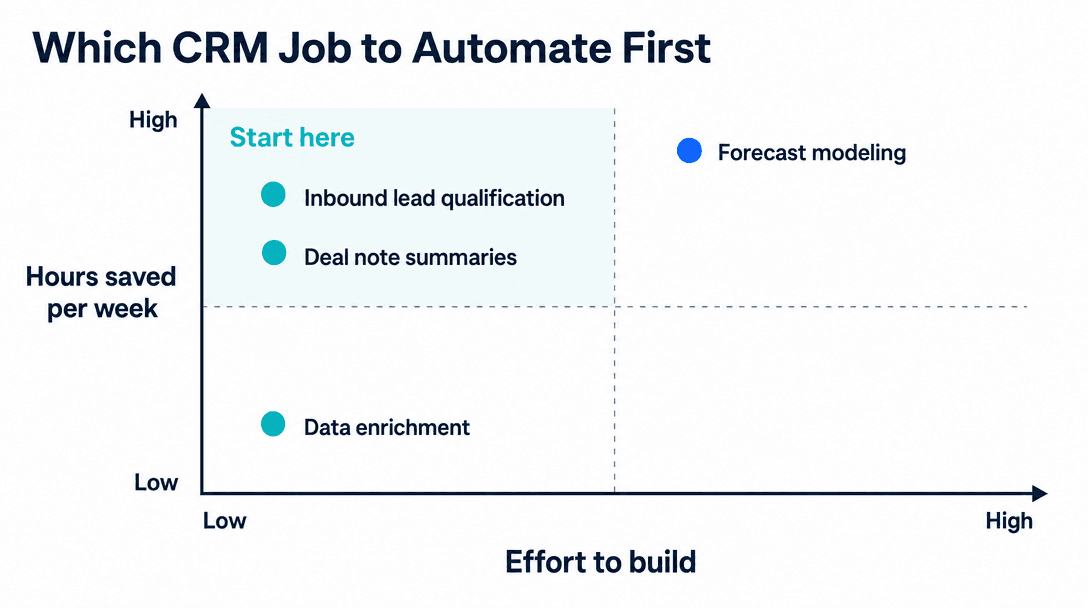
Not all AI workflows are worth the same. Ranked by hours saved against effort to build, four dominate.
Inbound lead qualification. A form fills in, the AI enriches it against your criteria and any external data you have, scores it, writes a short reason into the record, and routes it. This is the highest-value starting point for most businesses: the data is already there, the criteria usually exist somewhere in writing, the work is repetitive, and a wrong score costs a few minutes to correct. The lead qualification automation piece covers how the scoring logic gets built.
Deal and call summarization. After a call or an email thread, the AI writes a structured summary into the deal record: what was discussed, what was agreed, what happens next. Reps hate writing these and skip them, which is exactly why pipelines go stale. Low risk, immediate adoption.
Data enrichment and hygiene. Filling in missing company details, normalizing job titles, flagging duplicates. Useful, low effort, but the hours saved are smaller than they look.
Forecasting and pipeline prediction. Attractive on a slide, and usually premature. It needs a volume of clean historical outcome data that most businesses under $15M simply do not have yet. Building it on thin data produces confident numbers that are wrong, which is worse than no numbers.
The rule that keeps this safe: read, draft, check, approve, write
The failure mode nobody plans for is not the AI being wrong. It is the AI being wrong at machine speed with write access.
A person who mis-scores a lead affects one record and usually notices. An integration writing 400 records a day with a subtly broken rule corrupts a quarter of pipeline data before anyone looks, and unwinding it means reconstructing what each field held before the change, which, if you did not log it, is unrecoverable.
The pattern that prevents this has five steps. The AI reads the relevant records. It drafts the proposed change rather than applying it. It scores its own confidence. Above your threshold it writes automatically; below it, the change queues for a person to approve. Only then does it write.
Two operational details make this work in practice. Log the previous value of every field the AI touches, so any change is reversible. And start the confidence threshold high, automating maybe a third of cases, then lower it as you watch the approval queue and see where the AI is reliable. Teams that start permissive and tighten later have usually already written the bad data.
Set the threshold from evidence, not optimism
Run the workflow in draft-only mode for two weeks before enabling any automatic writes. Every proposed change goes to a human, who approves or rejects. At the end you have a measured accuracy rate by confidence band, and that is what sets the threshold, rather than a guess made in a kickoff meeting.
What most people get wrong
The biggest mistake is automating the wrong end of the funnel. Teams reach for outbound, meaning AI-written prospecting sequences and automated cold follow-ups, because it feels like growth. Inbound qualification is nearly always worth more: those people already raised their hand, the cost of slow follow-up is measurable, and nothing about it risks your domain reputation.
The second is scoping by tool rather than by decision. "Let's add AI to HubSpot" is not a project. "Every inbound form fill gets scored against our five criteria and routed within two minutes, with the reasoning written into the record" is a project. It has a definition of done, a measurable baseline, and an obvious failure signal. Scope AI inside the tools you already use that way and the project stays small enough to finish.
The third is skipping the baseline. If you do not know what percentage of inbound leads currently get contacted within an hour, you will not be able to prove the integration worked. Measure for two weeks before you build. It costs nothing, and it is the only thing that makes the ROI argument checkable later.
What it costs and how long it takes
A single production workflow covering inbound qualification with enrichment, scoring, reasoning and routing typically runs $6K to $15K to build and takes 3 to 6 weeks. Operating cost is modest: $100 to $500 a month in model and infrastructure spend at normal SMB volumes.
A broader integration covering several workflows, with write-back, approval queues and audit logging, runs $15K to $40K over 8 to 14 weeks.
The variable that moves both numbers most is not HubSpot. It is the other systems. A second integration against a modern API with good docs adds days. A legacy system with no API adds weeks, and occasionally forces a different design.
Free scoping call
Turn your AI idea into a written plan
Tell us what you want AI to do. In 30 minutes we tell you plainly whether it will pay for itself, and what it would take to build.
Book a scoping call →The bottom line
HubSpot is not the thing holding your team back, and replacing it is an expensive way to avoid the actual work. The API, webhooks and private apps give you everything needed to run a real AI layer beside the CRM, with HubSpot staying the system of record. Start with inbound lead qualification because it pays back fastest and fails cheaply. Put every write behind a confidence gate and log what you overwrite. Measure the baseline before you build, so the result is a number rather than a feeling. Done in that order, one workflow at $6K-$15K will tell you more about whether AI belongs in your revenue operation than any migration ever would.
Next step: For the architecture patterns that apply to any CRM, not just HubSpot, see how to integrate AI into your CRM. If you'd rather have the first workflow scoped against your actual pipeline data, that's what a 20-minute scoping call produces.
Can you add custom AI to HubSpot?+
Yes. HubSpot exposes a documented REST API covering contacts, companies, deals, tickets, notes and workflows, plus webhooks that fire on record changes and private apps for scoped authentication. That is everything a custom AI layer needs to read records, act on them, and write results back. You do not have to replace HubSpot or migrate data. The AI sits beside the CRM and treats it as the system of record.
What is the difference between HubSpot's built-in AI and a custom AI integration?+
HubSpot's native AI features work on data already inside HubSpot and do the jobs HubSpot decided to build: drafting emails, summarizing calls, basic scoring. A custom AI integration can combine HubSpot data with systems HubSpot does not know about (your product database, billing system, support tickets, internal documentation) and apply logic specific to your business. Native AI is faster to switch on and limited to HubSpot's roadmap; custom is slower to build and bounded only by what you can reach through an API.
Which HubSpot task should you automate with AI first?+
Inbound lead qualification, in almost every case. It has the highest hours-saved-to-effort ratio: the data is already in HubSpot, the criteria are usually written down somewhere, the work is repetitive, and a mistake is cheap to correct. Deal and call note summarization is the usual second choice for the same reasons. Forecasting and pipeline prediction look attractive but need far more clean historical data than most $1M-$15M businesses have.
How much does a HubSpot AI integration cost?+
A single well-scoped workflow, say inbound qualification with enrichment and routing, typically runs $6K to $15K to build, plus roughly $100 to $500 a month in model and infrastructure costs depending on volume. A broader integration covering several workflows with write-back and approval steps runs $15K to $40K. HubSpot's own AI features are bundled into seat pricing instead, which is cheaper but limits you to what HubSpot ships.
Should AI write directly into HubSpot?+
Not without a confidence gate. The safe pattern is read, draft, check, approve, write: the AI reads CRM data, drafts the change, scores its own confidence, and only writes automatically above a threshold you set. Below it, the change is queued for a person. Unconditional write access is how CRMs get corrupted: bad data written at machine speed is much harder to unwind than a slow human error, because nobody notices for weeks.
Free scoping call
Turn your AI idea into a written plan
Tell us what you want AI to do. In 30 minutes we tell you plainly whether it will pay for itself, and what it would take to build.
Book a scoping call →About the author

- Tags
- integrations
- crm
Subscribe to Our Newsletter
The AI Build Brief: practical playbooks on how to build, price and ship AI features, in one short email every other week.