

Ops teams already run on Slack. Decisions get made in threads, exceptions get escalated in DMs, and the actual state of the business lives across six other systems that nobody has open. The gap between where people talk and where the data sits is the tax an ops team pays every day, and it is the gap AI in Slack is worth aiming at.
TL;DR
- Slack's built-in AI works on Slack. It summarizes threads, catches you up, and searches history in plain language. That saves time, and it stops at the workspace boundary.
- A custom Slack agent reads your other systems and answers from them inside a thread. That removes context switching, which is where the bigger cost sits.
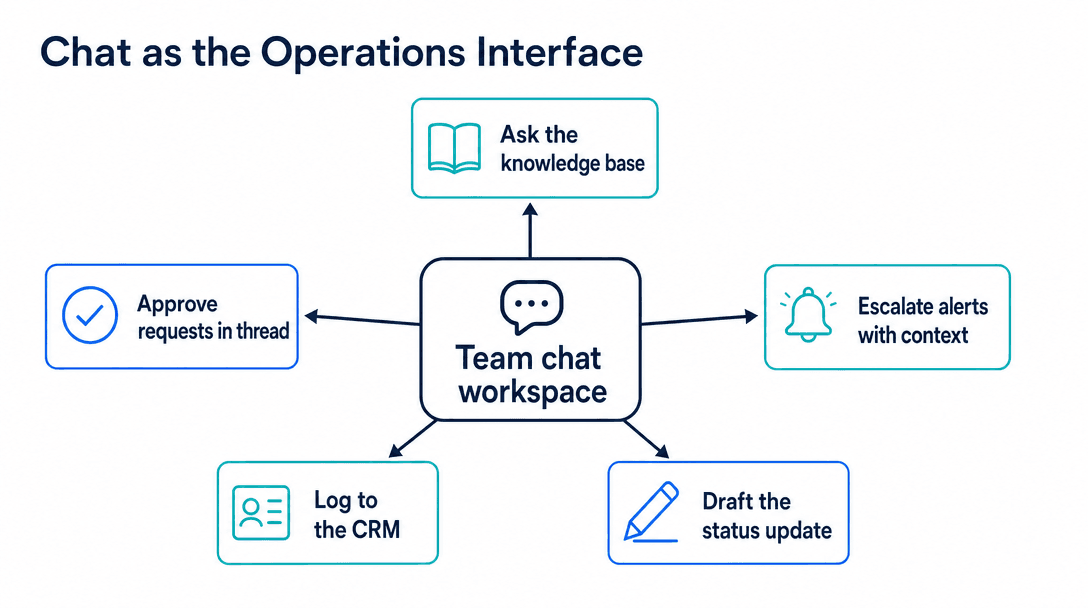
- The five use cases that pay back fastest: internal knowledge lookup, in-thread approvals, alert triage with context, logging to the CRM, and drafting status updates.
- Actions beat answers. An agent that can create the ticket is worth several that can only describe how.
- Single-source agent: $8K-$18K. Multi-system with actions: $20K-$45K. The systems drive the cost, not the AI.
Free scoping call
Turn your AI idea into a written plan
Tell us what you want AI to do. In 30 minutes we tell you plainly whether it will pay for itself, and what it would take to build.
Book a scoping call →The short answer
Slack's built-in AI summarizes threads, generates channel recaps, and searches message history in natural language. It only sees Slack. A custom Slack agent connects to your CRM, ticketing system, database and internal docs, answers from those sources inside a thread, and can take actions behind an approval button. For an ops team, the value split is roughly: built-in AI saves reading time, a custom agent saves switching time. Switching is the bigger number. Expect $8K-$18K for a single-source agent and $20K-$45K for a multi-system agent that also writes. What drives the price is how many systems it touches, not the model.
What Slack's built-in AI covers
The native features do one thing well: they operate on the conversation.
Thread summaries collapse a forty-message argument into what was decided. Channel recaps tell you what happened in the channels you ignored while you were on a call. Search takes a plain question instead of keywords, so you can ask when the vendor contract renewal was discussed rather than guessing which words someone used.
For a team that lives in Slack, that removes a daily annoyance. It is worth switching on and it costs nothing extra beyond the plan you are already paying for.
The boundary is hard, though. None of it sees anything outside Slack. Ask it the status of order 4471 and it will find the thread where someone mentioned order 4471, which is not the same answer. If the information you need lives in a database, a CRM, or a spreadsheet, the built-in AI cannot reach it.
The five use cases that pay back for ops teams
Once you connect an agent to systems beyond Slack, five patterns come up repeatedly. They are listed roughly in order of how quickly they return the build cost.
Internal knowledge lookup
Someone asks in a channel: what is our SLA for enterprise tickets, which carrier do we use for Canada, who approves a refund over $500. Today a colleague answers from memory or goes and looks it up. An agent connected to your internal documentation answers in the thread in seconds and cites where it came from.
This is the highest-frequency use case in most ops teams and the cheapest to build, because it needs read access to one source and no write path at all.
In-thread approvals
Discount requests, refund authorizations, purchase orders, time-off. The conversation already happens in Slack; the approval happens in some other system, or in an email, or it does not get recorded anywhere.
An agent can post the request as a structured message with the context attached and an approve button. The click writes the decision to wherever it belongs. This one is popular because it removes a step people were skipping anyway, which is why the audit trail was patchy.
Alert triage with context
A monitoring alert fires into a channel. On its own it is a line of text that means nothing until someone investigates. An agent can enrich it before a human reads it: which customer is affected, whether this fired last week, what the runbook says, who was on call the last three times.
The saving here is measured in minutes per alert, which sounds small until you count the alerts.
Logging to the CRM from a thread
A rep pastes a customer update into a channel. It never reaches the CRM, because reaching the CRM means opening the CRM. An agent watching for that pattern can draft the record update and ask the rep to confirm with a click.
If you are already running an AI layer on your CRM, this is a cheap extension of it rather than a separate build. The CRM integration patterns piece covers how that layer should be structured.
Drafting the status update
Weekly ops summaries, incident write-ups, handover notes. An agent with access to the week's threads and the relevant system data can produce a draft that a person edits, instead of a blank page at 5pm on Friday.
The related pattern for scheduled reporting is covered in AI automated reporting.
Built-in AI vs a custom agent
| Slack's built-in AI | Custom Slack agent | |
|---|---|---|
| Searches message history | Yes | Yes |
| Reads your CRM, tickets, database | No | Yes |
| Takes actions | No | Yes, with approval |
| Follows your approval rules | No | Yes |
| Cost | Bundled in your plan | $8K-$45K build, then usage |
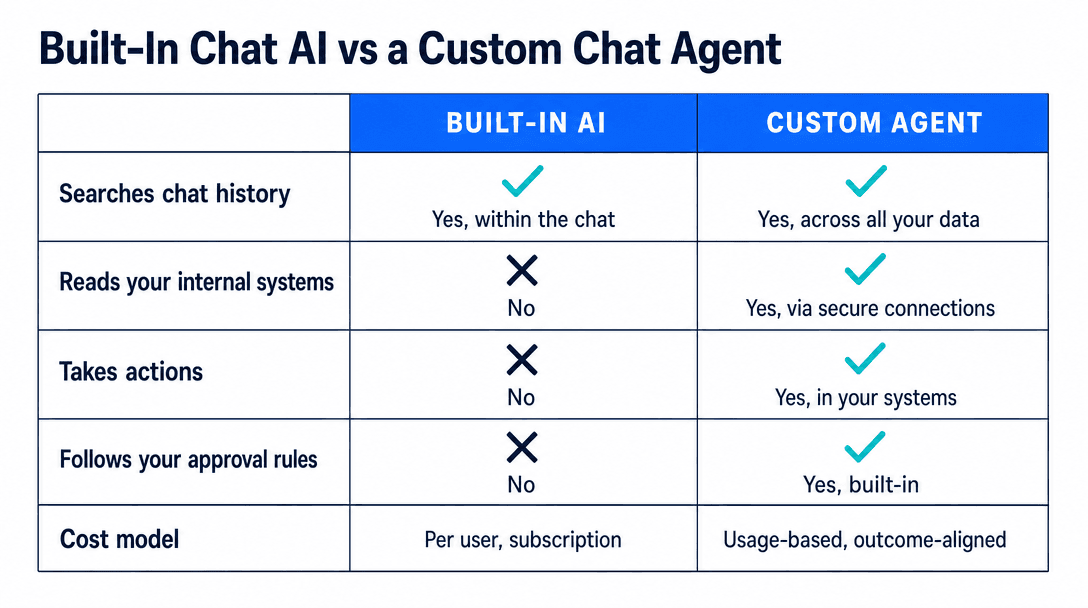
The honest reading of that table is that most teams should switch on the built-in features first and use them for a quarter. They cost nothing and they answer the question of whether your team will use AI inside Slack at all. Plenty of teams find they will not, which is a cheap thing to learn.
Actions matter more than answers
An agent that tells you how to create the ticket has saved you a lookup. An agent that creates the ticket has saved you the task.
The distinction shows up in adoption. Read-only assistants get used enthusiastically for two weeks and then quietly ignored, because asking the bot and then doing the work yourself is barely faster than doing the work. Agents that complete something get used for years.
The pattern that keeps action-taking safe is approval in place. The agent proposes, posting the action as a message with the details filled in and a confirm button. A person clicks. The action executes and the agent posts what it did. Nobody leaves the thread, and there is a permanent record of who approved what.
Where to put the approval button
Put it on the action, not on the conversation. An approval that requires opening another tool gets batched and forgotten, which reintroduces the delay you were removing. An approval that is one click inside the thread where the request already lives gets handled in seconds, and that difference is most of the value.
For the broader distinction between a bot that follows a script and one that decides what to do next, see what is an AI agent.
What most people get wrong
The common mistake is building a general assistant. A bot that can answer anything about the business sounds like the ambitious version and it fails for a predictable reason: nobody knows what to ask it, so nobody asks. Adoption dies in week three.
Narrow bots get used. One agent that answers shipping policy questions correctly every time will get more traffic than a general assistant that handles nine topics at 80%. Start with the single question your team asks most often, and let usage tell you what to add.
The second mistake is skipping the permission model. Slack is a shared space, and an agent that reads your CRM in a channel where contractors sit will happily read customer data to contractors. The agent needs its own permission boundary that mirrors your systems, checked per user rather than per channel. This is not difficult, but it is the kind of thing that gets discovered after launch rather than designed before it.
The third is measuring the wrong thing. Message counts go up whenever anything new is deployed. The number that matters is how many times someone got an answer without opening another tool, which you have to instrument deliberately.
What it costs
A single-source agent, connected to one knowledge base or one system, with read access only, runs $8K to $18K and takes three to six weeks. Running cost sits around $100 to $400 a month at normal team volumes.
A multi-system agent with write access, approval flows and per-user permissions runs $20K to $45K over eight to fourteen weeks.
The variable that moves the number is the count of systems and whether the agent writes. The model choice barely registers.
Free scoping call
Turn your AI idea into a written plan
Tell us what you want AI to do. In 30 minutes we tell you plainly whether it will pay for itself, and what it would take to build.
Book a scoping call →The bottom line
Switch on the built-in AI first, because it is free and it tells you whether your team will use AI in Slack at all. If they do, the next step is not a bigger assistant but a narrow agent connected to the one system your team asks about most, with an approval button on any action it takes. Ops teams do not lose their day to reading Slack. They lose it to leaving Slack, coming back, and pasting the answer in. That round trip is the thing worth removing, and it is the only thing a custom agent does that the built-in features cannot.
Next step: For the wider picture on where automation belongs in an ops function, see the AI workflow automation pillar. If you want to talk through which round trips are worth automating before anyone builds anything, a 20-minute scoping call is the place to start.
What can Slack AI do for an operations team?+
Slack's built-in AI works on the conversation itself. It summarizes long threads, catches you up on channels you missed, and searches message history in plain language. For an ops team that lives in Slack, this removes a daily tax: reading back through threads to find what was decided. What it cannot do is look at anything outside Slack, so it will not tell you an order's status or update a ticket.
What is the difference between Slack AI and a custom Slack agent?+
Slack AI reads Slack. A custom agent reads your systems. Built-in features summarize and search the messages already in your workspace; a custom agent connects to your CRM, ticketing system, database or internal docs, answers questions from those sources inside a Slack thread, and can take actions like creating a ticket or updating a record. One saves reading time, the other removes the context-switching that costs an ops team most of its day.
Is it worth building a custom Slack bot for a small business?+
It depends on how much your team switches tools. If people spend their day answering the same internal questions by looking something up in another system and pasting the answer back into Slack, a custom agent typically pays for itself quickly. If your Slack is mostly discussion and the lookups are rare, the built-in features plus a few workflow automations are enough and cost far less.
How much does a custom Slack AI agent cost to build?+
A single-purpose agent that answers questions from one internal knowledge source usually runs $8K to $18K to build and $100 to $400 a month to run. An agent that reads several systems and can take actions with approval steps runs $20K to $45K. The cost driver is the number of systems it connects to and whether it writes as well as reads, not the AI itself.
Can a Slack AI agent take actions, not just answer questions?+
Yes, and this is where most of the value sits for ops teams. An agent can create a ticket, update a record, trigger a workflow, or post a status change, all from a Slack thread. The pattern that keeps it safe is approval in place: the agent proposes the action as a message with a confirm button, a person clicks, and the action executes. That keeps a human in the loop without forcing anyone to open another tab.
Free scoping call
Turn your AI idea into a written plan
Tell us what you want AI to do. In 30 minutes we tell you plainly whether it will pay for itself, and what it would take to build.
Book a scoping call →About the author

- Tags
- integrations
- automation
Subscribe to Our Newsletter
The AI Build Brief: practical playbooks on how to build, price and ship AI features, in one short email every other week.