

There is a version of this article that argues you should stop using Zapier and build something proper. It would be wrong for most of the businesses reading it. Zapier is the correct first move for a large majority of small companies automating with AI, The mistake is not using it. The mistake is not knowing where it stops.
TL;DR
- For most SMBs, Zapier is the right first move. Building custom before you've proven the workflow is a common and expensive error.
- It works well for linear workflows, modest volume, and failures you can recover from.
- It breaks on three things together: heavy branching, high volume, and silent failures that cost money.
- The cost trap is the pricing shape, not the rate: tiered plans plus multi-task AI steps. Model your tasks per run, not per workflow.
- Zapier executes a fixed sequence. If the right next action depends on what the last step found, you need an agent, not a Zap.
Free scoping call
Turn your AI idea into a written plan
Tell us what you want AI to do. In 30 minutes we tell you plainly whether it will pay for itself, and what it would take to build.
Book a scoping call →The short answer
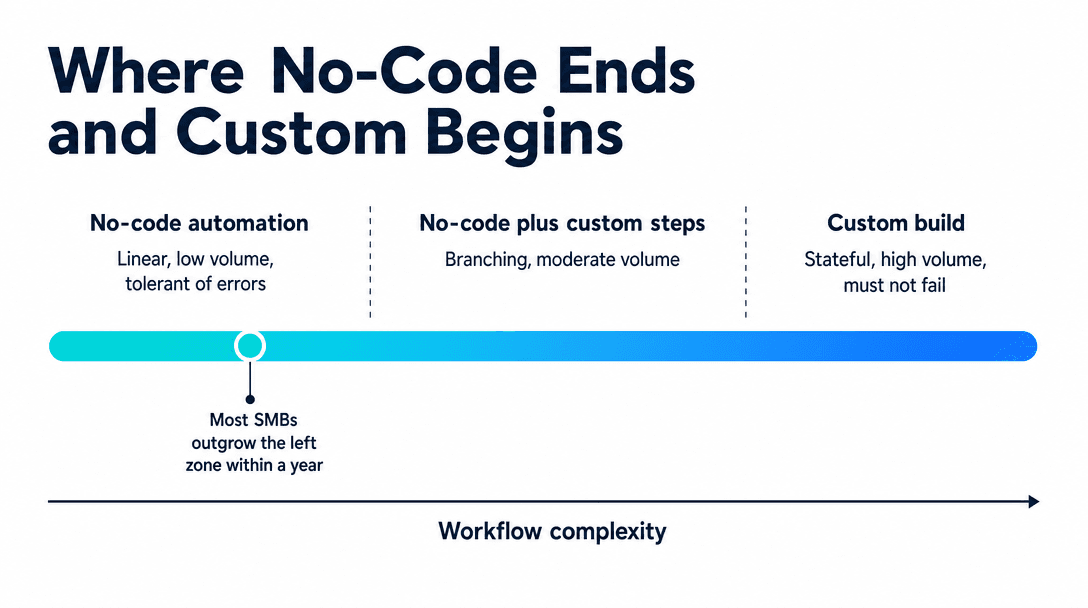
Zapier AI adds model-powered steps for extraction, classification, summarization and drafting inside a no-code workflow, which makes it the fastest way to get a working automation live. It is the right tool for linear workflows, hundreds to low thousands of runs a month, and recoverable errors. It becomes the wrong tool when branching logic, high volume, and expensive silent failures appear together. The cost surprise is structural: tiers step in jumps and a multi-step AI workflow burns several tasks per run, so a single busy automation can jump you two tiers. Prove the workflow on Zapier first, then rebuild only the ones that earn it.
What Zapier AI is good at
Three properties make it the correct default, and none of them are about the AI.
Speed to a working thing. A useful workflow (parse an inbound inquiry, classify it, route it, notify someone) can be live in an afternoon. No repository, no deploy, no environment. For a business testing whether an automation is worth having at all, that afternoon is the entire point.
The connector library. The unglamorous majority of automation work is authentication and API plumbing against tools that all behave slightly differently. Zapier has already done that for thousands of applications. A custom build re-does that work for every integration, and it is rarely interesting work.
Reversibility. If the automation is wrong, you turn it off. Nothing was capitalized, nobody maintains a codebase, and the sunk cost is a month of subscription. That matters more than it sounds, because most first automations are wrong in some way, and the cheapest place to discover that is somewhere you can walk away from.
The AI steps earn their place on messy input: pulling structured fields out of a free-text email, deciding which of six categories an inbound message belongs to, summarizing a long thread into three lines. These are the tasks that used to force a human into the middle of an otherwise automated flow.
Where it stops working
Three failure modes recur, and the important thing about them is that they arrive gradually rather than all at once.
Branching complexity. The first version has four steps. Nine months later it has twenty-two, with paths and filters and a couple of Zaps triggering each other. Nobody can describe what it does end to end, and nobody wants to touch it because the person who built it left. This is not a Zapier flaw. It is what happens to any logic that grows without a place to put structure. But the tool gives you no way to test it, version it, or reason about it, so the complexity has nowhere to go.
Silent failure. A step fails, the run stops, and the world looks normal. There is no queue backing up and no error anyone sees. Businesses routinely discover this weeks later, usually because a customer asks why nobody replied. For a workflow that posts an internal Slack message this is a nuisance. For one that routes inbound leads, it is revenue you cannot recover and cannot even count.
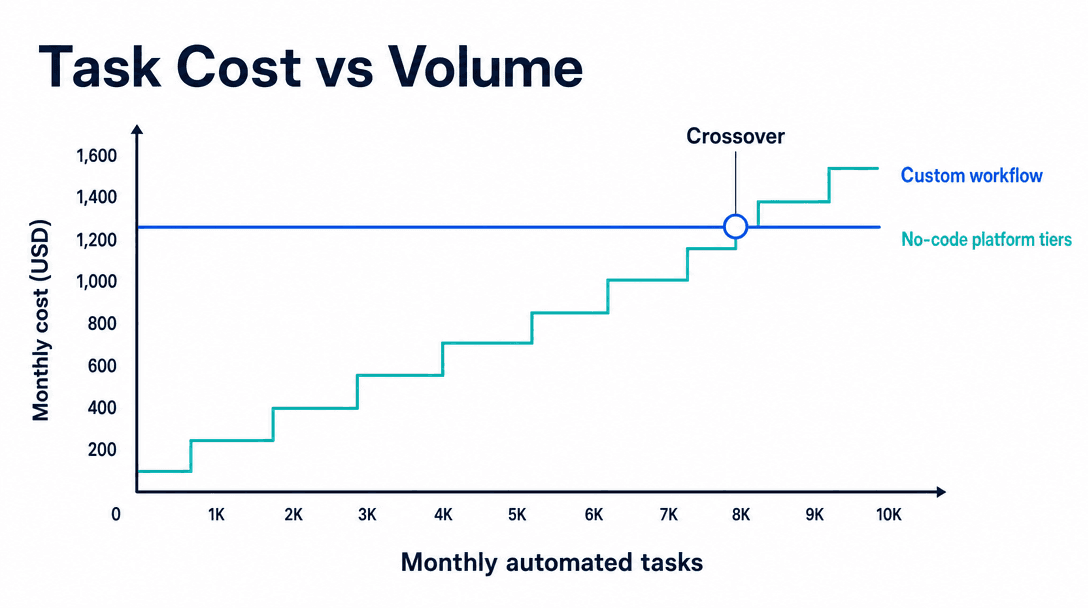
Volume economics. Every step consumes a task, AI steps included. A seven-step workflow running 3,000 times a month is 21,000 tasks, and tiered plans do not scale smoothly. They jump. The rate per task is not the problem; the shape of the pricing is.
The three-strike rule
One of those failure modes alone is usually survivable. A complex Zap that runs reliably and cheaply is fine. A cheap, simple Zap that occasionally fails silently is fine if the work is not urgent.
The point to rebuild is when they compound. Ask three questions:
- Does the workflow branch on more than a handful of conditions?
- Does it run more than roughly 10,000 tasks a month?
- Would a silent failure cost real money or a customer?
Two yeses is worth costing out. Three is usually a decision that has already been made: you are paying for the rebuild either way, just in incident time rather than build cost.
| No-code (Zapier) | No-code + custom steps | Custom workflow | |
|---|---|---|---|
| Time to live | Hours | Days | 3-8 weeks |
| Best volume | Under ~10K tasks/mo | 10K-50K | Any |
| Branching | Simple | Moderate | Unlimited |
| Failure visibility | Weak | Moderate | Whatever you build |
| Cost shape | Tiered, rises with use | Tiered + build | Fixed build, flat run cost |
The middle option most people skip
The choice is not binary, and the middle is underused.
You can keep Zapier as the trigger and connector layer while moving the hard part (the branching logic, the AI reasoning, the state) into a single custom endpoint that Zapier calls as a webhook step. Zapier does what it is best at: catching the event and talking to the tools. Your code does what it is best at: making the decision, handling errors properly, and being testable.
This preserves the connector library and the speed of change, removes the twenty-two-step Zap nobody understands, and typically costs a fraction of a full rebuild. For a business that has outgrown the logic but not the connectors, it is very often the right answer and almost nobody proposes it, because it does not fit neatly into either sales pitch.
A cheap fix worth doing this week
If you take nothing else from this: add failure alerting to your existing Zaps. Route errors to a channel a human reads daily. Silent failure is the most expensive property of no-code automation, and it is the easiest one to remove. It costs an hour, not a rebuild.
What most people get wrong
Building custom before proving the workflow. The expensive version of this error is spending $20K on a beautifully engineered automation for a process that turns out to be wrong. Zapier is a cheap way to find out what the workflow should be. Prove it there, then rebuild the ones that earn it. Reversing that order is how automation budgets get burned on something nobody ends up using.
Assuming task pricing scales linearly. It does not, and the AI steps make it worse because a single logical action can consume several tasks. Model out the task count for one run, multiply by expected monthly volume, and check which tier that lands in before committing. Most cost surprises here are arithmetic that nobody did.
Treating a fixed sequence as an agent. Zapier runs the steps you defined, in the order you defined them. An agent decides what to do next based on what it just found, keeps context across steps, and handles cases you never anticipated. "When a form comes in, extract fields, score, route" is a Zap and should stay one. "Read this inquiry, work out what it needs, gather whatever information that requires, and take the appropriate action" is an agent, and no amount of Zap steps gets you there. The what is an AI agent piece covers the distinction properly.
A sensible sequence
Months 1-3: automate on Zapier. Pick the process that wastes the most hours, build it in a day, measure what it saves. Add failure alerting immediately. The 30-day first automation plan covers how to choose the first one.
Months 4-9: watch three numbers. Monthly task consumption, failure rate, and step count. These are your rebuild triggers, and they are all visible in the product.
Month 9+: rebuild selectively. Only the workflows that hit two of the three strikes. Everything else stays where it is, because it is working and cheaper.
Most businesses running this sequence end up with a stable mix: a dozen simple Zaps that will never need rebuilding, and one or two custom workflows carrying the load that matters. That mix is the correct outcome, not a migration off the platform.
Free scoping call
Turn your AI idea into a written plan
Tell us what you want AI to do. In 30 minutes we tell you plainly whether it will pay for itself, and what it would take to build.
Book a scoping call →The bottom line
Zapier is not a stepping stone you are supposed to be embarrassed about. For linear workflows at modest volume with recoverable errors, it is the better engineering decision, and it stays that way indefinitely for a lot of automations. It stops being the right tool when branching, volume and expensive failure show up together. Even then, the answer is usually not a full rebuild but moving the decision logic behind a webhook while Zapier keeps the connectors. Start there, measure three numbers, and let the workflow tell you when it has outgrown the tool instead of deciding in advance.
Next step: For the broader framework on when to configure versus build, see build vs buy AI. If a workflow is already costing you more in failures than it saves in hours, a 20-minute scoping call puts a number on it.
What is Zapier AI and what can it do?+
Zapier's AI features let you insert model-powered steps into an automated workflow: extracting structured fields from a messy email, classifying an inbound message, summarizing a document, or drafting a reply. Combined with Zapier's connector library, that means an inbound form can be parsed, categorized, and routed into your CRM without anyone writing code. It works well for linear workflows over modest volume where an occasional error is recoverable.
Is Zapier good enough for AI automation, or do you need a custom build?+
For most small businesses starting out, Zapier is good enough and building custom first is a mistake. It becomes the wrong tool when three things appear together: branching logic with many conditions, task volume in the tens of thousands per month, and workflows where a silent failure is expensive. Any one of those alone is usually survivable. All three together is the point where a custom workflow costs less and breaks less.
How much does Zapier AI automation cost?+
Zapier bills by task, in tiered plans, and AI steps consume tasks like any other action. A workflow that runs a few hundred times a month sits comfortably in the lower paid tiers. The cost problem is not the rate, it is the shape: tiers step up in jumps rather than scaling smoothly, and multi-step AI workflows consume several tasks per run, so a single busy automation can push you two tiers up faster than expected. Model out your task count per run before committing.
When should you move off Zapier to a custom workflow?+
The clearest signals are a Zap with more than roughly fifteen steps or heavy branching, a workflow that fails silently and nobody notices for days, task costs that have climbed past what a build would amortize to, or a workflow that needs to hold state across runs. Reaching two of those four usually means the automation has outgrown the tool. Below that, migrating early costs money and buys nothing.
Can Zapier replace a custom AI agent?+
For linear task automation, largely yes. For agent behavior, no. Zapier executes a fixed sequence you defined in advance; an agent decides what to do next based on what it finds, holds context across steps, retries intelligently, and handles cases you did not anticipate. If your workflow really is 'when X happens, do Y then Z', Zapier is the cheaper and faster answer. If the right next action depends on the content of the previous one, you are describing an agent.
Free scoping call
Turn your AI idea into a written plan
Tell us what you want AI to do. In 30 minutes we tell you plainly whether it will pay for itself, and what it would take to build.
Book a scoping call →About the author

- Tags
- automation
- build vs buy
Subscribe to Our Newsletter
The AI Build Brief: practical playbooks on how to build, price and ship AI features, in one short email every other week.