

Most businesses do not fail at AI because the technology was not ready. They fail because they started with a project nobody could finish, measured against a number nobody wrote down. The fix is not a bigger budget or a better model. It is picking one narrow process, giving it 30 days, and agreeing in advance what "it worked" means.
TL;DR
- A good first automation runs at least 20 times a week, follows written rules, and produces output someone already reviews.
- Spend week one choosing and measuring, not building. Teams that skip the baseline cannot prove the result and lose the budget.
- Build the smallest version that touches production data in weeks two and three. Not a demo, not a full rollout.
- Week four is a decision, not a launch: scale it, fix one specific thing, or kill it and take the learning.
- Budget $5K-$20K to build and $50-$500/month to run a narrow first automation. Six-figure quotes are platform rollouts, not pilots.
- The number one killer is scope. A process that is secretly five processes will eat your 30 days in edge cases.
Free scoping call
Turn your AI idea into a written plan
Tell us what you want AI to do. In 30 minutes we tell you plainly whether it will pay for itself, and what it would take to build.
Book a scoping call →The short answer
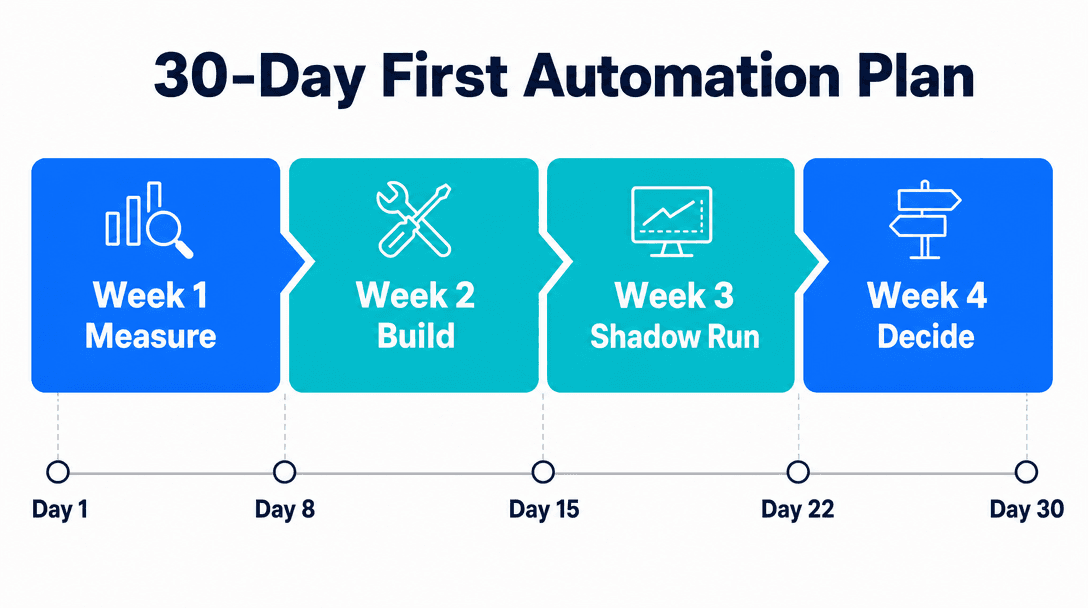
Pick one high-frequency, rule-based process where a human already checks the output. Measure it for a week. Build the smallest thing that does it end to end. Run it beside the human for a week. Then decide. Thirty days is enough for exactly one honest attempt, and one honest attempt teaches you more than six months of strategy work.
What counts as a good first AI automation?
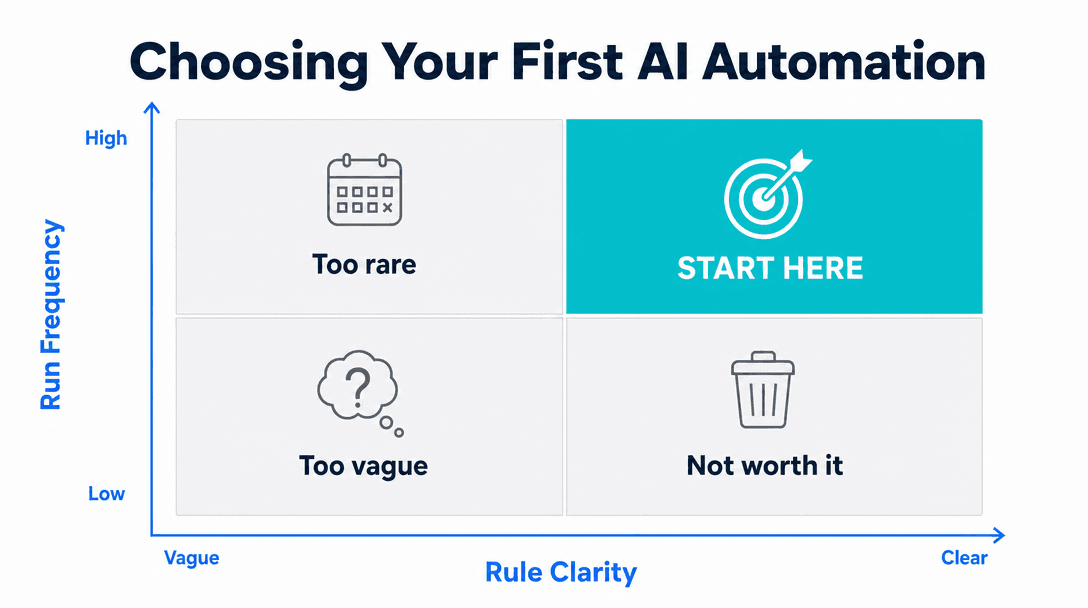
A good first AI automation is a process that runs frequently, follows rules someone could write down, and produces an output a person already checks before it goes anywhere. Those three properties are not a style preference. Each one solves a specific problem with pilots.
Frequency solves measurement. A process that runs 20 times a week gives you roughly 80 data points in a month, enough to see a real error rate. A process that runs twice a week gives you eight, which tells you nothing.
Written rules solve correctness. If the rules live only in a senior employee's head, you cannot tell whether the automation was wrong or whether the rule was never agreed on. You will spend your pilot arguing about the spec.
An existing reviewer solves safety. When someone already checks this output, you get an accuracy audit for free during the pilot, and a mistake costs a correction rather than a customer.
Processes that fit: invoice and receipt data entry, inbound lead routing and enrichment, appointment reminders and rescheduling, first-line support replies, quote and proposal drafting from a template, and weekly report assembly. Processes that do not fit: anything requiring a judgment call nobody has documented, anything that runs monthly, and anything where being wrong is expensive and invisible. If you run an online store, an ecommerce example works through the ROI math on cart recovery, review requests and support deflection.
Week 1: Measure before you build (days 1-7)
Nobody writes code this week. This is the week that decides whether the other three are worth anything.
Pick one process. Not a department, not a "workflow," one process with a clear start and a clear end. If you cannot describe it as "when X happens, someone does Y, and the result goes into Z," it is too big.
Write down the rules. Sit with whoever does the work and get the actual decision logic on paper, including the exceptions they handle without thinking about it. This document is your spec, and the exceptions are where your 30 days will go if you ignore them now.
Baseline three numbers. Time per run, error rate, and volume. Time the process with a stopwatch for a week, count how often the output needed correcting, and count how many times it ran. These are ugly, manual measurements. Do them anyway. Without a baseline you cannot prove anything in week four, and a pilot nobody can prove is a pilot that gets quietly defunded.
Agree the kill criteria. Write one sentence: "We scale this if it saves at least ___ hours a week with under ___ percent human intervention." Getting this agreed before anyone is emotionally invested in the build is the single highest-value hour of the whole month.
If week one reveals that nobody agrees what the rules are, that is not a delay. That is the finding, and it is worth more than the automation would have been.
Week 2: Build the smallest working version (days 8-14)
The goal is not a good automation. The goal is an end-to-end automation, however ugly, running on real data.
Smallest working version means it handles the standard case and nothing else. If 70 percent of your invoices are one-page PDFs from 15 known vendors, build for those and let everything else fall through to a human. Resist the urge to handle the weird cases now. You do not yet know which weird cases actually matter, and you will burn the month finding out the expensive way.
Two rules keep this week honest. First, it has to touch the real system by the end of the week, even if a human presses the final button. A demo that stops short of writing into your CRM has skipped the hard part, and the hard part is where projects die. Second, it has to log everything: input, output, confidence, and whether a human overrode it. Those logs are your week-four evidence.
This is also where the buy-versus-build question gets answered honestly rather than theoretically. If an off-the-shelf tool does 80 percent of this in an afternoon, use it. You are testing whether the process can be automated at all, not whether your team can build a platform. We wrote a longer decision framework on build vs buy for AI, but the short version for a first project is: buy unless the logic is genuinely yours.
Week 3: Run it beside the human (days 15-21)
Do not switch anything off. For one full week, the automation and the person both do the work, and you compare.
This is called shadow running, and skipping it is the most expensive shortcut in the whole plan. It costs you a week of duplicated effort and it buys you the only trustworthy accuracy number you will ever get, measured on live data, with a human ground truth sitting right next to it.
Track three things every run:
- Agreement rate. How often did the automation produce what the human produced?
- Intervention rate. How often did a human have to step in, and what triggered it?
- Time to correct. When it was wrong, how long did fixing it take?
That third number is the one teams forget, and it decides everything. An automation that is right 90 percent of the time and takes 30 seconds to correct is a win. An automation that is right 95 percent of the time but takes 20 minutes to untangle when it is wrong is worse than doing it by hand, because now someone has to check every output to find the bad five percent. Accuracy without cheap correction is surveillance work, not automation.
Week 4: Scale, fix, or kill (days 22-30)
Three outcomes, all of them acceptable. Pick one.
Scale if you hit the criteria you wrote in week one. Expand volume first, not scope. Run the same narrow automation on more of the same work before you teach it a second job.
Fix if you missed the criteria for one identifiable reason. One reason. If the answer is "a bunch of things," that is a kill, not a fix. Name the single failure, give it one more week, and re-measure against the same baseline.
Kill if the intervention rate never dropped, if correction was expensive, or if week one's rules turned out not to exist. Killing a 30-day pilot is a good outcome. You spent one month and a small budget to learn that a process is not ready, instead of finding out 11 months into a platform contract.
What most first automations get wrong
They automate the interesting process instead of the frequent one. The process everyone complains about is often rare and complicated. The process that actually costs you money is boring and happens 40 times a day. Automate the boring one.
They have no baseline. This is the most common and most fatal. Six months later someone asks whether the automation was worth it and the honest answer is "we think so," which is the same as no.
They confuse a demo with a pilot. A model producing good output in a chat window has proven nothing about your business. The integration, the permissions, the edge cases, and the handoff to a human are the project. The model is the easy part.
They pick a process with no owner. If nobody's week gets better when this works, nobody will fight for it when it breaks in month two.
They scale scope instead of volume. After a successful pilot, the instinct is to teach the automation three more jobs. Do more of the same job first. Breadth is where accuracy goes to die.
What a first automation actually costs
| Item | Typical range | Notes |
|---|---|---|
| Week 1 baseline | Internal time only | 3-6 hours of the process owner's week |
| Build (narrow, one process) | $5,000-$20,000 | Low end for routing or notifications, high end for document work with approvals |
| Off-the-shelf tool instead | $50-$500/mo | Right answer when your process is not unusual |
| Running cost | $50-$500/mo | Model usage, hosting, monitoring; scales with volume |
| Shadow-run week | Internal time only | Duplicated effort for 5 working days |
Two notes on these numbers. Running cost is usually underestimated and it is the one that persists, so ask any vendor for a monthly figure at your expected volume, not just a build price. And a quote in the six figures for a first automation is not a pilot. It is a platform rollout with a pilot's name on it, and it removes the one advantage a 30-day plan has, which is that killing it is cheap.
If you want a structured version of week one before you commit to a build, that is essentially what a scoping call does: find the process worth automating and put a number on it, so you are not choosing your first project on instinct.
The bottom line
Thirty days is not enough time to transform a business. It is exactly enough time to answer one question honestly: can this specific process be automated at a cost that beats doing it by hand? Answer that once, with real numbers, and the second automation is far easier to choose and far easier to fund.
Pick the boring, frequent, rule-shaped process. Measure it before you touch it. Build the smallest thing that runs end to end. Watch it work beside a person for a week. Then decide, using the criteria you agreed before anyone got attached to the outcome.
Next step: See how this applies to a specific process in AI workflow automation, or if you would rather start by finding which process is leaking the most money, a scoping call does week one for you.
Frequently asked questions
What should my first AI automation be?+
Pick a process that runs at least 20 times a week, follows rules a new hire could learn in a day, and produces an output someone already checks. High frequency gives you enough volume to measure in 30 days. Clear rules mean the model has something to be right or wrong about. An existing reviewer means you get a free accuracy check while you pilot. Invoice data entry, inbound lead routing, appointment reminders, and first-line support replies all fit. Anything requiring judgment calls nobody has written down does not.
How long does a first AI automation take to build?+
The build itself is usually one to two weeks for a narrow, single-process automation. The 30-day frame in this plan is decision time, not build time: one week to pick and baseline the process, one to two weeks to build the smallest working version, one week to run it alongside a human, and a few days to decide whether to scale, fix, or kill it. Teams that skip the baseline week almost always spend longer, because they have no way to prove the automation helped.
How much does a first AI automation cost?+
A narrow first automation typically runs $5,000 to $20,000 to build, plus $50 to $500 a month to operate depending on volume and how much model usage it consumes. Simple document or routing automations sit at the low end. Anything touching several systems, or needing a human approval step and an audit trail, sits at the high end. If a vendor quotes six figures for a first automation, they are selling you a platform rollout, not a pilot.
Should I use an off-the-shelf tool or build custom for my first automation?+
Start with an off-the-shelf tool if your process looks like everyone else's process. Support FAQ deflection, meeting notes, and standard CRM routing are solved problems and you should not pay to rebuild them. Build custom when the logic is specific to your business, when the automation has to write into a system with no usable integration, or when the per-unit pricing of a tool gets worse as you grow. Most businesses should buy first and build second, once they know exactly what the tool could not do.
How do I know if my first AI automation worked?+
Decide the number before you build, and measure it for a week before the automation goes live. The three that matter for a first project are time saved per run, error rate compared to the human baseline, and how often a human had to step in. If you cannot state the baseline in a sentence, you are not ready to build. A pilot that saves four hours a week with a 3 percent intervention rate is a clear win. One that saves six hours but needs a human to check every output has not automated anything.
What is the most common reason a first AI automation fails?+
Scope. The most common failure is picking a process that is really five processes wearing a trench coat, then discovering in week three that the edge cases outnumber the standard cases. The second most common is having no baseline, which means nobody can prove the thing worked and the project quietly loses its budget. Both are avoidable in week one, which is why this plan spends a full week choosing before anyone builds anything.
Free scoping call
Turn your AI idea into a written plan
Tell us what you want AI to do. In 30 minutes we tell you plainly whether it will pay for itself, and what it would take to build.
Book a scoping call →About the author

- Tags
- automation
- ai strategy
Subscribe to Our Newsletter
The AI Build Brief: practical playbooks on how to build, price and ship AI features, in one short email every other week.