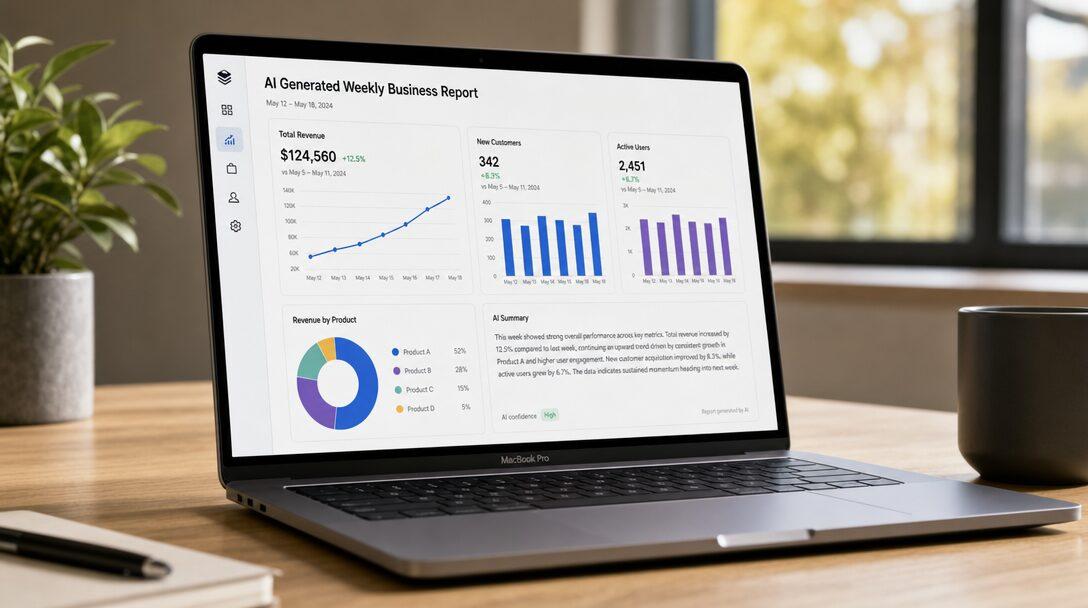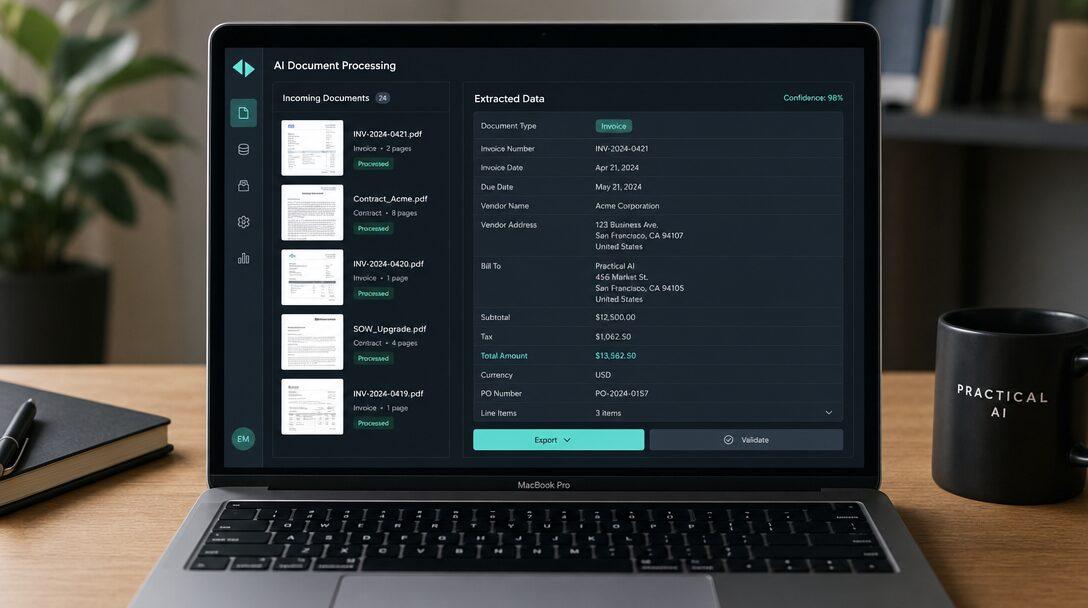

AI workflow automation is software that runs a business process end to end, using an AI model for the steps that need reading, judgment or writing, and ordinary code for everything else. The model reads an email, a PDF or a form and decides what it is, then the workflow updates your systems and sends anything the model is unsure about to a person. That is the difference from older automation, which only works when every input arrives in a fixed format.
TL;DR
- AI workflow automation handles the steps older automation could not: reading unstructured input and making a judgment call, with rules and human review around the model.
- RPA repeats clicks on a screen and breaks when the screen changes. Zapier and Make pass data between apps and now offer AI steps, but long, branching flows and error handling are where teams outgrow them.
- Good first candidates are lead qualification, document processing and recurring reporting. Each has volume, a checkable right answer and a person who can review the output.
- It fails on undefined processes, low volume, messy source data and irreversible actions with no review step.
- Start with one workflow, measure its baseline, keep a person on risky decisions and expand only after the numbers hold.
Free scoping call
Turn your AI idea into a written plan
Tell us what you want AI to do. In 30 minutes we tell you plainly whether it will pay for itself, and what it would take to build.
Book a scoping call →The short answer
AI workflow automation is a normal automated workflow with an AI model inside it. The model handles the parts that used to need a person to read and decide, such as classifying an email, pulling figures from an invoice or scoring a lead. Code handles everything with a fixed rule, and people review what the model is unsure about. It is worth building when a workflow has high volume, a right answer someone can check and inputs too varied for fixed rules.
What is AI workflow automation, in plain terms?
Every workflow is a chain of steps. Take an inbound supplier invoice. It arrives by email, someone opens the PDF, reads the supplier name, amount, GST number and due date, checks them against a purchase order, keys the invoice into accounting and sends it for approval.
Traditional automation can do the moving parts: watch the inbox, save the attachment, create the entry and send the approval request. It cannot read the PDF, because every supplier lays out invoices differently and fixed rules break on the first new format.
An AI model can read it. Language models and document models extract fields from text and scanned pages, classify messages, summarize and draft replies, even when the layout is new to them. AI workflow automation puts that ability inside the workflow, at the step where a person used to be required.
The model is not the whole system. Around it sit the parts that make it safe to run every day:
- Rules check what the model returns. Does the total equal the sum of the line items? Does the GST number match the supplier on file?
- Confidence thresholds decide what happens when the model is unsure. Clear cases go through, and unclear ones go to a person.
- Integrations write the result into the systems you already use, such as the CRM, accounting software, ticketing tool or Slack.
- Logs record every input, output and decision, so you can see why the system did what it did.
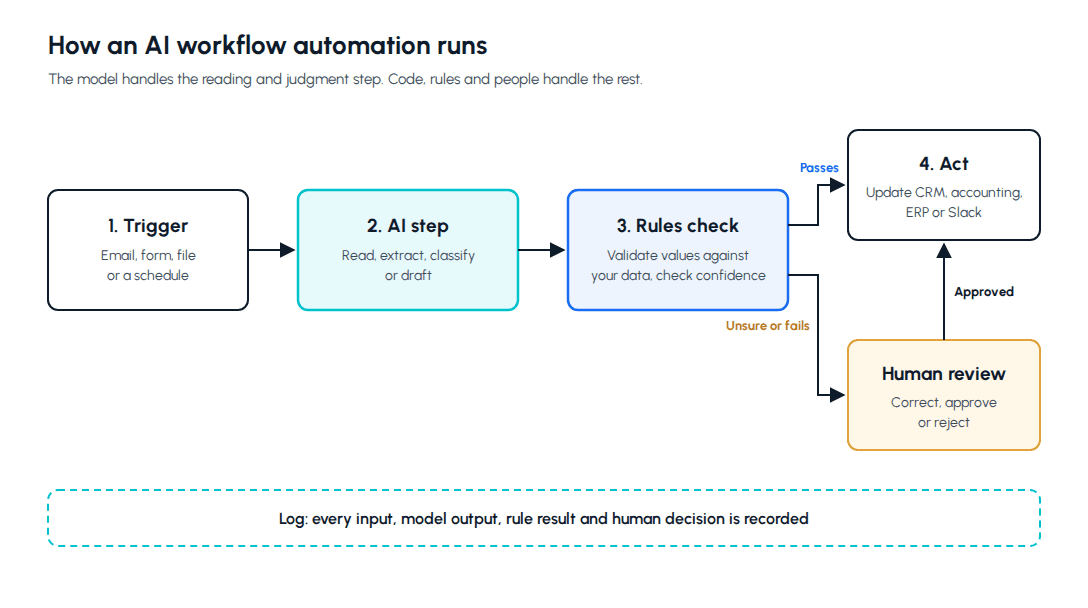
An AI workflow follows a sequence you design, with AI at specific points. An AI agent chooses its own next steps across tools, which makes it more flexible and harder to control. If you are weighing the two, what an AI agent is covers that difference.
How is AI workflow automation different from RPA and from Zapier or Make?
| RPA | Zapier or Make | AI workflow automation | |
|---|---|---|---|
| How it works | A software robot repeats clicks and keystrokes on screens | A trigger in one app starts actions in others through connectors | Code and an AI model run a designed workflow across systems |
| Unstructured input | No, it needs fixed screens and formats | Partly, through AI steps added to a flow | Yes, that is the main reason to use it |
| Breaks when | A screen layout or field position changes | A connector changes or a long chain fails partway | Inputs drift past what it was tested on, or validation rules are missing |
| Error handling | Exceptions defined bot by bot | Retries and alert emails | Built into the workflow: validation, review queues, logs |
| Best for | Legacy systems with no API | Short handoffs between cloud apps | Judgment steps at volume |
RPA (robotic process automation) came first. A bot logs into an application and performs the clicks a person would. It is still the practical choice when an old system has no API. It follows rules exactly, which is both its strength and its limit, because it cannot work out what an email is asking for.
Zapier and Make connect cloud apps. When a form is submitted, they add a CRM contact and post a message in Slack. They are quick and inexpensive for short, predictable handoffs, and both now let you add AI steps to a flow. Teams outgrow them on long branching flows, on steps that need your own business data to decide, and on failures that need handling rather than an alert. Zapier AI automation goes deeper on where that line sits.
To be fair to the no-code tools: plenty of useful AI workflow automation is a Zapier flow with one AI step. If that covers your process, use it. A custom build earns its cost when the judgment step needs your data, the volume is high or a wrong result is expensive.
What does AI workflow automation look like in practice?
Lead qualification
Before: new enquiries land in a shared inbox or the CRM. A sales coordinator reads each one, looks up the company, decides whether it fits and routes it. Good leads wait for hours behind spam and poor fits.
With AI workflow automation: the form submission or email starts the workflow. The model reads the message and extracts the company, the need, any budget signals and the timeline. Code enriches the record with company data and applies your fit rules. Clear fits go to the right rep with a short summary, clear non-fits get a polite reply with a useful resource, and anything in between goes to a person. The rep can see why each lead was scored the way it was.
AI lead qualification automation walks through this build in detail.
Document processing
Before: invoices, purchase orders, KYC documents or claims arrive as PDFs and scans. Someone keys the fields into the system of record, and errors surface weeks later during reconciliation.
With AI workflow automation: the model extracts fields from each document, whatever the layout. Rules validate them against what you already know, such as supplier master data, purchase order amounts and tax number formats. Documents that pass go straight into accounting or the ERP. Documents that fail a check go to a review queue that shows the extracted values beside the original page, so the reviewer corrects one field instead of retyping the whole document.
More on this in AI document processing automation.
Reporting
Before: every Monday, someone exports from several systems, pastes into a spreadsheet, builds the charts and writes a paragraph on what changed. It takes half a day, and the commentary gets written in a hurry.
With AI workflow automation: code pulls the numbers from each system on a schedule and calculates the metrics, because arithmetic should never be left to a language model. The model then drafts commentary from the calculated figures: what moved, by how much and which accounts or regions drove it. A manager reviews the draft and sends it. AI automated reporting covers the setup.
Where does AI workflow automation fail?
It fails in predictable places, and most of them have little to do with the model.
The process is not defined. If two people on your team would handle the same enquiry differently, the system has no right answer to aim for. Write the process down first. Sometimes that exercise fixes the problem on its own.
Volume is too low. A workflow that runs ten times a month rarely repays the build and the upkeep. A person with a checklist is cheaper.
The source data is poor. A lead scorer cannot route correctly if the CRM has duplicate companies and missing owners. AI does not clean the data it depends on.
Wrong actions cannot be undone. Sending money, deleting records or emailing customers without a review step turns a model's occasional mistake into a business incident. Keep a person in front of irreversible actions until the error rate is measured and acceptable.
Nobody checks it after launch. Models do not throw errors when quality drops. A supplier redesigns their invoice, a new product line appears, and accuracy slides with no alarm. Someone needs to watch a quality measure, such as the share of items sent to review or corrected by a person.
The model is asked to calculate or remember facts. Language models are good at reading and drafting and unreliable at arithmetic and recalling facts. Give those jobs to code and to your own data.
Which workflows are good candidates for AI automation?
A workflow is a good candidate when most of these are true:
- It runs often, dozens of times a week or more
- It involves reading unstructured input such as emails, documents, notes or call transcripts
- There is a right answer a person can check quickly
- Most cases follow rules you can write down, with judgment needed for the rest
- A mistake can be caught by a review step, or corrected without lasting harm
- The systems involved have APIs, or at least reliable exports
Poor candidates are the opposite: rare, high-stakes decisions with no clear right answer, or processes that live entirely in one person's head.
How do you start with AI workflow automation?
Pick one workflow with a clear start and end, such as "invoice received" to "invoice entered and sent for approval". A department or a broad AI strategy is too big to measure.
Measure the baseline for two weeks: how many items come in, how long each takes and how many errors get caught later. Without a baseline you cannot tell whether the automation helped.
Build the narrow version first, with a person reviewing every output. Compare the model's decisions with the reviewer's. When they agree consistently on a category of cases, let that category run unattended and keep review on the rest.
Expand only after the numbers hold for a few weeks, and add the next workflow rather than stretching the first one to do more.
The 30-day plan for your first AI automation lays this out week by week. If you want a team to design and build it with you, our AI workflow automation services start with a written scope for one workflow, billed time-and-materials, with a monthly retainer available for ongoing changes.
Frequently asked questions
What is AI workflow automation?+
AI workflow automation is software that runs a business process from start to finish and uses an AI model for the steps that need reading, judgment or writing. Ordinary code handles steps with fixed rules, such as moving data between systems, and people review anything the model is unsure about. For example, a workflow might watch an inbox for invoices, use a model to extract the supplier, amount and due date from each PDF, check those values against purchase orders, enter valid invoices into accounting and send the rest to a review queue. The model is one component. Rules that validate its output, confidence thresholds that route unclear cases to a person, integrations with your systems and logs of every decision are what make the workflow safe to run every day without someone watching it. Start with one workflow and add others once it runs reliably.
What is the difference between AI workflow automation and RPA?+
RPA, or robotic process automation, uses software robots that repeat the clicks and keystrokes a person makes in an application. It follows fixed rules, works well on legacy systems that have no API, and breaks when a screen layout or input format changes. AI workflow automation adds a model that can read unstructured input and make a judgment call, such as deciding what an email is asking for or extracting fields from an invoice in a layout it has not seen before. The two are often combined: an AI step reads and classifies a document, and an RPA bot enters the result into an old system that only has a screen interface. Choose RPA for fixed, repetitive screen work. Add AI where a person currently has to read something and decide. Neither replaces a clearly written process.
Can I build AI workflow automation with Zapier or Make?+
Often, yes. Zapier and Make both let you add AI steps to a flow, and for short, predictable processes that is usually the fastest and cheapest option. A flow that takes a form submission, asks a model to summarize and tag it, and posts the result to Slack is a reasonable use. Teams tend to outgrow them when a flow gets long and branching, when the judgment step needs data from your own systems to decide, when volume makes per-task pricing expensive, or when a failure halfway through needs proper handling rather than an alert email. At that point a custom build with its own validation, review queue and logs is easier to trust. Start with the no-code version if it covers your process, and move when you hit those limits. Keep the prompts and rules documented so the logic is portable.
What are common examples of AI workflow automation?+
The most common are lead qualification, document processing and recurring reporting. In lead qualification, a model reads each enquiry, extracts company, need and timeline, and code applies your fit rules to route it to a rep, send a resource or ask a person to decide. In document processing, a model extracts fields from invoices, purchase orders or identity documents, rules validate them against your records, and valid documents go straight into accounting or an ERP. In reporting, code pulls and calculates the numbers and a model drafts the commentary for a manager to review. Other good examples include support ticket triage, contract clause extraction and call summaries written into a CRM. They share high volume, unstructured input and a right answer a person can check quickly. Rare, loosely defined or high-stakes processes with no clear right answer make poor first choices.
Is AI workflow automation reliable enough for business processes?+
It can be, when the workflow is designed around the model's mistakes. Models are sometimes wrong, so a reliable workflow does not trust any single output. Rules check extracted values against data you already hold, confidence thresholds send unclear cases to a person, irreversible actions like payments or customer emails wait for approval, and every decision is logged. Start with a person reviewing every output, measure how often they agree with the model, and let a category of cases run unattended only once that agreement is high and stable. After launch, watch a quality measure such as the share of items sent to review, because accuracy drops quietly when inputs change. Keep arithmetic and fact lookups in code and in your own data, where models are weakest. Expect to adjust rules and thresholds regularly during the first few months.
Free scoping call
Turn your AI idea into a written plan
Tell us what you want AI to do. In 30 minutes we tell you plainly whether it will pay for itself, and what it would take to build.
Book a scoping call →About the author

- Tags
- ai automation
- automation
- ai implementation
Subscribe to Our Newsletter
The AI Build Brief: practical playbooks on how to build, price and ship AI features, in one short email every other week.