


Picture a 30-person plant that has picked ERPNext and now has two quotes on the table: a Frappe Cloud plan at a few thousand rupees a month, and an IT contractor who says he can run it on an AWS server in Mumbai for less. Both quotes are honest, and they price different things. One covers the server and the work of keeping ERPNext alive on it. The other covers the server. This post puts Frappe Cloud pricing and the self-hosted bill side by side in rupees, line by line, so you can see what each one leaves out.
TL;DR
- At the time of writing, Frappe Cloud lists site plans from ₹410 a month and server plans from ₹3,600. Offsite backups, SSH and the Product Warranty come with site plans from ₹2,050 on AWS and OCI.
- Site plans are billed by CPU time per day, not per user. When a plan's daily CPU time runs out, Frappe drops requests until the next day.
- Self-hosting on an 8 GB server costs roughly ₹4,600-8,000 a month on AWS Mumbai and about ₹5,600 on DigitalOcean Bangalore once you add disk, IP and backups.
- The server is the small part of a self-hosted bill. Patching, updates, backup checks and monitoring take a few hours a month of someone who knows Linux and bench.
- Neither option includes functional support, so someone still has to answer user questions.
Free ERPNext fit check
Will ERPNext fit your factory?
Answer a few quick questions. On a short call we tell you whether ERPNext fits how you make, stock and sell, and what the rollout looks like.
Check my fit →ERPNext hosting: what this post covers
Our ERPNext pricing in India guide covers the whole yearly bill: licence, support, upgrades, e-invoice API credits and a three-year cost against Tally and other ERPs. It quotes Frappe Cloud's entry prices and one AWS server size.
This post goes one level down, into ERPNext hosting alone. It covers what each Frappe Cloud plan tier includes, how compute billing works, what a complete self-hosted bill looks like on AWS Mumbai and DigitalOcean Bangalore, and the admin work that never shows up on a cloud invoice. For the server setup itself, see installing ERPNext v16 for production.
Frappe Cloud pricing at the time of writing
Frappe Cloud is Frappe's own hosting service for ERPNext and other Frappe apps, and the most direct route to ERPNext cloud hosting without managing a server. Its pricing page lists prices in both dollars and rupees, so the rupee figures below are Frappe's own, not a conversion.
| Plan | From (per month) | What it is |
|---|---|---|
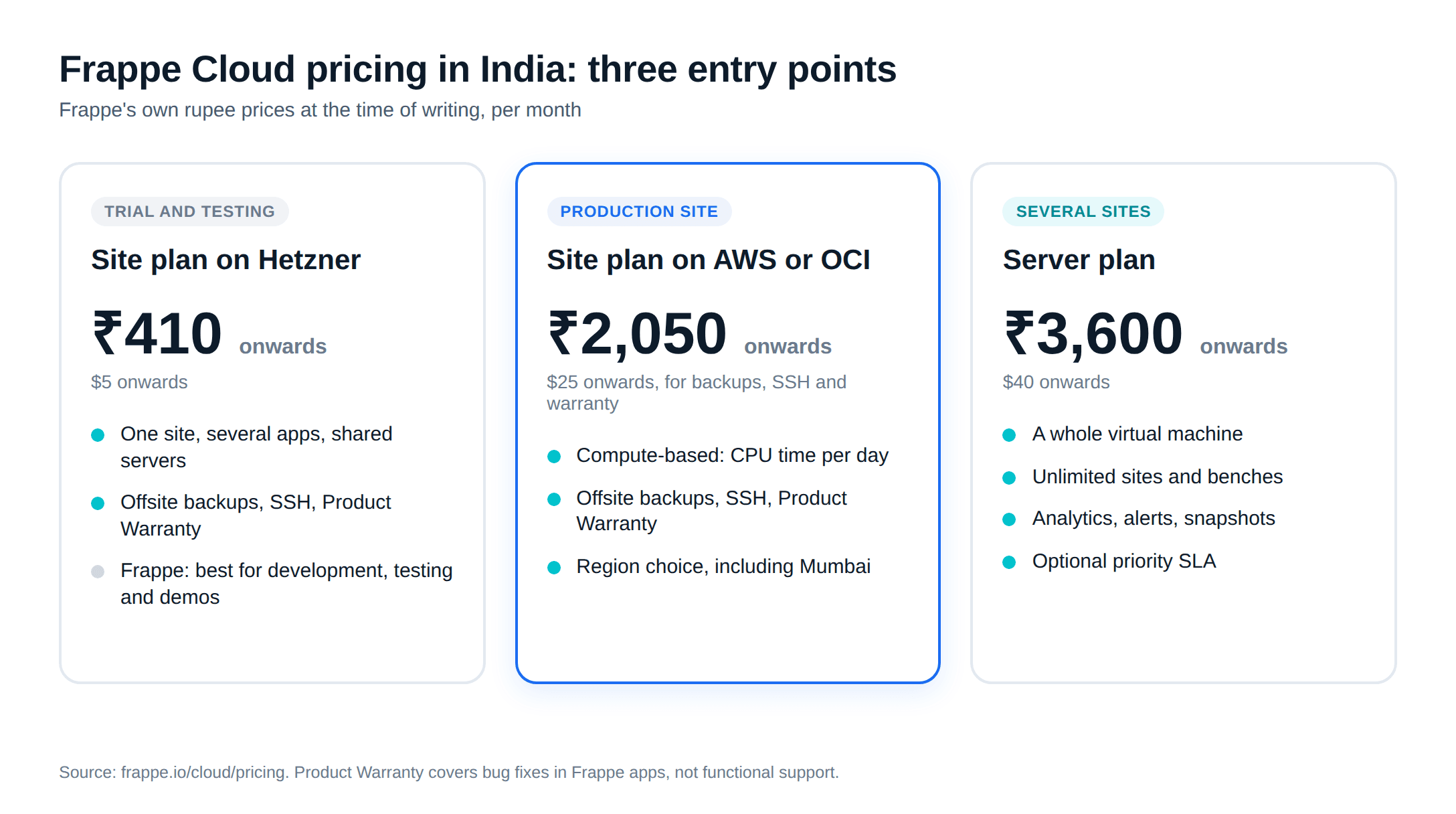
| Site plan on Hetzner | ₹410 ($5) | One site with several apps, on shared servers |
| Site plan on AWS or OCI | ₹2,050 ($25) for backups, SSH and warranty | The same, on Frappe's production-grade providers |
| Server plan | ₹3,600 ($40) | A whole virtual machine for many sites and benches |
The pricing page lists the site plan features as quick install for 150+ apps, upgrades and restores, multi-region hosting, monitoring, custom domains, custom app deployment, multiple environments, SSH access, offsite backups and the Product Warranty. A tooltip on four of those (multiple environments, SSH access, offsite backups and the Product Warranty) says they are available "on AWS and OCI in plans starting $25/mo or ₹2050/mo, and on Hetzner in plans starting $5/mo or ₹410/mo". Frappe's backup documentation says the same about offsite backups: "the $25 plan and above".
Server plans add dedicated or shared instances, unlimited sites and benches, server analytics, utilisation alerts, snapshots, auto-scaling and an optional Product Warranty with a priority SLA.
Which provider for a plant
The pricing page's own FAQ says Hetzner "is best suited for development, testing, and demo environments", and that for workloads where uptime and durability are critical, "Frappe recommends dedicated AWS or OCI instances". In practice, the ₹410 plan is for a trial or a test copy. A plant that runs dispatch and GST invoicing on ERPNext should budget for the AWS or OCI tiers, from ₹2,050 a month for a site or ₹3,600 for a server.
Frappe Cloud's main page lists Mumbai, India among its hosting locations and says the platform is "built on top of AWS and OCI infrastructure". If you want the data in India, choose the Mumbai region when you create the site, and confirm which plans are offered there before you commit.
How compute-based billing works
Frappe Cloud does not charge per user. Its billing FAQ explains the model:
- Each request to your site is logged with the time it took to process. Those times add up through the day.
- Each site plan has a daily CPU-time limit. There is no cap on users.
- When the day's CPU time is used up, the FAQ says "we will drop the request and all the subsequent requests". If that happens often, you move to a higher plan.
- Billing is daily. A $25 plan costs "$25 / 30 = $0.83 per day", and a site that runs 20 days pays for 20 days.
Two things follow for a plant. First, the cost tracks load, not headcount: a site where 25 people mostly read reports can cost less than one where five people run heavy stock reports and a production plan every hour. Second, if month-end closing or GST filing brings a burst of heavy reports, that day sets the plan you need. Watch the usage graph in the first month and size for the peak, not the average.
Self-hosting ERPNext: the full server bill
Self-hosting means you rent a plain server and install ERPNext on it yourself, or have an implementer do it. Frappe's database hardware guide suggests starting the database with at least 2 vCPU and 8 GB of RAM, so the comparisons below use 8 GB machines. A 4 GB server is cheaper but sits below that guidance once ERPNext, MariaDB, Redis and the background workers share it.
Assumptions: list prices excluding GST, 730 hours a month, converted at ₹90 to the dollar (both providers bill in dollars). Your card or invoice rate will differ.
AWS in Mumbai (ap-south-1)
At AWS's on-demand prices for Linux in the Mumbai region:
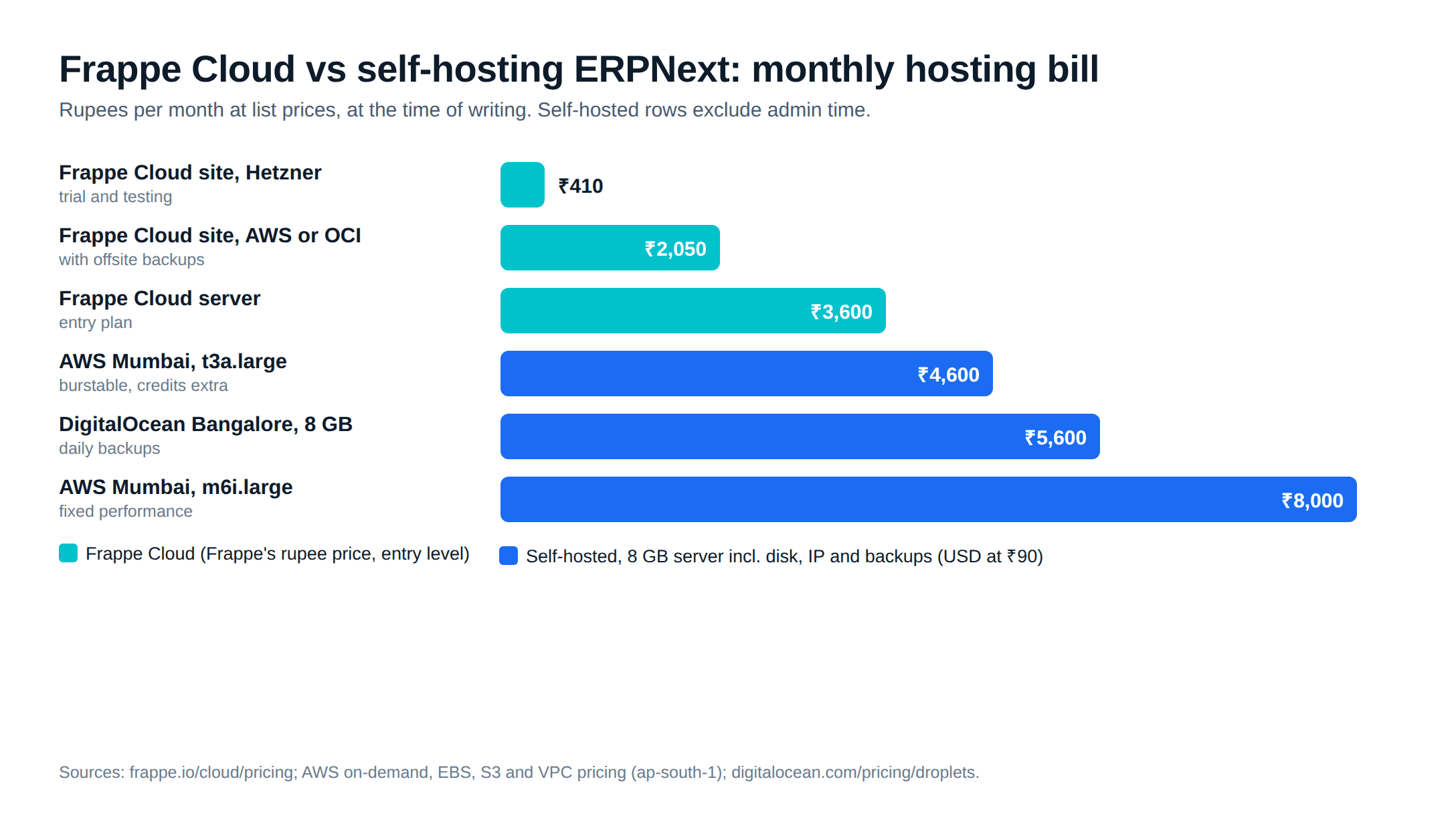
| Line | t3a.large (2 vCPU, 8 GiB) | m6i.large (2 vCPU, 8 GiB) |
|---|---|---|
| Instance | $0.0493/hour, about ₹3,240 | $0.101/hour, about ₹6,640 |
| 100 GB gp3 disk ($0.0912 per GB-month) | about ₹820 | about ₹820 |
| Public IPv4 address ($0.005/hour) | about ₹330 | about ₹330 |
| About 100 GB of backup copies in S3 ($0.025 per GB-month) | about ₹225 | about ₹225 |
| Monthly total | about ₹4,600 | about ₹8,000 |
Disk and snapshot rates are from the EBS pricing page, S3 from S3 pricing and the IPv4 charge from VPC pricing. Data sent out of AWS to the internet is billed on top.
The cheaper t3a is a burstable instance. AWS's documentation says T3 and T3a instances launch as unlimited by default: "If the average CPU usage over a 24-hour period exceeds the baseline, you incur charges for surplus credits." An ERPNext server that runs scheduled reports, backups and a busy month-end can cross that baseline. The m6i is a fixed-performance instance with no credit charges, which is why it costs more.
DigitalOcean in Bangalore
DigitalOcean has a data centre in Bangalore and lists one droplet price table on that page. A Basic droplet with 8 GiB of memory, 4 vCPUs, a 160 GiB SSD and 5,000 GiB of transfer costs $48 a month, about ₹4,320. Its backups are priced "at 20% (Weekly) or 30% (Daily) of Droplet cost", so daily backups add $14.40, about ₹1,300. That makes about ₹5,600 a month, with the disk, an IP address and a large transfer allowance already in the droplet price.
The hidden costs of self-hosting
The server bill is the part that fits in a spreadsheet. These are the parts that do not, and they are where the two quotes from the opening differ.
Backups, and proof they restore
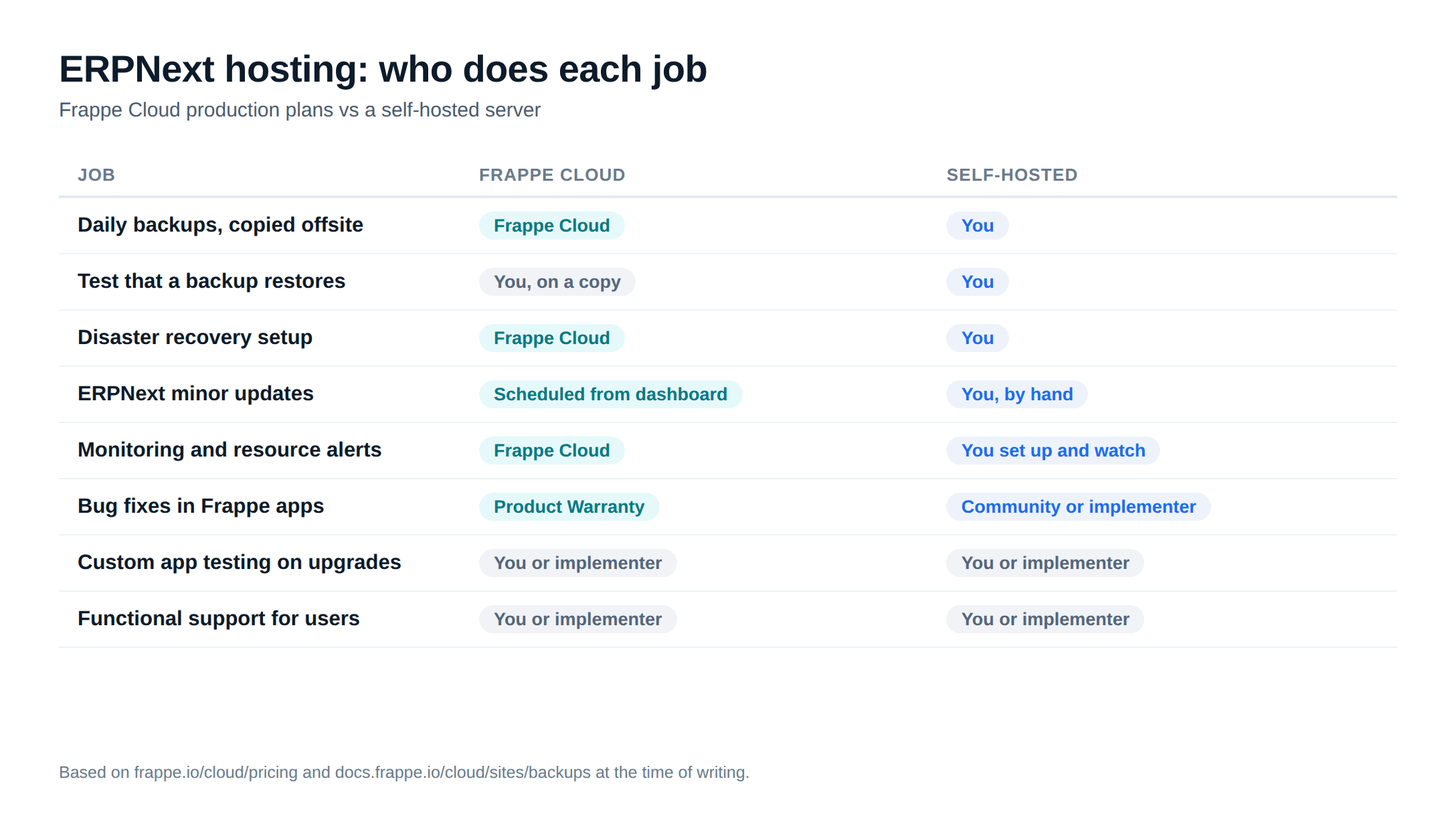
A backup you have never restored is a guess. Frappe Cloud takes a backup every 24 hours and keeps offsite copies on a rotation of "7 daily, 4 weekly, 12 monthly, and 10 yearly backups", per its backup docs. On your own server, someone has to schedule bench backup --with-files, copy the files off the machine, set a retention rule, and restore one onto a test site every few months to prove it works. Our v16 install guide walks through that routine.
Updates and upgrades
ERPNext and the India Compliance app both publish regular minor releases, and GST changes reach your site through them. Someone has to pull them, run the migration, and check that custom apps still work. Major version upgrades are a bigger job on a test copy first. Frappe Cloud's pricing page lists "easy upgrades and restores" from its dashboard. On a self-hosted server that work is manual, and it is easy to postpone until the version is out of support.
Monitoring and alerts
A full disk stops ERPNext writing documents, and a stuck background worker stops emails and scheduled jobs without any error on screen. Frappe Cloud's server plans include utilisation alerts. On your own server, you set up uptime checks, disk and memory alerts, and a person who receives them.
Security patching
The operating system, MariaDB, Redis, Nginx and Python all need security updates. SSH access needs keys, not passwords, and the firewall should expose only ports 80 and 443.
Admin time
None of the above is hard for someone who knows Linux and Frappe's bench tool, but it is regular. As a working assumption, budget a few hours a month for routine work, plus time for an upgrade and the odd 9 pm incident. Multiply those hours by what that person costs you. If nobody inside the plant has the skill, the realistic choice is managed hosting or an AMC that includes server care.
What neither option includes
Frappe Cloud's Product Warranty is "support from Frappe engineers for fixing bugs in Frappe Apps", and the pricing page adds that it "does not include functional support". A self-hosted server includes even less. In both cases, someone still has to answer the questions users actually ask: why a stock entry failed, how to add a field to the delivery note, why GSTR-1 does not match the books. That is the job of an internal ERP owner or an implementer's AMC. Our ERPNext support page explains how we cover that on all three setups.
Which ERPNext hosting option fits your plant
- Choose a Frappe Cloud site plan on AWS or OCI if you run one company on one site, have no in-house Linux skills and want backups and updates handled
- Choose a Frappe Cloud server plan if you need several sites (a test copy, a second company) or Server Scripts, which Frappe Cloud allows only on a private bench
- Self-host on AWS Mumbai if you already run other systems on AWS, want the data in an account you own, and have someone who will patch and check backups every month
- Self-host on DigitalOcean if you want a simple flat bill and accept a smaller set of managed services around the server
- Keep the hosting account, the backups and any custom app code in your company's name, whichever you pick
Our own default, for a typical 30-person plant with no IT staff, is a Frappe Cloud site plan on AWS in the Mumbai region, reviewed after the first few months of usage graphs. That is an opinion, not a rule.
You can also move between them. Frappe Cloud lets you download offsite backups (database, public files, private files and site config) from its dashboard, and those files restore onto a self-hosted bench. Moving the other way works too, but test it on a copy before cut-over.
If you want a second opinion on sizing, or someone to run the server and answer user questions, ERPNext support and hosting sets out how Metageeks, an independent ERPNext implementer, handles both. For the wider cost picture, go back to ERPNext pricing in India.
Frequently asked questions
How much does Frappe Cloud cost in India?+
At the time of writing, Frappe Cloud's pricing page lists site plans from 410 rupees a month and server plans from 3,600 rupees a month, with a 14-day free trial. Offsite backups, SSH access and the Product Warranty come with site plans from 2,050 rupees a month on AWS and OCI, or from 410 rupees on Hetzner. Check the checkout page for GST.
Is Frappe Cloud priced per user?+
No. Site plans are compute-based: each plan allows a set amount of CPU time per day, and Frappe's billing FAQ says that once a plan's CPU time is used up, requests are dropped until the next day. The number of people who log in does not change the bill, but how heavily they use the site does.
Is self-hosting ERPNext cheaper than Frappe Cloud?+
On the server bill alone, sometimes. An 8 GB AWS Mumbai server with disk, a public IP and backup storage comes to roughly 4,600 to 8,000 rupees a month at list prices, and a DigitalOcean 8 GB droplet with daily backups to about 5,600 rupees. Self-hosting also needs a few hours of skilled admin time every month, which Frappe Cloud's price already covers.
Does Frappe Cloud have a server in India?+
Frappe Cloud lists Mumbai, India among its hosting locations and says the platform runs on AWS and OCI infrastructure. If you want your data in India, choose the Mumbai region when you create the site and confirm which plans are offered there.
Does Frappe Cloud include ERPNext support?+
Only bug-fix support. The Product Warranty covers fixes for bugs in Frappe's own apps and in Frappe Cloud, and the pricing page says it does not include functional support. Questions such as how to set up a BOM or why a stock entry failed still need an implementer or an internal ERP owner.
Related reading
- ERPNext pricing in India: the full yearly running cost.
- Installing ERPNext v16 for production: the self-hosted server setup.
- ERPNext review: strengths and gaps for Indian plants.
Free ERPNext fit check
Will ERPNext fit your factory?
Answer a few quick questions. On a short call we tell you whether ERPNext fits how you make, stock and sell, and what the rollout looks like.
Check my fit →About the author

- Tags
- erpnext
- erp
- india
- manufacturing
- hosting
Subscribe to Our Newsletter
The AI Build Brief: practical playbooks on how to build, price and ship AI features, in one short email every other week.