
An ERPNext installation that works on a laptop and an ERPNext installation a plant can run its dispatch on are different jobs. The tutorial ends when the login screen appears. Production starts there: the server has to be sized, the backups have to leave the building, the certificate has to renew itself, and someone has to know what happens to your custom apps at the next upgrade. This guide covers running ERPNext v16 properly, with every version requirement checked against Frappe's own documentation.
TL;DR
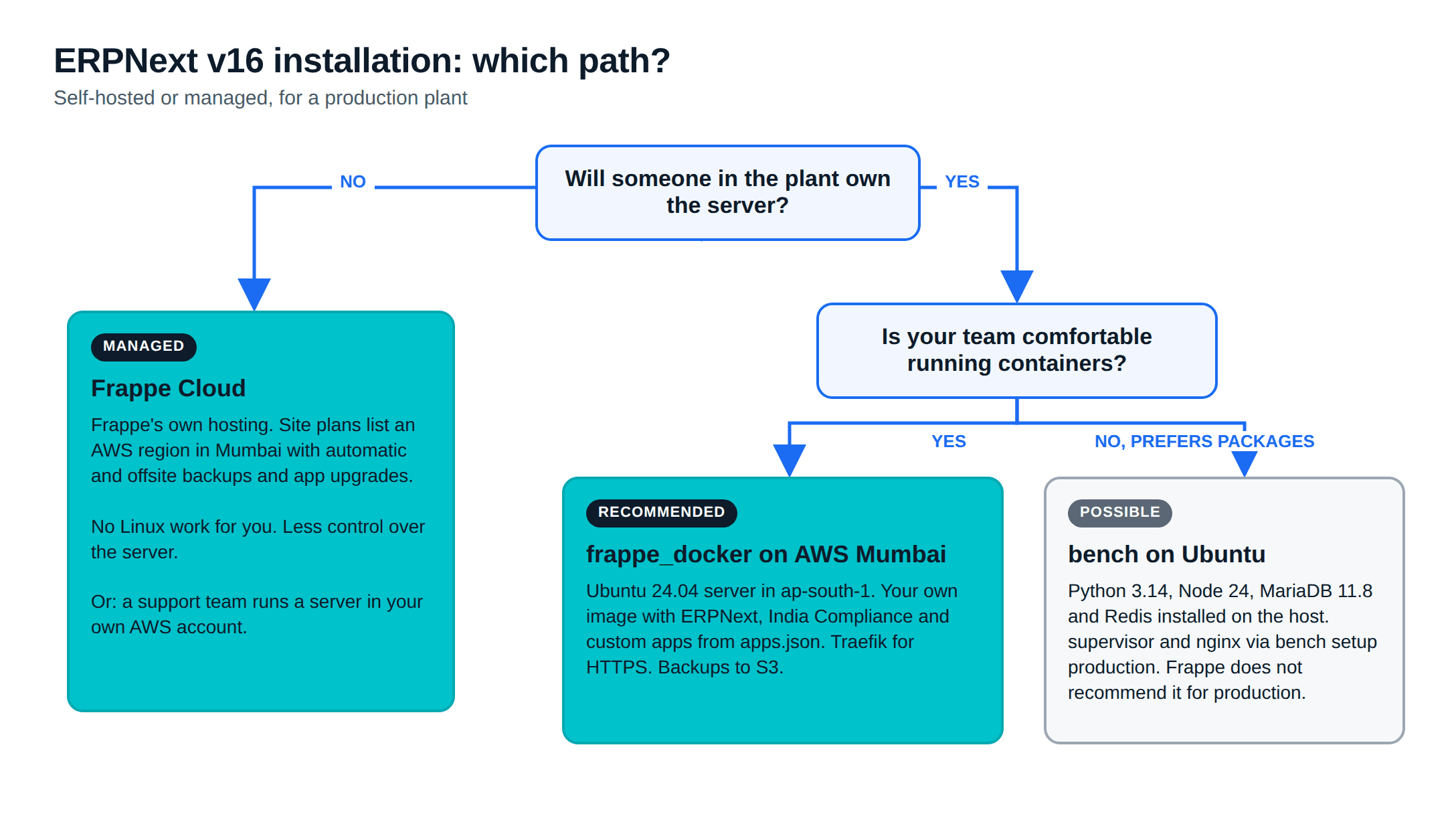
- There are three ways to run ERPNext v16 for a plant: Frappe Cloud (managed), Frappe's Docker setup on a cloud server, or a bench install on Ubuntu. Frappe recommends Docker over bench for self-hosted production.
- v16 needs Ubuntu 24.04+ or Debian 13+, Python 3.14, Node.js 24, MariaDB 11.8 and Redis 6+. Frappe's database guide starts at 2 vCPU, 8 GB of RAM and 50 GB of disk.
- For a self-hosted plant in India, our pick is frappe_docker on a cloud server in AWS Mumbai (ap-south-1), with custom apps baked into your own image.
- Production work goes beyond the install: offsite backups, a restore you have tested, HTTPS that renews itself, upgrades rehearsed on a copy, monitoring and locked-down access.
- If nobody in the plant will own that work, use Frappe Cloud or hand the server to a support team.
Free ERPNext fit check
Will ERPNext fit your factory?
Answer a few quick questions. On a short call we tell you whether ERPNext fits how you make, stock and sell, and what the rollout looks like.
Check my fit →ERPNext installation: three ways to run v16
ERPNext v16 was released on 12 January 2026. Whichever way you install it, you run the same software. The difference is who looks after the server.
- Frappe Cloud: Frappe's own hosting. Its site plans page lists an AWS region in Mumbai, with automatic backups, offsite backups and automatic app upgrades. You never touch a Linux prompt. The trade-off is less control over the server.
- frappe_docker on a cloud server: frappe_docker is Frappe's container setup. You rent a virtual machine, for example on AWS in Mumbai, and run ERPNext in containers. Frappe's bench README says: "We recommend using Docker Installation to setup a Production Environment."
- A bench install on Ubuntu: the traditional route. You install MariaDB, Redis, Python and Node on the server and let the bench tool manage everything. It still works, but Frappe's own production setup guide opens with a warning: "We DO NOT recommend installing on bare metal servers."
AWS Mumbai is a place to run options 2 or 3, not a fourth method. It keeps the data in India, in an AWS account your company owns. For what each option costs per month, see our post on ERPNext pricing in India.
If you would rather not run the server yourself, our ERPNext support and hosting team can run it for you on Frappe Cloud, on AWS or in your own server room.
What ERPNext v16 needs
These are the v16 prerequisites from Frappe's installation guide. They are higher than v15's, so an old server image will not do.
| Component | Frappe v16 |
|---|---|
| Operating system | Debian 13+ or Ubuntu 24.04+ |
| Python | 3.14 |
| Node.js | 24 |
| MariaDB | 11.8 |
| Redis or Valkey | 6+ |
| Yarn | 1.22+ |
| pip | 25.3+ |
PDFs are now made with Chromium, which bench downloads itself, and cron must run for scheduled backups and certificate renewal. With Docker, the image carries Python, Node and the rest, so the host needs only Docker, Docker Compose v2 and git.
Sizing the server
Frappe does not publish a single minimum for the whole stack. Its database hardware guide gives numbers for the database alone:
- Start with at least 2 vCPU and 8 GB of RAM.
- Start with at least 50 GB of disk, or about three times your current database size, and roughly 2,000-3,000 IOPS.
- Do not rely on swap for the database server.
- Separate the database server from the application server when you can, and scale up a single machine for as long as possible before adding replicas.
On one server that runs everything, the application, Redis and workers sit on top. For a plant of 20-50 users, we treat 2 vCPU and 8 GB as the floor and watch memory in the first month. The web tier is set by GUNICORN_WORKERS in frappe_docker's example.env, which suggests the usual formula of two workers per CPU core plus one.
If you tune one thing, give MariaDB the memory. Frappe's guide calls the InnoDB buffer pool "the most important parameter you need to tweak" and suggests it take about 60% of a dedicated database server's RAM.
Recommended path: ERPNext on Docker in AWS Mumbai
This is the setup we recommend for a plant that wants to self-host. It follows frappe_docker's build guide and its production example with HTTPS.
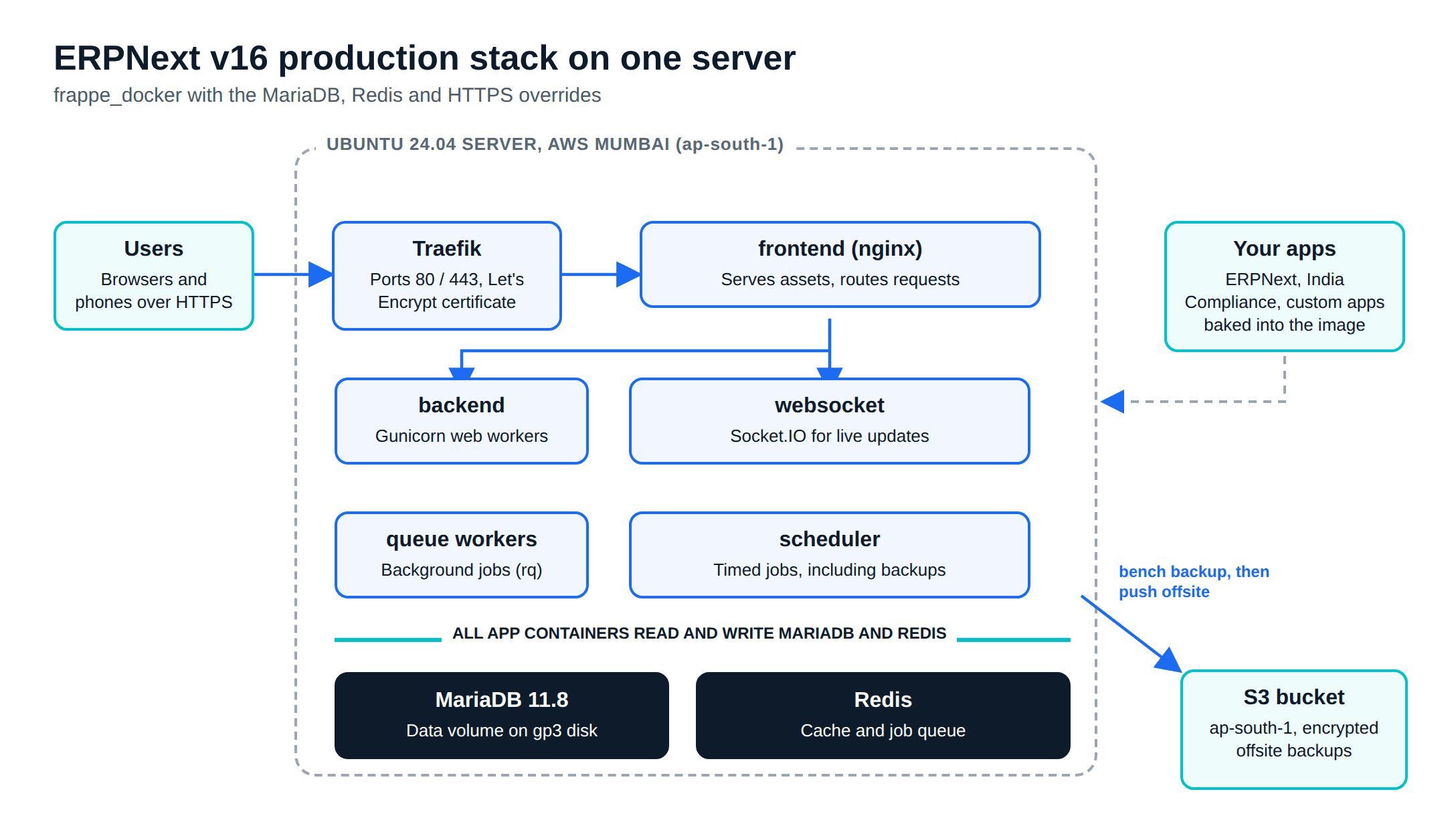
1. Prepare the server
Launch an Ubuntu 24.04 LTS instance in the Mumbai region (ap-south-1) with a gp3 disk sized from the guide above. Attach an Elastic IP and point a DNS record such as erp.yourplant.in at it. In the security group, open ports 80 and 443 to the internet and port 22 only to your office IP. Then install Docker:
curl -fsSL https://get.docker.com | bash
git clone https://github.com/frappe/frappe_docker
cd frappe_docker
2. Build an image with your apps
In production, frappe_docker installs apps at build time. You list them in apps.json and build your own image. ERPNext, the India Compliance app for GST, and any custom app your plant uses all go in:
[
  { "url": "https://github.com/frappe/erpnext", "branch": "version-16" },
  { "url": "https://github.com/resilient-tech/india-compliance", "branch": "version-16" },
  { "url": "https://github.com/your-company/plant_custom", "branch": "main" }
]
docker build \
--no-cache \
--build-arg=FRAPPE_PATH=https://github.com/frappe/frappe \
--build-arg=FRAPPE_BRANCH=version-16 \
--secret=id=apps_json,src=apps.json \
--tag=plant-erp:2026-11-01 \
--file=images/layered/Containerfile .apps.json goes in as a build secret, so a private repository token never lands in the image history. Tag each build with a date, never latest, so you can roll back.
3. Configure and start the stack
cp example.env .env
# then edit .env:
#   CUSTOM_IMAGE=plant-erp
#   CUSTOM_TAG=2026-11-01
#   PULL_POLICY=missing
#   DB_PASSWORD=<a long random password>
#   LETSENCRYPT_EMAIL=it@yourplant.in
#   SITES_RULE=Host(`erp.yourplant.in`)

mkdir -p ~/gitops
docker compose --env-file .env \
  -f compose.yaml \
  -f overrides/compose.mariadb.yaml \
  -f overrides/compose.redis.yaml \
  -f overrides/compose.https.yaml \
  config > ~/gitops/erp.yaml

docker compose --project-name erp -f ~/gitops/erp.yaml up -d
The HTTPS override adds Traefik, which gets and renews a Let's Encrypt certificate for the domain in SITES_RULE. The DNS record has to point at the server and port 80 has to be reachable for that to work.
4. Create the site
Name the site after its domain, because the stack picks the site by host name:
docker compose --project-name erp exec backend \
  bench new-site erp.yourplant.in \
  --mariadb-user-host-login-scope='172.%.%.%' \
  --db-root-password '<db password>' \
  --admin-password '<admin password>' \
  --install-app erpnext

docker compose --project-name erp exec backend \
  bench --site erp.yourplant.in install-app india_compliance
Open https://erp.yourplant.in, log in as Administrator and run the setup wizard. The configuration work that follows (chart of accounts, items, BOMs, warehouses) is an ERPNext implementation project of its own.
If you want fewer steps, frappe_docker also lists the Easy Install script from the bench repository as production-ready. It installs Docker, creates the stack, issues the certificate and saves the generated passwords to ~/passwords.txt on the server. Move those passwords somewhere safer once it finishes.
The bench install on Ubuntu
Some teams prefer bench because their admins manage Ubuntu servers with packages, not containers. On Ubuntu 24.04 the steps from Frappe's installation guide look like this:
sudo apt update
sudo apt install git redis-server libmariadb-dev mariadb-server mariadb-client pkg-config
curl -o- https://raw.githubusercontent.com/nvm-sh/nvm/v0.40.3/install.sh | bash
nvm install 24 && npm install -g yarn
curl -LsSf https://astral.sh/uv/install.sh | sh
uv python install 3.14 --default
uv tool install frappe-bench

bench init --frappe-branch version-16 frappe-bench && cd frappe-bench
bench get-app --branch version-16 erpnext
bench new-site erp.yourplant.in
bench --site erp.yourplant.in install-app erpnext
sudo bench setup production $USER
bench config dns_multitenant on
sudo -H bench setup lets-encrypt erp.yourplant.in
Check that the MariaDB package your distribution installs is 11.8. bench setup production configures supervisor and nginx so the processes restart when they crash. The Let's Encrypt command adds a root cron job that tries to renew the certificate every month; Frappe's SSL guide notes that the certificates expire every three months.
One MariaDB detail to know about: frappe_docker's bundled MariaDB 11.8 config turns innodb_snapshot_isolation off. The docs call it a compatibility workaround for Frappe concurrency errors, matching the defaults Frappe uses for its own hosting. On a bench install you set that yourself.
Backups offsite, and a restore you have tested
A backup that sits on the same disk as the database dies with that disk. Production needs the backup, a copy somewhere else, and proof that it restores.
Back up the files too
bench --site all backup --with-files dumps the database and the public and private file folders. Attachments such as signed POs and quality certificates live in those folders. The frappe_docker backup guide runs it from cron every six hours:
0 */6 * * * docker compose -p erp -f /home/ubuntu/gitops/erp.yaml exec -T backend bench --site all backup --with-files > /dev/nullCopy it off the server
frappe_docker ships a script that pushes the latest backup to S3 (site operations). Use a bucket in ap-south-1 and an IAM user that can write only to that bucket:
docker compose -p erp -f ~/gitops/erp.yaml exec backend push_backup.py \
  --site-name erp.yourplant.in --bucket plant-erp-backups \
  --region-name ap-south-1 --endpoint-url https://s3.ap-south-1.amazonaws.com \
  --aws-access-key-id '<key id>' --aws-secret-access-key '<secret>'
In v16, the S3, Dropbox and Google Drive backup settings moved out of the framework into a separate Offsite Backups app, per Frappe's v16 migration guide. Its S3 Backup Settings can push daily, weekly or monthly from inside ERPNext. Turn on Encrypt Backups in System Settings as well, and keep the encryption key somewhere other than the server (Frappe's guide).
Test the restore
bench restore takes the database file plus --with-public-files and --with-private-files. It cannot restore the files alone, and it warns before restoring an older version over a newer one. Restore the latest offsite copy onto a spare server each quarter and open a few recent invoices. A backup nobody has restored is a guess.
Our ERPNext support plans include running these backups and the quarterly restore test, if you would rather someone else watched them.
SSL, domains and the network
- HTTPS everywhere: Frappe's security FAQ recommends a proper TLS setup and HSTS on the domain. It adds the "Secure" flag to cookies only over HTTPS.
- A subdomain you control: use something like
erp.yourplant.in, in your company's DNS account, not the implementer's. - Ports: only 80 and 443 face the internet. SSH is limited to known IPs or reached through AWS Systems Manager. The database port is never public.
Updates and upgrades with custom apps
Treat minor updates and major upgrades differently.
Minor updates (v16.x to a newer v16.x) arrive often. On Docker, rebuild the image with a new tag, set CUSTOM_TAG in .env, regenerate erp.yaml, run up -d, then bench --site erp.yourplant.in migrate. On bench, bench update pulls the apps, runs patches, builds assets and restarts processes (production guide). Back up first either way, and keep the previous image tag so a bad update is one line to undo.
Major upgrades need a rehearsal. The v16 migration guide lists changes that break custom code: Python 3.14 and Node 24 as minimums, the desk moving from /app to /desk, list and database queries sorting by creation instead of modified, frappe.db.commit() no longer allowed from document hooks, and changes to standard workspaces being lost. Restore production onto a copy, upgrade the copy, and have the plant's key users run a day's transactions on it before you touch live.
Edits to ERPNext's core files make every upgrade harder, because an update overwrites them and someone has to redo each one. Our ERPNext development team builds custom features as separate Frappe apps in your Git repository, installed with bench get-app or listed in apps.json, so they can be tested against each new version.
Monitoring
- Inside ERPNext: v16 includes a System Health Report that checks background jobs, the scheduler, errors, email, database, cache, file storage, backups and SocketIO. Check it weekly and after every update.
- The server: Frappe's database guide suggests Prometheus and Grafana with the Node Exporter for CPU, RAM and disk I/O, and the MySQLD Exporter for MariaDB. Its rule of thumb: if database CPU stays above 50% for long periods, add vCPUs.
- From outside: uptime, certificate expiry and disk space alerts. Backups fill disks.
Security basics
- Turn on two-factor authentication in System Settings, at least for System Managers.
- Set a minimum password score and a session expiry in System Settings.
- Never use the Administrator account for daily work. Give each person their own user and role.
- Patch the host OS and apply new v16 releases on a schedule.
- Keep the AWS account, the domain and the Git repositories in the company's name, with at least two people holding admin access.
Pre-go-live checklist
- The server meets the v16 prerequisites and the sizing above, with room to grow the disk.
- ERPNext, India Compliance and every custom app are pinned to known versions in your image or bench.
- HTTPS works, and the certificate renews without anyone touching it.
- Backups with files run on a schedule, an encrypted copy lands offsite, and a restore onto a spare server has been tested.
- Only ports 80 and 443 are public; SSH and the database are not.
- Two-factor authentication is on for administrators, and the Administrator password is stored safely.
- Uptime, disk and certificate alerts reach a person who will act on them.
- The upgrade process is written down, and the previous image tag or a full backup can be restored in under an hour.
- Someone is named as owner of the server, with a backup person.
If no one in the plant can own that last line, our ERPNext support and hosting service covers the server, the backups and every upgrade, on Frappe Cloud or on your own AWS account.
Frequently asked questions
Can I run ERPNext v16 on Docker in production?+
Yes. Frappe's bench README recommends the Docker installation for production. The frappe_docker repository marks two methods as production-ready: compose.yaml with override files, and the Easy Install script, which uses frappe_docker underneath. The single-file pwd.yml setup is a disposable demo. You cannot install custom apps on it, so do not build a live site on it.
What are the system requirements for ERPNext v16?+
Frappe's installation guide lists these for v16: Debian 13+ or Ubuntu 24.04+, Python 3.14, Node.js 24, MariaDB 11.8, Redis or Valkey 6+, Yarn 1.22+ and pip 25.3+. PDFs are rendered with Chromium, which bench downloads itself. For hardware, Frappe's database guide recommends starting the database with at least 2 vCPU, 8 GB of RAM and 50 GB of disk.
Can I install ERPNext on Windows?+
Not directly. Frappe supports Debian, Ubuntu and macOS. Its installation guide says Windows users can use Ubuntu in WSL, which works for trying ERPNext or for development. A live plant system belongs on a Linux server, in the cloud or in your server room.
How do I upgrade ERPNext from v15 to v16?+
Take a full backup with files, restore it onto a copy of the server, and upgrade the copy first. Version 16 needs Python 3.14 and Node.js 24, and Frappe's migration guide lists breaking changes for custom apps, including a new desk URL, a changed default sort order and a ban on database commits inside document hooks. When the copy passes your tests, repeat the upgrade on live during a planned window and run bench migrate.
Related reading
- ERPNext pricing in India: what Frappe Cloud, AWS Mumbai and on-premise hosting cost each year.
- ERPNext integrations in India: India Compliance for GST, plus Tally, WhatsApp and the shop floor.
- ERPNext implementation cost in India: what moves the price of the project itself.
- Moving from Tally to ERPNext: masters, opening balances and the cut-over weekend.
Free ERPNext fit check
Will ERPNext fit your factory?
Answer a few quick questions. On a short call we tell you whether ERPNext fits how you make, stock and sell, and what the rollout looks like.
Check my fit →About the author

- Tags
- erpnext
- erp
- manufacturing
- india
- hosting
Subscribe to Our Newsletter
The AI Build Brief: practical playbooks on how to build, price and ship AI features, in one short email every other week.