

Picture a 40-person fabrication plant in Faridabad with one planner, two shifts and about 60 open orders. Every morning the planner rebuilds the day in Excel: which orders are short of material, which machine is free, which customer has called twice. The owner wants "production planning software" and finds a dozen tools that read alike in the brochure and behave very differently on the floor. This post is for the owner or planner of a 10-200 person Indian plant who is choosing what kind of software to buy, and how to tell the kinds apart before a demo.
TL;DR
- "Production planning software" covers three jobs: keeping BOMs, planning materials (what to make and buy), and scheduling machines (what runs where, in what order). Tools differ most on the third.
- The four options are spreadsheets, standalone BOM or MRP tools, dedicated scheduling (APS) tools, and an ERP that does planning inside the same database as stock and accounts.
- For most small plants the deciding question is whether the bottleneck is material or machine time. Material problems point to an ERP; sequencing problems on a few busy machines point to a scheduling tool on top.
- ERPNext covers BOMs, production plans, work orders, job cards and workstation capacity. It slots operations into free workstation time, but its documentation describes no optimiser or drag-and-drop scheduling board.
- Test any tool on one real week of your own orders before you sign.
Free ERPNext fit check
Will ERPNext fit your factory?
Answer a few quick questions. On a short call we tell you whether ERPNext fits how you make, stock and sell, and what the rollout looks like.
Check my fit →What production planning software has to do
Production planning software is any system that turns customer demand into a plan for what to make, what to buy and when. Three separate jobs hide under that one label.
- Keep the bill of materials (BOM). The BOM lists the components and quantities to make one unit, and often the operations and machines. Every plan downstream multiplies these numbers, so a BOM that is 10 percent light makes every purchase order 10 percent short.
- Plan materials and production. Turn demand (sales orders, forecasts) into a make list and a buy list, netting off stock and open orders. This is material requirements planning, or MRP. Our MRP vs ERP guide walks through one MRP run by hand.
- Schedule the floor. Put each job on a machine, in an order, at a time, within the hours and machines the plant really has. This is production scheduling.
A tool sold as "production planning software" may do one, two or all three, and the depth of the third varies the most.
Production scheduling software: infinite vs finite capacity
Scheduling vendors split the field into two approaches. PlanetTogether, which sells scheduling software, describes infinite capacity loading as a method that "will assume that there is sufficient capacity available": it works back from each due date with standard lead times and ignores what is already booked. Finite capacity scheduling takes the real capacity of each resource into account and pushes work into the next open window when a machine is full.
Classic MRP plans with infinite capacity, so it will plan three jobs on one press in the same week without complaint. That is fine for deciding what to buy, and wrong for telling an operator what to run on Tuesday. Software that sequences jobs against real capacity, and re-plans when something changes, is usually sold as advanced planning and scheduling (APS).
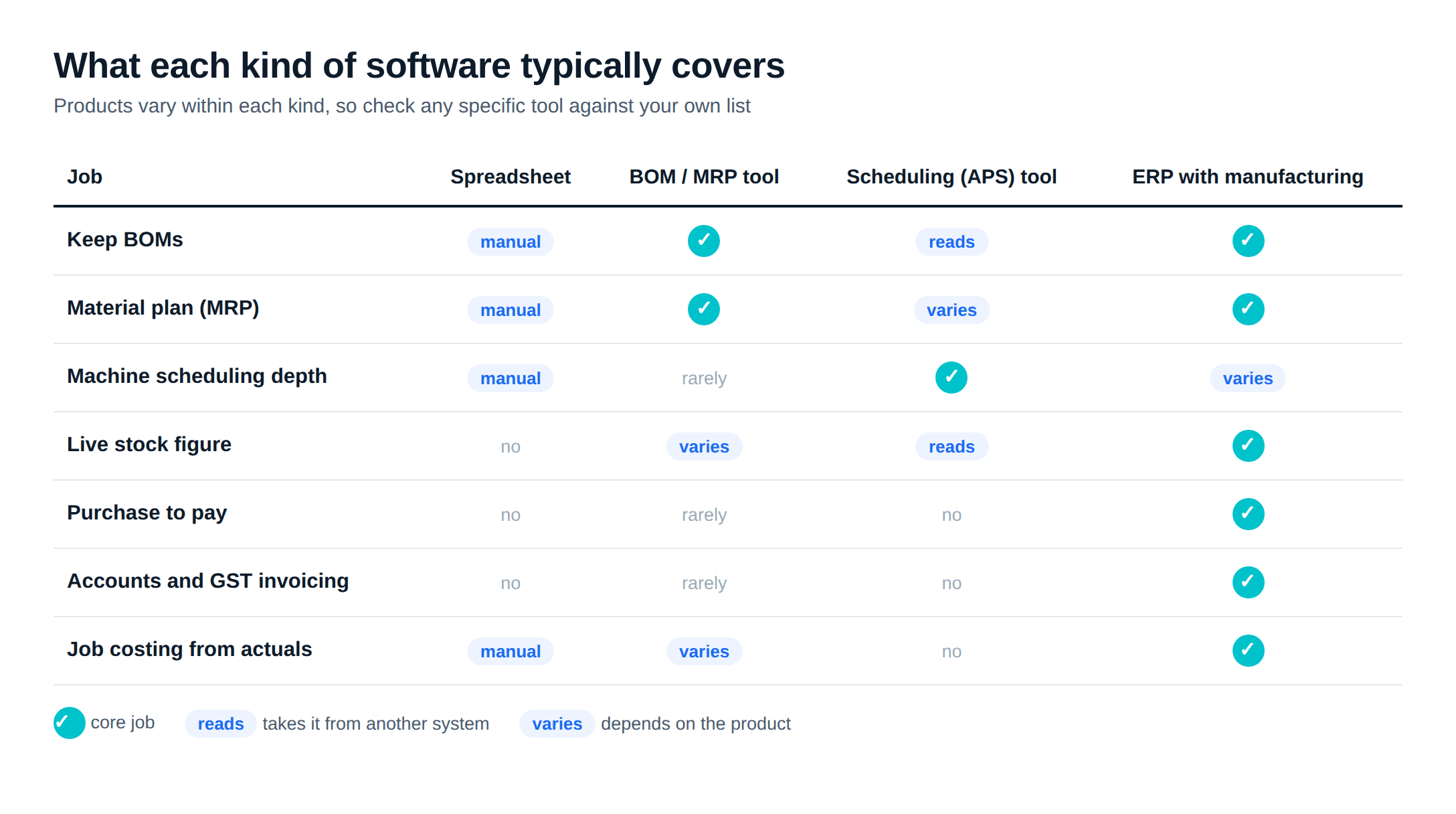
The four kinds of software
Spreadsheets
BOM or MRP tools
Scheduling (APS) tools
ERP
Spreadsheets
For a plant with a handful of products and a planner who keeps the sheet current, Excel works. It fails in predictable ways: stock in the sheet disagrees with the store, a rush order means rebuilding the plan by hand, and the file means nothing to anyone but its author. It also holds no history, so nobody can ask why last month's plan slipped.
BOM software and standalone MRP tools
BOM software keeps product structures; MRP tools add a material plan on top, and some add work orders. The catch is the handover: the buy list ends in the tool, and the purchase order, goods receipt, bill and GST invoice happen in another system. Our MRP vs ERP post lists the conditions under which that split still works.
Dedicated scheduling tools
APS tools exist for one problem: many jobs, few machines, and an order of work that changes the outcome. They model setup times, shifts and constraints, and let a planner drag jobs on a Gantt-style board. A scheduling tool that does not keep stock or books sits on top of an ERP and needs an integration to read orders and send back the schedule, so ask each vendor what their product keeps and what it reads from elsewhere.
An ERP with manufacturing
An ERP keeps BOMs, plans materials, issues work orders, records stock moves and posts the cost, all against one set of records. Its planning reads the same stock the storekeeper updates, which removes one common cause of bad plans: a stock figure that is a week old. Where ERPs differ is how far their scheduling goes.
What to look for, whichever kind you buy
Use this as the checklist for every demo. Ask the vendor to show each item on your data, not theirs.
- Multi-level BOMs with scrap or process loss, and a controlled way to change a BOM once it is in use.
- One stock figure: planning reads the same stock that the store updates, not a copy.
- Netting: the plan subtracts stock on hand and open orders before it suggests a purchase.
- Sub-assemblies you can mark as make, buy or send to a job worker.
- Workstations with shift hours and holidays, and operations with times, if machine capacity matters to you.
- Shop-floor capture: material issued, output and rejects booked against the job, by the operator or supervisor.
- What happens on a rush order: how many clicks to re-plan, and what moves.
- Costing per job or batch from actual material and time, if margins vary by order.
- Reports the owner will read: open work orders, late orders, material shortages.
- Who can change the plan, and whether the system records who changed what.
For job work, check also how material sent to a job worker is tracked for GST. Our post on job work and ITC-04 covers the filing side.
How ERPNext covers planning, BOMs and the floor
ERPNext runs the chain as linked documents: Sales Order, Production Plan, Material Request and Work Order, then Job Cards and Stock Entries on the floor. The ERPNext production planning, BOM and MRP walkthrough covers each step with its settings. In buying terms, here is what is documented.
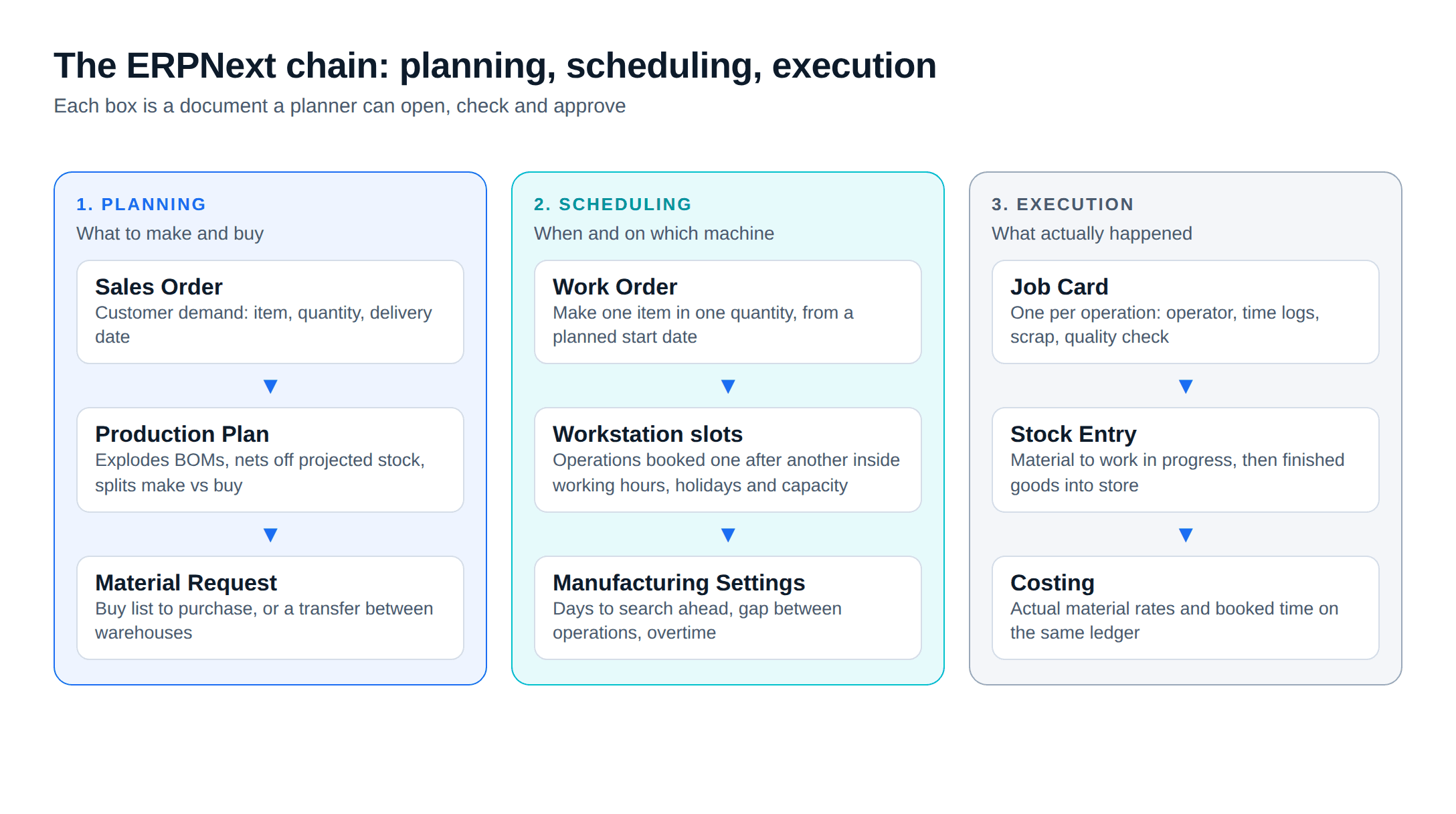
For BOMs, ERPNext has multi-level BOMs with operations, scrap and process loss. The BOM Creator builds a multi-level structure on one screen as a tree and generates the individual BOMs on submit. The BOM Update Tool replaces a sub-assembly's BOM in every parent BOM that uses it and can refresh BOM costs from the latest rates.
For planning, the Production Plan pulls in Sales Orders or Material Requests, fetches sub-assemblies from the BOMs, and lets you mark each as in-house, subcontracted or bought. With the Skip Available options on, it reduces requirements by the projected quantity in stock. From the submitted plan you create Work Orders and Material Requests.
For capacity, a Workstation has working hours (split by shift if needed), a holiday list, operating costs and a Production Capacity, defined as the number of jobs it can run at the same time. When a Work Order with operations is submitted, ERPNext reserves a slot for each operation "serially after the planned start date", checking workstation timings, holidays and slots already taken. If an operation needs more time than the free slots allow, it asks you to break the operation. Manufacturing Settings control how many days ahead it searches, the gap between operations, and whether overtime or holiday work is allowed.
On the floor, Job Cards are created per operation when the Work Order is submitted. They record the workstation, the employee, time logs, scrap and in-process quality inspections. The Plant Floor view shows the status of workstations on a floor, the stock in that floor's warehouse, and job cards to work through. Downtime Entry records minutes a machine was down.
Because all of this sits on the same database as purchase, stock and accounts, the cost of a work order comes from actual purchase rates and booked time, not a separate spreadsheet.
Where ERPNext's scheduling stops
ERPNext does finite slotting: it will not book a workstation beyond its hours and capacity. What the documentation we reviewed does not describe:
Scheduling gaps to check on a trial
- An optimiser that re-sequences many open work orders across machines to cut changeovers or meet due dates. As documented, each Work Order books free slots when it is submitted, so the order of submission decides who gets the earlier slots.
- Sequence-dependent setup times, such as a longer changeover from black to white plastic than from white to black.
- A drag-and-drop scheduling board where moving one job reschedules the jobs behind it.
- Rescheduling of already-booked operations when a machine breaks down or an order is pulled forward. The Work Order page does not cover it.
If material shortages cause most late orders, the slotting ERPNext does, plus a planner who sets planned start dates, is enough. It matters when a few machines are always the bottleneck and the order of jobs on them decides whether orders ship on time.
When a dedicated scheduling tool makes sense
Consider an APS tool on top of the ERP when most of these hold:
- Three or more machines are a constant bottleneck, and the queue on them is long.
- Setup or changeover time depends on what ran before.
- Customers ask for a firm date at order entry, and that date depends on the queue.
- The planner spends hours a day reshuffling, and a re-plan after one breakdown takes most of a shift.
If only one or two of these hold, a middle path is cheaper. A custom scheduling board or shop-floor screen built on ERPNext's own Work Order and Job Card data, a Gantt view of one bottleneck line or a tablet screen for operators, keeps one database and avoids an integration. That is ERPNext development work, scoped like any other build.
A hypothetical example: a 40-person plant choosing
Assume a plant with 40 people, 120 active items, two-level BOMs, eight machines, two shifts, Tally for accounts, and about 60 open orders at a time. These figures are invented for the example.
The planner's log for one month shows 14 late orders. Nine were late because a component arrived after the job should have started. Three were late because the press shop was overbooked. Two were customer changes.
Here, nine of 14 late orders trace back to material. The fix is a material plan that reads true stock and open purchase orders, which is the job of an ERP's planning, not a scheduling optimiser. Three overbooking cases are worth watching: if ERPNext's workstation slotting shows the press shop overloaded a week ahead, the planner can move start dates. If overbooking grows to most late orders after go-live, that is the time to price a scheduling board or an APS tool.
The same log, with 10 of 14 late orders caused by the press-shop queue, would point the other way.
How to choose for your plant
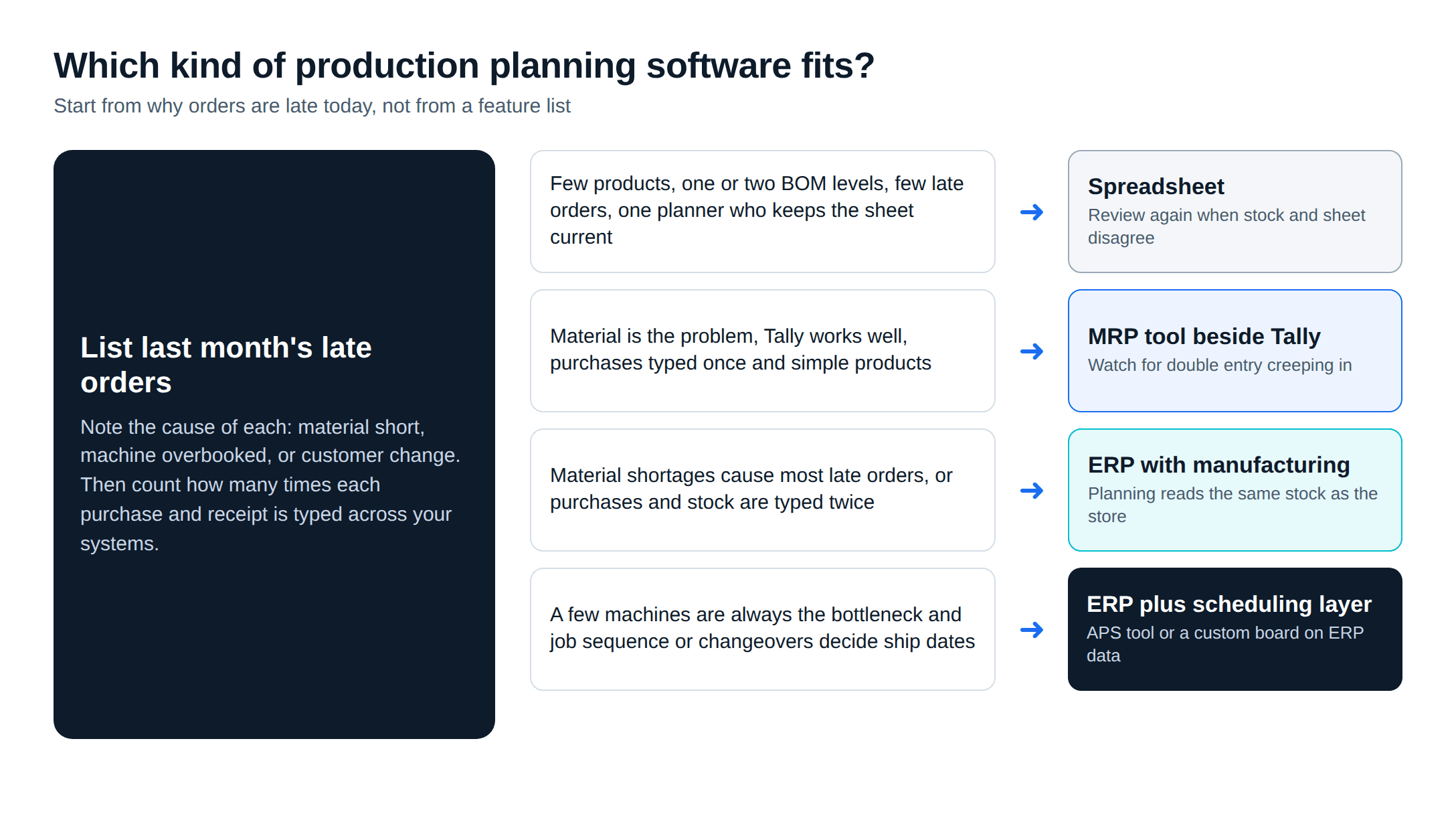
- Find the bottleneck. List last month's late orders and the reason for each: material, machine time or a customer change.
- Count double entry. Count how many times a purchase and a receipt are typed across your systems today.
- Pick the kind first, then the product. Material problems and double entry point to an ERP. Sequencing problems on a few busy machines point to an ERP plus a scheduling layer.
- Test on your data. Before you sign, run one real week on a trial: explode two of your BOMs from real sales orders, compare the buy list with a physical count, submit work orders with operations, and see whether the schedule they produce is one your planner would accept.
For the wider choice of system, cost and moving off Tally, see our guide to ERP for manufacturing in India and the list of Tally alternatives for manufacturers.
Metageeks is an independent ERPNext implementer. If you want that one-week test done on your own orders, ERPNext implementation for manufacturers explains how we scope a plant and write down what the system will plan and what the planner will still decide.
Frequently asked questions
What is the difference between production planning and production scheduling software?+
Planning software decides what to make and buy, in what quantity, by roughly when: it explodes the bill of materials and nets off stock. Scheduling software decides which job runs on which machine, in what order, at what hour, within the capacity the plant actually has. Many products do some of both, but the depth varies a lot, so ask a vendor to show each one on your own data.
What is BOM software?+
BOM software keeps the bill of materials: the list of components, quantities and, often, operations needed to make one unit of a product. On its own it is a product-data tool. Its value comes when the same BOM feeds material planning, costing and the work order the shop floor runs, so a change to the BOM reaches all three.
Can ERPNext do finite capacity scheduling?+
Partly. When a Work Order with operations is submitted, ERPNext reserves time slots for each operation one after another from the planned start date, checking each workstation's working hours, holiday list and existing bookings. That respects capacity. What its documentation does not describe is an optimiser that re-sequences many orders across machines to cut changeovers or meet due dates, or drag-and-drop rescheduling on a board.
Is Excel enough for production planning in a small plant?+
It can be for a plant with a few products, one or two BOM levels and a planner who keeps the sheet current. It stops being enough when the stock in the sheet and the stock in the store disagree, when one rush order means rebuilding the whole plan by hand, or when nobody but the planner can read the file.
When does a small plant need a dedicated scheduling tool?+
When the bottleneck is sequencing, not materials: many orders competing for a few machines, setup times that depend on what ran before (colour or size changes, for example), and dates promised to customers that depend on the exact order of jobs. If those conditions hold and the planner spends hours each day reshuffling, an advanced planning and scheduling tool on top of the ERP is worth pricing.
Related reading
- ERPNext production planning, BOM and MRP: the step-by-step setup inside ERPNext.
- MRP vs ERP: when a planning tool is enough and when the plant needs the whole system.
- Where Tally inventory breaks for a plant: WIP, job cards, QC holds and traceability.
- ERPNext implementation cost in India: what drives the cost of a project.
Free ERPNext fit check
Will ERPNext fit your factory?
Answer a few quick questions. On a short call we tell you whether ERPNext fits how you make, stock and sell, and what the rollout looks like.
Check my fit →About the author

- Tags
- erpnext
- erp
- manufacturing
- india
- production planning
Subscribe to Our Newsletter
The AI Build Brief: practical playbooks on how to build, price and ship AI features, in one short email every other week.