

Tally inventory goes well past bookkeeping: godowns, batches with expiry dates, bills of materials, job work and reorder levels are all in TallyPrime. This post is for the owner or stores head of a running plant, not for someone learning Tally for an exam. It covers what Tally inventory handles well, the eight points where a plant outgrows it, and what an ERP adds at each one.
TL;DR
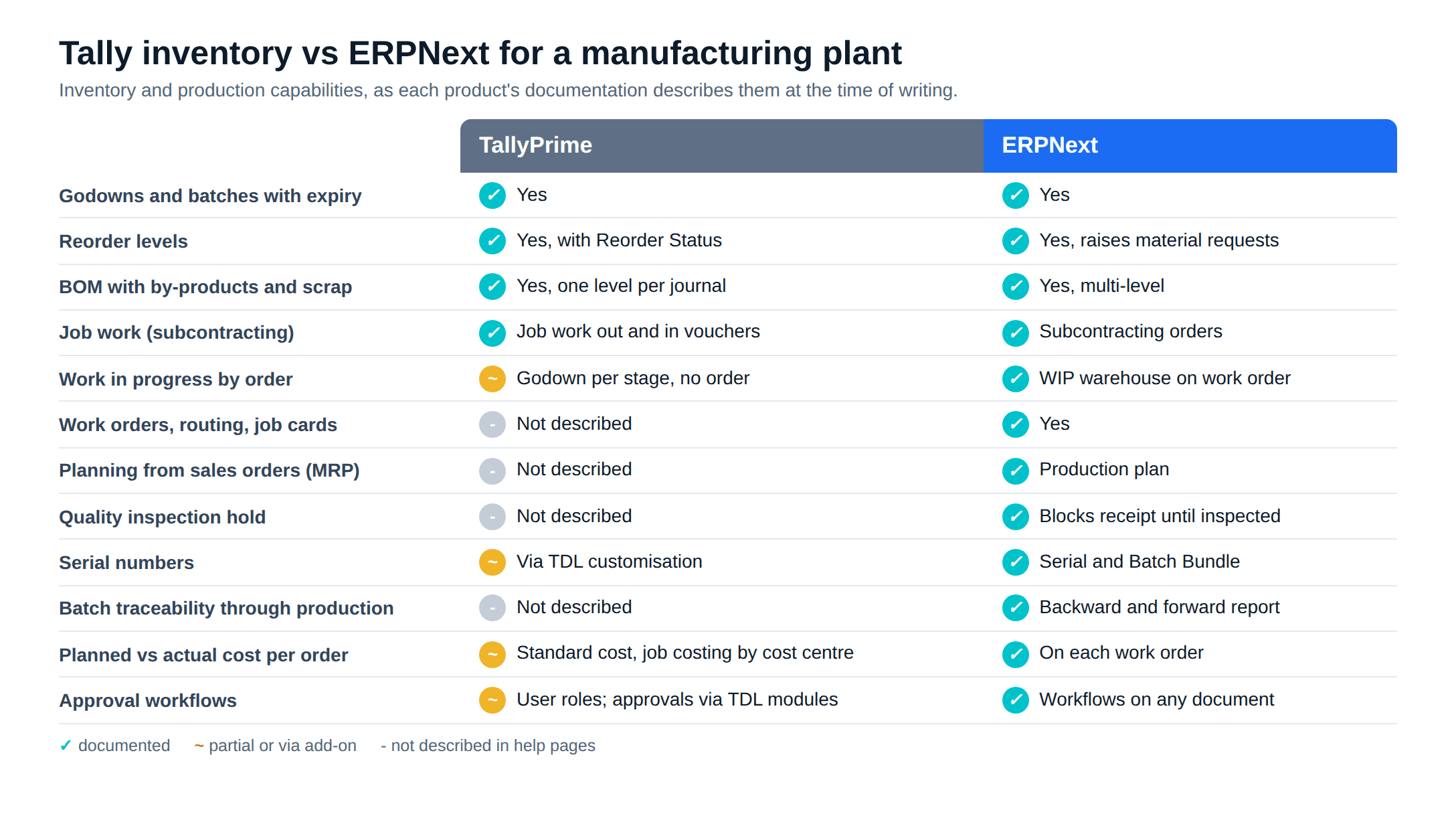
- TallyPrime inventory covers stock items, godowns, batches with manufacturing and expiry dates, reorder levels, BOMs with by-products and scrap, manufacturing journals, job work vouchers and job costing.
- It records what happened. It does not plan what should happen: Tally's help pages do not describe work orders, routings, job cards, MRP from sales orders or quality inspection.
- TDL add-ons can fill single gaps such as serial numbers or voucher approvals. They get expensive when you need five of them at once.
- If three or more items on the checklist below are true, you have outgrown Tally inventory, even if Tally still keeps your books well.
Free ERPNext fit check
Will ERPNext fit your factory?
Answer a few quick questions. On a short call we tell you whether ERPNext fits how you make, stock and sell, and what the rollout looks like.
Check my fit →Inventory management in TallyPrime: what it does well
Everything here comes from Tally's own help pages. For a single-site plant with simple recipes, this is a capable stock system.
Stock items and godowns come first. Each item can sit in any number of godowns, and the Stock Journal moves stock between them one to one, many to one or one to many. Tally's inventory guide calls a godown "any physical location where your stock resides", from a warehouse to a rack.
Batch tracking is switched on per item, with optional manufacturing date, expiry date or shelf life. The Batch Summary shows inward and outward quantity per batch and flags expired stock.
You can set a reorder level and minimum order quantity on an item, group or category. The Reorder Status report nets pending purchase and sales orders against stock and shows the shortfall.
For production, a stock item can have one or several BOMs, each component drawn from a named godown and typed as component, by-product, co-product or scrap. A Manufacturing Journal consumes the components, books the finished good and spreads additional costs by percentage.
For material sent to a job worker, Tally has Job Work Out orders and Material Out vouchers, plus a Job Work In side for plants that process material for others. A Material In voucher can auto-consume components against a BOM.
Each job or project can also be a cost centre, and the Job Work Analysis report shows revenue, cost and profit per job.
Where a plant outgrows it
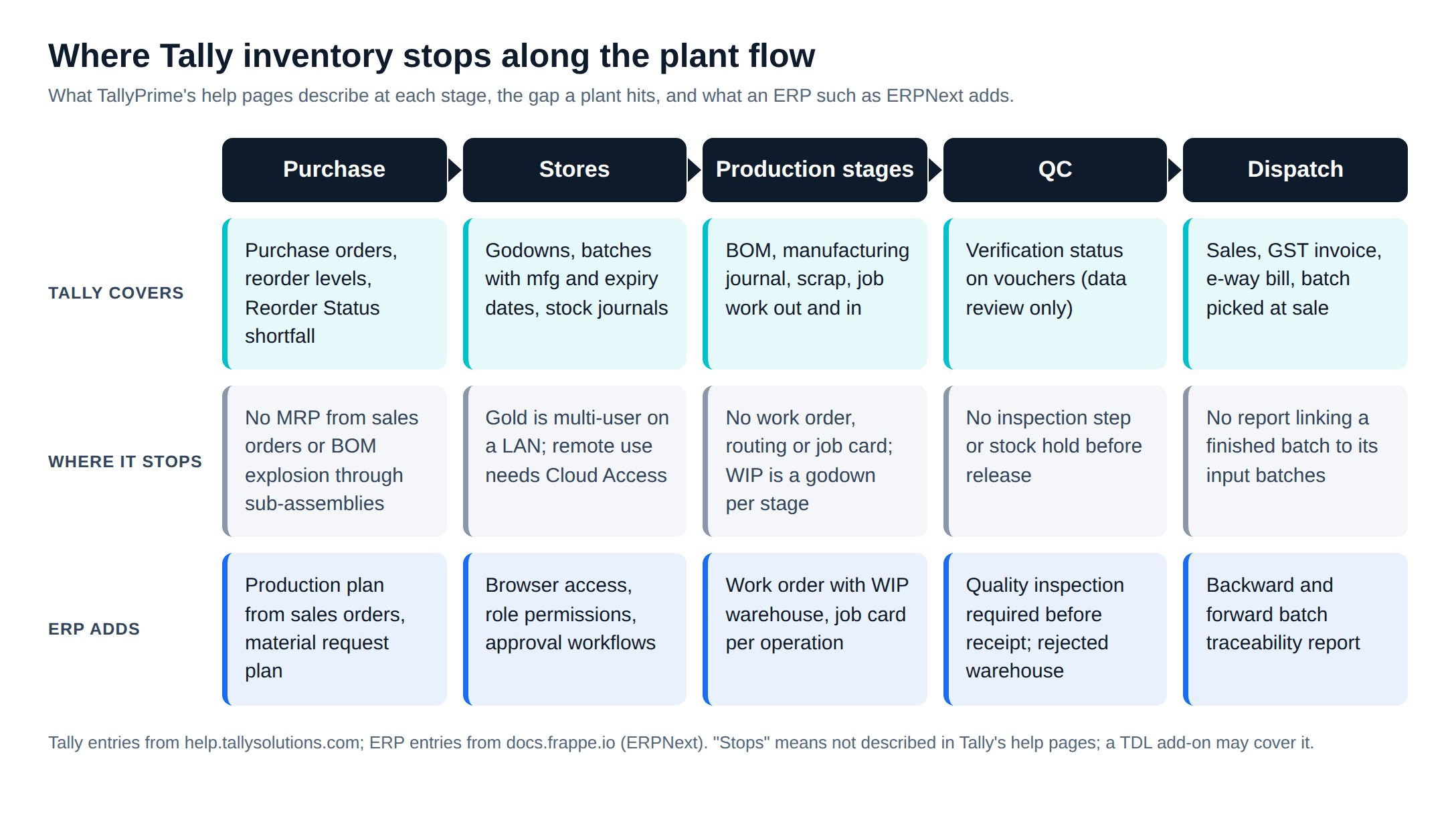
Tally inventory management follows the same pattern at every point below. Tally records a voucher after the fact. An ERP holds an order that exists before the work starts, and the floor updates it as the work happens. "Not described" means Tally's help pages do not cover it; a TDL add-on may.
Work in progress across stages
In Tally, the help pages show WIP done with a godown per stage (their example is washing, then dyeing) and a Stock Journal for each move. The Godown Summary then shows "the items are being tracked at each stage with quantity and rate". Nothing ties those moves to one production order, so nobody can ask "how much of order 214 is still in dyeing?"
In ERPNext, a Work Order names a work-in-progress warehouse. Material moves in through a "Material Transfer for Manufacture" entry, and the order tracks required, transferred and consumed quantity per item.
Work orders, routing and job cards
Tally's help pages describe no internal work order, routing or job card. Job Work Out orders are for outside job workers. Tally's customisation page lists "streamline job orders with custom workflows" as a TDL build, so it is custom work, not a standard feature.
In ERPNext, a BOM can carry a routing of operations and workstations. Submitting the work order creates a job card for each operation, and the operation status moves from Pending to Work In Progress to Completed as job cards are updated.
Multi-level BOMs and planning from sales orders
In Tally, BOMs are per item, and the help pages do not describe exploding a finished good through its sub-assemblies. Reorder Status nets open orders against stock, which is reorder planning: it tells you what has fallen below a minimum. It does not work out what a new sales order needs, two BOM levels down.
An ERPNext Production Plan pulls items from sales orders, fetches sub-assemblies, and builds a raw material request plan. With "Skip Available Raw Materials" on, it subtracts projected quantity first. Our post on production planning, BOMs and MRP in ERPNext walks through it.
Quality inspection holds
Tally's help pages have no stock inspection step. Tally does have a verification status with On Hold and Verified, but it marks vouchers during data review, not stock. The workaround is a QC godown and a Stock Journal to release accepted goods, which depends on someone remembering to do it.
In ERPNext, an item can require inspection. The purchase receipt then cannot be submitted until a quality inspection is attached, and rejected quantity goes to a rejected warehouse. In-process inspections can be raised against a job card.
Batch and serial traceability across production
Tally covers batches well at receipt and dispatch. Two limits show up in production. Tally's own FAQ notes that when batch, manufacturing date or expiry is enabled, item quantity is not auto-filled in the manufacturing journal. And serial number management appears on Tally's customisation page as a TDL build, not a standard feature. The help pages describe no report that links a finished batch to the raw material batches consumed in it.
ERPNext version 15 added the Serial and Batch Bundle, and the Serial and Batch Traceability report runs backward (which component batches made this batch) and forward (which customers received it). One caveat from the docs: if a raw material was never mapped to a specific finished good, the report lists it under every finished good in that stock entry.
Stores on the floor, in real time
Tally's Gold licence is for "multiple users working simultaneously on the same data within a LAN network". Users outside the office network need TallyPrime Cloud Access, which needs a valid TSS subscription, or a Tally Virtual User licence on a server. Picture a plant where the stores desk is a PC near the server, so receipts and issues get keyed in from paper slips at the end of the shift.
ERPNext runs in a web browser, so a storekeeper can post a receipt or issue from a phone at the gate. There is no per-user licence fee, so adding the five people on the floor does not change the software bill (our ERPNext vs Tally comparison covers licensing).
Costing: actual against standard, per order
In Tally, a stock item can carry a standard cost, which Tally describes as "an estimated cost which is derived from the historical analysis of data", and it fills in on purchases. The Manufacturing Journal shows an effective cost, and the Cost Estimation report rolls up BOMs. Tally's help notes the two can disagree, because the estimate covers costs from purchase to sale. Job costing gives profit per cost centre, not per production run.
Each ERPNext work order carries a planned operating cost from the BOM and an actual operating cost from its job cards, alongside the actual materials consumed. You see the variance on the order, while the batch is still on the floor.
Approvals
In Tally, user roles control who can create, alter or only view vouchers, and edits to back-dated vouchers can be locked after a cut-off date. A maker-checker step, where a purchase order or stock adjustment waits for a manager, is not in the help pages; third-party developers sell TDL voucher-authorisation modules for it.
ERPNext workflows add states, transitions and approver roles to any document type, with conditions such as doc.grand_total <= 100000. A material request above a limit can go to the plant head, and a stock reconciliation can need the accounts manager's approval.
When a TDL add-on is the better answer
TDL, Tally's customisation language, can add fields, reports and automation, and TallyShop sells ready-made add-ons. If your only gap is a serial number field or one approval step, an add-on costs less than an ERP project and keeps your accountant's workflow intact.
The trouble starts when you need several. Each add-on comes from a different developer, has to be re-tested on each TallyPrime release, and still sits on vouchers rather than orders. None of them gives you a production order that the floor updates.
You have outgrown Tally inventory if...
Count how many of these are true for your plant today.
- Production status lives in a spreadsheet or a WhatsApp group, not in Tally.
- You cannot say how much of a given order is at each stage without walking the floor.
- Raw material shortages show up when the batch is about to start, not when the sales order is booked.
- Your products have sub-assemblies, and someone works out requirements level by level by hand.
- Incoming material sometimes reaches production before QC has passed it.
- A customer or auditor has asked which supplier batch went into a finished batch, and the answer took a day.
- The stores team writes slips that someone keys into Tally at the end of the shift.
- You find cost overruns at month end, when the batch is already sold.
- Purchase orders or stock adjustments go through without a second person checking them.
One or two ticks: a TDL add-on or a tighter process may be enough. Three or more, especially the first four, and the gap is structural. Tally can keep the books while stores and production move to an ERP, or ERPNext can take over both. The Tally to ERPNext migration guide covers what moves, the GST ledgers and the cut-over weekend.
Metageeks, an ERPNext implementation company, scopes this from your plant's flow, not from a module list. Our ERPNext implementation for manufacturers starts with a walk through purchase, stores, production, QC and dispatch, and ends with a written scope you can compare against other quotes.
Frequently asked questions
Can Tally track work in progress?+
Partly. Tally's help pages show how to move material through process stages using a separate godown for each stage and a Stock Journal for each move, so the Godown Summary shows quantity and value at each stage. There is no production order tying those moves together, so the WIP figure is only as current as the last voucher someone entered. ERPNext tracks WIP against a work order with its own work-in-progress warehouse.
Does TallyPrime support multi-level BOMs?+
Tally lets you define one or more BOMs per stock item, mark components as by-products, co-products or scrap, and copy components between BOMs. Its help pages do not describe exploding a finished good's BOM down through its sub-assemblies to raw materials. With sub-assemblies, you record a manufacturing journal for each level. ERPNext's production plan can pull sub-assembly items and explode the BOM to raw materials.
Can Tally hold stock for quality inspection?+
Not as a built-in inspection step. The workaround is a QC godown: receive into it, then move accepted stock to the main store with a Stock Journal. Tally's verification status (On Hold, Verified and so on) marks vouchers during data review; it is not a stock hold. In ERPNext an item can be set to require a quality inspection, and the purchase receipt cannot be submitted until the inspection is filled in.
Can a TDL add-on fix these gaps?+
Some of them. Tally's own customisation page lists serial number management and job order workflows among manufacturing customisations built in TDL, and voucher-approval modules are sold by third-party developers. An add-on is a good answer for one missing report or field. When the gaps are work orders, planning, QC and traceability together, you are building an ERP inside an accounting product.
Related reading
- ERPNext vs Tally for manufacturers: the whole-product comparison, including GST and licensing.
- Moving from Tally to ERPNext: data, GST ledgers and the cut-over, step by step.
- Production planning, BOMs and MRP in ERPNext: what replaces the spreadsheet beside Tally.
- Tally alternatives for manufacturers: the wider shortlist, with India prices.
- MRP vs ERP: when material planning alone is enough and when a plant needs an ERP.
Free ERPNext fit check
Will ERPNext fit your factory?
Answer a few quick questions. On a short call we tell you whether ERPNext fits how you make, stock and sell, and what the rollout looks like.
Check my fit →About the author

- Tags
- erpnext
- erp
- manufacturing
- india
- tally
Subscribe to Our Newsletter
The AI Build Brief: practical playbooks on how to build, price and ship AI features, in one short email every other week.