

MRP vs ERP looks like a choice between two products, but one sits inside the other. MRP software plans materials: it tells you what to buy, how much and when. ERP software runs the business: it plans materials too, then raises the purchase order, receives the goods, books the bill, issues the GST invoice and works out what the job cost. This post is for the owner of a 10-100 person Indian plant deciding whether a planning tool is enough or whether the plant needs the whole system.
TL;DR
- MRP (material requirements planning) explodes the bill of materials, subtracts stock and open orders from demand, and offsets each order by its lead time. It does not raise the purchase order, book the bill or issue the invoice.
- MRP II added master scheduling and capacity planning. ERP added everything else: accounting, GST invoicing, purchase-to-pay, sales and costing, on one database.
- A standalone MRP tool plus Tally can work for a plant with simple products and one person keeping the two systems in step.
- An ERP pays off once purchase and stock figures are being typed twice, job costing matters, or the stock in the planning tool stops matching the books.
- ERPNext's Production Plan does the MRP netting inside the ERP. It nets one total requirement, not weekly buckets, so the planner still owns the dates.
Free ERPNext fit check
Will ERPNext fit your factory?
Answer a few quick questions. On a short call we tell you whether ERPNext fits how you make, stock and sell, and what the rollout looks like.
Check my fit →First, which MRP?
In India, "MRP" also means the price printed on a pack: the maximum retail price, the highest price a packaged commodity may be sold to the consumer for, inclusive of all taxes, as defined in the Legal Metrology (Packaged Commodities) Rules, 2011. It is a labelling rule, not software.
This post is about the other MRP: material requirements planning, the method a plant uses to work out its material needs.
MRP vs ERP: the difference in plain terms
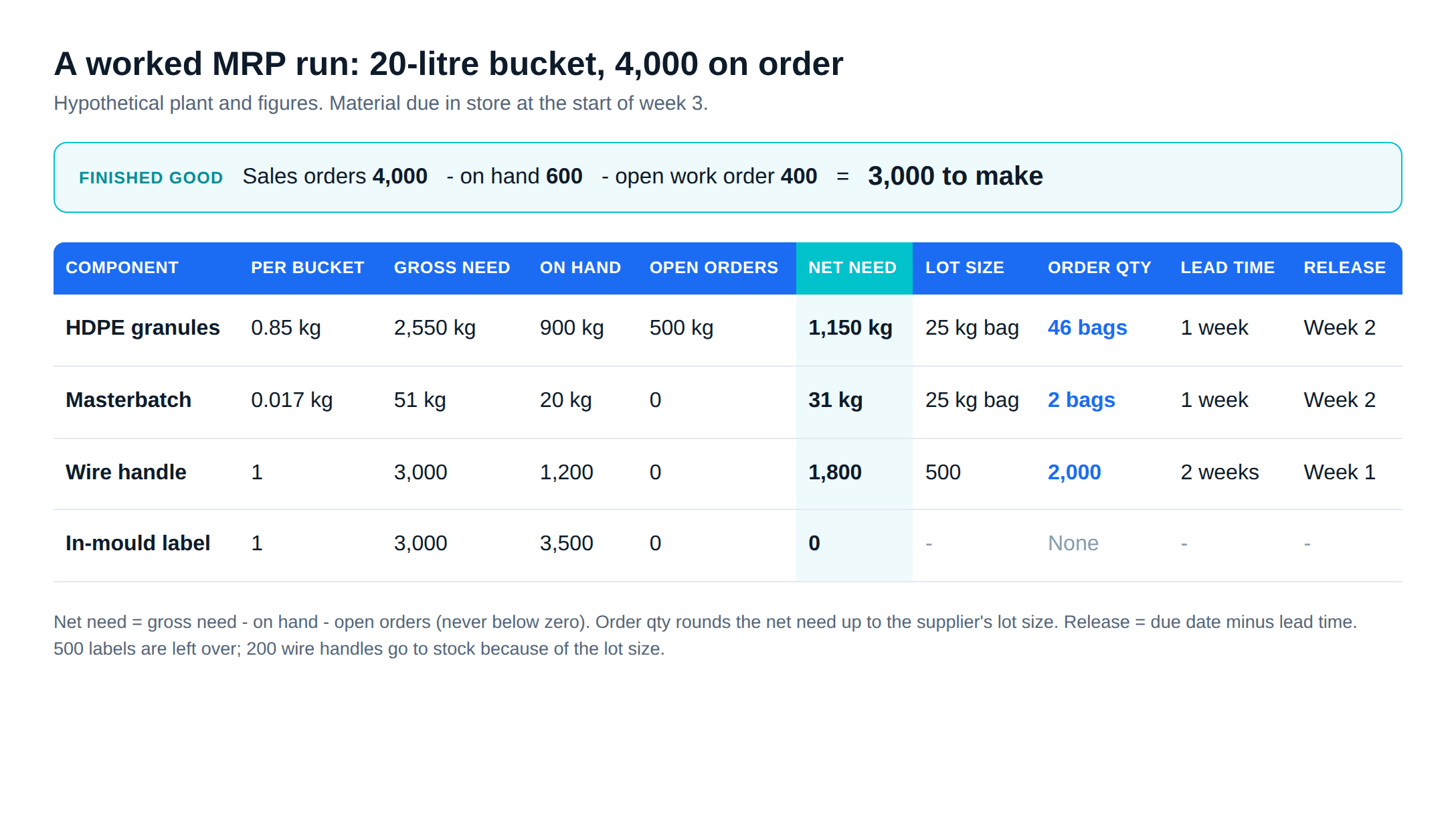
MRP: material requirements planning
MRP turns a demand for finished goods into a list of material orders. It is described as a production planning, scheduling and inventory control system with three aims: have materials ready for production, keep stock low, and plan manufacturing and purchase. Joseph Orlicky set out the method in his 1975 book Material Requirements Planning.
An MRP run does three things:
- Explodes the bill of materials (BOM). One finished good becomes its components, level by level, multiplied by the quantity to make.
- Nets the requirement. From the gross requirement it subtracts stock on hand and orders already open. An operations management text from the University of Houston writes it as gross requirements plus safety stock minus inventory on hand, reset to zero if the answer is negative.
- Offsets by lead time. The same text shifts each planned order back by its lead time: an order that must arrive in week 3 with a one-week lead time is released in week 2. Lot sizes round the quantity up to what a supplier will sell.
MRP II: manufacturing resource planning
In 1983, Oliver Wight extended MRP into manufacturing resource planning, MRP II, adding master scheduling and capacity planning among other things. MRP asks "do we have the material?" MRP II also asks "do we have the machines and the hours?"
ERP: enterprise resource planning
ERP is the suite of integrated applications that runs a company's core processes on shared data. The term, credited to Gartner in the 1990s, extended MRP and MRP II beyond the factory: financial and management accounting, order processing, purchasing, inventory, HR and payroll. In an ERP, MRP is one function among many, and it plans against the same stock and order records the accountant uses.
A worked MRP run for one product
Picture a hypothetical moulding plant that makes a 20-litre HDPE bucket with a lid, a wire handle and an in-mould label. All the figures below are invented for the example; the arithmetic is real.
The BOM, per bucket: 0.85 kg of HDPE granules (body and lid), 0.017 kg of colour masterbatch (2 percent of the granules), one wire handle and one label.
Demand: sales orders for 4,000 buckets, to ship at the end of week 4. Moulding and assembly run in week 3, so all material must be in the store by the start of week 3.
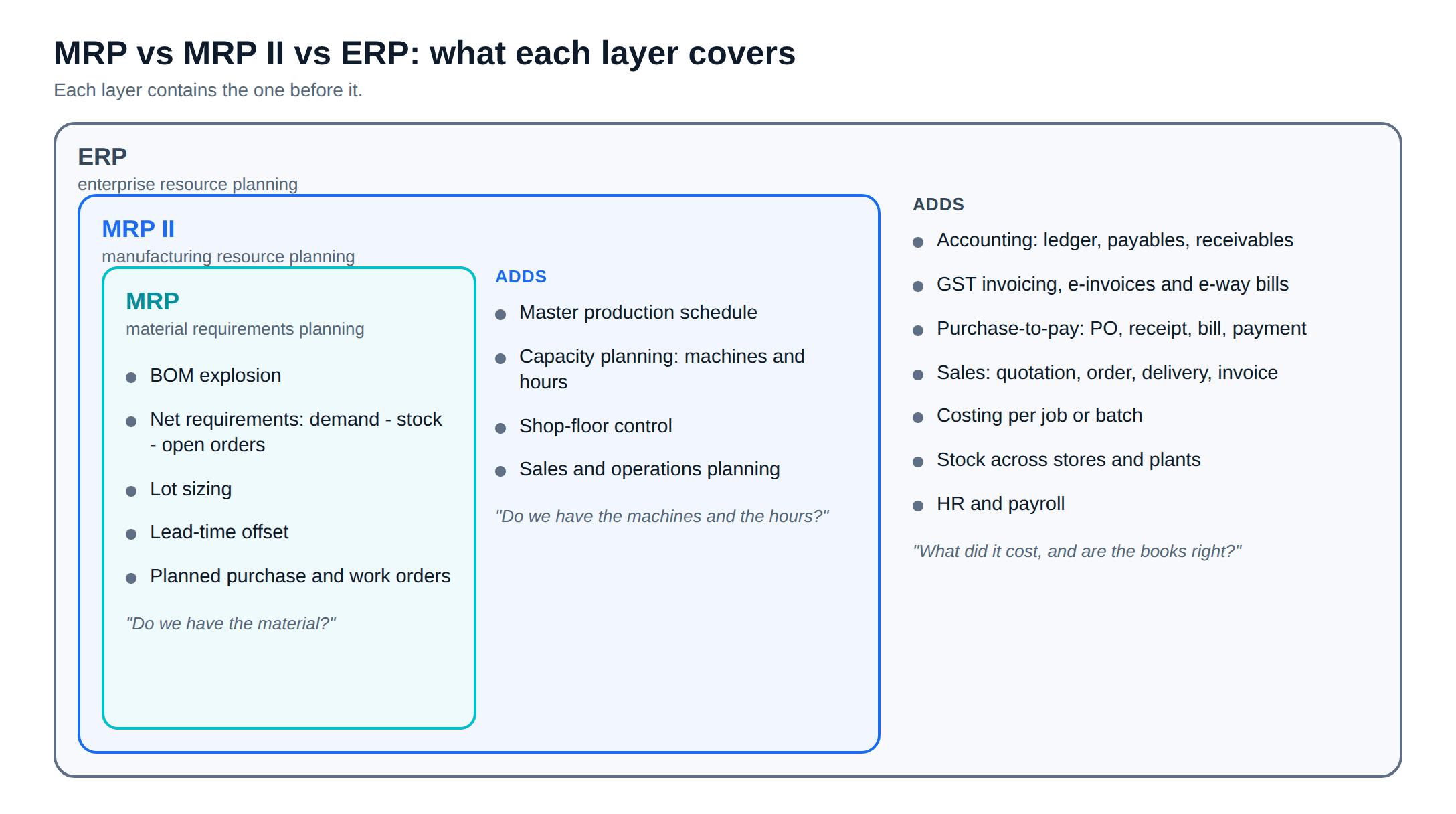
Step 1, net the finished good. The store holds 600 finished buckets and a work order for 400 more is already open.
4,000 - 600 - 400 = 3,000 buckets to make.
Step 2, explode the BOM for 3,000 buckets.
- HDPE granules: 3,000 x 0.85 kg = 2,550 kg
- Masterbatch: 3,000 x 0.017 kg = 51 kg
- Wire handles: 3,000
- Labels: 3,000
Step 3, net each component against stock on hand and open purchase orders, then round up to the supplier's lot size.
| Component | Gross need | On hand | Open orders | Net need | Lot size | Order qty | Lead time | Release in |
|---|---|---|---|---|---|---|---|---|
| HDPE granules | 2,550 kg | 900 kg | 500 kg | 1,150 kg | 25 kg bag | 1,150 kg (46 bags) | 1 week | Week 2 |
| Masterbatch | 51 kg | 20 kg | 0 | 31 kg | 25 kg bag | 50 kg (2 bags) | 1 week | Week 2 |
| Wire handles | 3,000 | 1,200 | 0 | 1,800 | 500 | 2,000 | 2 weeks | Week 1 |
| Labels | 3,000 | 3,500 | 0 | 0 | - | None | - | - |
Step 4, offset by lead time. Everything is due at the start of week 3. The granules and masterbatch have a one-week lead time, so their orders go out in week 2. The handles take two weeks, so that order goes out this week. Labels need no order: 500 will be left over.
The answer is only as good as two inputs. The BOM must carry the real usage, including process loss: if a bucket really uses 0.90 kg once runners and rejects are counted, the granule order is 150 kg short. And "900 kg on hand" must be true. A planning tool that reads stock from a spreadsheet updated on Fridays plans against last Friday.
What a standalone MRP tool leaves out
The MRP run ends with a list: buy 46 bags of granules in week 2. What happens after the list depends on other software. When a plant buys a tool sold as MRP software, check which of these it handles and which go back to Tally or a spreadsheet:
Accounting
GST invoicing
Purchase-to-pay
Costing
Sales and dispatch
Shop-floor records
The e-invoicing threshold comes from Notification 10/2023-Central Tax, effective 1 August 2023. A plant above it needs an invoicing system that generates the invoice reference number, whichever planning tool it uses.
When MRP alone is enough
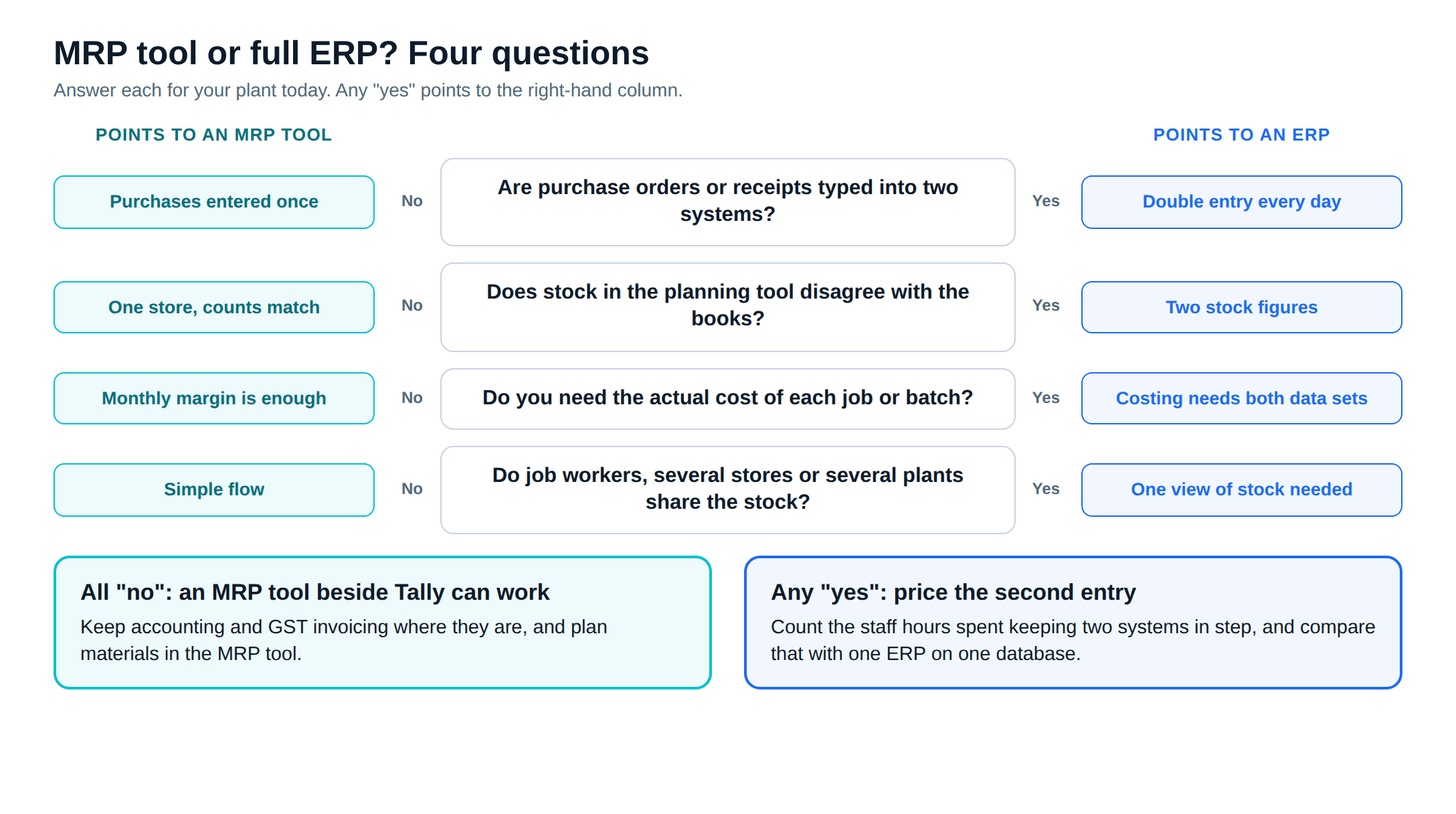
A standalone MRP tool beside Tally is a sound choice when all of these are true:
- Accounting and GST invoicing already work in Tally, and the accountant is happy there.
- Products have one or two BOM levels and the material list per product is short.
- Purchase volume is low enough that one person can enter each purchase order and receipt in both systems the same day.
- The plant does not need per-job or per-batch costing; a monthly margin from the books is enough.
- Stock lives in one store, counted often enough that the planning tool's figure can be trusted.
Here MRP software fixes planning and the accounts team keeps working the way it does now.
When an ERP is worth it
The case for an ERP rests on double entry. Each of these signs means two systems are holding the same facts and disagreeing:
Signs the planning tool is no longer enough
- Purchase orders are raised in the MRP tool and typed again in Tally, and the two totals differ at month end.
- Stock in the planning tool and stock in the books disagree, and nobody knows which one is right.
- The owner asks what a batch cost, and the answer takes a day of spreadsheets.
- Material goes to job workers and comes back, and tracking it means a third register.
- Several stores or plants need one view of stock and orders.
At that point the plant is paying for MRP software and for the people who keep it in step with the books. One database removes the second entry. Our guide to ERP for manufacturing in India covers what else to weigh: cost, choosing a system and moving data out of Tally. For what ERPNext itself costs to run each year, see ERPNext pricing in India.
How ERPNext handles MRP inside the ERP
In ERPNext, the MRP run is a document called a Production Plan. You pull in open Sales Orders or Material Requests, fetch the finished goods that have a BOM, and fetch sub-assemblies from their BOMs. Each sub-assembly can be marked to make in-house, subcontract or buy. The plan then builds a raw-material list and creates Work Orders and Material Requests from it.
The netting step uses ERPNext's Projected Qty, which the documentation defines as actual stock plus planned, requested and ordered quantities, minus quantities reserved for sales orders, production, subcontracting and production plans. That one figure covers both the "on hand" and "open orders" columns of the worked example. The Production Plan documentation gives the formula as Required Qty = BOM Required Qty - Projected Qty; in version 16 the checkbox that switches it on is labelled Consider Projected Qty in Calculation (RM).
The version 16 Production Plan doctype has two more options that matter here: Include Safety Stock in Required Qty Calculation, and Consider Minimum Order Qty, which raises a small order to the item's minimum. If the purchase unit is a bag marked as a whole-number unit, the v16 code rounds the quantity up to whole bags, as in the granule and masterbatch rows of the worked example. In the same code, a Material Request raised from the plan takes its Required By date from the plan row, or otherwise today plus the item's lead time in days.
It does not plan in weekly buckets. The plan nets one total requirement for the orders you selected, so the "release in week 2" column is the planner's call, not the system's. For the click-by-click detail (exploded items, consolidation, purchase and transfer, work orders and job cards), see our walkthrough of ERPNext production planning, BOM and MRP.
After the plan, a standalone tool hands over and ERPNext carries on. The Material Request becomes a Purchase Order, the receipt updates the same stock the next plan reads, the supplier bill posts to the same ledger, and the cost of the work order is built from those actual rates.
How to decide for your plant
Take one real product and one real month of orders, and run the worked example above by hand. Count how many times each purchase and receipt would be entered across your systems today. If the answer is once, a planning tool may be all you need. If it is twice or more, price the second entry in staff hours and compare it with an ERP.
If you want that comparison done on your own data, ERPNext implementation for manufacturers explains how Metageeks, an ERPNext implementation company, scopes a plant and writes down what the system will plan before any setup starts.
Frequently asked questions
What is the difference between MRP and ERP?+
MRP (material requirements planning) answers one question: what materials to buy or make, how many, and when, worked out from demand, the bill of materials, stock and lead times. ERP (enterprise resource planning) runs the whole business on one database: sales, purchase, stock, production, accounting, tax and payroll. An ERP for manufacturers includes MRP as one of its functions.
Is MRP software enough for a small manufacturing plant?+
It can be, if the plant's accounting and GST invoicing already work well in another system such as Tally, the product structure is simple, and someone is willing to keep stock and purchase figures in step between the two systems. Once the same transactions are being typed twice, or the stock figure in the planning tool disagrees with the books, count the hours spent fixing it and compare them with the cost of one ERP.
Does ERPNext have MRP?+
Yes. ERPNext's Production Plan explodes the bills of materials for the sales orders or material requests you select, nets off projected stock, and creates Work Orders and Material Requests for the shortfall. In version 16 it can also add safety stock and raise a small order to the item's minimum order quantity. It does not plan in weekly time buckets, so a planner still sets the dates.
Is MRP in manufacturing the same as MRP on a product label?+
No. On a product label in India, MRP means maximum retail price, the highest price a packaged product may be sold for, inclusive of all taxes, under the Legal Metrology (Packaged Commodities) Rules, 2011. In manufacturing software, MRP means material requirements planning. The two share an acronym and nothing else.
Related reading
- ERPNext production planning, BOM and MRP: the step-by-step setup inside ERPNext.
- ERP for manufacturing in India: cost, choice and migration for 20-100 person plants.
- ERPNext pricing in India: what it costs to run each year.
- Where Tally inventory breaks for a plant: WIP, job cards, QC holds and traceability.
Free ERPNext fit check
Will ERPNext fit your factory?
Answer a few quick questions. On a short call we tell you whether ERPNext fits how you make, stock and sell, and what the rollout looks like.
Check my fit →About the author

- Tags
- erpnext
- erp
- manufacturing
- india
- production planning
Subscribe to Our Newsletter
The AI Build Brief: practical playbooks on how to build, price and ship AI features, in one short email every other week.