

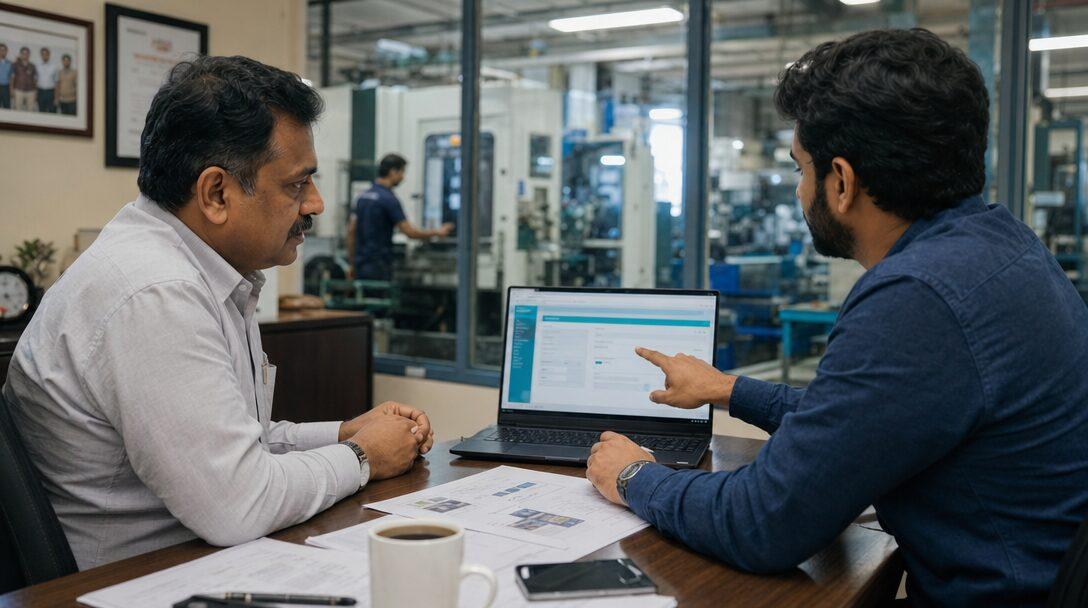
Picture a 30-person auto components plant in Pune that has outgrown Tally and two spreadsheets. One vendor offers to build custom ERP software from the ground up, exactly to its process. Another says to start from ERPNext and customise it. A third sells a subscription ERP that could be live in a month. All three call their offer "custom", and the quotes cannot be compared line by line. This guide is for that owner. In the interest of disclosure: Metageeks is an independent ERPNext implementer, so we earn money when the second option wins.
TL;DR
- There are three routes: build custom ERP software from scratch, customise an open-source ERP such as ERPNext, or buy a SaaS ERP and configure it.
- A from-scratch build means writing the ledger, GST, stock valuation, permissions and audit trail before any of your own process. It fits when what you need is mostly not ERP.
- ERPNext customisation is a ladder: Customize Form and custom fields, then Client and Server Scripts, then a separate custom Frappe app. None of it touches ERPNext's core code, which is what keeps upgrades possible.
- Over five years, upgrades, compliance changes, hosting and who maintains the code drive the cost more than the first build does.
- Whoever builds it, get a written copyright assignment and keep the repository in your company's name.
Free ERPNext fit check
Will ERPNext fit your factory?
Answer a few quick questions. On a short call we tell you whether ERPNext fits how you make, stock and sell, and what the rollout looks like.
Check my fit →Three ways to get custom ERP software
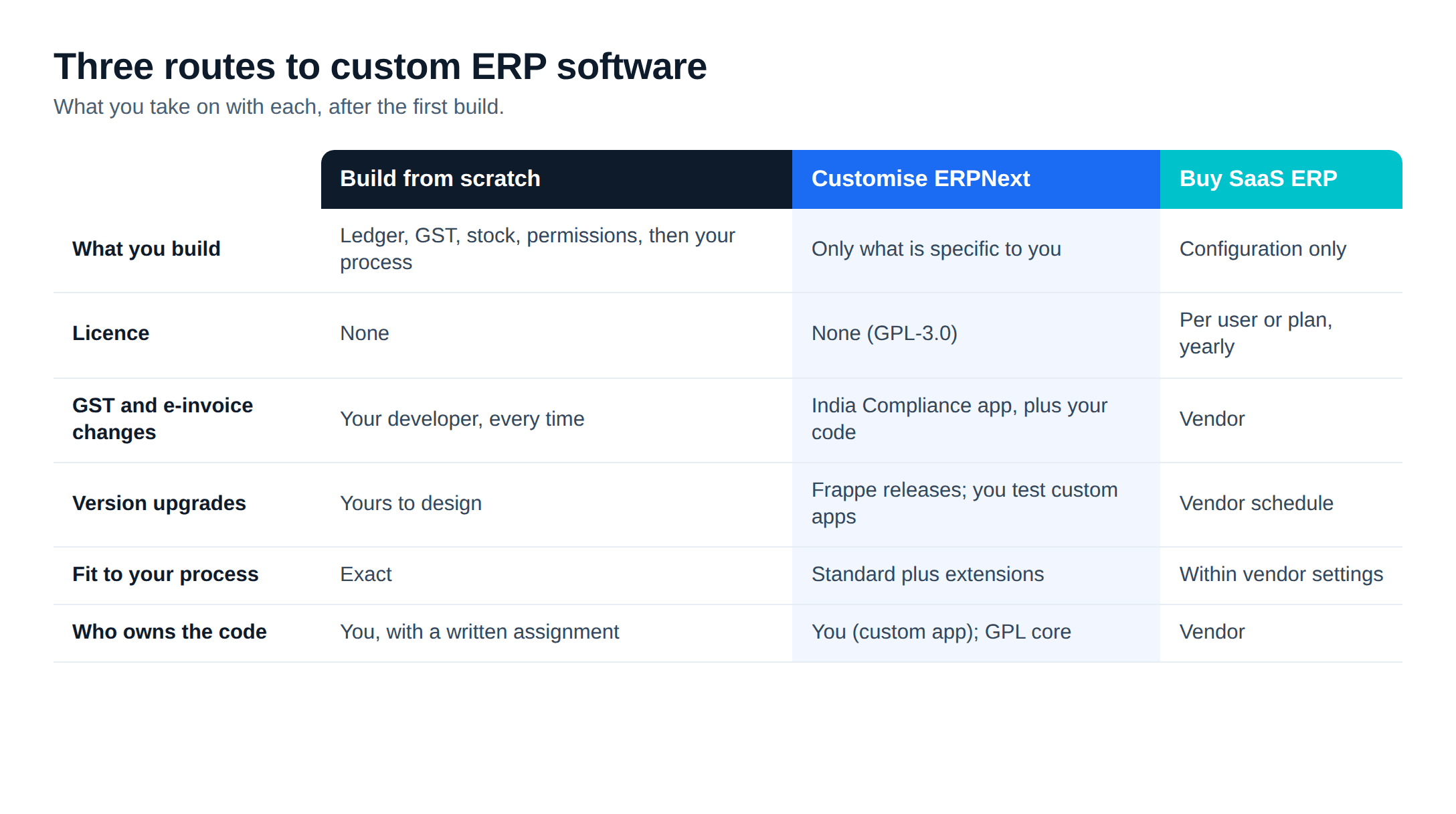
The word "custom" covers three different projects.
- Build from scratch. A development company writes a new application for your business. Every screen, table and report is new code.
- Customise an open-source ERP. You start from a working ERP, here ERPNext on the Frappe Framework, and add what is specific to you. Accounting, stock, buying, selling and manufacturing already exist.
- Buy a SaaS ERP and configure it. You rent the software per user or per month, change settings within what the vendor allows, and the vendor owns the code.
Option 1: build a custom ERP from scratch
A from-scratch build matches your process exactly and carries nothing you do not use. The catch is everything an ERP has to do before it does anything specific to you: a double-entry ledger with an audit trail, GST templates with e-invoices, e-way bills and returns, stock valuation across warehouses and batches, linked buying and selling documents, field-level permissions, reports and an API.
None of that is what makes your business different, yet you pay to design, write and test all of it, then maintain it. When a GST rule changes or the e-invoice schema moves, your developer changes your code, because nobody else will.
A from-scratch build fits when what you need is mostly product software (a dealer portal, a booking engine, a marketplace) with an ERP behind it at most. It also fits when your core process fights a standard ledger and stock model at every step, and you have checked that against a working ERP rather than assumed it. Either way, budget for a permanent development team. Our custom software vs SaaS post has a break-even model for build decisions, and custom software development cost in India covers market rates for build work.
Option 2: customise ERPNext
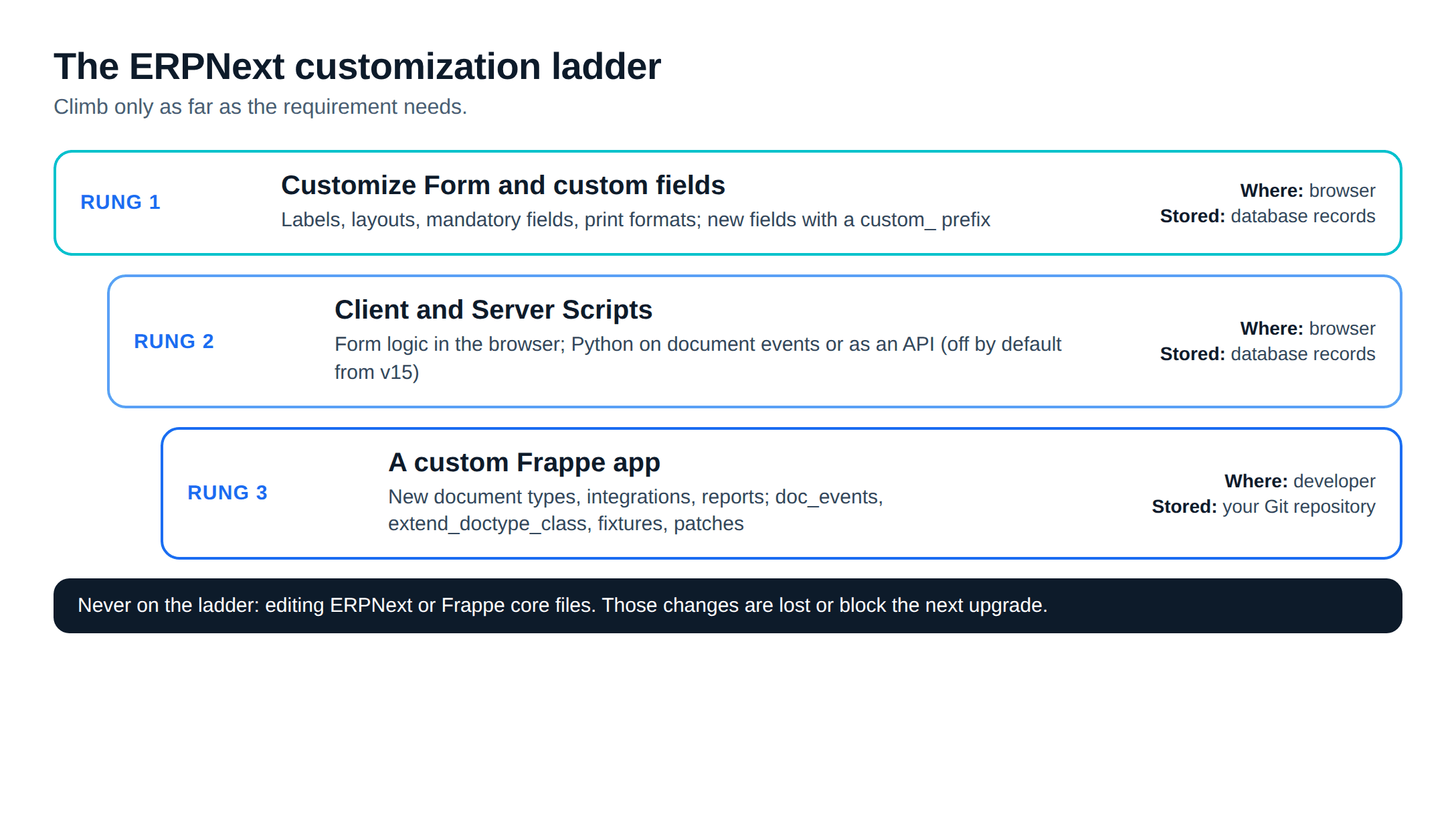
ERPNext is published under GPL-3.0 with no licence fee, and it runs on the Frappe Framework, which was designed to be extended. Customisation works as a ladder: start at the lowest rung that does the job.
Rung 1: Customize Form and custom fields
Customize Form changes labels, layouts, mandatory fields and default print formats from the browser. Custom fields add fields to any form. The documentation notes that custom fields get a custom_ prefix by default "to avoid a potential clash with current/future standard fields", a small detail that protects you at upgrade time.
Rung 2: Client Scripts and Server Scripts
A Client Script is JavaScript that runs on a form in the user's browser: a validation, a fetched value, a field that turns read-only after save. Its validations apply only in the browser form, not to API calls, the documentation warns. For rules that must hold everywhere, a Server Script runs restricted Python on document events (before save, after submit and others) or as an API endpoint.
Server Scripts have two limits. From version 15 they are disabled by default and must be switched on in the site or bench config, and on Frappe Cloud they need a private bench, because shared benches do not allow them. Both kinds of script live as records in your database. That makes them quick to add, and easy to lose track of, since they are not in Git unless you export them.
Rung 3: a custom Frappe app
Anything bigger goes into a separate app, created with bench new-app. The Frappe apps documentation describes it as a Python package installed alongside ERPNext. A custom app holds new document types (a karigar ledger, a mould register, a dealer claim), integrations, reports and pages. It changes standard behaviour through hooks instead of editing ERPNext's files:
doc_eventsruns your code when any document type is created, saved, submitted or cancelled.extend_doctype_class, new in version 16, adds methods to a standard document class and lets several apps extend the same class. The documentation prefers it tooverride_doctype_class, which replaces the class outright and "can cause issues when you have multiple apps overriding the same DocType class".fixturesexports records of the document types you list to JSON files in the app, so settings made on a test site travel to production with the code.patches.txtlists one-time data migrations that run in order duringbench migrate.
The app lives in its own Git repository, so it can be reviewed, tested and moved to a new server or a new implementer.
A worked example
Take a typical 30-person plant, assuming discrete manufacturing, two-level BOMs, job work to a plating vendor, and an owner who wants a WhatsApp dispatch notice and a tablet screen for the shop floor. Its list sorts onto the ladder like this:
- A "drawing revision" field on Item and a mandatory PO number on Sales Order: rung 1.
- Blocking a Delivery Note when the customer is over its credit limit by more than a set margin: a Server Script, rung 2.
- A mould register with shot counts and a maintenance alert: a new document type in a custom app, rung 3.
- The WhatsApp notice: an existing Frappe app, covered in our ERPNext integrations guide.
- The shop-floor screen: a small web app inside the custom app, as described in the ERPNext mobile app post.
BOMs and job work need no code, because they are standard ERPNext. Our ERPNext development team scopes projects this way, tagging each line with its rung before anyone estimates it.
Option 3: buy a SaaS ERP
A subscription ERP is the fastest route to live. The vendor carries hosting and upgrades, and in many products tax updates as well, so you do not need a developer on call. The trade-offs arrive later. Customisation stops where the vendor's settings stop, so a process that does not fit gets changed or handled in a side tool that talks to the ERP's API. Per-user pricing grows with headcount. And you own your data but not the software: what you can export, in what format, and for how long after you stop paying are set by the contract, so read that clause before signing.
SaaS fits when your processes are close to standard, nobody in the business wants to own a system, and speed matters more than fit. The custom software vs SaaS post covers the costs a SaaS invoice does not show, such as workaround hours and integration subscriptions.
What drives total cost of ownership
Prices depend on scope, so we are not giving any here. What we can show is where the money goes over five years and how each route shifts it.
| Cost driver | Build from scratch | Customised ERPNext | SaaS ERP |
|---|---|---|---|
| Licence | None | None (GPL-3.0) | Per user or plan, every year |
| First build | The whole ERP plus your processes | Your processes only | Configuration |
| Compliance changes (GST, e-invoice) | Your developer, every time | India Compliance app plus your custom code | Vendor |
| Version upgrades | Yours to design | Frappe releases; you test your custom app | Vendor, on its schedule |
| Hosting | Yours | Yours or Frappe Cloud | Included |
| Key-person risk | High: one codebase, one team | Lower: any Frappe developer can read a standard app | Vendor risk instead |
| Exit cost | Low if you hold the code | Low: code and data are yours | Set by the contract |
Three of these rows usually decide it.
Compliance: in ERPNext, Indian GST features come from the free India Compliance app, maintained separately from your own code. In a from-scratch build, each change to GST rules or portal APIs becomes a change request to your developer.
Upgrades: Frappe's supported versions page lists planned end of life for version 15 at the end of 2027 and version 16 at the end of 2029. A custom app will need at least one major version move in a five-year life, so budget for testing it.
People: custom ERP software is only as maintainable as its code is readable to the next developer. A standard Frappe app follows a structure any Frappe developer knows; a bespoke codebase follows whatever its first team decided.
For the ERPNext route in numbers, see our ERPNext implementation cost guide.
Upgrade safety: what survives a version upgrade
The rule is short: never edit ERPNext's or Frappe's own files. A change to core code is overwritten at the next update, or blocks it. Everything on the ladder avoids this, since form changes, custom fields and scripts are database records and a custom app sits in its own folder.
Some work remains at each major version. Custom apps and scripts have to be tested, because ERPNext functions and fields they rely on may have changed. Hooks that replace standard behaviour, such as override_doctype_class and override_whitelisted_methods, are the most fragile, since the code they replace keeps changing upstream. Upgrade a staging copy of production first, put your main documents through it, then upgrade production. Our ERPNext v16 production install guide covers the server side.
Who owns the code
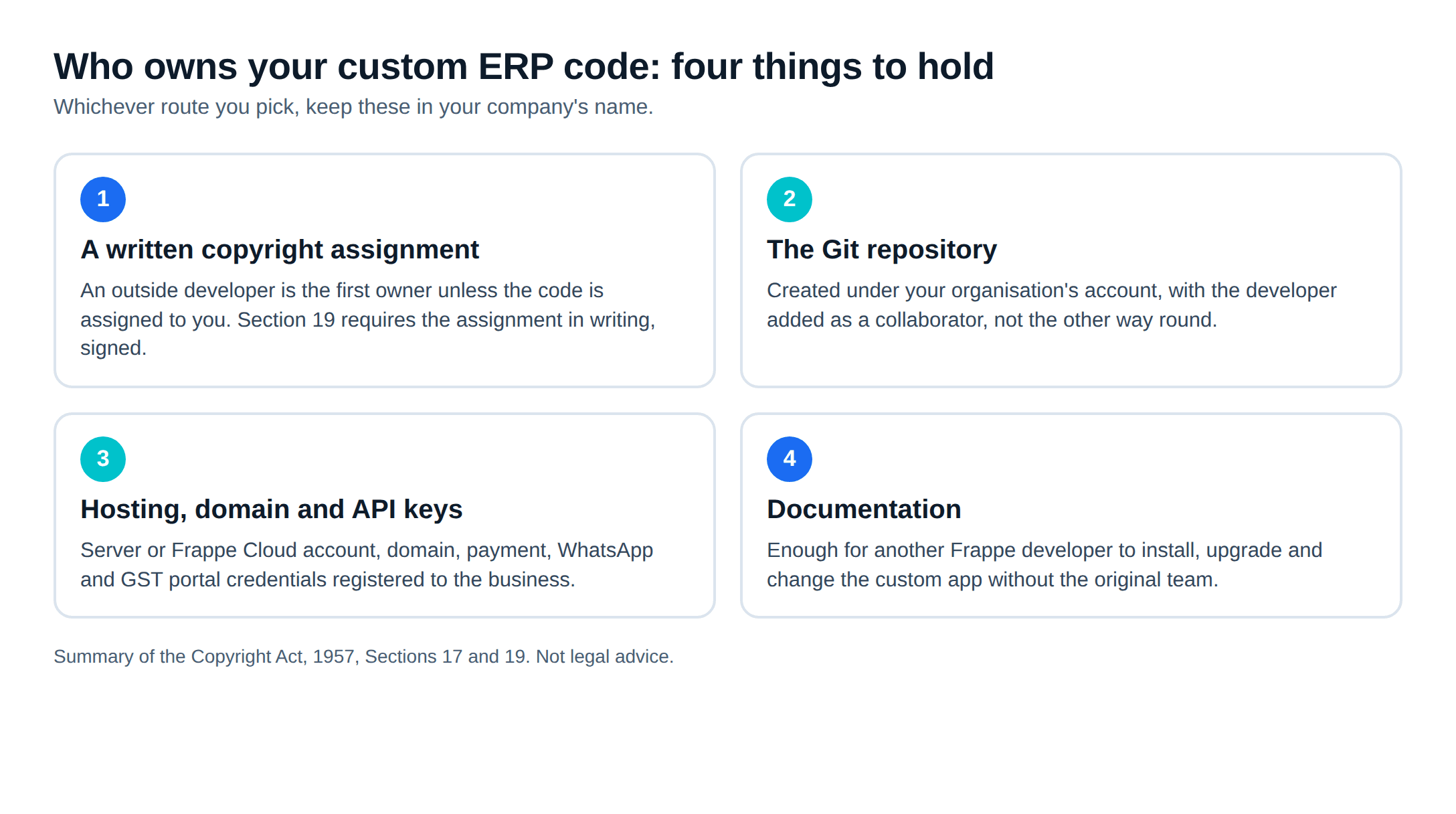
Under Section 17 of the Copyright Act, 1957, the author of a work is its first owner. The main exception for software is work made by an employee "in the course of his employment under a contract of service", which the employer owns unless they agree otherwise. An outside development company is not your employee. If it builds your custom ERP software and the contract is silent, it can argue that it owns the code and you hold only a licence to use it. Ownership moves to you through an assignment, and Section 19 says an assignment is valid only if it is in writing and signed by the assignor. Have a lawyer check the clause; this is a summary, not legal advice.
ERPNext itself is GPL-3.0, so nobody can take it away from you. The GNU GPL FAQ says the GPL does not require you to release a modified version and that you can use modifications privately. Obligations to provide source apply when you distribute the software to others.
Paper ownership is not enough if you cannot reach the code. Keep the Git repository, the server or Frappe Cloud account, the domain and API keys in your company's name, with the developer added as a collaborator.
How to choose, and how to vet a custom ERP software development company
Work through these in order:
- Is what you need mostly accounting, GST, stock, buying, selling and production? Then start from an ERP, not from scratch.
- Does standard ERPNext cover most of your process with settings alone? Then customisation is a short list, not a project. A guided ERPNext demo on your own documents answers this quickly.
- Will someone in the business own the system? If not, a SaaS ERP may suit you better than any custom route.
- Is the core requirement customer-facing product software? Build that part custom and connect it to an ERP for the books.
When you talk to a custom ERP development company, ask:
- Show us a custom app you have moved through a major version upgrade, and what broke.
- Will any of your changes touch ERPNext's own files? (The only good answer is no.)
- Whose GitHub account will the code live in?
- How do custom fields and settings move from the test site to production: fixtures, or by hand?
- Who tests the next upgrade, and is that in the support contract?
- Is the copyright assignment in the contract, in writing?
- What documentation do we get, and can another Frappe developer pick it up?
Our ERPNext development team works to the same list: changes stay out of core, the code sits in a repository you own, and each item is placed on the ladder before it is quoted.
Frequently asked questions
Is it better to build custom ERP software or customise ERPNext?+
If you need accounting, GST, stock and manufacturing plus a few processes of your own, customising ERPNext is usually the lower-risk route, because the ledger, tax and stock logic already exist and you only build the part that is unique. A from-scratch build makes sense when the core of what you need is not ERP at all, such as a platform you sell to customers, or when your rules fight a standard accounting and stock model at every step.
Will ERPNext customisations break when we upgrade?+
Changes made through Customize Form, custom fields, Client Scripts and Server Scripts are stored as records in your database, not in ERPNext's code, so updating the code does not overwrite them. Code in a separate custom Frappe app survives too, but it has to be tested and sometimes updated for each major version. What breaks upgrades is editing ERPNext's own files, which should never be done.
Who owns the code when a company builds custom ERP software for us?+
Under Section 17 of India's Copyright Act, 1957, the author is the first owner of a work unless an exception applies, such as work made by an employee under a contract of service. An outside development company is not your employee, so ownership passes to you through an assignment, which Section 19 says must be in writing and signed by the assignor. Put the assignment in the contract, and keep the repository and hosting accounts in your company's name.
Can a custom Frappe app be kept private under the GPL?+
ERPNext is licensed under GPL-3.0. The GNU project's FAQ says the GPL does not require you to release a modified version, and that you can make modifications and use them privately. Obligations to provide source arise when you distribute the software to others. If you plan to sell or hand the app to third parties, take legal advice on the licence first.
What should I ask a custom ERP software development company before hiring them?+
Ask to see a custom app they have taken through a major version upgrade, how they keep changes out of ERPNext core, whose GitHub account the code lives in, how fixtures and patches move changes between sites, who tests each upgrade, and what happens to the code and documentation if you end the contract.
Free ERPNext fit check
Will ERPNext fit your factory?
Answer a few quick questions. On a short call we tell you whether ERPNext fits how you make, stock and sell, and what the rollout looks like.
Check my fit →About the author

- Tags
- erpnext
- erp
- india
- custom development
Subscribe to Our Newsletter
The AI Build Brief: practical playbooks on how to build, price and ship AI features, in one short email every other week.