

The SaaS tool your operations team picked three years ago started as twelve seats on a company card. Today it is forty seats, a middleware plan that keeps it talking to accounting, and a spreadsheet someone rebuilds every Friday because the tool cannot produce the report finance wants. None of those costs sits on one invoice, so the question of whether to build your own internal software usually gets asked a year late, or answered with a guess.
TL;DR
- SaaS is cheaper to start and usually cheaper for generic work. Keep buying when the tool fits your process and your team rarely works around it.
- The invoice is not the cost. Add seat growth, weekly workaround hours at a loaded hourly rate, and what you pay to keep the tool integrated.
- In the illustrative model below, a $90,000 build breaks even against a SaaS setup costing $64,800 in year one at around month 28. Cut workarounds to 5 hours a week and it never breaks even inside three years.
- Custom wins when the workflow is specific to you, data has to move between systems you own, or a rule the tool cannot enforce is costing you mistakes.
- Price both paths over 36 months, including the months you pay for both while the build runs.
Written scope and estimate
Get your project scoped before you commit
Share what you need built. We come back with a written scope and an estimate you can compare against any other quote.
Get a written scope →The short answer
Custom internal software beats SaaS when the full cost of the SaaS path (seat fees, plus the hours your team spends working around the product, plus what it costs to keep it integrated) outgrows the cost of building and running your own tool over about three years. If the subscription is most of what you spend and workarounds are rare, keep buying. If workaround labor is approaching the size of the invoice, run the break-even model below with your own numbers.
Why does the SaaS bill keep growing when the process hasn't changed?
Per-seat pricing ties your bill to headcount, not to the value the tool delivers. Hire six people into operations and the invoice goes up, even if the new hires only look up records twice a day. Many products have no cheap read-only seat, so occasional users pay full price.
Renewals add to it. Vendors raise list prices, retire older plans and move features you rely on into a higher tier. The approval step or audit log included in your plan three years ago may now be an enterprise feature.
Most businesses also pay for more than they use. Zylo's 2026 SaaS Management Index, built on more than 40 million licenses, puts median SaaS spend at $9,455 per employee and finds organizations leave an average of 36 percent of their licenses unused. Some of your bill is probably seats nobody logs into. A license review costs nothing, so do it before you model a build.
What does working around the tool actually cost?
Workarounds are the cost nobody invoices. They look like this:
- Exporting to a spreadsheet to build a report the tool cannot produce
- Typing the same customer or order into two systems because they do not sync
- Chasing approvals over WhatsApp or email because the product has no approval step
- Keeping a side list of exceptions the tool's data model cannot hold
- Fixing records after someone edits the wrong field, because permissions are all or nothing
Each one is small. Across a team they add up to hours a week, and those hours grow with headcount the same way seats do.
To measure it, ask the people who use the tool daily to log workaround time for two weeks. Keep the log simple: task, minutes, how often. Multiply the weekly total by a loaded hourly rate, meaning salary plus benefits, payroll costs and overhead, not salary alone. This number decides most build-versus-buy calls for internal tools, and most businesses have never written it down.
What is the integration tax on SaaS?
Your SaaS tool holds data other systems need, and keeping them in step costs money.
Middleware is the visible part: a Zapier or Make plan billed by task volume, or a connector product billed per sync. Then there is API access. Some vendors only open the API on higher plans, and rate limits can throttle a nightly sync once volume grows. Finally there is the person who owns the brittle connection, notices when records stop syncing and repairs the mismatch by hand.
There is a structural cost too. The data lives in the vendor's model. If your business tracks something the product has no field for, you bend it into a notes field or a custom field that reports cannot filter well, and you pay for that every time someone needs an answer from the data.
At what point does building custom software pay for itself?
Here is a worked example. Every number below is illustrative, chosen to show the method. It is not a quote or a benchmark, so swap in your own.
The SaaS path
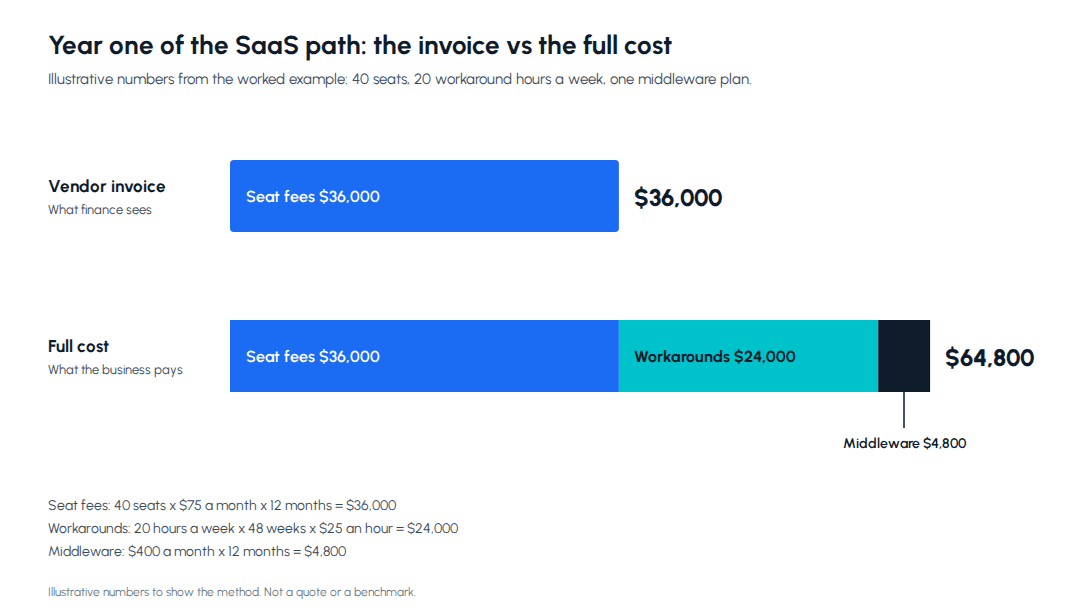
- 40 seats at $75 a month: $3,000 a month in year one, rising 10 percent a year as the team grows and prices go up
- Integration middleware: $400 a month
- Workarounds: 20 hours a week across the team, 48 working weeks a year, at a loaded $25 an hour, which is $24,000 a year or $2,000 a month
That comes to $5,400 a month in year one, or $64,800 for the year. The SaaS vendor's invoice shows $36,000 of it.
The custom path
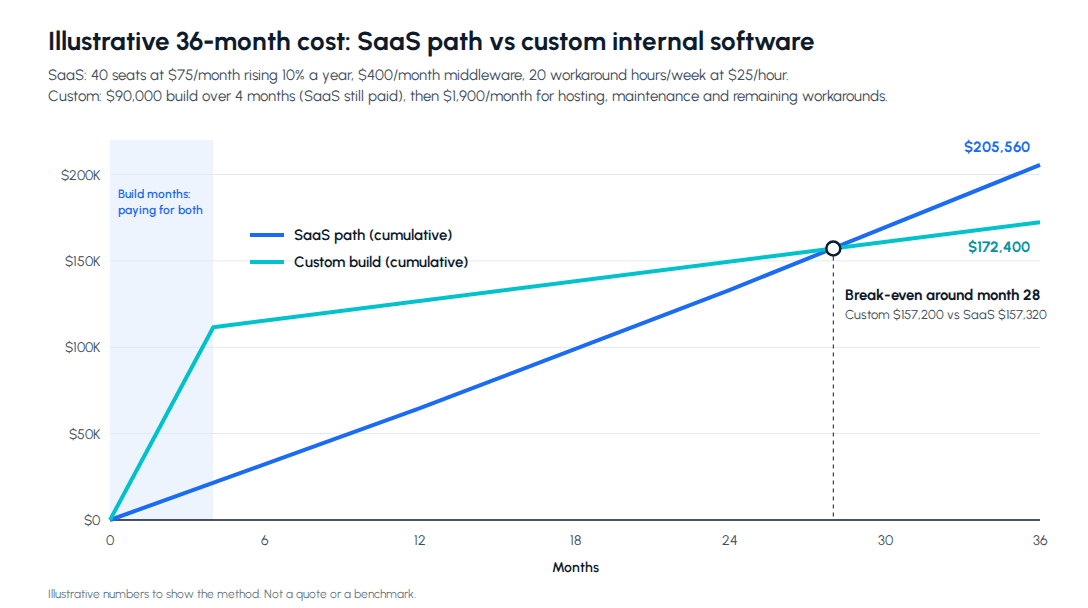
- Build: $90,000, spread evenly over four months, with the SaaS setup still running during those months
- After launch: $1,500 a month for hosting and a maintenance retainer
- Remaining workarounds: 4 hours a week, or $400 a month
So the custom path has cost $111,600 by the end of month four ($90,000 of build plus four months of SaaS at $5,400), and $1,900 a month after that.
The arithmetic. Cumulative SaaS cost reaches $64,800 at month 12, $133,200 at month 24 and $205,560 at month 36. Cumulative custom cost reaches $126,800 at month 12, $149,600 at month 24 and $172,400 at month 36. The lines cross at month 28, when the custom path has cost $157,200 and the SaaS path $157,320. Over three years the build comes out $33,160 ahead, and at year-three prices each further month adds about $4,130 to the gap.
Now stress the model, because the first version usually flatters whichever answer you wanted.
Workarounds are lower than you thought. At 5 hours a week instead of 20, the SaaS path costs $151,560 over three years and the custom path $166,400. The build never pays back inside 36 months. Keep buying.
The build runs 30 percent over. At $117,000 instead of $90,000, break-even moves from month 28 to about month 35. Still positive, but thin, and a second overrun would erase it.
In most versions of this model, workaround hours move the answer more than seat price does. If you cannot measure them, you are not ready to decide.
When should you keep buying SaaS?
Keep buying when the process is generic. Payroll, general ledger accounting, email, HR records and e-signature are solved problems, and the vendor spreads its development cost across thousands of customers. You will not build a better payroll system for less.
Keep buying when the vendor carries compliance work, like tax rule changes or statutory filing formats. That upkeep is part of what the subscription pays for.
Keep buying when the process is still moving. Software built around a workflow that changes every quarter gets rebuilt every quarter.
Keep buying when nobody can own the tool after launch. Custom internal software needs someone inside the business to decide what changes and to budget for maintenance. Without that owner the tool decays, and the team drifts back to spreadsheets.
For the AI version of this decision, build vs buy AI covers where off-the-shelf AI tools hit their ceiling.
What does a sensible first custom build look like?
Rarely a full replacement. The lower-risk move is a narrow internal tool for the one workflow the SaaS product handles badly. It reads and writes the same data through the vendor's API, and the vendor stays the system of record for everything else. You measure hours saved on that one workflow before deciding whether to replace more.
The requirement that justifies a build is usually a rule the business needs and generic tools do not enforce. In our work on the Dalmia Resorts member records system, that rule was a second pair of eyes: a support executive's correction to a member record is saved as a pending request, and nothing changes until a verifier approves it. That project moved about 20,000 member records off paper files and spreadsheets rather than off a SaaS subscription, but the lesson carries over. Finding a record went from about 15 minutes to under 30 seconds because the tool was built around how the support team searches, and the approval rule is exactly the kind of requirement a generic tool would have made them work around.
If you are pricing the build side of the model, custom software development cost and timeline in India breaks down published rates, effort drivers and billing models. When a build does make sense, a custom software development engagement for internal tools with Metageeks starts with a scope agreed in writing, is billed time-and-materials against that scope or on a monthly retainer for ongoing work, and ends with the source code in your hands.
How do you run this decision for your own business?
- List what the SaaS path costs today. Seats, plan tier, middleware, API add-ons and your renewal date.
- Log workaround hours for two weeks. Multiply by a loaded hourly rate and by 48 weeks.
- Project headcount. Seats follow hiring, so use the hiring plan, not today's number.
- Get a written estimate for the narrowest useful build. One workflow, with roles, integrations and data migration listed.
- Draw both cumulative lines over 36 months. Include the months you pay for both.
- Stress it. Halve the workaround hours and add 30 percent to the build. If building still wins, build. If the answer flips, keep buying and revisit at renewal.
The renewal date matters more than it looks. It is the one point in the year where you can change plan, cut seats or leave without paying twice, so start the model a few months before it arrives.
Frequently asked questions
Is custom software cheaper than SaaS?+
Not at the start, and rarely for generic work. A subscription has no build cost, so SaaS nearly always wins the first year. Custom internal software gets cheaper when the whole SaaS path keeps growing: seats that scale with headcount, renewal increases, hours spent exporting and re-keying data, and the middleware that keeps the tool connected. In the illustrative model in this post, a $90,000 build with $1,900 a month in running costs overtakes a SaaS setup costing $5,400 a month in year one at around month 28. With five workaround hours a week instead of twenty, the same build does not pay back inside three years. The answer depends on your workaround hours far more than on the subscription price, so measure those before you compare quotes. Include the months you pay for both while the build runs.
How do I calculate the break-even point between SaaS and custom software?+
Draw two cumulative cost lines over 36 months. The SaaS line is seat fees, with your expected headcount growth and renewal increases, plus middleware and integration costs, plus weekly workaround hours multiplied by a loaded hourly rate. The custom line is the build cost spread across the build months, plus the SaaS you keep paying while the build runs, plus hosting, maintenance and any workarounds left after launch. Break-even is the month where the custom line drops below the SaaS line. If it lands after month 36, or only works with optimistic hour counts, keep buying. Then rerun the model with the build 30 percent over budget and the workaround hours halved. If building still wins under both changes, the case is sound. If it flips, revisit the decision at your next renewal. Use loaded hourly rates, not salaries.
What are the hidden costs of SaaS for internal tools?+
The largest is labor spent working around the product: exporting to spreadsheets to build a report the tool cannot produce, entering the same record in two systems, and chasing approvals over chat because the tool has no approval step. The second is integration: middleware subscriptions, API access that sits behind a higher plan, and time spent fixing sync failures. The third is seat creep. Per-seat pricing grows with headcount rather than value, and people who only need to view a record often still need a paid seat. Zylo's 2026 SaaS Management Index found organizations leave an average of 36 percent of their SaaS licenses unused. Vendors also move features into higher tiers at renewal, which raises the price of keeping the same setup. A two-week log of workaround time and a license review usually reveal most of these costs.
When should a business keep paying for SaaS instead of building?+
Keep buying when the process is generic and the tool fits it, such as payroll, accounting ledgers, email and HR records. Keep buying when the vendor carries compliance work you would otherwise own, like tax rule updates or statutory filing formats. Keep buying when your team is small, workarounds are rare, or the process is still changing month to month, because software built around an unsettled process gets rebuilt. And keep buying if nobody inside the business can own a custom tool after launch, since someone has to decide on changes and budget for maintenance. A common middle path is to keep the SaaS product as the system of record and build a small internal tool for the one workflow it handles badly. Revisit the question at each renewal, because that is when changing plan, cutting seats or leaving costs the least.
Can we replace only part of a SaaS tool with custom software?+
Yes, and it is often the cheapest way to start. Most SaaS products expose an API, so a custom tool can read and write the same records while your team keeps the vendor for everything it does well. Typical first builds are an approval queue the product lacks, a report that combines data from the SaaS tool and your accounting system in one view, or a data entry screen shaped around how your team actually works. This keeps the build narrow, often a single workflow, and lets you measure the hours saved before deciding whether to replace more. Check two things first: whether API access is included in your plan or sits behind a higher tier, and whether the vendor's rate limits can handle your volume. Keep the vendor as the system of record until the new tool has proved itself.
Written scope and estimate
Get your project scoped before you commit
Share what you need built. We come back with a written scope and an estimate you can compare against any other quote.
Get a written scope →About the author

- Tags
- custom software
- build vs buy
- pricing
Subscribe to Our Newsletter
The AI Build Brief: practical playbooks on how to build, price and ship AI features, in one short email every other week.