

Most apps a business commissions are made of forms, lists, a login, payments and push notifications. For that kind of app, choosing between cross-platform and native mostly comes down to whether you want to pay for it twice. There are real exceptions where native is worth the second codebase, and they are narrower than most vendors let on.
TL;DR
- Cross-platform (React Native or Flutter) is the right default for business apps: one codebase, both stores, and no difference a user can feel on ordinary screens.
- Native (Swift and Kotlin) wins on real-time graphics, continuous background location, heavy camera or video processing, and new OS features on launch day.
- One codebase does not halve the build. GoodFirms estimates a 20-40% saving. The bigger saving comes after launch, when every feature and OS update lands once.
- In India, Android developers are the deepest hiring pool and iOS developers cost the most. React Native and Flutter both draw on large pools.
- Choose the stack the people maintaining the app in year three will know, not the one that wins a benchmark.
Written scope and estimate
Get your project scoped before you commit
Share what you need built. We come back with a written scope and an estimate you can compare against any other quote.
Get a written scope →The short answer
Build cross-platform unless the app's core value depends on the phone's hardware or the newest OS features. If users mostly fill in forms, browse, book, pay and get notified, React Native or Flutter will serve both stores from one codebase and cost less to keep alive. If the app tracks location all day, renders real-time graphics, processes video frames or needs widgets and watch apps on day one, budget for native, or at least for native modules inside a cross-platform app.
What is the actual difference between cross-platform and native?
Native means two separate apps. The iOS app is written in Swift, usually with SwiftUI. The Android app is written in Kotlin, usually with Jetpack Compose. Each has its own codebase, its own bugs and its own release cycle.
Cross-platform means one codebase that produces both apps. The two frameworks that matter in 2026 work differently:
- React Native is written in TypeScript or JavaScript and renders real platform components. React Native 0.82, released in October 2025, was the first version to run entirely on the New Architecture, and the current release is 0.87. The React Native docs recommend starting new apps with the Expo framework.
- Flutter is written in Dart and draws its own interface. Since Flutter 3.27, its Impeller rendering engine is the default on iOS and on Android API 29 and later.
A third option has matured recently. Kotlin Multiplatform shares business logic across platforms, and JetBrains declared Compose Multiplatform for iOS stable in May 2025, so shared UI is now possible too. It suits Android-first teams who already write Kotlin.
None of these is a website wrapped in an app shell. That was the Cordova era, and it is where cross-platform got its reputation for feeling cheap.
Is cross-platform fast enough for a business app?
For the apps most companies build, yes. A booking screen, an order history, a checkout, a chat thread and a settings page do not stress a modern phone, whichever framework draws them.
When a cross-platform app does feel slow, the cause is usually ordinary engineering: a long list that renders every row at once, full-size photos loaded into thumbnails, heavy work on the main thread, or a team that only ever tested on the newest iPhone. A native app built with the same habits would be slow too.
The test that settles it is cheap. Put the build on a three- or four-year-old mid-range Android, on a weak mobile connection, and use it the way a customer would. That device is closer to what most of your users carry than anything on a developer's desk.
When does native app development win?
Native earns its extra cost when the value of the app lives in the hardware or the operating system rather than in the screens.
Continuous background location. Fleet tracking, field workforce check-ins and fitness apps that record routes run into battery limits and background rules that both Apple and Google tighten most years. You can do this cross-platform, but you will write a lot of native code to do it well.
Real-time graphics, AR and games. Anything that redraws the screen continuously and needs a steady frame rate belongs close to the platform's graphics stack.
Heavy camera and video processing. Live filters, document scanning with edge detection, and on-device analysis of every video frame all push data through the pipeline faster than a framework layer wants to carry it.
New OS features on launch day. Home screen widgets, Live Activities, watch apps and similar extensions are written in the platform's own language even when the main app is cross-platform. If your product depends on shipping these the week Apple or Google announces them, you want native skills on the team.
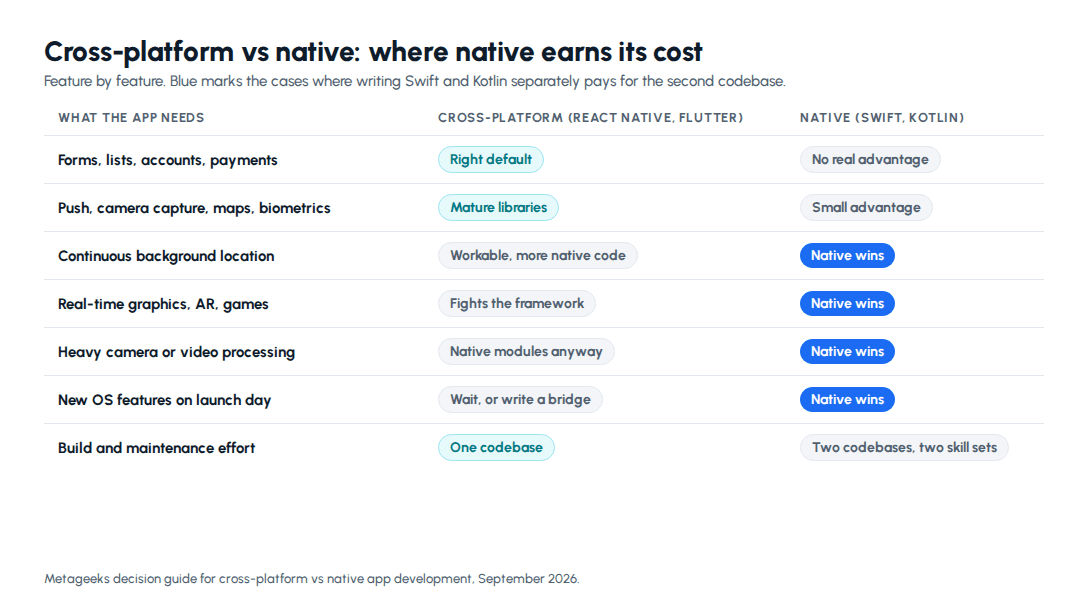
There is also a middle path. A React Native or Flutter app can include a native module for the one demanding feature, such as a custom camera screen, while everything else stays shared. That often costs far less than going fully native for one screen.
What about Bluetooth, NFC, payments and other device APIs?
Most device features have mature cross-platform libraries: camera capture, maps, biometrics, push notifications, file pickers and in-app purchases. Payment and maps providers commonly publish React Native or Flutter SDKs.
The risk is not whether a library exists. It is whether the specific library you need is maintained. Before you commit, check the library's last release date, open issues, and whether it supports the current React Native architecture or Flutter version. A Bluetooth library abandoned two years ago is a native module you will end up writing yourself, and that work belongs in the estimate from the start.
Does one codebase really halve the cost?
No, but it gets closer than you might expect, and the gap grows over time.
On the build, the screens, business logic, state handling and API calls are written once. Some work still happens per platform: signing and store setup, push notification certificates and keys, permission prompts, platform-specific design details, and testing on both operating systems. GoodFirms' app cost guide estimates cross-platform development saves 20-40% against building two native apps.
After launch, two codebases hurt more. Every new feature is built twice and tested twice. Every annual OS release has to be absorbed twice. Since April 28, 2026, Apple has required App Store uploads to be built with the iOS 26 SDK, and Google Play requires new apps and updates to target Android 16 from August 31, 2026. Two native apps also drift: one platform gets a feature a sprint later, then two sprints, then never.
If you are budgeting the full picture, mobile app development cost in India and for US buyers covers build ranges, store fees and what upkeep costs each year.
Which is easier to hire for in India?
Hiring depth matters because somebody has to maintain the app after the first team moves on. Salary data reported to AmbitionBox gives a rough picture of each pool:
| Job title | Reported salaries | Typical range (₹ lakh a year) | Experience band |
|---|---|---|---|
| Android Developer | 24.1k | 6.5-7.2 | 1-6 years |
| iOS Developer | 13.1k | 7.7-8.5 | 1-6 years |
| Flutter Developer | 11.7k | 5.4-5.9 | 0-5 years |
| React Native Developer | 7.2k | 6.9-7.7 | 1-6 years |
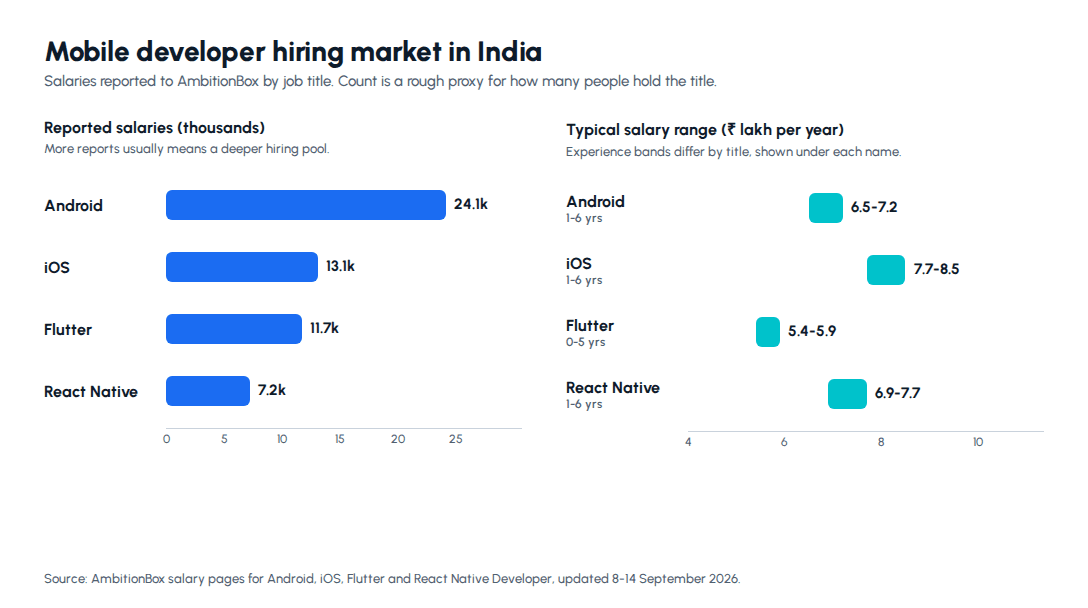
Read the counts as a proxy, not a census. React Native's number understates its pool, because many React Native developers hold a "React Developer" or "Frontend Developer" title and come from the large JavaScript workforce. The practical conclusions still hold. Going native in India means hiring or retaining iOS developers, the more expensive and less plentiful skill. Going cross-platform lets one team cover both stores.
Should you pick React Native or Flutter?
Both are mature and both ship large production apps. The deciding factors are usually about people and design, not speed.
React Native fits teams that already work in TypeScript and React, and companies with a React web app, because skills and tooling carry across. It renders platform components, so the app follows iOS and Android conventions without extra effort.
Flutter fits products with a strongly branded, custom interface that should look the same on both platforms, because Flutter draws every pixel itself. The trade is Dart, which fewer developers know before they start, although the Flutter pool in India is already sizeable.
Metageeks' default for most client apps is React Native, as the mobile app development page sets out, and we build in Flutter where it fits. For a multi-tenant healthcare marketplace in India, we built a Flutter Android app for patients and doctors that calls the same API as the Next.js web app. The web app is live in beta and the Android app is in internal testing.
How do you make the call for your app?
Answer these five questions in writing before you ask anyone for an estimate.
- What does the app do that a mobile website cannot? If the answer is nothing, you may not need an app at all.
- Does the core feature depend on hardware or new OS features? Background location, AR, real-time graphics and video processing point to native, or to native modules.
- Which devices do your users carry? Test on those devices. In India that usually means mid-range Android first.
- Who maintains it in year three? Choose a stack your team, or a replacement vendor, can pick up without a rewrite.
- Is there a web app already? If it is React, React Native shares the most. Either way, a shared API keeps web and mobile from disagreeing about the data.
The bottom line
For most business apps, cross-platform development is cheaper to build, much cheaper to maintain, and indistinguishable to users. Native is worth its second codebase when the app lives in the hardware: continuous location, real-time graphics, heavy camera work, or OS features you must ship on launch day. Pick between React Native and Flutter on your team's skills and your design needs, then test on the phones your users actually own.
Next step: If you want a straight answer on platform, scope and whether you need an app at all, see how we approach Android and iOS app development and tell us what your users need to do on their phones.
Frequently asked questions
Is cross-platform app development cheaper than native?+
Usually, but by less than the one-codebase pitch implies. Screens, business logic and API calls are written once, which is most of the code in a typical business app. Some work still happens twice: platform setup, push notification configuration, permission handling, store listings and testing on both operating systems. GoodFirms' app cost guide puts the saving at 20 to 40 percent against building two native apps, which matches the intuition that you save a lot but not half. The larger saving shows up after launch. Every feature, bug fix and annual OS update lands in one codebase instead of two, so the gap widens each year the app stays in service. If the app will live for three years or more, judge the two options on maintenance cost rather than build cost.
Is React Native or Flutter slower than a native app?+
For the apps most businesses build, users cannot tell the difference. Forms, lists, accounts, payments, maps and notifications all run smoothly in a well-built React Native or Flutter app. React Native 0.82 was the first release to run entirely on its New Architecture, which removed the old asynchronous bridge behind most of the historical complaints, and Flutter made its Impeller rendering engine the default on iOS and modern Android in version 3.27. Slowness in a cross-platform app usually comes from ordinary engineering problems: long lists rendered badly, oversized images, heavy work on the main thread, and testing only on flagship phones. Native keeps a real edge in sustained graphics work, such as games, AR and frame-by-frame video processing. Test on a three- or four-year-old mid-range Android before you conclude anything.
When should I choose native app development over cross-platform?+
Choose native when the app's core value depends on the hardware or the operating system rather than on screens and data. Four cases come up repeatedly. Continuous background location, such as fleet tracking, where battery rules and OS restrictions change every year. Real-time graphics, AR or games. Heavy camera or video processing, like live filters or on-device analysis of each frame. And products that need new OS features on launch day, such as widgets, Live Activities or watch apps. Native also makes sense when the app is the product itself and you can fund a dedicated team per platform for years. If none of those describe your app, cross-platform will cost less to build and much less to maintain, and your users will not notice the difference on the screens they use every day.
Should I pick React Native or Flutter?+
Pick React Native if your team or vendor already works in TypeScript and React, especially if you have a React web app, because skills, tooling and sometimes code carry across. React Native renders real platform components, so the app follows iOS and Android conventions by default, and the React Native documentation recommends starting new apps with the Expo framework. Pick Flutter if you want a custom-designed interface that looks identical on both platforms, since Flutter draws every pixel itself, and if your team is comfortable learning Dart. Both are mature, both are backed by large companies, and both have shipped apps at very large scale. The better question is which one the people maintaining the app in year three will know. Hiring depth where you build matters more than benchmark differences between the two.
Can I start cross-platform and switch to native later?+
Yes, and it is a sensible plan for many products, but treat a switch as a rewrite of the app layer rather than a migration. Your backend, API, database and design system carry over completely, which is why a clean API boundary matters from day one. The mobile code itself does not carry over. A middle path often removes the need to switch: keep the cross-platform app and write the one demanding feature as a native module, such as a custom camera screen or a background location service. Both React Native and Flutter support this directly. Teams that eventually go fully native usually do it because they grew large enough to staff two platform teams, not because the cross-platform app failed. Getting to market sooner on one codebase is often what paid for that growth.
Written scope and estimate
Get your project scoped before you commit
Share what you need built. We come back with a written scope and an estimate you can compare against any other quote.
Get a written scope →About the author

- Tags
- mobile apps
- mobile app development
- build vs buy
Subscribe to Our Newsletter
The AI Build Brief: practical playbooks on how to build, price and ship AI features, in one short email every other week.