
Most founders who ask for "an app" picture an icon on a phone. Many of them would be better served by software that opens in a browser first, for practical reasons: how people find it, how many drop off at the install step, and what it costs to keep two codebases in step. The exceptions are real, though, and it pays to know which side of the line your product sits on before you commit a budget.
TL;DR
- In August 2026, StatCounter measured 64.45% of India's web traffic on mobile, and 92.79% of India's mobile traffic came from Android. A web app built for a mid-range Android phone reaches that audience through a link.
- Build the web app first when users arrive from search, ads or shared links, use the product occasionally, or work at a desk.
- Build the mobile app first when the product needs dependable offline use, background location, Bluetooth hardware or heavy camera work.
- A progressive web app covers a lot on Android. On iPhone there is no install prompt, and push notifications work only after a user adds the app to the Home Screen by hand.
- Put the business rules in an API from day one, so the second app reuses the backend instead of duplicating it.
Written scope and estimate
Get your project scoped before you commit
Share what you need built. We come back with a written scope and an estimate you can compare against any other quote.
Get a written scope →The short answer
Build the web app first when users arrive from links, search or ads, use the product a few times a month, or work in an office. Build the mobile app first when the product needs offline work for hours, background location, Bluetooth or heavy camera use, or when the same person opens it many times a day. Either way, put the business logic in an API so the second app reuses it.
Where will your users open it?
Start with the device mix, because it settles more of this decision than any feature list. In India, StatCounter measured 64.45% of web traffic on mobile in August 2026, against 34.97% on desktop and 0.58% on tablets. On phones, Android accounted for 92.79% of mobile traffic and iOS for 7.15%.
Two things follow. In India, web first means mobile web first: a web app that loads quickly on a mid-range Android phone over a variable connection, not a desktop layout squeezed onto a small screen. And the iPhone limits covered below matter less to an Indian consumer product than to one aimed at the US or Europe, where iPhones make up a much larger share of phones.
Internal tools are the easy case. Dalmia Resorts' support team works from a browser-based member records application that only office networks can reach. The people using it sit at desks during working hours, so a phone app would add a store listing and a second codebase without helping anyone do their job.
What does asking people to install an app cost you?
A web app opens from the link someone tapped in a search result, an ad or a WhatsApp message. A mobile app sends that person to a store listing, then a download, then a first launch, then sign-up. Every extra step loses some of the people who started, and the loss is heaviest when they do not know the product yet.
Updates follow the same pattern. A fix to a web app reaches everyone on their next page load. A fix to a store app waits for review, which Apple says finishes in under 24 hours for 90% of submissions, and then waits again for each user to update. For an early product that changes every week, those delays add up.
Wrapping your website in an app shell does not get around this. Apple's App Review Guideline 4.2 asks for "features, content, and UI that elevate it beyond a repackaged website", and an app that is only a website in a frame can be rejected on those grounds.
Does the product need offline, background or hardware access?
This is where native apps earn their extra cost. Browsers can cache pages and data with a service worker, so a web app can open and show recent data without a connection. What browsers handle poorly is work that happens while the app is not on screen.
- Background sync. Chrome has supported the Background Synchronization API since version 49. Safari and Firefox do not support it, per MDN's browser compatibility data, so a form filled in offline on an iPhone waits until the user opens the app again.
- Background location. A web page can read location only while it is open. Delivery tracking, field sales routes and fitness tracking need an installed app.
- Hardware and heavy on-device work. Bluetooth devices, continuous camera processing and on-device video editing belong in a native or cross-platform app.
Large files on their own are not a reason to go native. On Montage India's stock media marketplace, 4K video files of several gigabytes upload from the browser straight to Amazon S3 through presigned URLs, without passing through the API server.
Can a progressive web app replace a native app on iPhone?
Partly. A progressive web app (PWA) is a web app with a manifest and a service worker, which lets it sit on the home screen, open without the browser's address bar and cope with a weak connection. On Android, Chrome supports an install prompt, push notifications and background sync, so a well-built PWA gets close to an installed app for forms, bookings, dashboards and payments.
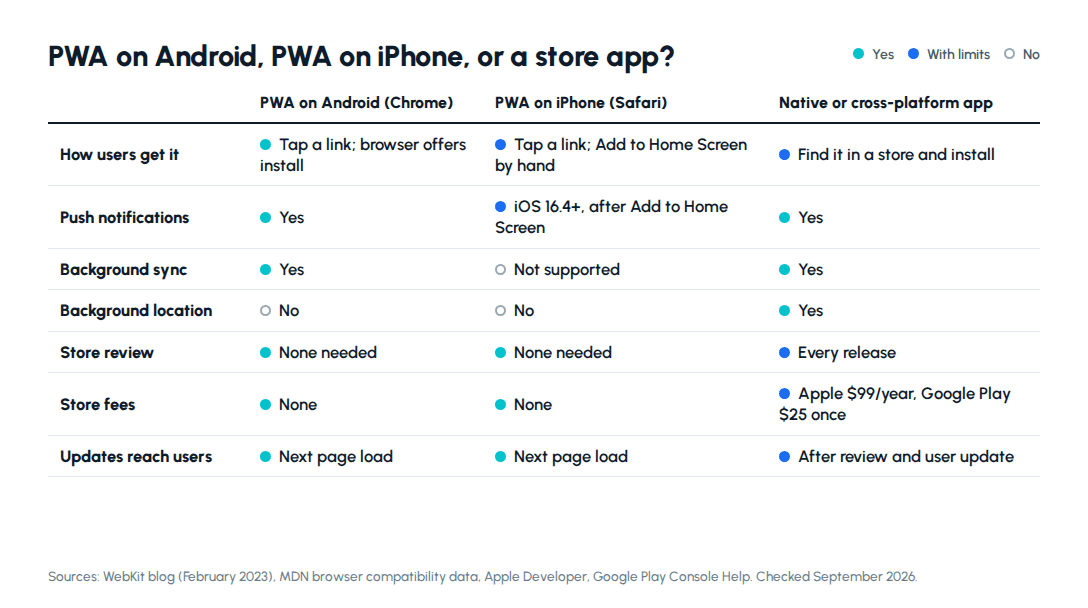
iOS is more restrictive:
- Push works, with conditions. Since iOS and iPadOS 16.4, WebKit supports web push for Home Screen web apps. The app must be added to the Home Screen with a standalone or fullscreen display mode, and the permission request has to follow a direct user action such as tapping a subscribe button. A site open in a Safari tab cannot ask.
- No install prompt. Safari does not support the
beforeinstallpromptevent that Chrome uses to offer installation, so users have to find Add to Home Screen in the Share menu. The app has to explain those steps. - Storage matches the browser. WebKit's 2023 storage policy gives a Home Screen web app the same storage quota it would have in Safari.
- The platform can change its mind. In February 2024 Apple said iOS 17.4 would drop Home Screen web apps in the EU, then reversed the decision in March 2024. Nothing broke in the end, but the feature depends on one company's choices.
What do app stores cost beyond the build?
The entry fees are small. Apple's Developer Program costs $99 per membership year, and a Google Play developer account has a one-time $25 registration fee.
Commission matters more if you sell digital goods or subscriptions through store billing. Apple's Small Business Program takes 15% for developers with up to $1 million in proceeds in the prior year. Google Play's service fee is 15% on the first $1 million of annual earnings and 30% above it in most markets, with auto-renewing subscriptions at 15%. Physical goods and real-world services, such as a delivered order or a doctor's appointment, generally fall outside store billing.
Then there is upkeep. Each major Android and iOS release can change permissions or retire APIs, and both stores enforce minimum SDK versions over time, so a store app needs at least a yearly update even when the product itself is stable. A web app needs maintenance too, but no store sets its deadlines.
How much more do two codebases cost?
Building everything natively means three apps to keep in step: the web app, an Android app and an iOS app, each with its own releases and its own bugs. Cross-platform frameworks such as React Native and Flutter turn the two phone apps into one codebase, which for most business apps roughly halves the mobile build and its maintenance. Fully native builds still earn their cost for hardware-heavy products.
Clutch's pricing guides give a sense of scale. The average app development project on the platform costs $90,780 over about 11 months, against $66,499 over about nine months for web development. Those averages mix very different projects, but the direction matches what a second client adds.
The order that works for most products is API first, web app second, phone app third. On a healthcare marketplace we built, the Next.js web app and a Flutter Android app call the same API. The web app is live in beta and the Android app is in internal testing. When the business rules live in the API, the second app is mostly new screens on top of work that already exists.
If the web app is coming first, what a web application costs and how long it takes breaks down rates, cost drivers and weeks by app type.
So which should you build first?
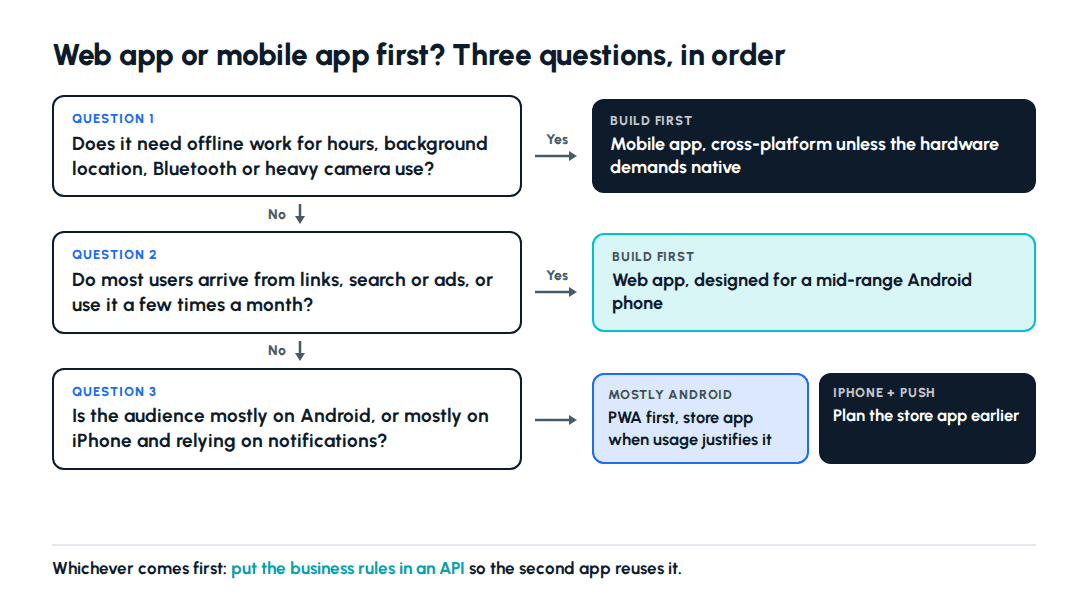
Work through the questions in order:
- Does the product need offline work for hours, background location, Bluetooth or heavy camera use? Build the mobile app first, cross-platform unless the hardware demands native.
- Do most users arrive from links, search or ads, or use it a few times a month? Build the web app first, designed for a mid-range Android phone.
- Is the audience mostly on Android? A PWA adds home screen install and push without a store listing, and a store app can follow once usage justifies it.
- Are most users on iPhone, and do notifications matter to the product? Plan the store app earlier, because iOS web push depends on a manual Home Screen install.
Next step: If the web app comes first, read how we approach web application development for mid-range phones. If the product needs the phone from day one, see mobile app development for Android and iOS. Or tell us what your users need to do and get a straight answer on which to build first.
Frequently asked questions
Should a startup build a web app or a mobile app first?+
For most startups, the web app. It opens from a link in a search result, an ad or a WhatsApp message with nothing to install, and a fix can go live the same day without waiting for store review. That matters in India, where StatCounter measured 64.45% of web traffic on mobile in August 2026, so a web app built to load fast on a mid-range Android phone already reaches most users on their phones. Start with a mobile app instead when the product depends on something browsers handle poorly: dependable offline use for hours at a time, background location, Bluetooth hardware or heavy camera processing. A product the same person opens many times a day can also justify an install early. Either way, build the backend as an API from the start, so a second app later reuses it instead of rebuilding it.
Is a PWA good enough instead of a native app?+
On Android, often yes. Chrome supports the install prompt, push notifications and background sync, so a well-built progressive web app can sit on the home screen and behave much like an installed app. On iPhone the gaps are larger. Safari has no install prompt, so users must add the app from the Share menu themselves, and push notifications only work after they do. Background sync is not supported in Safari or Firefox at all, according to MDN's compatibility data. A PWA also cannot appear in app store search, which matters if your users look for apps there. It is a strong choice when your audience is mostly on Android, uses the product occasionally and mainly needs forms, dashboards, bookings or payments. It is a weak one when the product needs background location, Bluetooth or dependable work offline.
Do PWAs support push notifications on iPhone?+
Yes, since iOS and iPadOS 16.4, but with conditions that change how you design the product. WebKit announced in February 2023 that web push works only for web apps added to the Home Screen, with a manifest that sets the display mode to standalone or fullscreen. A website open in a Safari tab cannot ask for push permission. The request itself must follow a direct user action, such as tapping a subscribe button, so it cannot fire on page load. Once granted, notifications appear on the Lock Screen, in Notification Center and on a paired Apple Watch like any other app's, and the Badging API can set a count on the icon. The hard part is getting users to add the app to the Home Screen at all, because Safari offers no install prompt, so the app needs a short explanation of the steps.
How much does it cost to publish on the App Store and Google Play?+
The entry fees are small. Apple's Developer Program costs $99 per membership year, and a Google Play developer account has a one-time registration fee of $25. The larger costs come later. If you sell digital goods or subscriptions through store billing, Apple's Small Business Program takes 15% for developers with up to $1 million in proceeds in the prior year, and Google Play charges 15% on the first $1 million of annual earnings and 30% above that in most markets, with auto-renewing subscriptions at 15%. Then there is maintenance. Each major Android and iOS release can change permissions or retire APIs, and the stores enforce minimum SDK versions, so a store app needs updates at least once a year. Every update goes through review, which Apple says finishes in under 24 hours for 90% of submissions.
Can one backend serve both a web app and a mobile app?+
Yes, and it is the pattern we recommend when a product will eventually need both. Build the backend as an API that owns the business rules, permissions and data, then treat the web app and the phone app as two clients of it. On a healthcare marketplace we built, the Next.js web app and a Flutter Android app call the same API. The web app is live in beta, and the Android app is in internal testing, so the second client arrived without a second backend. The API has to be designed for this from the start: token-based sign-in that works outside a browser, versioned endpoints so an older app version keeps working after a release, and no business logic that lives only inside web pages. Retrofitting those after the web app has shipped costs more than planning them in the first sprint, before any mobile work begins.
Written scope and estimate
Get your project scoped before you commit
Share what you need built. We come back with a written scope and an estimate you can compare against any other quote.
Get a written scope →About the author

- Tags
- web apps
- mobile apps
- web application development
Subscribe to Our Newsletter
The AI Build Brief: practical playbooks on how to build, price and ship AI features, in one short email every other week.