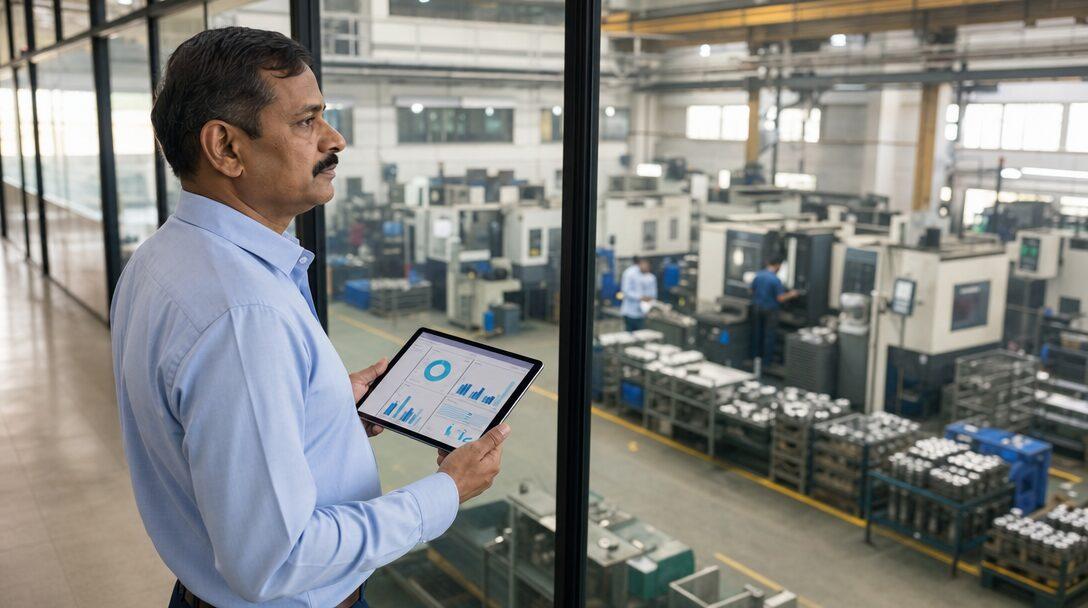


Picture a 60-person auto-components plant near Manesar that bought ERPNext in March, planned to go live in June, and is still running Tally in October. The software works. What stalled the project was an item master with four names for one bearing, BOMs that existed only in the production head's notebook, and an owner who could not find a free afternoon to approve the stock count. This post sets out the ERP implementation steps for a 20-200 person Indian manufacturer, with example durations, and then the challenges that stall plants and how to defuse each one. ERPNext is the worked example because it is what Metageeks implements, but most of this applies to any ERP.
TL;DR
- Nine steps: discovery, process mapping, masters cleanup, configuration, data migration, UAT on a copy, training, cutover at a month or quarter start, and hypercare.
- Our worked example for a 60-person plant comes to about 8-14 weeks before go-live, plus four to six weeks of hypercare. Treat that as an example, not a promise.
- What stalls plants is rarely the software: dirty item masters, BOMs not on paper, an uncounted opening stock, owner time, scope creep into custom code, an endless parallel run and late GST setup.
- Each challenge has a fix that costs days if you handle it before configuration and weeks if it surfaces at cutover.
Free ERPNext fit check
Will ERPNext fit your factory?
Answer a few quick questions. On a short call we tell you whether ERPNext fits how you make, stock and sell, and what the rollout looks like.
Check my fit →The nine ERP implementation steps for a plant
The steps below are the order we use when scoping a plant on ERPNext implementation work. They overlap in practice: masters cleanup runs alongside configuration, and training starts during UAT. If you are still deciding whether the plant needs an ERP at all, start with our guide to ERP for manufacturing in India.
1. Discovery and scoping
Discovery ends with a written scope: modules, users, sites, integrations, reports and a go-live date. The point is to fix what is in phase one. A plant that tries to launch manufacturing, quality, HR, payroll and a customer portal on the same day has five projects, not one. Our ERPNext implementation cost post shows how scope drives the quote, with published market ranges.
2. Process mapping
Map how work moves today, not how the brochure says it should. For each flow, note who raises the document, who approves it and where the paper goes. In ERPNext terms, this is where you decide whether purchase starts from a Material Request, whether production runs through Work Orders with job cards or simpler stock entries, and how job work goes through Subcontracting.
3. Masters cleanup
Merge duplicate items, settle one naming rule, assign units of measure and decide which items carry batches or serial numbers. Do the same for customers and suppliers, with GSTINs checked. This step decides how good every later report is, so it gets its own section under the challenges below.
4. Configuration
Set up the company, chart of accounts, warehouses, tax templates, naming series, roles and approval workflows. ERPNext's Customize Form adds custom fields and changes field properties without code. Anything beyond that, such as a new document type or an integration, is ERPNext development and belongs in the written scope.
5. Data migration from Tally
Masters, closing balances, unpaid invoices and opening stock move. Voucher history stays in Tally as a read-only archive. ERPNext's Data Import takes CSV or Excel files and makes you resolve every validation warning before it imports. Its documentation recommends batches of a few thousand records rather than tens of thousands at once. Opening balances go in as the opening balance guide describes: unpaid invoices for customers and suppliers, a Journal Entry for the remaining ledgers, and a Temporary Opening account that should end at zero. Our Tally to ERPNext migration checklist covers the GST ledgers and a sample cutover weekend.
6. UAT on a copy
In user acceptance testing, the people who will use the system run real transactions on a copy of the configured site, never the live one. On Frappe Cloud, you can create a site from a backup, and a self-hosted bench can restore a backup onto a new site. Give each department a script: raise a purchase order, receive with a quality check, issue to a work order, finish, invoice with GST. Each flow gets a named signer.
7. Training
Train by role, on the test site, with the plant's own items. A storekeeper needs receipts, issues and stock transfers. An accountant needs payment entries, bank reconciliation and GST reports. A two-hour session per role, repeated for each shift, beats one long demo for everybody.
8. Cutover at a month or quarter start
Pick the first day of a month or quarter after a closed period, so there is one clean closing figure to load. Freeze entries in Tally, export, import, reconcile trial balance, stock value and party balances, then go live. If the numbers do not reconcile by the agreed deadline, do not go live; run another cycle in Tally and try at the next month start.
9. Hypercare
The first four to six weeks after go-live are when small errors compound: a wrong warehouse on a receipt, a missed GST template, a BOM quantity off by a factor of a thousand. Daily check-ins in week one, then twice a week, through the first month-end close. After that, an ERPNext support arrangement covers fixes and changes.
How long the steps take: a worked example
Published implementer guides give a wide range. Aurigait quotes 4-8 weeks for a standard two or three module ERPNext deployment and 3-5 months for a mid-sized, multi-module rollout. Those are marketing pages, not audited surveys, so here is our own example, with assumptions.
Example: a 60-person plant with one site, two warehouses, about 1,500 active items, 80 BOMs, job work for plating, TallyPrime for accounts, Excel for production, and e-invoicing already in place. Phase one covers stock, buying, selling, manufacturing, subcontracting and accounts with GST. No payroll, no custom apps.
| Step | Example duration |
|---|---|
| Discovery and scoping | 1-2 weeks |
| Process mapping | 1-2 weeks |
| Masters cleanup | 3-5 weeks, overlapping configuration |
| Configuration | 3-4 weeks |
| Data migration rehearsals | 1-2 weeks |
| UAT on a copy | 2-3 weeks |
| Training | 1-2 weeks, overlapping UAT |
| Cutover | One weekend |
| Hypercare | 4-6 weeks after go-live |
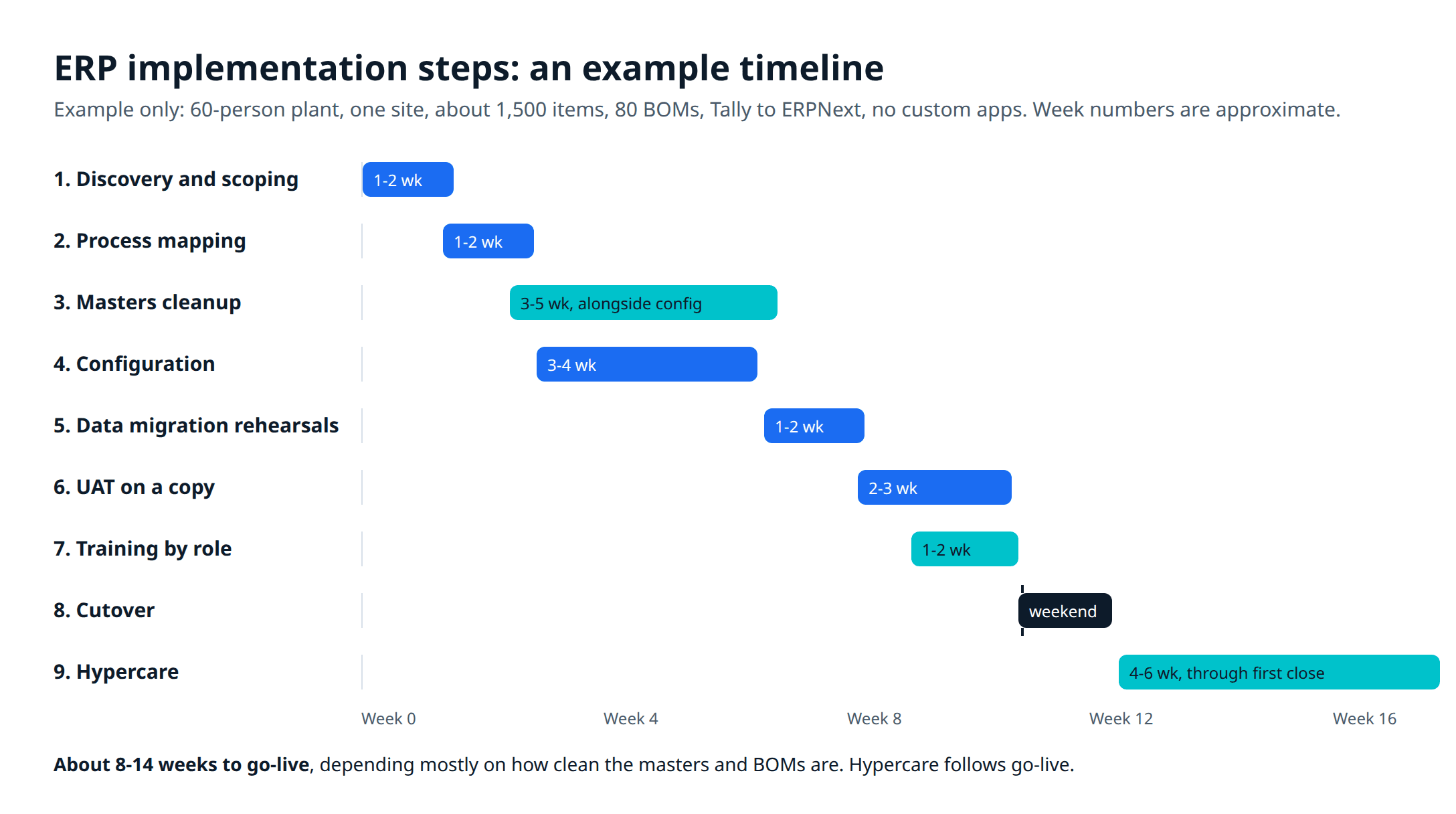
With the overlaps, that comes to about 8-14 weeks before go-live. Halve the items and BOMs and the masters work shrinks. Add a second plant, payroll or a custom app and it grows. Masters cleanup is the line most sensitive to the plant itself: it depends on how much of the plant's knowledge is already written down.
ERP implementation challenges that stall plants, and how to defuse each
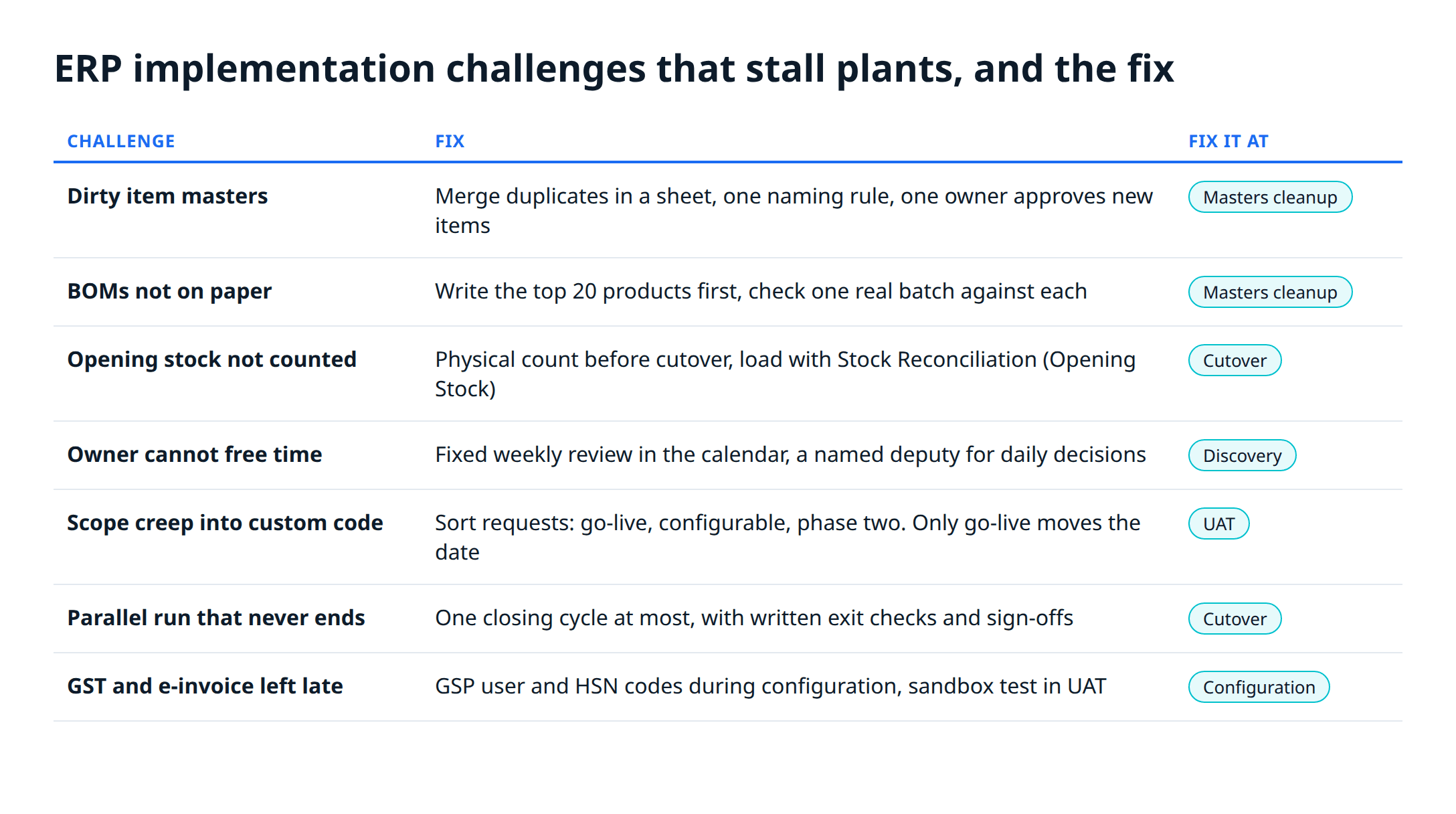
All seven start in the plant, not the software, and each costs less to fix before configuration than at cutover. If a project is heading for ERP implementation failure, these are the causes we check first.
Dirty item masters
The symptom is one bearing under four names, items with no unit of measure, and codes that changed meaning over the years. Every report built on that data is wrong, and once staff catch a wrong report, they stop trusting the ERP.
The fix: export the item list from Tally into a sheet during step 3, sort by name and merge duplicates before anything is imported. Agree a naming rule (for example, category, material, size) and one owner who approves new items after go-live. Lock item creation to that role.
BOMs that are not on paper
In some plants the bill of materials lives only in the production head's memory. ERPNext needs it written: a BOM lists raw materials with quantities and, if you use operations, the workstation and time for each. A submitted BOM cannot be edited, per the documentation; you cancel, duplicate and submit a new one.
The fix: start with the top 20 products by sales value, not all of them. Sit with the production head, write each BOM on paper, then weigh or count one real batch against it. Load those first and add the rest in hypercare. Our production planning walkthrough shows how BOMs feed work orders and material requests.
Opening stock nobody has counted
If Tally's stock figure has drifted from the store, loading it into ERPNext moves the error into the new system on day one.
The fix: count physically before cutover. Count slow movers and stores items a week or two ahead, and count fast movers on the cutover weekend. Load the result with a Stock Reconciliation using the Opening Stock purpose, which sets quantities per warehouse as of a date and supports batch and serial numbers. Post the difference against Tally's book value in Tally, with your accountant, so the opening balances agree.
An owner who cannot free time
The owner is the only person who can settle a dispute between purchase and accounts, approve the scope and sign off the stock count. If those decisions wait weeks, the project waits weeks.
The fix: book a fixed 90-minute weekly review in the owner's calendar for the length of the project, and name a deputy, such as the accounts head or plant manager, who can decide day-to-day questions. Write decisions down in the meeting notes the same day.
Scope creep into custom code
During UAT, users ask for the old Tally report, a different print format, an extra approval. Each request is small. Together they turn a configuration project into a development project and push the date.
The fix: sort every request into three buckets: needed for go-live, configurable without code (custom fields, print formats, report filters), and custom development for phase two. Only the first bucket can move the date. Phase two items get scoped and priced separately once the plant has run a close on the system.
A parallel run that never ends
Running Tally and ERPNext side by side feels safe. Without an exit date, it doubles entry work, the two systems drift, and staff keep the one they trust.
The fix: if you run in parallel at all, limit it to one closing cycle and write the exit checks into the plan: trial balance, stock value and party balances match, and each department head signs off. When they pass, Tally becomes read-only.
GST and e-invoice setup left to the last week
GST templates, HSN codes and e-invoice credentials touch every sales invoice. In ERPNext, GST, e-invoices and e-way bills run through the India Compliance app. Its GST Settings guide says you need a separate GSP user from the e-invoice or e-way bill portal for API access, and that e-invoices are generated only for invoices dated after the "Applicable From" date you set. A sandbox mode lets you test e-invoice and e-way bill calls before go-live.
Timing matters too. GSTN's advisory of 5 November 2024 says that from 1 April 2025, taxpayers with an aggregate annual turnover of ₹10 crore or more cannot report an e-invoice on the portal more than 30 days after its date, with no such restriction below ₹10 crore for now. A cutover that leaves invoices unreported for weeks can run into that window.
The fix: create the GSP user and enter HSN codes on items during configuration, test in sandbox during UAT, and make the first live e-invoice part of the cutover checklist. Our e-invoicing from your ERP post covers what to automate first.
Before you sign an implementation plan
- A written phase-one scope with modules, users, reports and a go-live date.
- A named owner for item masters, BOMs and the stock count, with dates.
- A UAT script per department, run on a copy of the site, with a named signer.
- A cutover date at a month or quarter start, and the reconciliation checks that decide go or no-go.
- An end date for any parallel run.
- GSP credentials, HSN codes and a sandbox test done before UAT ends.
- A support arrangement for the weeks after hypercare.
If you are working out the budget side, ERPNext pricing in India covers hosting and running costs. Metageeks, an independent ERPNext implementer in Delhi NCR, scopes each plant with a written plan before setup starts; our ERPNext implementation page explains how.
Frequently asked questions
What are the main steps of an ERP implementation?+
For a small or mid-sized plant: discovery and scoping, process mapping, cleaning the masters, configuration, data migration, user acceptance testing on a copy of the system, role-wise training, cutover at the start of a month or quarter, and a few weeks of hypercare after go-live. Masters cleanup and data migration are where the effort concentrates, because every later step depends on them.
How long does an ERP implementation take for a small manufacturer?+
Published implementer guides give 4-8 weeks for a standard two or three module ERPNext deployment and 3-5 months for a mid-sized, multi-module rollout. Our worked example for a 60-person plant comes to about 8-14 weeks to go-live, plus four to six weeks of hypercare. Clean item masters and BOMs shorten it; owner time that is never freed lengthens it.
Why do ERP implementations fail?+
The causes covered in this post sit inside the plant, not the software: item masters with duplicates, BOMs that live in someone's head, opening stock nobody has counted, an owner who never signs off, scope that drifts into custom code, and a parallel run with no end date. Each one has a fix that costs a few days if you deal with it before configuration, and weeks if you find it at go-live.
Should we run the old system and the ERP in parallel?+
Briefly, if at all, and with an end date written into the plan. One closing cycle is enough to compare trial balance, stock value and party balances. A parallel run with no exit criteria doubles data entry, and staff drift back to the system they trust. Agree the checks that end it before it starts.
Can we move from Tally to ERPNext in the middle of the year?+
Yes. A month start after a closed period works, because ERPNext needs one verified closing position to load as opening balances. April 1 is the cleanest date because the books close for the year, but waiting months for it is rarely worth the delay. Pick a month or quarter start and rehearse the migration on a test site first.
Related reading
- ERP for manufacturing in India: what an ERP does in a plant and when to move.
- Tally to ERPNext migration: what moves, what stays and a cutover weekend.
- ERPNext implementation cost in India: published market ranges and what drives them.
- ERPNext pricing in India: hosting, support and running costs.
Free ERPNext fit check
Will ERPNext fit your factory?
Answer a few quick questions. On a short call we tell you whether ERPNext fits how you make, stock and sell, and what the rollout looks like.
Check my fit →About the author

- Tags
- erpnext
- erp
- manufacturing
- india
- implementation
Subscribe to Our Newsletter
The AI Build Brief: practical playbooks on how to build, price and ship AI features, in one short email every other week.