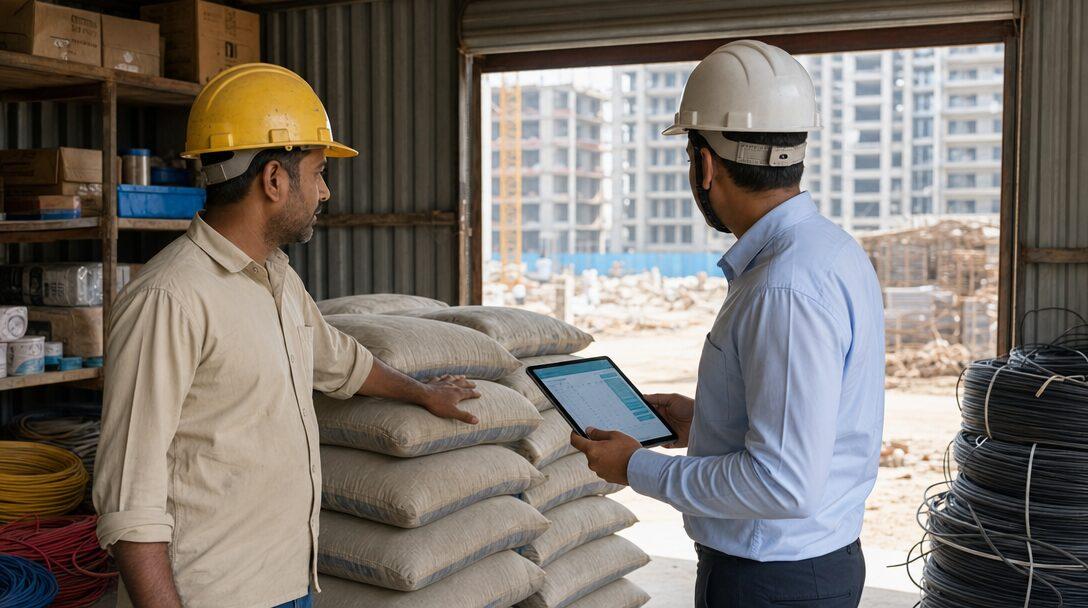


Picture an electrical subcontractor with 120 people and nine live sites: two factory sheds for an industrial client, a hospital block under an EPC firm, and six residential towers for developers. The estimate sits in one Excel file, the BOQ in another, cable indents arrive on WhatsApp, and the RA bill is rebuilt by hand each month from site measurement sheets. Software for electrical contractors should join those pieces, so the rate you quoted, the cable you sent to site and the quantity you billed all trace back to one BOQ line. Below is what that one system needs to hold for an Indian electrical or MEP contractor, and where ERPNext v16 covers it as standard and where it needs custom work.
TL;DR
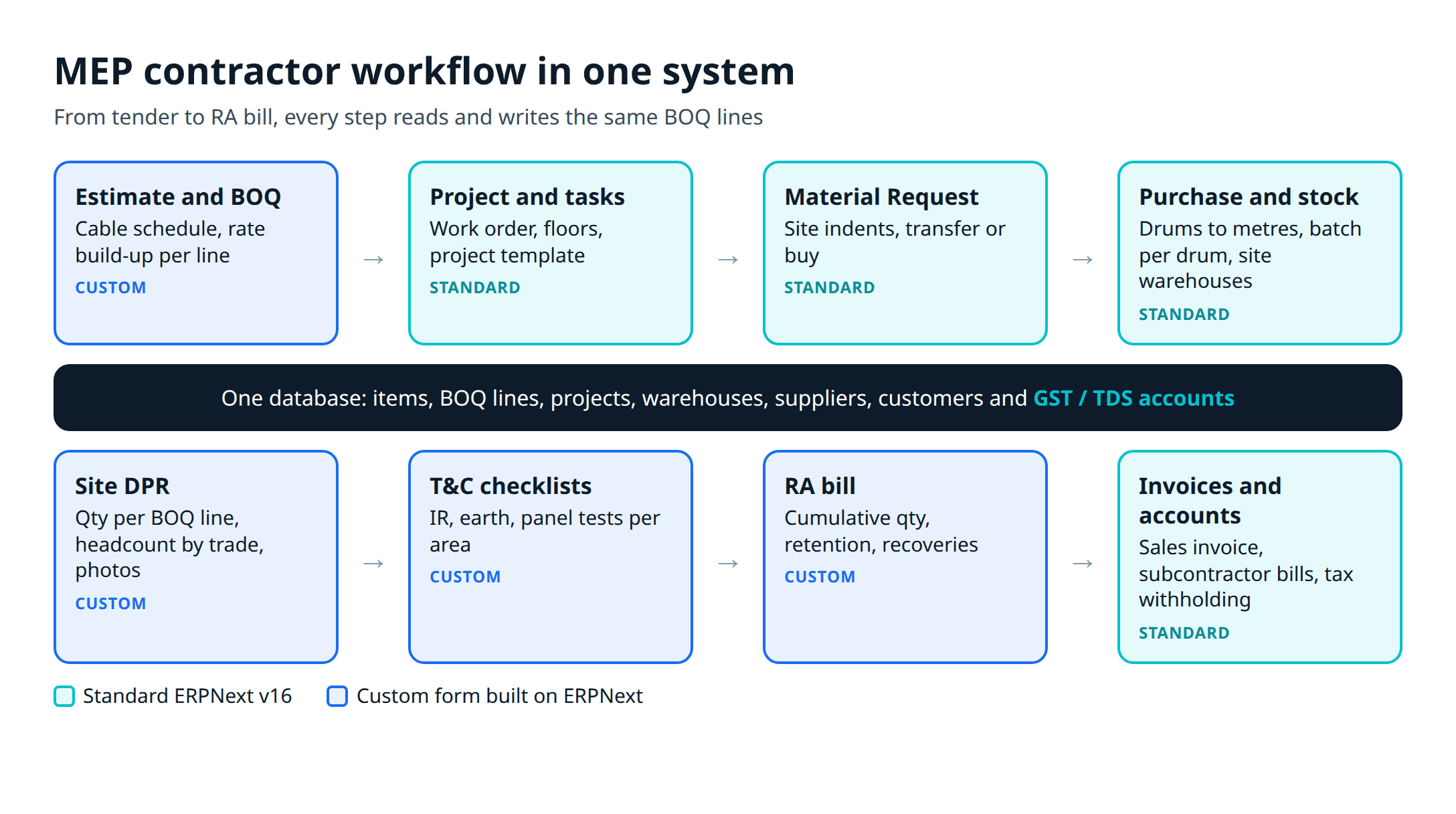
- The workflow to cover runs tender estimate, work order, project plan, material indents, site DPR, testing records, RA bill, subcontractor bills, and GST and TDS accounts.
- ERPNext covers projects, tasks, timesheets, material requests, stock with unit conversion (buy cable in drums, stock it in metres), purchasing, tax withholding and GST accounts as standard.
- The estimate and BOQ builder, the site DPR form, the RA bill with retention, and testing and commissioning checklists are custom work on top of ERPNext.
- Tally can stay as the accounting system for a transition year, but the site and BOQ data should live in one place from day one.
Free ERPNext fit check
Will ERPNext fit your factory?
Answer a few quick questions. On a short call we tell you whether ERPNext fits how you make, stock and sell, and what the rollout looks like.
Check my fit →What electrical and MEP contractors need from software
Electrical and MEP subcontractors work between two sets of documents: the main contractor's BOQ and work order above, and their own cable schedules, drawings, labour gangs and suppliers below. Electrician business management software built for small service jobs (call-outs, quotes, one-off invoices) does not handle that. A contractor billing a ₹4 crore package in monthly RA bills needs these records connected.
Tender and estimate
Work order and plan
Indents and stock
DPR and labour
RA bill and accounts
Testing and commissioning records (insulation resistance, earth resistance, panel checks) and bills from your own labour subcontractors sit alongside these. If the estimate, indent and bill live in different files, nobody can answer the question a fixed-rate contract keeps raising: is this site making money on the cable it has used so far?
For the wider picture of how this fits contractors of every trade, read our construction ERP software guide for India.
Electrical construction estimating software: the build-up
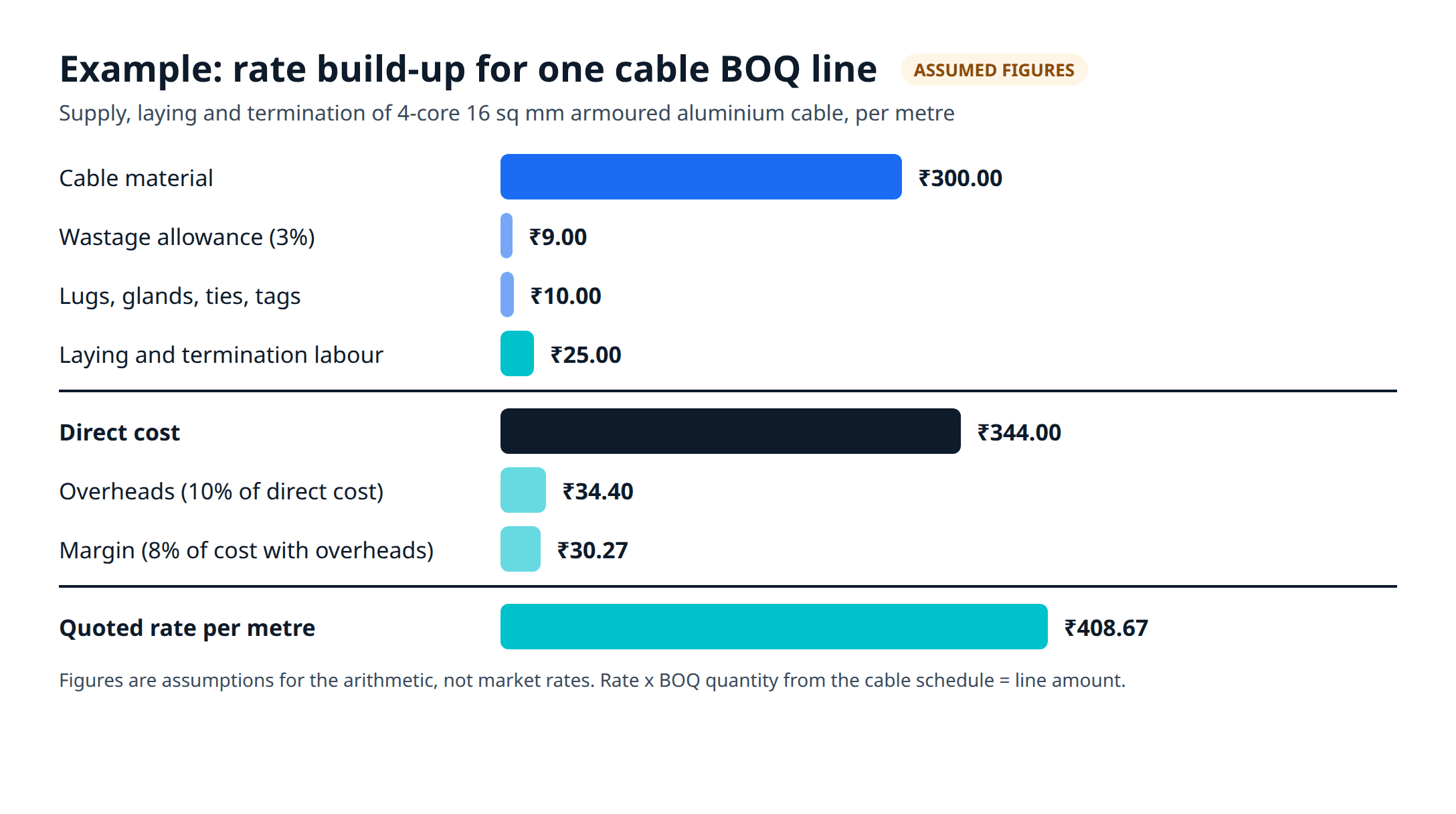
An electrical estimate is a rate build-up per BOQ line. Take "supply, laying and termination of 4-core 16 sq mm armoured aluminium cable on cable tray". The rate you quote has to carry:
- cable material per metre, plus a wastage allowance for offcuts and terminations
- lugs, glands, cable ties and tags per termination
- labour for laying per metre and for each termination
- tools, scaffolding, transport and site overheads, usually as a percentage
- margin
Example: assume cable at ₹300 a metre, 3% wastage, ₹25 a metre for laying labour, accessories averaging ₹10 a metre, 10% overheads and 8% margin. These are figures for the arithmetic only, not market rates. Material with wastage is ₹309, plus ₹10 accessories and ₹25 labour is ₹344 a metre. Overheads take it to ₹378.40 and margin to ₹408.67. Multiply by the BOQ quantity from the cable schedule and the line is priced.
In Excel this works until the copper or aluminium price moves and forty tenders reference the old rate. In a system, the build-up is stored per line: the material component links to an item and its last purchase rate, the labour component to a labour rate per activity. Revising the estimate then becomes a recalculation, and the won estimate becomes the project's budget without retyping.
ERPNext has no estimate or BOQ builder as standard. It has items, price lists and BOMs, but a BOM is built for manufacturing, not for a contract line with measured quantities. We build the estimate and BOQ as custom doctypes that read item rates from ERPNext and, once the work order arrives, create the project and its budget. That is the kind of work our ERPNext development team does.
Material: cable drums, metres and site indents
Material is where a cable-heavy contract can lose margin without anyone noticing, and it is where standard ERPNext is strongest.
For indents, a site engineer raises a Material Request for what the next week of work needs. ERPNext's documentation describes it as an internal requirement that "creates no stock or accounting entries", with purposes including Purchase and Material Transfer, and an optional Project field on each item row. So one request can be split: some items transferred from the central store, the rest bought.
Cable is bought by the drum or coil, issued by the metre and billed by the metre. ERPNext lets you buy in one unit and stock in another: the item master lists each purchase unit with its conversion factor, and the stock ledger always posts in the stock unit. If a drum is always 500 metres, set Drum = 500 Metre and order in drums. If drum lengths vary, the cleaner setup is to order in metres and record each drum as a Batch. Then the store can see how many metres remain on each drum at each site, and a short drum on receipt is visible on the day it arrives.
Panels and DBs sit in the same item master, each with its make and model from the approved list, and are bought on purchase orders to approved suppliers.
For site stock, each site is a warehouse. Transfers from the central store to site, and returns of leftover cable, are stock entries. Material consumed against a project feeds the project's Total Consumed Material Cost, per the Project documentation. Our post on construction material management software covers site stores, reconciliation and theft control in more detail.
Site progress: the DPR with manpower by trade
A daily progress report for an MEP site records what was done against which BOQ line, on which floor, by how many people of which trade: electricians, helpers, plumbers, duct fabricators, welders. It also records hindrances, such as a slab not handed over or drawings pending.
ERPNext's standard pieces get part of the way. Projects and Tasks hold the plan, a Project Template can set up the same task list for each new tower or shed, and Timesheets record hours by employee, activity type, project and task with a costing rate, which flows into project costing.
Timesheets assume named employees logging hours. A site engineer counting 14 electricians and 22 helpers from two labour contractors needs a different form: a DPR with a row per BOQ line (quantity done today) and a row per trade (headcount and contractor), filled on a phone at the end of the shift, with photos. That DPR is a custom doctype. Once it exists, the cumulative quantity done per BOQ line becomes the starting point for the RA bill, and labour headcount by contractor becomes the check against their bills.
Testing and commissioning records
Before handover, expect the main contractor or client to ask for test records: insulation resistance per circuit, earth pit resistance, continuity, panel and DB checks, and, on the mechanical side, pressure tests and air balancing. Without a system, these sit in paper formats or Excel templates and get assembled at the end.
ERPNext has no testing and commissioning checklist for installed systems as standard. A custom checklist doctype linked to the project, the area and the BOQ line, with readings, pass or fail, the tester and an attached signed sheet, turns handover into a report rather than a hunt through folders. It also helps the RA bill: if your contract holds back part of the payment until testing is done, the checklist shows which lines are ready.
RA bills, retention and subcontractor bills
The RA bill is where the BOQ comes back. Each running account bill shows, per BOQ line, the contract quantity, quantity billed to date, this bill's quantity, the rate and amount, then deductions: retention, advance recovery, materials supplied by the main contractor, and TDS.
ERPNext has the documents underneath: a Sales Order for the work order, Sales Invoices for each bill, and payment terms for due dates. The Project page pulls Total Billed Amount from those invoices and shows gross margin against cost. What it lacks is the measurement layer: cumulative quantity per BOQ line, the previous-bill and this-bill columns, retention held and released, and the RA bill print format main contractors expect. That is custom, and we walk through the full chain in from BOQ to RA bill in ERPNext.
Your own labour subcontractors bill you the same way in reverse. A labour contractor's bill can be a Purchase Invoice tagged to the project, so it lands in project cost, and checked against the DPR headcount before it is approved.
GST and TDS on MEP contracts
An MEP contract that supplies and installs material in a building can be a works contract for GST, and the main contractor may deduct TDS from each RA bill. The rates, the input tax credit rules and their exceptions are set out in our post on GST and TDS on works contracts. Confirm your own position with your CA.
On the software side, ERPNext handles both. GST invoices, e-invoices and e-way bills for material movements run through the free India Compliance app. TDS on the bills you pay to your own subcontractors is set up as a Tax Withholding Category, which holds the rate, the single-bill and cumulative thresholds, and the account the deduction posts to. TDS deducted from your bills by the main contractor is booked when you record their payment, so the receivable from each client shows what is still outstanding.
Tally, Excel and WhatsApp, or one system?
If you came here searching for accounting software for builders, you may already run Tally, and Tally keeps good statutory books. It does not hold a BOQ, a site warehouse per project, a cable drum balance or a DPR. Our ERPNext vs Tally comparison covers the line between accounting software and an ERP in detail.
Standard in ERPNext v16
Custom for MEP contractors
A practical order: start with stock, purchasing and projects, since everything after them depends on clean item, warehouse and project data, then add the DPR, then the RA bill once the BOQ data is clean. Accounts can move from Tally on day one or after the first financial year closes. Our ERPNext implementation work follows that order, and the Tally to ERPNext migration guide covers moving the ledgers.
Before you commit, test one live site end to end:
- Load one real BOQ, with its cable schedule, and price three lines from the estimate builder.
- Buy one cable drum, receive it at site, and issue it in metres across two weeks of work.
- Have the site engineer fill the DPR on a phone for five days, with headcount by trade.
- Produce one RA bill from the DPR quantities and compare it with the one you made in Excel.
- Check the project cost report against what accounts say the site has spent.
Frequently asked questions
What software do electrical contractors in India use?+
A common setup is accounts in Tally, estimates and BOQs in Excel, and site updates over WhatsApp. That can hold up for two or three sites. Past that, the gaps show between the estimate, the material sent to site and the RA bill. A system such as ERPNext keeps projects, stock, purchasing, timesheets and accounts in one database, with the BOQ, DPR and RA bill added as custom forms.
Is there electrical estimating software that also handles billing?+
An estimating tool on its own produces the estimate, and billing happens somewhere else unless the tool connects to it. An ERP holds the estimate as structured data so the same BOQ lines drive material indents, site progress and RA bills. In ERPNext the estimate and BOQ builder is custom work. The purchasing, stock and accounting it feeds into are standard.
Can ERPNext track cable by drum and by metre?+
Yes. An item can be bought in one unit and stocked in another, with a conversion factor on the item master, so you can buy in drums and keep stock in metres. If your drum lengths vary, buy in metres and record each drum as a batch so you can see what is left on every drum.
Does ERPNext have RA billing and retention for contractors?+
Not as standard. ERPNext has projects, sales orders, sales invoices and payment terms, but no BOQ measurement sheet, cumulative RA bill or retention ledger out of the box. These are built as custom doctypes on top of the standard documents, and the GST invoice and accounting entries stay standard.
Should an MEP contractor replace Tally with ERPNext?+
Only if the trouble is beyond accounting: material leaking between sites, no project-wise cost, RA bills prepared from spreadsheets. If accounts are the only need, Tally is enough. Some contractors move everything to ERPNext; others keep Tally for statutory books for a year while sites run on ERPNext.
Related reading
- Construction ERP software in India: the pillar guide for contractors of every trade.
- From BOQ to RA bill in ERPNext: measurement, cumulative billing and retention, step by step.
- Construction material management software: site stores, indents and reconciliation.
- GST and TDS on works contracts: rates, credit rules and deductions on RA bills.
- ERPNext vs Tally: where accounting software ends and an ERP begins.
Free ERPNext fit check
Will ERPNext fit your factory?
Answer a few quick questions. On a short call we tell you whether ERPNext fits how you make, stock and sell, and what the rollout looks like.
Check my fit →About the author

- Tags
- erpnext
- erp
- construction
- india
- mep contractors
Subscribe to Our Newsletter
The AI Build Brief: practical playbooks on how to build, price and ship AI features, in one short email every other week.