

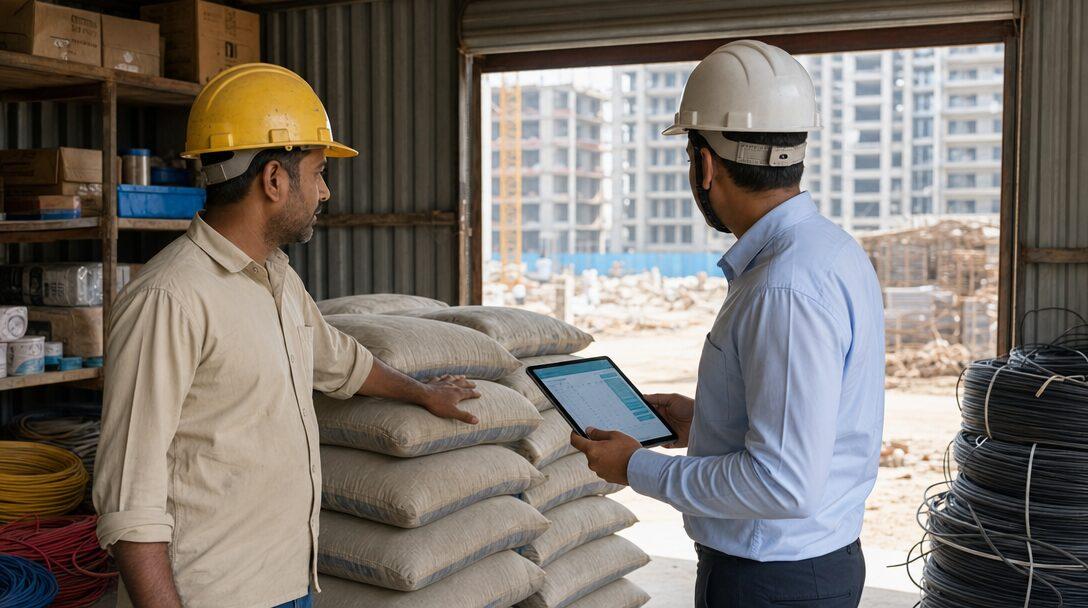
Picture an electrical and civil contractor with five live sites around Gurugram and Noida. Each site has a storekeeper with a register, a WhatsApp group for indents, and a habit of borrowing cable from the site down the road when a delivery is late. The office has Tally for purchase bills and an Excel sheet per site that is updated on Saturdays, when someone remembers. At the end of a job nobody can say how much cement went into the work and how much went missing, or whether the client's free-issue steel was used within the allowance. This post walks through the material cycle on a contractor's sites, what construction inventory management software has to record at each step, and how far ERPNext covers it out of the box.
TL;DR
- Site material management is one chain: indent, approval, purchase order, receipt at the site store, issue to work, transfers, returns, then a periodic count. Every step has to carry the site and the project.
- In ERPNext, each site is a warehouse. Material Request, Purchase Order, Purchase Receipt and Stock Entry (Material Issue, Material Transfer) cover the chain, and stock documents carry a Project field.
- Client free-issue material can be received as a Customer Provided item, outside the buying cycle.
- What standard ERPNext does not give you: consumption against BOQ quantities with wastage norms, a free-issue reconciliation statement and a simple mobile screen for the site store. Those are custom builds.
- Moving material between your own sites usually needs an e-way bill above Rs 50,000, on a delivery challan or a tax invoice depending on GST registration.
Free ERPNext fit check
Will ERPNext fit your factory?
Answer a few quick questions. On a short call we tell you whether ERPNext fits how you make, stock and sell, and what the rollout looks like.
Check my fit →The material cycle on a contractor's sites
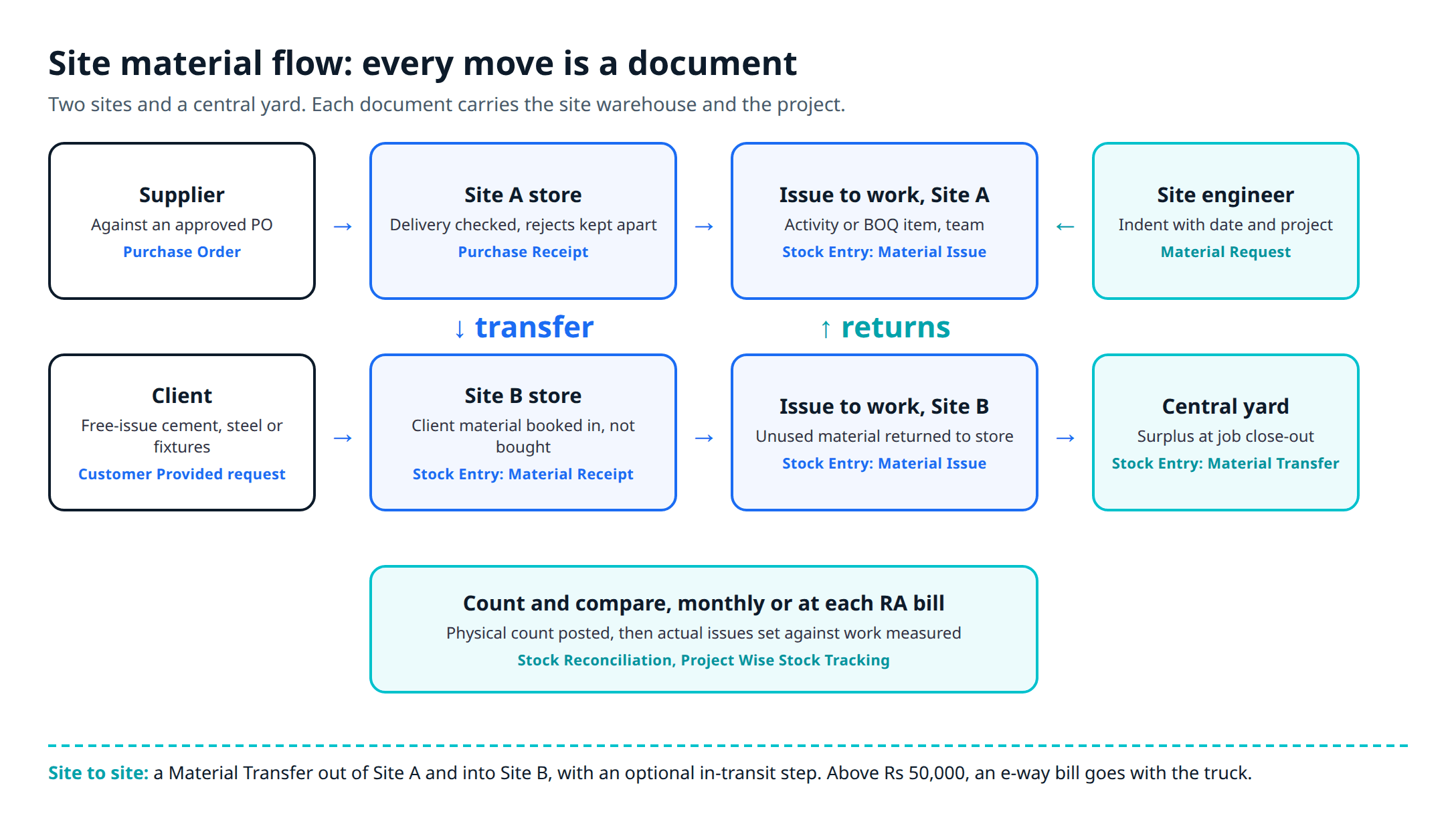
Whatever the trade, site material moves through five steps. What you are buying software for is a record at each step that names the site, the project and, ideally, the BOQ item.
Indent
Approval and PO
Receipt at site
Issue to work
Count and compare
Around that line sit four side flows where material tends to go missing: transfers between sites, returns of unused material to the store or to a central yard, free-issue material supplied by the client, and wastage, which is allowed up to a norm and has to be explained beyond it.
What each step needs to record
-
Indent: item, quantity, site, project, required date and who asked. An indent sent as a WhatsApp photo of a handwritten list leaves no record, so nobody can later tell what was asked for and what was bought.
-
Approval and purchase order: the approver should see what the site already holds, what is on order and what other sites hold before approving a purchase. A site short of 2.5 sq mm cable may be able to get it from a site that has finished its wiring.
-
Receipt at the site store (GRN): quantity received, quantity rejected, supplier challan number, vehicle and date. Material delivered straight to site and never booked opens a gap between purchase bills and stock that no report can close later.
-
Issue to work: what was issued, to which activity or BOQ item, and to whom (a subcontractor's team or your own labour). Without it, you only know what the whole site used, not which work used it.
-
Transfers and returns: out of one site, in transit, into another. Returns from work to store, and from site to central yard when a job winds down.
-
Count: a physical count of the site store, usually monthly or at each RA bill, with differences posted and explained.
Construction inventory management in ERPNext
Every step above has a standard document in ERPNext version 16.
| Step | ERPNext v16 document | Notes |
|---|---|---|
| Site store | Warehouse, one per site | Group warehouses for "All sites" and a central yard |
| Indent | Material Request (Purchase or Material Transfer) | Project field on each row |
| Purchase | Purchase Order | Created from the Material Request |
| Receipt at site | Purchase Receipt | Accepted and rejected warehouses |
| Issue to work | Stock Entry, Material Issue | Project on the entry and on each row |
| Site to site | Stock Entry, Material Transfer | Optional in-transit step |
| Client free issue | Material Request (Customer Provided) and Stock Entry (Material Receipt) | Stays out of the buying cycle |
| Count | Stock Reconciliation | Differences posted to Stock Adjustment |
ERPNext's warehouse documentation describes a tree: tick "Is Group" on a parent and add warehouses under it. For a contractor: a "Sites" group, one warehouse per site and one for the central yard. Each warehouse belongs to a company and, with perpetual inventory, links to a stock account, so site stock shows in the balance sheet.
The Material Request purpose decides what happens next: Purchase leads to a Request for Quotation or Purchase Order, Material Transfer to a stock transfer, Material Issue to an issue, and Customer Provided to the client-material flow. The request "creates no stock or accounting entry" on its own, and each item row has a Project field to attribute the requirement to a job.
A Purchase Receipt is created from the submitted Purchase Order and books accepted quantity into one warehouse and rejected quantity into a rejected warehouse, so damaged bags do not show as usable stock.
Stock Entry purposes include Material Issue (stock leaves the source warehouse), Material Receipt and Material Transfer (between two internal warehouses). In the v16 source, the Stock Entry doctype has a Project field on the header and on each item row, plus an "Add to Transit" option for goods that leave one site before they reach the next. Purchase Receipt items carry a Project field too.
For reports, the Project Wise Stock Tracking report "provides visibility into stock movements associated with projects, including purchased items and issued items". The Stock Ledger shows every quantity and value issued, received or transferred, by item and warehouse. Projected quantity adds actual, requested and ordered stock, less reservations. The Stock Projected Qty report lists it by item and warehouse, so the approver sees what a site will have, not just what it holds today.
Stock Reconciliation records the physical count and posts the difference to a Stock Adjustment account.
If your stores are still in Tally, our post on where Tally inventory breaks covers what Tally's godowns and stock journals handle and where they stop.
Free-issue material from the client
Free-issue material is the client's: cement, steel, cable or fixtures the client buys and hands to the contractor to build into the work. It does not belong in the contractor's purchases, but the contractor is answerable for every unit of it. When the job closes, the client wants a reconciliation statement: quantity received, quantity built into the work as per measurement, allowed wastage, quantity returned, and the balance the contractor has to account for. If the contract recovers excess consumption at a set rate, that balance is a deduction from your final bill.
ERPNext documents a flow for this. An item marked Is Customer Provided, with a default customer and "Is Purchase Item" unticked, cannot be received through the buying cycle, because that would make the client a supplier. It is received with a Customer Provided Material Request and a Stock Entry of type Material Receipt, and one request can have several receipts.
What is missing is the statement itself. Standard reports show received, issued and balance by warehouse. They do not multiply measured BOQ quantities by the material norm, add the contract's wastage allowance and set the result against actual issues. That report is a custom build, and so is a per-client view if the client wants to see it on the portal.
Theoretical vs actual consumption against BOQ
Theoretical consumption is the quantity of work measured, multiplied by a norm per unit. Actual consumption is what the store issued for that work, less returns. The contractor's job is to explain the gap beyond the allowed wastage.
Example, with invented figures: a site has executed three BOQ items to date. The norms and wastage allowances are assumptions; use the ones in your contract or estimating data.
| BOQ item | Work done | Norm | Theoretical | Allowance | Actual (issued less returns) | Variance over allowance |
|---|---|---|---|---|---|---|
| PCC 1:4:8, cement | 120 cum | 3.4 bags per cum | 408 bags | 2% (416 bags) | 455 bags | 39 bags over |
| Reinforcement steel | 18.0 t per bar bending schedule | 1 t per t | 18.0 t | 3% (18.54 t) | 19.6 t | 1.06 t over |
| 25 mm PVC conduit | 1,800 m | 1 m per m | 1,800 m | 3% (1,854 m) | 1,840 m | Within allowance |
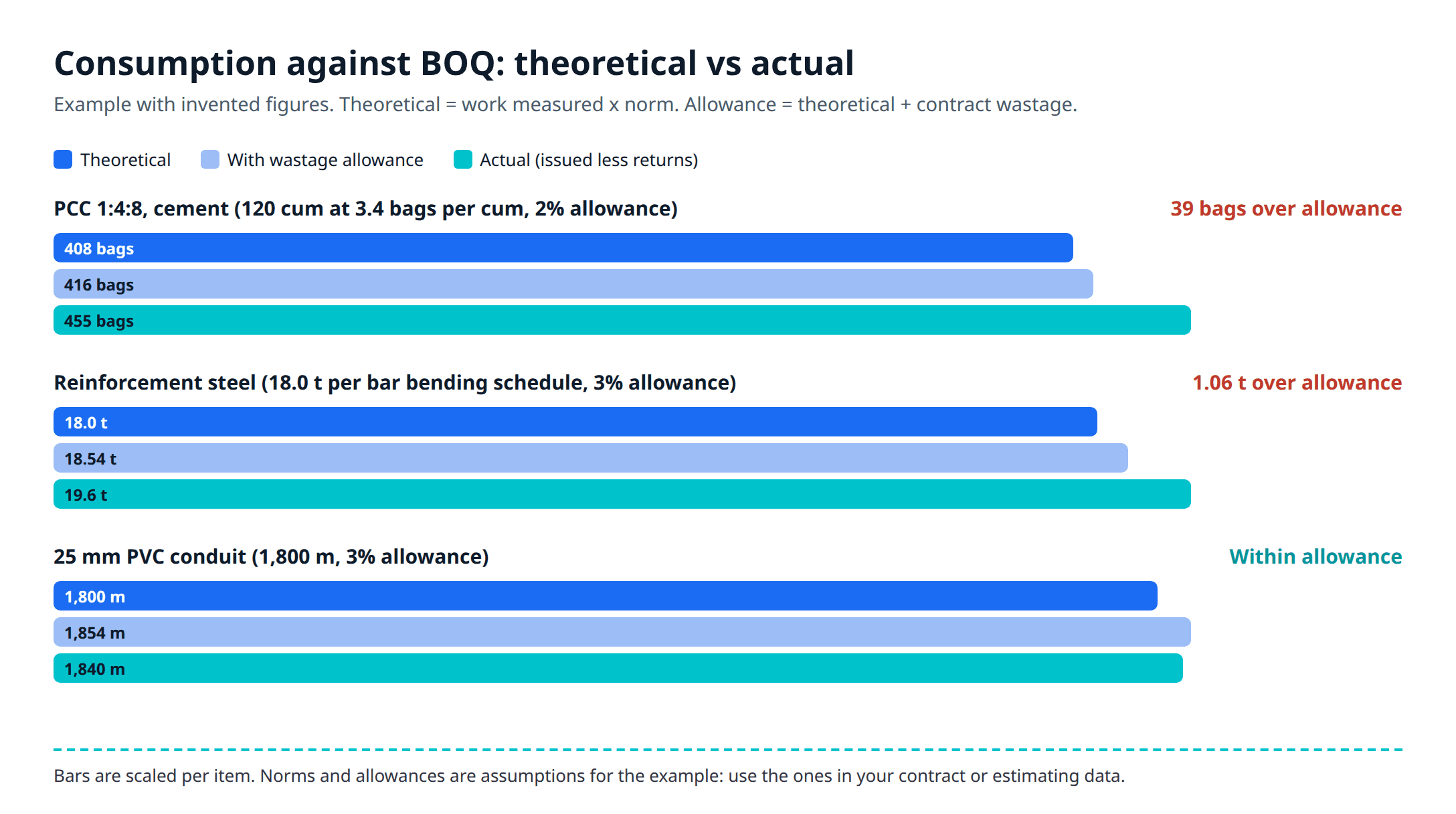
Two of three items are over. The cement gap may be a measurement still to be booked, issues booked to the wrong activity, or genuine loss. For the steel, check the offcut records first. Without issue records tied to the BOQ item, you cannot even ask these questions.
Standard ERPNext gives you actual issues by project and item, but it has no BOQ, measured quantity or norm table, so the theoretical column does not exist. Our BOQ to RA bill walkthrough shows how BOQ items and measurement sheets are built as custom doctypes. Once they exist, the consumption variance report reads the measured quantity from them and the actual issues from Stock Entries tagged with the same BOQ item.
E-way bills for movement between your own sites
Moving material from one site to another is not a sale, but GST still applies to the paperwork. Rule 138 of the CGST Rules requires a registered person to generate an e-way bill before moving goods with a consignment value above Rs 50,000, whether the movement is "in relation to a supply", "for reasons other than supply" or an inward supply from an unregistered person. The e-way bill portal's FAQ adds that for movements other than supply, the delivery challan is the basis for the e-way bill.
How the transfer is documented depends on registration:
- Two sites under the same GSTIN, usually in the same state: not a supply. The material moves on a delivery challan, with an e-way bill if the value crosses the limit. Movement within a state follows the rules each state notifies, and some states set their own limits.
- Sites under two GSTINs of the same company, usually in two states: the registrations are distinct persons, and Schedule I of the CGST Act treats supply between them as a supply even without consideration. That means a tax invoice and an e-way bill.
This is general information, not tax advice; works contracts have further rules, which our post on GST and TDS on works contracts covers, and your CA should confirm how your transfers are billed. On the system side, ERPNext's India Compliance app can create e-way bills from stock entries and delivery notes; our e-invoice and e-way bill guide explains the setup and the API credits.
What needs custom work
Three pieces are not in standard ERPNext. All three can be built on its documents without a second system.
BOQ consumption variance
Free-issue reconciliation
Mobile site-store screen
The mobile screen decides whether the other two have data to work with. A full Stock Entry form is a lot to ask of a storekeeper on a site with patchy network, and if the issue is not booked on the day it happens, the variance report is built on guesses. Scoping these three is ERPNext development work, priced per build.
Before you choose material management software for construction
- One warehouse per site, and a rule that no material enters a site without a receipt.
- Issues booked against a project and, once BOQ items exist, against the BOQ item.
- Transfers between sites recorded on both ends, with an in-transit step if trucks take more than a day.
- Client free-issue items set up as Customer Provided, never as purchases.
- A count at every RA bill, posted the same week.
- A trial on one live site for a month: book every receipt, issue and transfer, then compare the system's closing stock with a physical count.
Material management is one module of the wider system. Our guide to construction ERP software in India covers projects, labour, subcontractors and billing around it. Metageeks is an independent ERPNext implementer; ERPNext implementation for contractors explains how we set up site warehouses, the indent-to-issue chain and the counts, and write down which reports are standard and which are built.
Frequently asked questions
What is construction inventory management software?+
It is software that tracks material on a contractor's sites: what each site asked for, what was bought and received at the site store, what was issued to which work, what moved between sites and what came back. Good construction inventory software ties every movement to a project, so the contractor can compare material consumed with the quantity of work done.
Can ERPNext track stock separately for each construction site?+
Yes. Make one warehouse per site, grouped under a parent if you like, and every receipt, issue and transfer posts to that site's warehouse. Stock Entries, Purchase Receipt items and Material Requests also carry a Project field, and the Project Wise Stock Tracking report shows stock purchased and issued against each project.
How do contractors reconcile free-issue material from the client?+
Record what the client delivered, record what was issued to the work, and compare that with the theoretical quantity for the work measured, plus the wastage the contract allows. ERPNext can receive client material as a Customer Provided item, so it stays out of the buying cycle. The reconciliation statement that compares it against BOQ quantities is a custom report.
Do I need an e-way bill to move material between my own sites?+
Often, yes. Rule 138 of the CGST Rules requires an e-way bill when goods worth more than Rs 50,000 move for reasons other than supply, and a stock transfer counts. Within one GST registration the goods move on a delivery challan. Movement to a site under another GSTIN of the same company is generally treated as a supply and needs a tax invoice. States notify their own rules for movement within the state, so check the limit in yours with your CA.
What is the difference between theoretical and actual material consumption?+
Theoretical consumption is the quantity of work done multiplied by the material norm per unit, such as bags of cement per cubic metre of concrete. Actual consumption is what the site store issued for that work, less returns. The gap, after the allowed wastage, is the variance a project manager has to explain.
Related reading
- Construction ERP software in India: the full picture for a contractor with several live sites.
- From BOQ to RA bill in ERPNext: BOQ items, measurement sheets and running bills.
- E-invoice and e-way bill from your ERP: GST documents for dispatches and transfers.
- Where Tally inventory breaks: the stock limits that push businesses to an ERP.
Free ERPNext fit check
Will ERPNext fit your factory?
Answer a few quick questions. On a short call we tell you whether ERPNext fits how you make, stock and sell, and what the rollout looks like.
Check my fit →About the author

- Tags
- erpnext
- erp
- construction
- india
- inventory
Subscribe to Our Newsletter
The AI Build Brief: practical playbooks on how to build, price and ship AI features, in one short email every other week.