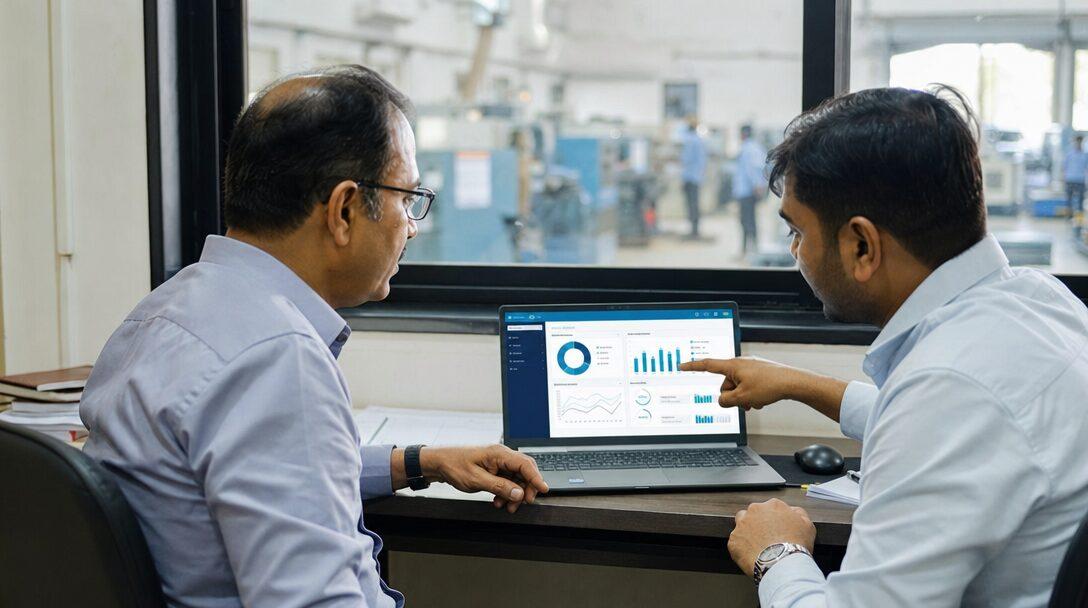


Picture the accounts desk at a 30-person plant in Pune. Supplier bills arrive as email PDFs, WhatsApp photos and the odd courier envelope, and one person types each into ERPNext: GSTIN, bill number, every line with its HSN code, the taxable value, CGST and SGST or IGST, then the total, then a check that it matches the purchase order. Invoice AI can take over the typing and the first round of checks, but not the decision to post. This guide walks through invoice processing automation in ERPNext, with the GST checks that matter in India and the reconciliation that comes after.
TL;DR
- Invoice AI reads a supplier PDF or photo, extracts the GST fields and creates a draft Purchase Invoice in ERPNext. A person compares it with the original and submits.
- The fields that matter in India: supplier GSTIN, supplier invoice number and date, place of supply, HSN or SAC per line, taxable value, and CGST and SGST or IGST.
- Before a person sees the draft, the system checks the supplier by GSTIN, duplicates by invoice number, the tax type against place of supply, the arithmetic, and the rates and quantities against the purchase order and receipt.
- After submission, GSTR-2B reconciliation in the India Compliance app checks that the supplier reported the same invoice to the GST portal. AI does not replace that step.
- No accuracy figure is promised here. Measure on a few weeks of your own bills, run alongside manual entry.
Free ERPNext fit check
Will ERPNext fit your factory?
Answer a few quick questions. On a short call we tell you whether ERPNext fits how you make, stock and sell, and what the rollout looks like.
Check my fit →What invoice AI does, and what it should not do
AI invoice processing has one job: turn an unstructured document into structured fields that match your ERP. Older OCR tools needed a template per supplier layout. Model-based extraction can read layouts nobody set it up for, which matters when a plant buys from dozens of suppliers who each print bills differently.
It should not decide. Guessing an expense account, accepting a rate above the purchase order or submitting the invoice are accounting decisions with GST and audit consequences, and they belong to a person with the right role in ERPNext. That split runs through every step below, and it is how we scope invoice capture on our AI for ERPNext builds.
The flow: from supplier bill to draft Purchase Invoice
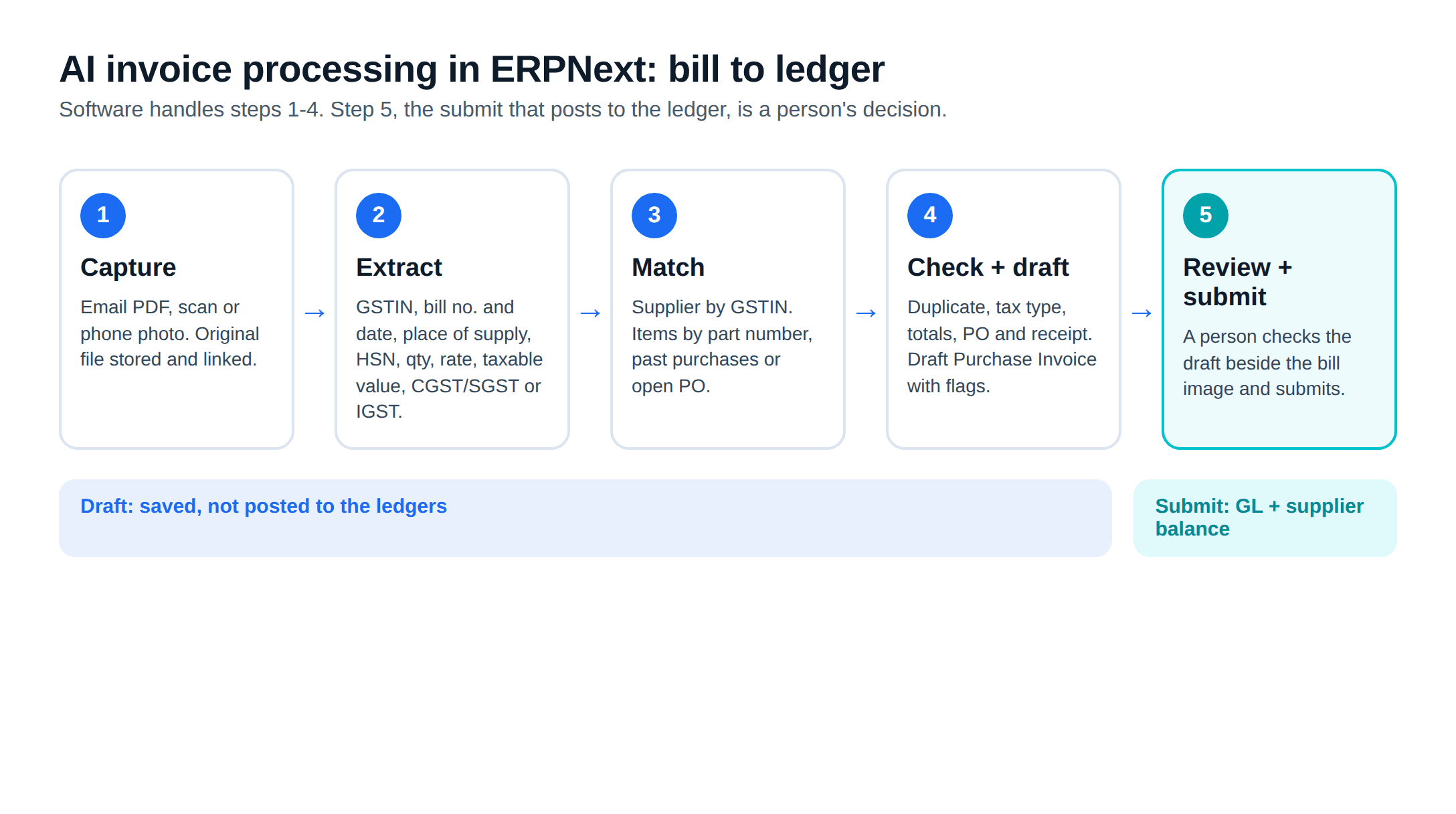
- Capture: Bills arrive at a dedicated email inbox or are uploaded from a phone. Each file stays linked to the document it becomes.
- Extract: The model reads the header (supplier name and GSTIN, invoice number and date, place of supply, IRN if the bill is an e-invoice), each line (description, HSN or SAC, quantity, unit, rate, taxable value, tax rate) and the tax summary.
- Match: The supplier is found by GSTIN in the Supplier master. Lines are matched to items through the supplier's part numbers, past purchases of the same item, or the open purchase order.
- Check and draft: The checks in the next section run. A Purchase Invoice is saved in draft, created from the purchase receipt or order where one exists, with the bill attached and any failed checks listed for the reviewer.
- Review and submit: A person opens the draft beside the bill image, resolves the flags and submits. Only then does ERPNext post to the ledger.
Frappe's Purchase Invoice documentation describes a draft as "saved but not posted to the ledgers". Submission is what "updates the supplier balance and the General Ledger", creates payment ledger entries and updates billed quantities on the linked order or receipt.
The GST fields to extract
| Field | Where it goes in ERPNext | Why it matters |
|---|---|---|
| Supplier GSTIN | Matches the Supplier and its address | Wrong GSTIN means the invoice will not match GSTR-2B |
| Supplier invoice number | Supplier Invoice No | Duplicate check and reconciliation key |
| Supplier invoice date | Supplier Invoice Date | Must be the date on the bill, not the entry date |
| Place of supply | Place of Supply on the invoice | Decides CGST and SGST versus IGST |
| HSN or SAC per line | Item tax details | Tax rate check and GST reporting |
| Quantity, rate, taxable value | Item lines | Compared with the purchase order and receipt |
| CGST, SGST or IGST, cess | Taxes table | Compared with the tax ERPNext calculates |
| IRN and QR code (e-invoices) | Attached and noted | A cross-check on header fields |
On the date, Frappe's documentation is explicit: "Use the date printed on the Supplier's bill, not the date on which you enter it."
E-invoices carry a useful extra. When a supplier above the e-invoicing threshold reports a B2B invoice, the Invoice Registration Portal returns a signed QR code. The portal's system overview says the QR code contains the GSTINs of seller and buyer, the invoice number and date, the number of line items and the HSN of the main item by value, along with the IRN. The QR gives a second, signed source to compare with what the model read from the page. Who must e-invoice, and how ERPNext does it on the sales side, is in our e-invoice and e-way bill guide.
The checks before a person sees the draft
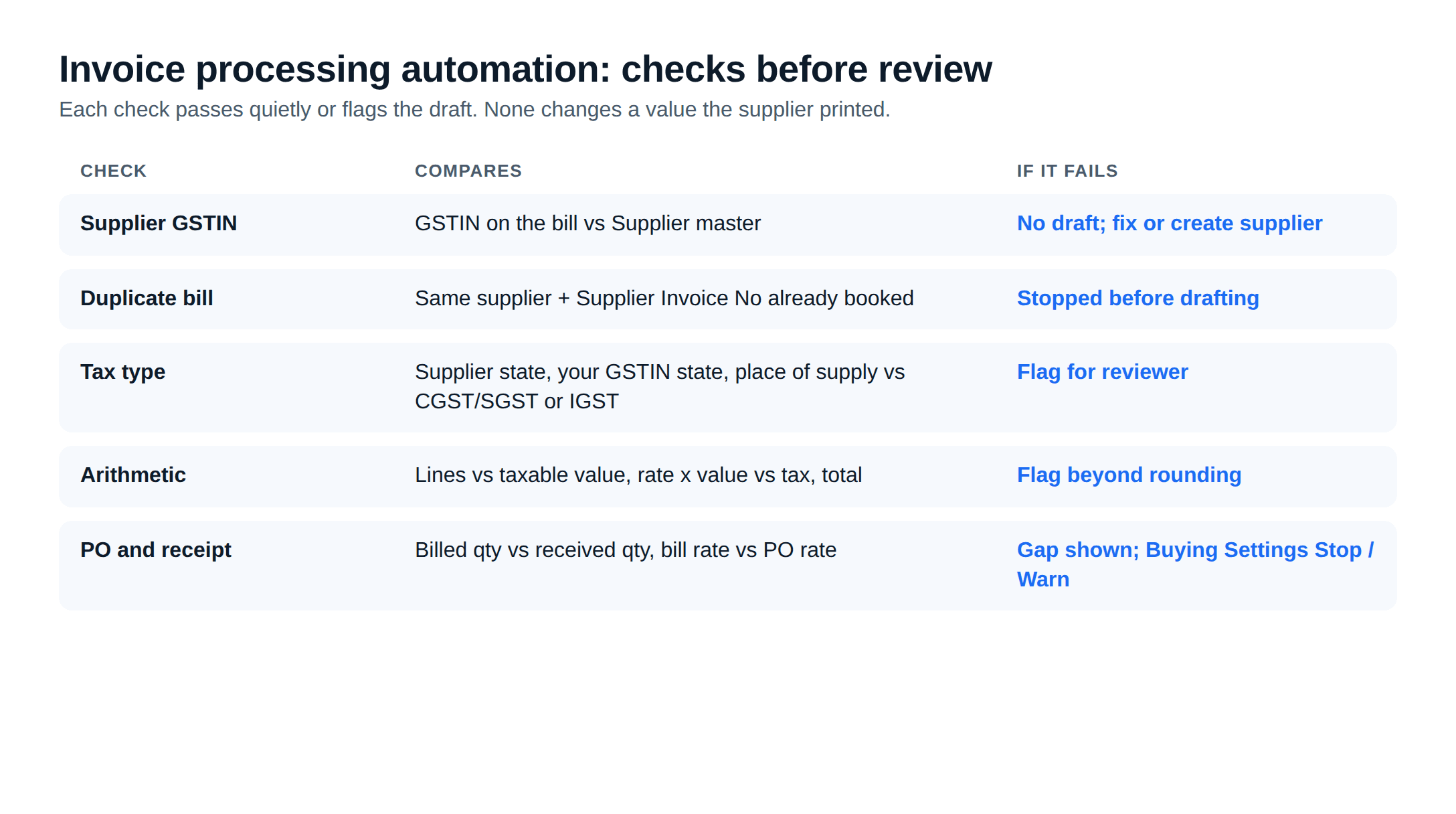
The checks matter more than the extraction, because they catch what a tired person misses at 6 pm.
- Supplier by GSTIN: If the GSTIN on the bill is not on any supplier, the draft is not created against a guessed supplier. The bill goes to a queue to create or fix the supplier first. The India Compliance app, per its README, offers GSTIN verification against government APIs, which needs an India Compliance account because those API calls carry a cost.
- Duplicate bill: Same supplier, same Supplier Invoice No: flagged before anything is drafted. Suppliers re-send bills, and the same PDF can arrive by email and WhatsApp.
- Tax type against place of supply: Each GSTIN belongs to one state registration. If the supplier's state (from its GSTIN and address in ERPNext), your GSTIN's state and the place of supply on the bill point to an intra-state supply but the bill shows IGST, or the reverse, the draft is flagged. Place-of-supply rules have exceptions, so the check flags rather than corrects.
- Arithmetic: Lines add to the taxable value, tax amounts match rate times value within rounding, and the total matches. A difference of a rupee or two is rounding; anything larger is flagged.
- Rate and quantity against the purchase order and receipt: Covered in the next section.
Matching against the purchase order and receipt
ERPNext already has the controls for three-way matching. The extraction layer's job is to use them, not rebuild them. In Buying Settings:
- "Is Purchase Order required for Purchase Invoice & Receipt creation?" set to Yes "stops an unlinked Purchase Receipt or Purchase Invoice".
- "Is Purchase Receipt required for Purchase Invoice creation?" set to Yes "stops an invoice not linked to a receipt".
- "Maintain same rate throughout the purchase cycle" compares an invoice rate with its source order or receipt. The action can be Stop or Warn, and a named role can override a Stop for a genuine exception.
When the bill lists a receipt or PO number, or the supplier has one open receipt for those items, the draft is created from that receipt, and the rate check runs against the order. If the supplier billed 1,000 units and stores received 960, the reviewer sees the gap before anyone pays for 1,000.
One setting to watch: Frappe's documentation says to leave Update Stock clear on the Purchase Invoice "when a Purchase Receipt already records the stock movement", or stock value can be counted twice. For bills without a receipt, such as freight or repairs, the draft goes in directly and a person picks the expense account if the supplier's history does not settle it.
The person who submits
In our builds the review screen shows the bill image beside the draft, with each flag next to its field and uncertain fields marked. The reviewer fixes, submits or rejects.
Two ERPNext controls make this enforceable rather than a matter of trust:
- The integration runs as its own ERPNext user whose role can create Purchase Invoices but not submit them. Frappe's MCP server documentation notes that requests run with the user's own permissions; the same holds for the REST API.
- Every submitted invoice records who submitted it, and the attached bill shows what it was built from. That is the audit trail your CA will ask for.
After submission: GSTR-2B reconciliation
Next comes confirming the supplier reported the invoice. The GST portal's GSTR-2B FAQ describes GSTR-2B as an "auto-drafted ITC statement" generated for each registered person, on the 14th of the following month for monthly filers. Input tax credit depends on what appears there, subject to conditions and exceptions your CA will confirm.
In ERPNext, the India Compliance app's Purchase Reconciliation Tool compares downloaded GSTR-2A and 2B data with submitted Purchase Invoices for a GSTIN and period. Frappe's reconciliation troubleshooting page lists the outcomes:
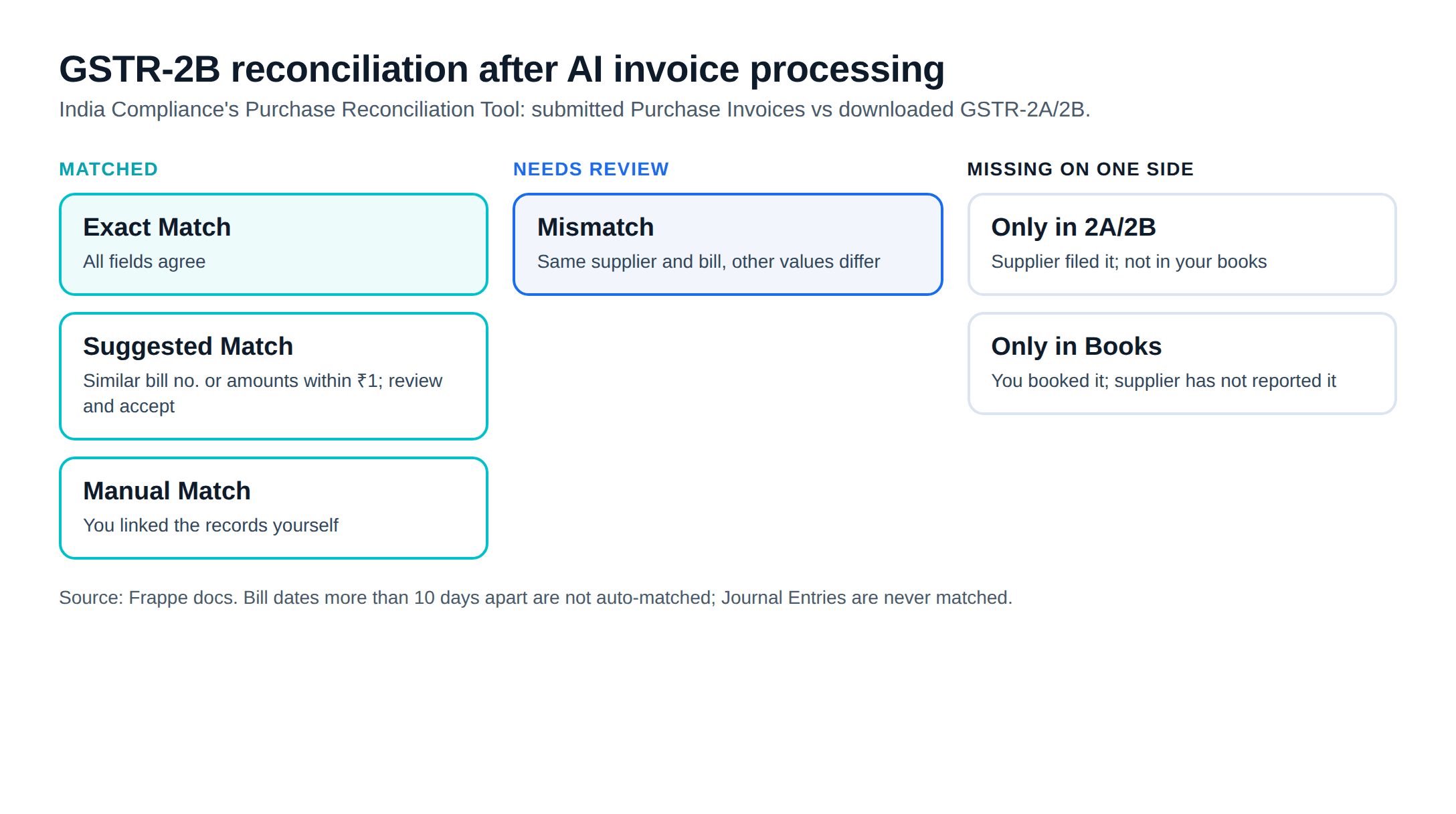
- Exact Match when all fields agree, and Suggested Match when the bill number is similar or amounts differ by a rupee or less.
- Mismatch when supplier and bill match but other values differ.
- Manual Match when you link records yourself.
- Only in 2A/2B when the supplier filed an invoice you have not booked, and Only in Books when you booked one the supplier has not reported.
The same page notes that bill dates more than 10 days apart are not matched automatically, that Journal Entries are never matched, and that Accept, Pending and Ignore "do not change anything on the GST Portal". The India Compliance README also lists invoice management (IMS) actions for GSTR-3B.
Reading the invoice number and date from the document, and from the e-invoice QR where there is one, avoids one cause of those mismatches. Our ERPNext GST accounting guide covers the rest of the GST setup.
Buying an app or building it
The Frappe Cloud marketplace lists third-party invoice OCR apps for ERPNext, and general document-processing platforms can feed ERPNext through its API. Whichever route you take, ask:
- Does it create drafts only, under a user that cannot submit?
- Does it read the GST split and place of supply, or only totals?
- Does it create the invoice from the purchase receipt, so quantities and rates are checked?
- Can the reviewer see the original image next to the draft?
- Where are your bills processed and stored, and for how long?
- Which ERPNext versions does it support, and who maintains it?
Reading is the easier part; matching and validation against your own data decide whether a project works, as our AI document processing automation post explains. For where invoice capture sits among the other AI jobs in an ERP, see AI in ERP.
Where to start
Collect one month of supplier bills as they arrive, photos and all. Fix supplier GSTINs and item HSN codes in ERPNext first, because extraction cannot match what the masters get wrong. Then run invoice capture alongside manual entry for a few weeks and compare each draft with what your team entered. That comparison, on your own bills, is the only accuracy figure worth trusting.
Invoice capture to a draft Purchase Invoice with GST fields is one of the launch features on our AI for ERPNext page, built by Metageeks as an independent ERPNext implementer, with a person approving every invoice before it posts.
Frequently asked questions
What is invoice AI?+
Invoice AI is software that reads a supplier invoice, from a PDF, a scan or a phone photo, and pulls out the fields an accounts team would otherwise type: supplier GSTIN, invoice number and date, line items with HSN codes, taxable value and GST amounts. In an ERP setup it then creates a draft purchase entry from those fields for a person to check and submit.
Can AI create a Purchase Invoice in ERPNext automatically?+
It can create a draft. ERPNext's API and Frappe's built-in MCP server both let an authorised user create documents, so an extraction service can save a Purchase Invoice in draft state, linked to the purchase order or receipt. We stop there on purpose: submitting is what posts to the ledger, and that step stays with a person in accounts.
How does invoice processing automation handle CGST, SGST and IGST?+
It reads the tax amounts printed on the bill, then checks them against what ERPNext expects. An intra-state purchase normally carries CGST and SGST, an inter-state one IGST, but place-of-supply rules decide, so the check compares the supplier's state from its GSTIN, your billing GSTIN and the place of supply on the bill. A mismatch is flagged for the reviewer rather than corrected silently.
Does AI invoice processing replace GSTR-2B reconciliation?+
No. Extraction gets the supplier's bill into your books correctly. Reconciliation checks whether the supplier reported the same invoice to the GST portal, which you can only see once GSTR-2B is generated. In ERPNext, the India Compliance app's Purchase Reconciliation Tool compares submitted Purchase Invoices with downloaded GSTR-2A and 2B data. Good extraction makes that step cleaner; it does not replace it.
What if the supplier sends a handwritten or poor-quality bill?+
The draft will have gaps or low-confidence fields, and the reviewer fills them in from the image, which sits next to the draft. A well-built setup shows which fields it is unsure about instead of guessing. Bills that cannot be read at all go to the normal manual entry queue.
Related reading
- AI in ERP: the four jobs AI does inside an ERP, with ERPNext as the example.
- E-invoice and e-way bill from your ERP: the sales side of GST compliance.
- AI document processing automation: why extraction projects stall.
- ERPNext GST accounting: GST setup in ERPNext.
Free ERPNext fit check
Will ERPNext fit your factory?
Answer a few quick questions. On a short call we tell you whether ERPNext fits how you make, stock and sell, and what the rollout looks like.
Check my fit →About the author

- Tags
- erpnext
- erp
- manufacturing
- india
- ai
Subscribe to Our Newsletter
The AI Build Brief: practical playbooks on how to build, price and ship AI features, in one short email every other week.