

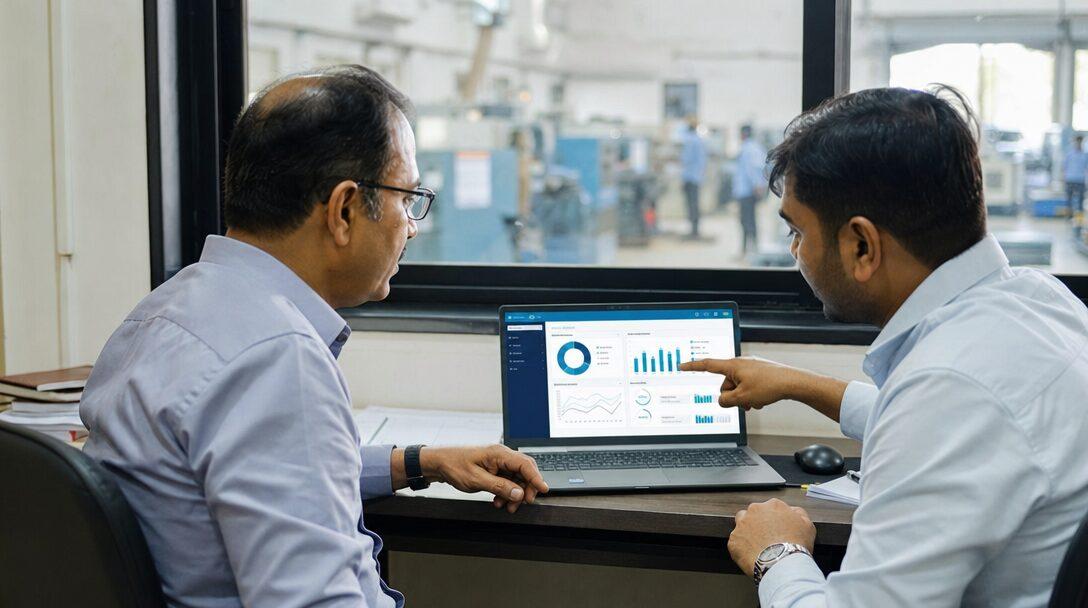
Picture a plant owner in Rajkot who has heard "AI-powered ERP" in three vendor calls this month and still cannot say what the AI would do on a Tuesday morning in his accounts office. This post answers that for a manufacturer or distributor, using ERPNext as the worked example. A disclosure first: Metageeks implements ERPNext and builds AI features on it, so we have a stake. To keep that in check, every product claim links to Frappe's own documentation, and we say plainly what ERPNext does not ship.
TL;DR
- AI in ERP does four jobs: it reads documents into draft entries, answers questions about your data in plain language, follows up on routine tasks, and predicts quantities such as demand.
- ERPNext ships no finished AI business features at the time of writing. Frappe Framework v16 has a built-in MCP server that lets AI clients work with ERP data under user permissions, and ERPNext's Forecasting report is statistical, not AI.
- The useful starting points for an Indian plant are supplier invoice capture with GST fields, read-only questions about the ERP, and collections follow-up on overdue invoices.
- AI inventory management and AI demand forecasting come after those, and only once reorder levels and the built-in Forecasting report have stopped being enough.
- The safety rule: AI prepares drafts, a person submits. Nothing posts to the ledger without a human decision.
Free ERPNext fit check
Will ERPNext fit your factory?
Answer a few quick questions. On a short call we tell you whether ERPNext fits how you make, stock and sell, and what the rollout looks like.
Check my fit →What "AI in ERP" means on a working day
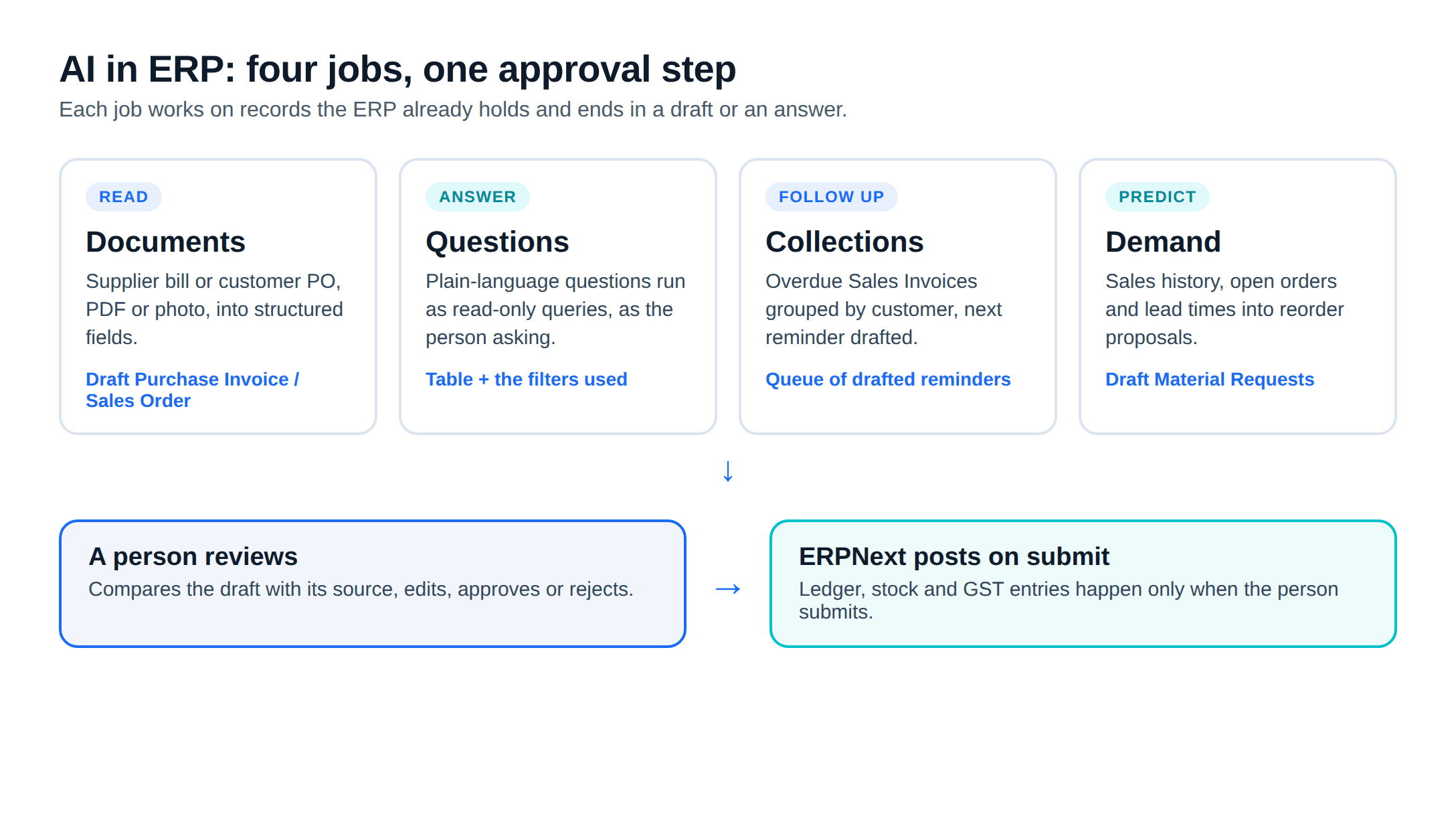
Strip out the marketing and AI in an ERP comes down to four jobs, each done on top of records the ERP already keeps:
- Read: Turn a supplier's PDF or a phone photo of a bill into a draft Purchase Invoice, or a customer's purchase order into a draft Sales Order.
- Answer: Let a manager type "which customers are more than 60 days overdue in Gujarat?" and get the list from live data, without someone building a report first.
- Follow up: Watch overdue Sales Invoices and draft reminders in the right order, to the right contact, for a person to send.
- Predict: Estimate next month's demand per item, and from that, what to reorder and when.
Plenty of what vendors call "AI" is ordinary automation that ERPNext already does without any model. When an item's stock falls to its reorder level, ERPNext can create a Material Request automatically and email the purchase manager. That is a rule, and a good one. Before paying for AI, check whether a rule, a workflow or a scheduled report already solves the problem.
The rest of this post takes each job in turn, then covers forecasting, manufacturing uses and the approval rule. If you want the short version of what we build, the AI for ERPNext service page lists it.
ERPNext AI: what Frappe ships today
We checked Frappe's documentation and GitHub before writing this section, because "does ERPNext have AI?" gets confident answers in both directions.
A built-in MCP server (Frappe Framework v16): MCP, the Model Context Protocol, is a standard way for an AI client to call tools in another system. Frappe's MCP guide says the framework "includes a built-in Model Context Protocol (MCP) server" with 13 tools to find document types, list and read documents, create, update and delete them, and call whitelisted methods. It needs Frappe v16 or later. Requests come from an authenticated user, and the server applies that user's permissions, including field-level rules. It is a building block for developers; no accountant would use it directly. That makes role design important: the server can do whatever the connecting user's role allows.
The Forecasting report: ERPNext's Forecasting report under Manufacturing projects future quantity or amount from past Sales Orders, Delivery Notes or Quotations using exponential smoothing, with a smoothing constant that defaults to 0.3. It is a sound statistical method, not machine learning.
What is being retired or set aside: Frappe's chat app documentation says, in its Raven agents page, that "AI features in Raven are being retired". The separate frappe/mcp library is marked deprecated in favour of the built-in server, and the repository is archived.
What is not there: We found no documented native feature in ERPNext that reads supplier invoices, answers questions in plain language or chases payments. Those come from third-party apps on the Frappe Cloud marketplace or from custom apps. Check who maintains a marketplace app and which versions it supports before installing it, the same as any other community app.
Use case 1: supplier invoices into draft Purchase Invoices
This is the job we suggest starting with, because the work is repetitive and the fields are well defined. A supplier bill arrives as a PDF on email or a photo on WhatsApp. The AI reads the supplier GSTIN, invoice number and date, HSN codes, quantities, taxable value and the CGST and SGST or IGST amounts, matches the supplier and items to ERPNext masters, and creates a draft Purchase Invoice linked to the purchase order or receipt where one exists.
The draft then waits. Frappe's Purchase Invoice documentation is clear on the difference: a draft is "saved but not posted to the ledgers", and submission is what updates the supplier balance and the general ledger. A person in accounts compares the draft with the original image and submits it.
The full flow, the GST checks and the GSTR-2B reconciliation step are in our guide to AI invoice processing in ERPNext. Why extraction projects stall on messy scans and odd layouts is covered in AI document processing automation.
Use case 2: asking the ERP questions in plain language
ERPNext's no-code Report Builder works on one document type at a time, with its child tables. A question such as "which items did we buy from more than one supplier last quarter, and at what price spread?" spans purchase orders, receipts and invoices. Today that means a Query Report or a Script Report written by a developer.
A plain-language report feature takes the question, works out which document types and fields it needs, runs read-only queries as the person asking, and returns a table with the filters it used shown underneath. Two design rules matter more than the model:
- Read-only: The feature only reads. It cannot create, change or delete records, whatever the question says.
- Role-aware: It sees what the logged-in user can see. A sales executive asking about margins gets nothing a sales executive cannot already open in ERPNext.
Showing the filters is what makes answers checkable. If the answer says "Gujarat, invoices due before 1 October, outstanding above zero", a manager can spot a wrong assumption in seconds. Scheduled summaries that write themselves are a related job, covered in AI automated reporting.
Use case 3: collections follow-up on overdue invoices
In a business that sells on credit, following up on overdue invoices is the job that slips when accounts is busy closing the month. A collections agent reads submitted Sales Invoices past their due date, groups them by customer, checks what was already sent, and drafts the next message: a polite reminder first, a statement of account later, a call task for the sales owner after that.
It does not record payments, write off balances or change credit limits. Payment Entries and adjustments stay with accounts. The agent's output is a queue of drafted reminders and tasks that a person approves, edits or skips.
AI inventory management and AI demand forecasting
This is the use case vendors lead with, and the one we suggest doing later. Forecasting is only as good as the history behind it. If your sales history still sits in Tally exports or spreadsheets, with item names that changed over the years, a model has little clean data to learn from.
A sensible order of work:
- Set reorder levels and quantities per item and warehouse in the Item master, and turn on automatic Material Requests in Stock Settings. This is rule-based and needs no AI.
- Run the built-in Forecasting report on a year or two of sales orders or delivery notes, monthly, and compare it with what actually sold.
- Add AI forecasting where the simple numbers fail: items with strong seasonality, demand driven by dealer schemes, a few large customers whose orders swing, or long import lead times. A model can weigh open sales orders, lead times and seasonal patterns together, then propose reorder quantities as draft Material Requests for the purchase team.
The output is still a proposal. A purchase manager who knows a customer is about to switch suppliers will overrule any forecast, and should be able to.
The same "next" list includes reading customer purchase orders into draft Sales Orders, for distributors and job shops that receive POs as PDFs. The pattern matches invoice capture: extract, match items and prices, create a draft, and let sales coordination check it.
AI for manufacturing beyond the ERP
"AI for manufacturing" also covers predictive maintenance from machine sensors and camera-based quality inspection on the line. Both are established fields, but the data comes from PLCs, sensors and cameras, not from the ERP. ERPNext's role is to hold the outcome: Asset Maintenance schedules and logs, and Quality Inspection records against receipts and production. If a vision system rejects a part, the useful ERP link is a Quality Inspection entry, not a chatbot.
For a 10-200 person plant, we suggest getting the document and reporting jobs right inside the ERP before starting a sensor project. The first needs only the data you already have.
The rule that keeps AI out of your ledger
Every AI feature we build on ERPNext follows one rule: AI prepares, a person approves. In practice:
- AI creates documents in draft state only. Submission, which posts to the ledger, is a human action.
- The AI runs as a dedicated ERPNext user whose role can create drafts but cannot submit, cancel or delete. Frappe applies role permissions to every API and MCP call, so the limit is enforced by the ERP, not by a promise in the prompt.
- Every draft keeps a link to its source: the supplier PDF, the customer email or the query that produced an answer.
- Question-answering features are read-only by design.
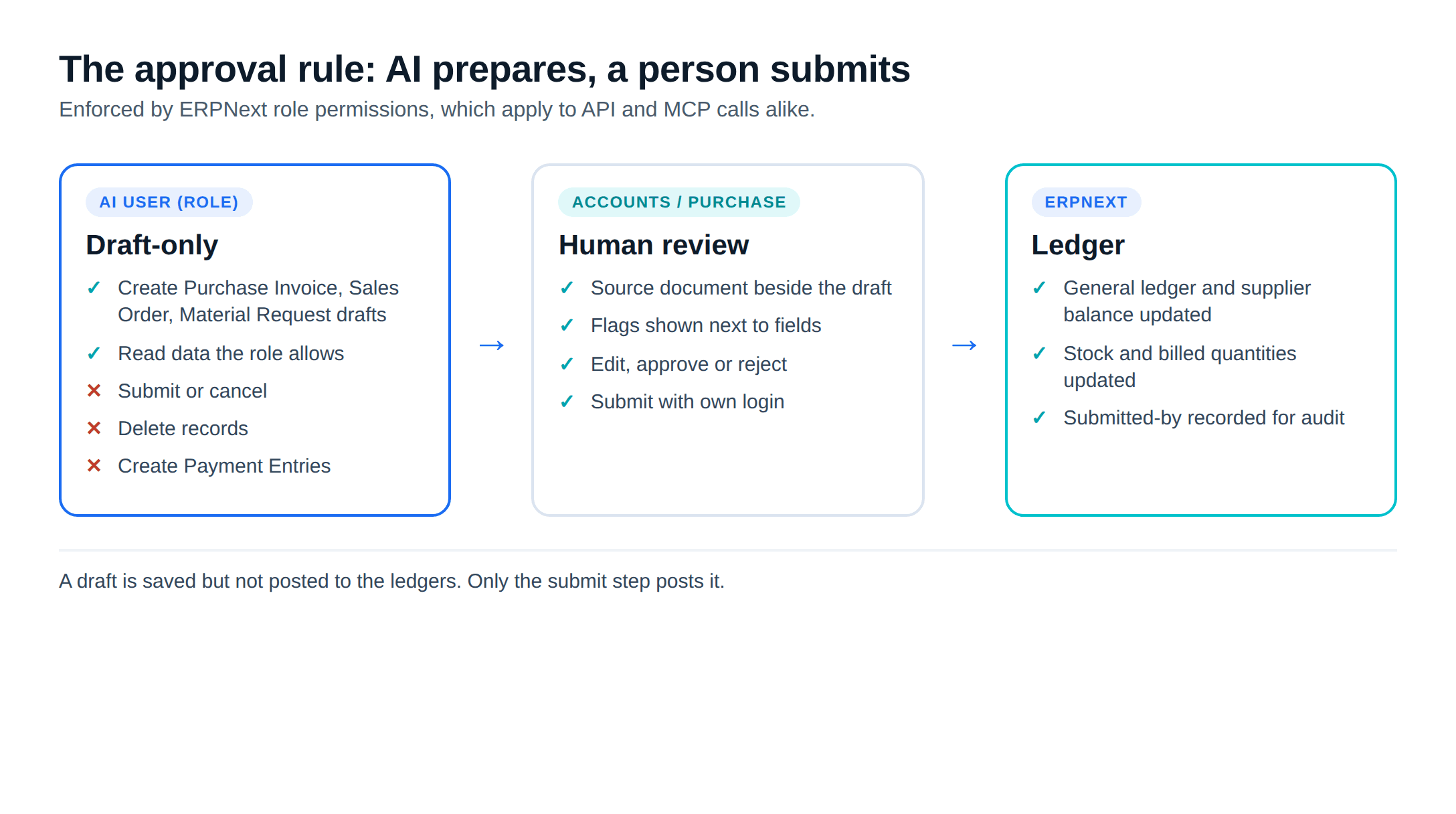
This rule costs some speed. It also means the accountant who signs the GST return can see, on every Purchase Invoice, who submitted it and what it was built from.
Where to start
- Pick one job, usually supplier invoice capture or plain-language reports, not all four at once
- Clean the masters it depends on: supplier GSTINs, item HSN codes, customer contacts and payment terms
- Measure your own baseline first: invoices per month, minutes per invoice, days sales outstanding
- Create a dedicated AI user with draft-only permissions before anything connects
- Run it alongside the current process for a few weeks and compare drafts with what people entered
If ERPNext itself is not live yet, get that right first: AI on top of an ERP with messy masters makes the mess faster. ERPNext implementation covers how we scope a plant before setup. When the ERP is running and one of the jobs above is taking up your team's time, AI for ERPNext sets out the features Metageeks, an independent ERPNext implementer, builds today and what comes next.
Frequently asked questions
What does AI in ERP actually mean?+
It means software that does four jobs on top of the ERP's own records: reading documents such as supplier invoices into draft entries, answering questions about the data in plain language, following up on tasks such as overdue invoices, and predicting quantities such as demand. The ERP still holds the ledger and the rules. The AI layer prepares work, and a person approves it.
Does ERPNext have built-in AI features?+
Not as finished business features at the time of writing. Frappe Framework v16 includes a built-in MCP server, which lets an AI client read and change documents under the logged-in user's permissions, but it is plumbing for developers, not an invoice reader or a forecasting assistant. ERPNext's Forecasting report uses exponential smoothing, a statistical method. Frappe's Raven documentation says its AI features are being retired. Invoice capture, chat-style reports and similar features come from third-party apps or custom work.
Can AI post entries to the ledger in ERPNext by itself?+
Technically it could, because Frappe's MCP server and REST API act with whatever rights the connecting user has. We do not set it up that way. The way we build these features, the AI creates draft documents only, and a person with the right role reviews and submits them. A draft Purchase Invoice in ERPNext is saved but not posted to the ledgers until someone submits it.
Is AI demand forecasting worth it for a small plant?+
Start with what ERPNext already has: reorder levels that raise Material Requests automatically, and the Forecasting report on past sales orders or delivery notes. If those numbers are not good enough because demand depends on seasons, schemes or a few large customers, AI forecasting is the next thing to test, provided you have enough clean sales history to learn from.
What data do I need before adding AI to my ERP?+
Clean masters matter more than the model. For invoice capture, every supplier needs a correct GSTIN and every item a correct HSN code. For reports, document types and fields need consistent use across branches. For collections, customer contacts and payment terms must be filled in. For forecasting, sales history should sit in ERPNext rather than in spreadsheets.
Related reading
- AI invoice processing in ERPNext: from supplier PDF to a draft Purchase Invoice with GST fields.
- AI document processing automation: why extraction is the easy part.
- AI automated reporting: summaries that write and send themselves.
- ERPNext review: strengths and gaps for Indian plants.
Free ERPNext fit check
Will ERPNext fit your factory?
Answer a few quick questions. On a short call we tell you whether ERPNext fits how you make, stock and sell, and what the rollout looks like.
Check my fit →About the author

- Tags
- erpnext
- erp
- manufacturing
- india
- ai
Subscribe to Our Newsletter
The AI Build Brief: practical playbooks on how to build, price and ship AI features, in one short email every other week.