
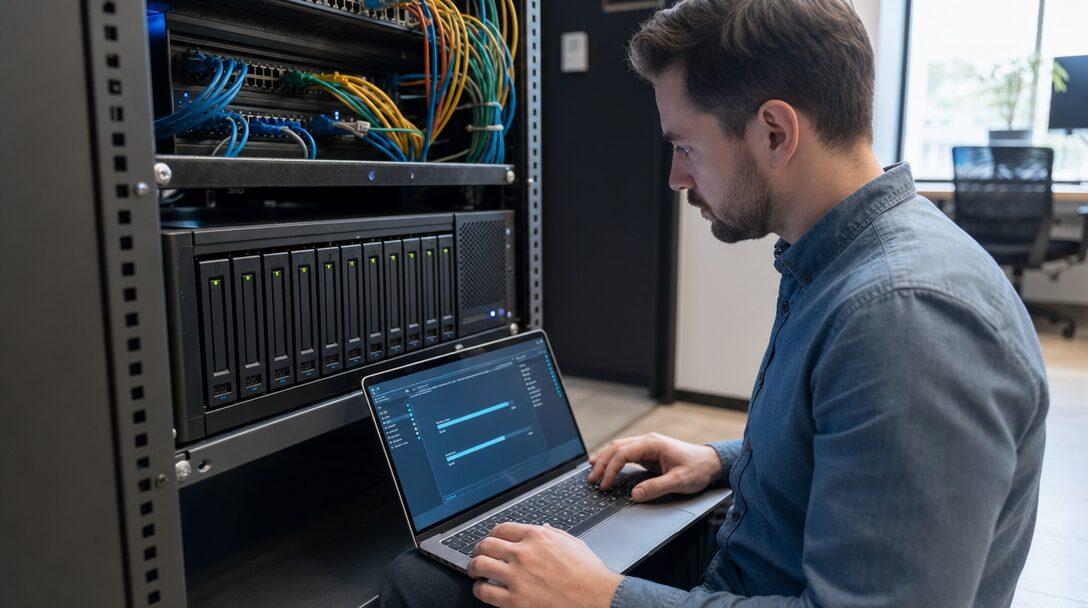
The NAS in the office cupboard is nearly full, its warranty ran out last year, and the only copy of five years of work sits on one set of disks in one room. Moving to AWS solves the hardware problem and hands you a new set of decisions: what goes first, where a multi-terabyte archive should live, how that much data crosses an office internet line, and how to switch over without losing a day of files. The AWS tools for this are mature. Migrations go wrong in the order of the steps and in the costs nobody priced.
TL;DR
- Inventory first: every share, server and database, its size, its file count and its owner. Retire what nobody uses before paying to move it.
- Lift and shift servers, and save redesign for after the move. Change a database to Amazon RDS during the migration only when that change is small and well understood.
- Let the link speed set the timeline. One terabyte takes about 1.2 days on a 100 Mbps line at 80% of its speed, and AWS DataSync charges $0.0125 per GB copied.
- AWS Snowball Edge closed to new customers in November 2025, so plan large archives around DataSync, a faster link or AWS Data Transfer Terminal.
- Cut over with a final incremental sync, and keep the old NAS read-only as the rollback path for a few weeks.
- Budget for running both environments, downloads, archive retrievals and backups. Timelines and totals in this post are illustrative.
Free cloud cost review
Find out where your cloud bill is leaking
Tell us your stack and we review where the spend goes, what to fix first and what a migration would involve.
Request a cost review →The short answer
Move in this order: inventory what you have and retire what nobody uses, build the AWS side as code, seed the bulk data with DataSync while the old system keeps working, rehost servers without redesigning them, sync changes until cutover, then switch and keep the old hardware read-only as your rollback. For a few servers and a multi-terabyte archive, that typically takes two to four months, and the data copy usually sets the pace.
AWS prices in this post are list prices for US East (N. Virginia), checked on aws.amazon.com in September 2026. Mumbai and other regions price differently. Figures for a hypothetical small team are marked as illustrative.
Should you move off your own servers at all?
Usually yes, when the hardware is due for replacement, when there is no off-site copy, or when staff and customers outside the office need the files. Owning disks means owning disk failures, firmware updates and the question of what happens if the room floods.
There are good reasons to keep some things local, which AWS's migration guidance calls "retain". A team editing 4K video straight off a NAS on a fast office network will find the same work slower over the internet. Hardware you bought last year still has years of paid-for life in it. Some data has residency rules that limit where it can go.
A hybrid is common and sensible: working files stay on a local NAS, and AWS holds the archive and the off-site copy. You can move the rest later, once the first part has proved itself.
What should you move first?
Start with a written inventory, not a tool. For every share, server and database, record its size, its file count, who owns it, when it last changed and what depends on it. File count matters as much as size: ten million small files copy more slowly than a few large ones and cost more in request fees.
Then move in this order:
- Retire what nobody uses. Folders untouched for years and virtual machines nobody can name go to an archive or get deleted. Every terabyte you retire is a terabyte you do not copy, store or back up.
- Copy the archive off-site. A one-way copy of cold data into Amazon S3 is low risk, gives you an off-site backup straight away, and doubles as the seed copy for the real migration.
- Move low-risk applications. Internal tools and intranet sites teach the team how the AWS side behaves before anything customers depend on moves.
- Move databases with the applications that use them. Splitting an application from its database across an internet link adds latency to every query.
- Move live working shares last. People write to them every day, so they need the most careful cutover.
Pick the AWS region at the same time, based on where your users are and any rules on where the data may sit. The multi-tenant healthcare marketplace we built for an Indian client runs in the AWS Mumbai region for that reason.
Should you lift and shift or re-platform?
AWS's migration strategies guide lists seven options, from retire and retain through rehost (lift and shift), replatform and refactor. For large migrations it recommends rehosting or replatforming and modernising after the move, because redesigning an application while also moving it doubles the ways the project can fail.
Rehost servers. AWS Application Migration Service replicates a running server into AWS and is free for 2,160 hours per source server, about 90 days of continuous replication. You still pay for the replication resources and the test and cutover instances it launches.
Replatform where it removes ongoing work. Moving a self-managed PostgreSQL or MySQL database to Amazon RDS is the classic case: backups and patching become AWS's job, and the application barely notices.
Decide what a file share becomes. Software that expects a mounted drive needs Amazon EFS or Amazon FSx. An archive people reach through an application can live in S3, which is far cheaper per gigabyte. On Montage India's stock media marketplace, which Metageeks built on AWS, about 15 TB of footage on the company's NAS, by its own figure, is being uploaded to Amazon S3 through the platform's processing pipeline. Each video has to become HD, Full HD and 4K renditions with a watermarked preview before it can be sold, so the files stop being folders on a share and become assets in an application. That is a re-platform of the archive, and it means the stored total grows beyond the source size.
Where should a large file archive live on AWS?
In S3, in a class chosen by how fast someone needs a file back. Storage prices fall sharply down the list, and access gets slower or more expensive.
| S3 storage class | Storage per GB-month | Time to first byte | Minimum billed duration |
|---|---|---|---|
| S3 Standard | $0.023 | Milliseconds | None |
| S3 Standard-IA | $0.0125 | Milliseconds, plus $0.01 per GB retrieved | 30 days |
| S3 Glacier Instant Retrieval | $0.004 | Milliseconds, plus $0.03 per GB retrieved | 90 days |
| S3 Glacier Flexible Retrieval | $0.0036 | 1-5 minutes to 12 hours, by retrieval tier | 90 days |
| S3 Glacier Deep Archive | $0.00099 | Within 12 hours, or 48 for bulk | 180 days |
Prices from Amazon S3 pricing; restore times from AWS's archive retrieval documentation.
Three rules keep this from going wrong during a migration:
- Land first, tier later. Copy everything into S3 Standard or Intelligent-Tiering, watch real access for a month or two, then add lifecycle rules. Guessing up front and restoring from Deep Archive in week two is how archive projects blow their budget.
- Bundle small files. Each object moved into a Glacier class is a billable request, and Standard-IA bills small objects as 128 KB. Zip or tar folders of tiny files that are read as a set.
- Separate what customers download. A file someone expects the moment they pay must not wait 12 hours for a restore.
Once the data is in and settled, moving cold data down a storage class and the other ways to cut an AWS bill cover the ongoing tuning.
How do you get terabytes into AWS?
Over the network, in most cases, and the link speed decides how long it takes.
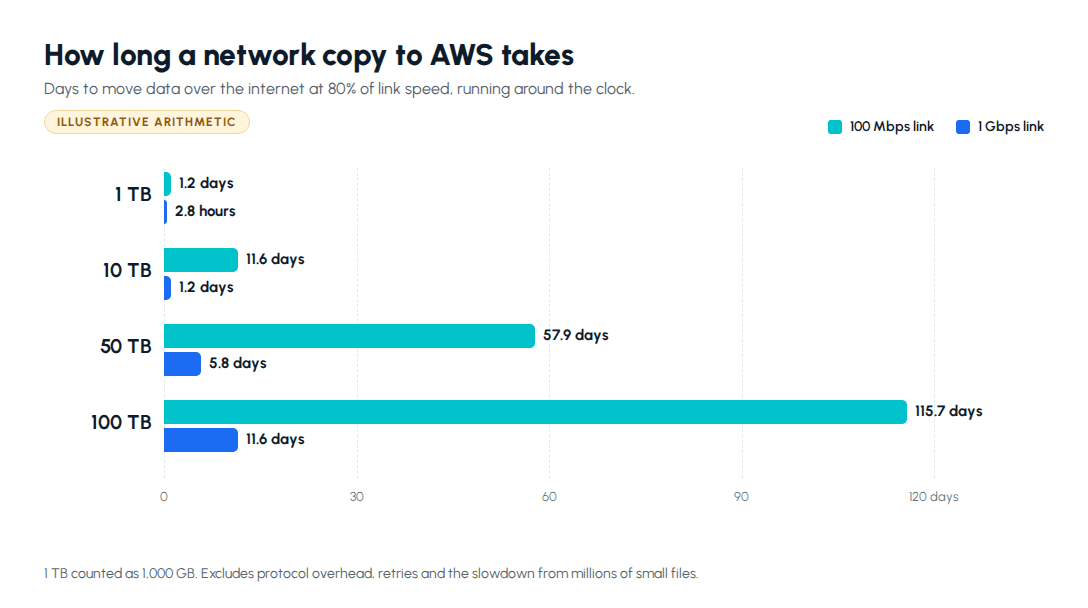
A 100 Mbps link running at 80% of its speed moves one terabyte in about 1.2 days. A 1 Gbps link does it in about 2.8 hours. So a 15 TB archive needs roughly 17 days of continuous copying on 100 Mbps and under two days on 1 Gbps, if nothing else uses the line.
AWS DataSync is the default tool for NAS data. You run its agent as a virtual machine on VMware ESXi, KVM or Hyper-V next to the NAS, point it at the NFS or SMB shares, and it copies to S3, EFS or FSx over TLS. It checks integrity during the transfer, can copy only what changed since the last run, runs on a schedule, and lets you change its bandwidth limit while a transfer is running, so you can throttle it during office hours. Basic mode costs $0.0125 per GB copied, and Enhanced mode $0.015 per GB plus $0.55 per task run. As an illustration, 15 TB in Basic mode costs about $187.50 in DataSync fees, before S3 requests and storage.
Physical transfer has changed. AWS Snowball Edge, the device AWS used to ship out for large archives, is no longer available to new customers since November 7, 2025. AWS now points new customers to DataSync, to partners, or to AWS Data Transfer Terminal: you book a slot, carry your own drives to a facility with at least two 100G connections to AWS, and pay by the port hour, starting at $300 an hour for North America to North America, with no per-GB fee. The terminals AWS lists are in the US, Europe, Tokyo and Sydney. There is none in India, so a team here with a slow line usually gets further by upgrading the office link for the weeks of the copy.
Before the full run, copy a representative 100 GB folder and time it. That number, not the figure on the broadband contract, is what your plan should use.
How do you cut over without losing data?
By making the final switch small. If the bulk copy happened weeks earlier, cutover only moves the last day's changes.
- Seed early. Run the full DataSync copy while everyone keeps working on the old system.
- Sync nightly. Schedule incremental runs. Their duration tells you how long the final sync will take.
- Lower DNS TTLs a few days before cutover, so name changes take effect in minutes.
- Rehearse. Point a copy of each application at the AWS data, open a sample of files, restore one database backup and time every step.
- Freeze and sync. At a set time, make the old shares read-only, run the final incremental sync and let DataSync verify it.
- Switch. Change DNS, mapped drives and application settings, then have named people check their own folders and workflows.
- Hold the rollback. Keep the old NAS and servers intact and read-only. Write down in advance what triggers a rollback, such as missing files or an application that cannot reach its data, and who decides.
Rollback gets harder every day people write to the new system, because those changes would have to be copied back. Keep the window short, a few weeks, and wipe the old hardware only after it has passed.
How long does a small-team migration take?
Two to four months is a fair expectation for a handful of servers, one or two databases and a multi-terabyte file share. The shape matters more than the total: the stages overlap, and the data copy runs underneath everything else.
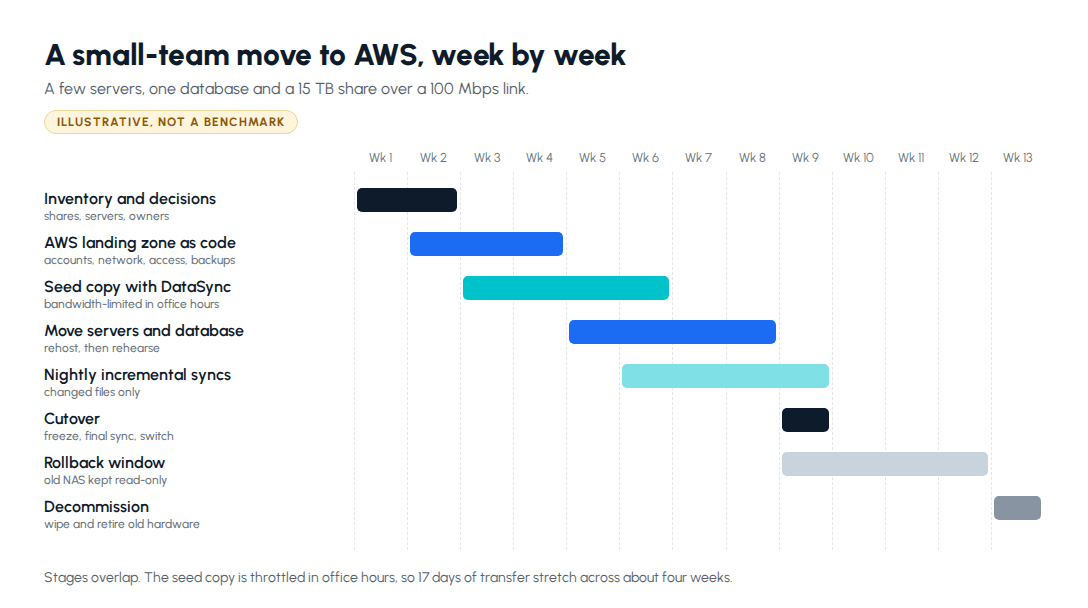
The first two weeks go on the inventory and decisions. The AWS side, meaning accounts, networking, access and backups, is best written as code from the start, so a mistake can be fixed by changing a file rather than remembering clicks. The seed copy starts as soon as a bucket exists. Servers and the database move and get rehearsed while the syncs run nightly, and cutover lands around week nine, followed by the rollback window and decommissioning.
What stretches this is rarely the technology. It is a software licence tied to old hardware, a supplier who has to whitelist new IP addresses, or a folder nobody will admit to owning.
Where do migration costs surprise people?
Paying twice. The NAS, its power and its support contract carry on through the copy and the rollback window, while AWS bills from the first upload.
Getting data back out. Uploads into S3 are free. Downloads to the internet cost $0.09 per GB after the first 100 GB a month, and archive restores add a retrieval fee on top. Illustratively, pulling 1 TB out of Glacier Deep Archive to the office with a standard retrieval costs about $20 to restore and about $90 to download, if the free 100 GB is already used.
Backups. S3 stores data durably, but it does not undo a deletion or a ransomware attack on its own. Versioning, a copy in a second bucket, or AWS Backup fixes that, and AWS Backup storage for S3 lists at $0.05 per GB-month, more than S3 Standard itself. Decide what "backed up" means before the invoice decides it for you.
Request fees on small files. Lifecycle transitions into Deep Archive cost $0.05 per 1,000 objects. Illustratively, ten million small files moved down to Deep Archive is about $500 in transition requests alone.
Network paths. Servers in private subnets that reach S3 through a NAT gateway pay a per-GB processing fee on every transfer. A free S3 gateway endpoint avoids it.
Replication and rehearsal instances. Application Migration Service is free per server for its first 2,160 hours, but the replication servers, disks and test instances it launches are not.
How should you scope a migration with an outside team?
In writing, with the inventory attached. A useful scope lists each share, server and database, where each one lands on AWS, the transfer method and measured speed, the cutover and rollback plan, and who owns the AWS accounts afterwards. The answer to that last one should always be you.
Time-and-materials against that written scope suits migration work, because the inventory, the real transfer speed and the first rehearsal each change the effort in ways nobody can price on day one. Once you are running on AWS, a small monthly retainer covers changes and help during incidents, if you want it.
Ask for the infrastructure as code in your own repository. Montage India's queues, Lambda functions, storage, database and monitoring are all defined in one AWS CDK app, so the environment can be rebuilt, reviewed and handed to another team. That is the standard we hold our cloud and DevOps work on AWS, from infrastructure as code to deploy pipelines and runbooks to, and it is worth asking of anyone who moves your systems.
The bottom line
Moving off on-prem servers or a NAS is mostly a sequencing problem. Inventory and retire first, copy the archive off-site early, rehost rather than redesign, let DataSync seed and sync the files, and cut over with the old hardware held read-only as your rollback. Price the costs that come after the move, meaning downloads, restores, backups and request fees, before you choose a storage class.
Next step: If your NAS or server room is due for replacement, see how we plan and run AWS migrations and infrastructure your team can operate, and tell us what you are running today.
Frequently asked questions
How long does it take to move a NAS to AWS?+
For a small team, plan on two to four months from the first inventory to switching off the old hardware, and expect the data copy to set the pace. Over the internet, one terabyte takes about 1.2 days on a 100 Mbps link running at 80 percent of its speed, and about 2.8 hours on a 1 Gbps link. At that rate a 15 TB archive needs roughly 17 days of continuous copying on 100 Mbps, and longer if you throttle transfers in office hours so staff can still work. Servers and databases usually move faster than the files, because replication tools copy them in the background while they keep running. After cutover, keep the old NAS read-only for a few weeks as your rollback path before you wipe it. The dates that slip are rarely technical: a software licence that needs reissuing, or a folder nobody will admit to owning.
Should I use AWS DataSync or ship drives to AWS?+
Start with AWS DataSync unless the copy would take months. DataSync runs as an agent virtual machine next to your NAS, reads NFS or SMB shares, checks integrity during the transfer and can copy only what changed on later runs, which is what makes a clean cutover possible. Basic mode costs $0.0125 per GB copied, so 15 TB comes to about $187.50 before S3 request and storage charges. The old answer for very large archives, AWS Snowball Edge, closed to new customers on November 7, 2025. AWS now points new customers to DataSync, to AWS Data Transfer Terminal, where you carry your own drives to a facility with 100G connections and pay by the port hour, or to partners. The terminals AWS lists are in the US, Europe, Tokyo and Sydney, with none in India, so for a team here a faster office link for the weeks of the copy is usually the practical option.
Can I put an archive straight into S3 Glacier Deep Archive?+
You can, and for files nobody opens it is the cheapest S3 storage class, at $0.00099 per GB-month in US East. Three things decide whether it fits. Restores are slow: a standard retrieval finishes within 12 hours and a bulk retrieval within 48, so nothing a customer or colleague expects to open today belongs there. Objects are billed for at least 180 days, so data you might reorganise or delete soon costs more than the headline rate suggests. And each object a lifecycle rule moves into Deep Archive costs a request fee of $0.05 per 1,000 objects, which adds up across millions of small files. A safer plan is to land everything in S3 Standard or Intelligent-Tiering, watch what people actually open for a couple of months, then write lifecycle rules for the folders that stay cold. Bundle tiny files into larger archives before they go down a class.
Should we lift and shift or re-platform when moving to AWS?+
Lift and shift first for most small teams, then improve once the system runs on AWS. AWS's own migration guidance lists seven strategies and recommends rehosting, relocating or replatforming during a large migration and modernising afterwards, because changing the architecture and the location at the same time multiplies what can go wrong. Rehosting a server with AWS Application Migration Service is free for 2,160 hours per source server, about 90 days of continuous replication, though you pay for the replication resources and test instances it launches. The sensible exceptions are small, well-understood changes that remove ongoing work, such as moving a self-managed PostgreSQL or MySQL database to Amazon RDS so backups and patching stop being your job. File shares force a choice anyway: software that expects a mounted drive needs Amazon EFS or FSx, while an archive people reach through an application can live in S3.
What costs do people miss when migrating to AWS?+
Four charges catch most teams. First, running both environments: the NAS, its power and its support contract stay on through the copy and the rollback window, while AWS storage bills from the first upload. Second, getting data back out: uploads into S3 are free, but downloads to the internet cost $0.09 per GB in US East after the first 100 GB a month, and restoring from Glacier Deep Archive adds $0.02 per GB for a standard retrieval or $0.0025 for bulk. Third, backups: S3 keeps data durably but does not undo a deletion by itself, and an AWS Backup copy of S3 data lists at $0.05 per GB-month, more than S3 Standard storage at $0.023. Fourth, request fees on archives made of millions of small files. Before you commit to a storage class, price one test restore and one realistic month of downloads, then compare those numbers with what the NAS costs you today.
Free cloud cost review
Find out where your cloud bill is leaking
Tell us your stack and we review where the spend goes, what to fix first and what a migration would involve.
Request a cost review →About the author

- Tags
- cloud devops
- aws
- migration
Subscribe to Our Newsletter
The AI Build Brief: practical playbooks on how to build, price and ship AI features, in one short email every other week.