

The AWS bill has climbed every month for a year, and nobody can say which service is responsible. The first proposal is often a rewrite onto serverless, containers or another cloud. In most accounts that is an expensive answer to a cheap problem, because the waste sits in configuration: oversized instances, environments that never switch off, storage in the wrong class and traffic taking the costly route. None of it needs application code changes.
TL;DR
- Find the money first. Cost Explorer's console is free, and grouping by usage type exposes NAT gateways, idle IPs and data transfer hiding under "EC2-Other".
- Delete idle resources and schedule non-production environments before anything else. Both are low-risk and take days.
- Rightsize next, then commit. AWS quotes savings of up to 66% for Compute Savings Plans and up to 72% for EC2 Instance Savings Plans and Reserved Instances.
- Move cold data down a storage class. S3 Standard lists at $0.023 per GB-month in US East, and Glacier Deep Archive at $0.00099.
- Fix the network path: free S3 gateway endpoints instead of NAT, a CDN for downloads, fewer cross-zone calls.
- Keep it down with tags, budgets, anomaly alerts and a monthly review. Example savings in this post are illustrative.
Free cloud cost review
Find out where your cloud bill is leaking
Tell us your stack and we review where the spend goes, what to fix first and what a migration would involve.
Request a cost review →The short answer
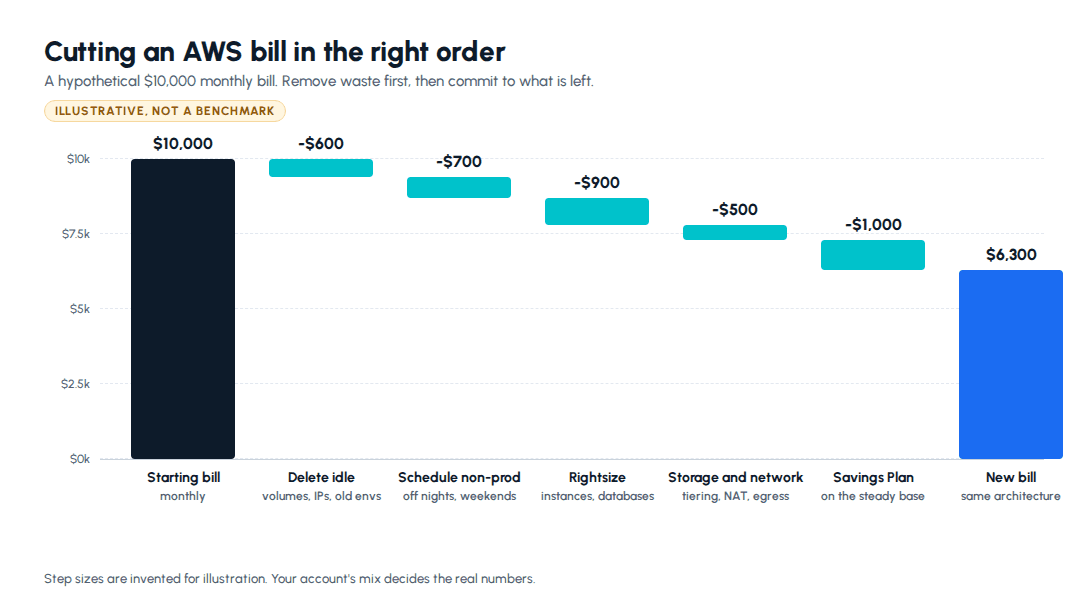
Work in this order: see where the spend goes, delete what is idle, schedule what is only needed during working hours, rightsize what is oversized, fix storage classes and network paths, and only then commit to Savings Plans on the steady usage that is left. Committing before cleaning up locks in waste for one to three years. None of these steps requires a rewrite.
All prices in this post are AWS list prices for US East (N. Virginia), checked on aws.amazon.com in September 2026. Other regions, including Mumbai, price differently. Savings figures for a hypothetical account are marked as illustrative.
Where is the money actually going?
You cannot cut what you cannot attribute. Three free or nearly free tools do most of the work.
Cost Explorer. The console is free. The API costs $0.01 per request. Group spend by service first, then by usage type. The "EC2-Other" line is where surprises live, because it collects EBS volumes, snapshots, NAT gateway charges, idle addresses and data transfer under a name that sounds like rounding.
Cost allocation tags. Tag every resource with at least an environment, an owner and a service name, then activate those tags for billing. Until you do, "which team spends this?" has no answer.
Compute Optimizer. It is free for its standard recommendations, which analyse 14 days of metrics. Enhanced infrastructure metrics extend that to three months for about $0.25 per resource per month.
Spend an afternoon here before changing anything.
What can you delete this week?
Idle resources bill every hour and do nothing. They are the safest cut available, once you have confirmed nobody depends on them.
- Unattached EBS volumes. Left behind when instances are terminated. They cost $0.08 per GB-month on gp3 and $0.10 on gp2, per EBS pricing.
- Old snapshots. $0.05 per GB-month in the standard tier. Snapshots you must keep but rarely restore can go to the archive tier at $0.0125.
- Idle public IPv4 addresses. AWS charges $0.005 an hour for every public IPv4 address, in use or idle. That is about $3.65 a month each, and old accounts often have dozens.
- Load balancers with no targets, and forgotten environments. The proof-of-concept from last year that still has a database running.
While you are in EBS, move gp2 volumes to gp3. It lists 20% lower per GB, includes 3,000 IOPS and 125 MB/s of throughput as baseline, and the change can be made in place on a running volume.
How do you stop paying for environments nobody is using?
Development, staging and QA environments are usually used for about a third of the week and billed for all of it.
A staging environment used from 8am to 8pm on weekdays needs 60 of the week's 168 hours. Stopping it the rest of the time removes about 64% of its instance hours. Storage keeps billing while it is stopped, but compute is usually the larger share.
Two practical notes. AWS publishes an Instance Scheduler solution that starts and stops EC2 and RDS on a timetable, or you can do the same with a scheduled job. And an RDS instance can stay stopped for at most seven consecutive days before AWS starts it again automatically, and you still pay for its storage and backups while it is stopped. A schedule handles that. A one-off stop does not.
How do you rightsize without breaking production?
Most instances were sized once, defensively, at launch, and never looked at again.
Start with Compute Optimizer's recommendations and your own metrics. CPU alone misleads, so install the CloudWatch agent where you need memory data. Then move one size down at a time, one service at a time, and watch latency percentiles and error rates for a few days before the next step. Keep the previous size in your infrastructure code so rolling back is a one-line change.
Consider Graviton at the same time. AWS says Graviton-based instances cost up to 20% less than comparable x86 instances. Node.js, Python, Java and Go services usually move with little effort. The work is in container images and native dependencies, which need arm64 builds.
Apply the same scrutiny to RDS instances sized for launch-week traffic that never arrived.
When should you buy Savings Plans or Reserved Instances?
After rightsizing and scheduling, not before. A commitment bought against oversized instances turns temporary waste into a one- or three-year contract.
According to AWS, Compute Savings Plans cut costs by up to 66% and apply across instance families, sizes and regions, and to Fargate and Lambda. EC2 Instance Savings Plans reach up to 72% in exchange for committing to one instance family in one region. Reserved Instances also go up to 72% and remain the way to commit on services such as RDS.
Commit to the floor, not the average. Look at your lowest week of steady usage over the last few months and cover that. Peaks stay On-Demand.
For interruptible work, such as CI runners, batch jobs and media processing queues, Spot Instances are priced up to 90% below On-Demand. The catch is a two-minute interruption notice, so the work has to tolerate being stopped and retried.
Which S3 storage class should your data be in?
Storage grows quietly because nothing forces anyone to look at it. The price difference between classes is large.
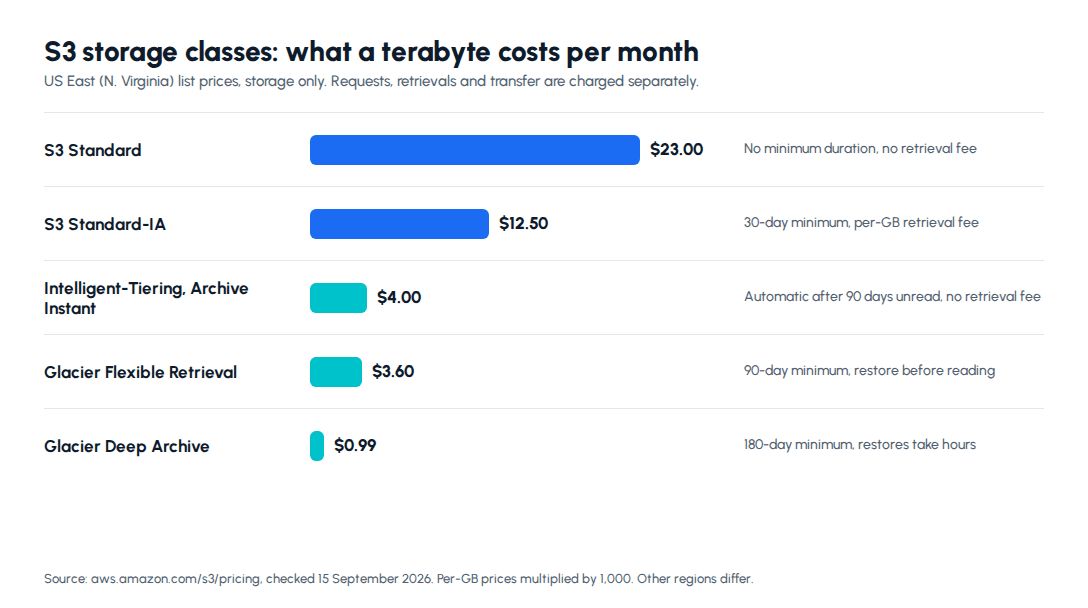
When you do not know the access pattern, use S3 Intelligent-Tiering. It moves objects to an Infrequent Access tier after 30 days without access and to Archive Instant Access after 90, with no retrieval fees. It costs $0.0025 per 1,000 objects a month to monitor, and objects under 128 KB are never tiered, so it is a poor fit for buckets holding millions of tiny files.
When you do know the pattern, write a lifecycle rule. Application logs nobody reads after a month can move to a Glacier class. Compliance archives that must be kept for years belong in Deep Archive. Mind the minimum storage durations: 30 days for Standard-IA, 90 for Glacier Flexible Retrieval and 180 for Deep Archive. Deleting early still bills the minimum.
Montage India's stock media marketplace, which Metageeks built on AWS, is moving an archive of about 15 TB of footage from the company's NAS to AWS. As list-price arithmetic, 15 TB costs about $345 a month in S3 Standard and about $15 in Deep Archive. The cheap class only suits files nobody needs quickly, though. A file a buyer expects to download straight after paying cannot wait hours for a restore. The storage class is a product decision as much as a cost one.
Why is data transfer on the bill, and how do you shrink it?
Network charges are the hardest to read because several different fees share one word.
Internet egress. The first 100 GB a month is free, aggregated across services, then $0.09 per GB for the next 9.9 TB. Serving large public files through a CDN, rather than straight from servers, usually lowers both cost and latency.
NAT gateways. $0.045 an hour plus $0.045 per GB processed. Private instances that pull from S3 through a NAT gateway pay that processing fee on every gigabyte. A gateway endpoint for S3 has no additional charge and takes that traffic off the NAT path.
Cross-zone traffic. Data between Availability Zones costs $0.01 per GB in each direction. Spreading across zones is right for resilience, but a chatty service calling a cache or database in another zone thousands of times a second pays for it.
Keep big files off your servers. On the Montage India platform, the API issues a presigned URL and the browser uploads media straight to Amazon S3, so multi-gigabyte video never passes through the API servers.
Logs. CloudWatch Logs ingestion lists at $0.50 per GB in the standard class and $0.25 in the Infrequent Access class. Log groups keep data forever by default, so set a retention period on every one.
How do you keep the bill from creeping back?
A one-off cleanup decays within a year unless ownership changes.
- Infrastructure as code. When resources are defined in Terraform or AWS CDK, nothing appears without a reviewed change, and nothing is left behind when a stack is removed. Montage India's queues, Lambda functions, storage, database and monitoring are all defined in one CDK app for this reason.
- Required tags. Enforce environment, owner and service tags in code review or policy.
- Budgets and anomaly alerts. AWS Budgets monitoring and notifications are free. Turn on Cost Anomaly Detection so a sudden jump is flagged within days, not at month end.
- A monthly review. Thirty minutes with the top ten line items and the people who own them.
The bottom line
Cutting an AWS bill rarely needs a rewrite. See where the money goes, delete idle resources, schedule non-production environments, rightsize, fix storage classes and network paths, and only then commit to Savings Plans on what remains. Keep it down with code-defined infrastructure, tags and a monthly look.
Next step: If nobody on your team has time to trace the bill line by line, see how our cloud and DevOps services handle spend attribution, rightsizing and infrastructure as code, and tell us what your account looks like today.
Frequently asked questions
What is the fastest way to reduce AWS costs?+
Delete what nobody uses, then turn off what nobody needs overnight. Unattached EBS volumes, old snapshots, idle public IPv4 addresses, load balancers with no targets and forgotten test environments all bill every hour, and removing them carries almost no risk once you have confirmed the owner. Next, schedule non-production environments to stop outside working hours. A staging environment used from 8am to 8pm on weekdays runs 60 of the week's 168 hours, so stopping it the rest of the time removes about 64 percent of its instance hours. Both steps take days rather than months, need no code changes and can be reversed if someone objects. Rightsizing and Savings Plans usually save more in total, but they take more care, so do them after the quick removals have shrunk the base you are optimising.
Should I buy AWS Savings Plans or Reserved Instances?+
For most teams, Savings Plans, and only after you have rightsized and scheduled. AWS says Compute Savings Plans reduce costs by up to 66 percent and apply across instance families, sizes, regions, Fargate and Lambda. EC2 Instance Savings Plans go up to 72 percent but lock you to an instance family in one region. Reserved Instances also reach 72 percent and remain the main commitment option for services such as RDS. Terms are one or three years. The common mistake is committing first: if you buy a plan and then shrink your instances, you pay for a commitment you no longer use. Commit to the steady floor of your usage, the amount you run even in the quietest week, rather than the average, and leave peaks on On-Demand or Spot.
Is S3 Intelligent-Tiering worth it?+
For data with unknown or changing access patterns, usually yes. Intelligent-Tiering moves an object to an Infrequent Access tier after 30 days without access and to an Archive Instant Access tier after 90 days, with AWS quoting storage savings of 40 and 68 percent for those tiers. There are no retrieval charges, and an object moves back to the frequent tier automatically when someone reads it. The costs are a monitoring fee of $0.0025 per 1,000 objects a month, and the fact that objects under 128 KB are never tiered. That makes it poor value for buckets holding millions of tiny files. If you already know the pattern, such as logs nobody reads after 30 days, a lifecycle rule straight to a Glacier class is cheaper, as long as you respect its minimum storage duration.
Why is data transfer so expensive on my AWS bill?+
Because several separate charges hide under one idea. Data sent to the internet costs $0.09 per GB in US East after the first 100 GB a month, and that tier is shared across services. A NAT gateway charges $0.045 an hour plus $0.045 for every GB it processes, which means private servers pulling from S3 through NAT pay a processing fee a free S3 gateway endpoint would remove. Traffic between Availability Zones costs $0.01 per GB in each direction, so chatty services split across zones add up. Start by grouping Cost Explorer by usage type to see which of these you are paying. The usual fixes are gateway endpoints for S3 and DynamoDB, a CDN in front of public downloads, and keeping high-volume internal traffic inside one zone where resilience allows.
How do I stop my AWS bill from creeping back up?+
Give every resource an owner and make spend visible every month. Define infrastructure as code with Terraform or AWS CDK so nothing exists without a reviewed change, and require cost allocation tags such as environment, team and service on everything you create. Set AWS Budgets alerts, which are free for monitoring and notifications, at levels that would surprise you, and switch on Cost Anomaly Detection so a sudden jump is flagged within days instead of at month end. Set retention on CloudWatch log groups, because the default keeps logs forever. Then hold a thirty-minute monthly review of the top ten line items with the people who own them. Most bills creep through many small unowned resources, not one big mistake, so ownership and a regular look beat any one-time cleanup.
Free cloud cost review
Find out where your cloud bill is leaking
Tell us your stack and we review where the spend goes, what to fix first and what a migration would involve.
Request a cost review →About the author

- Tags
- cloud devops
- aws
- cost reduction
Subscribe to Our Newsletter
The AI Build Brief: practical playbooks on how to build, price and ship AI features, in one short email every other week.